
Nano Photo AI GPT Image 2: Text‑to‑Image & Image‑to‑Image

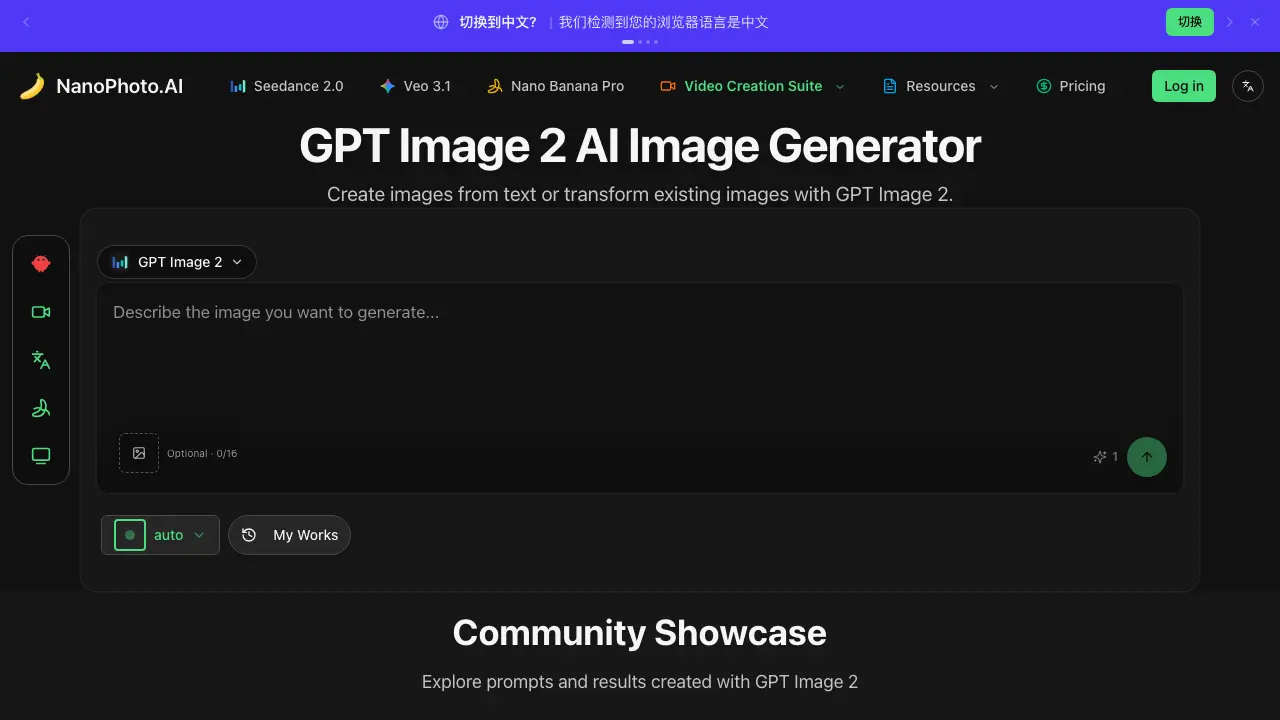
What is GPT Image 2
Nano Photo AI’s GPT Image 2 is an AI‑driven image generator that converts textual descriptions into high‑quality visuals and can also modify existing pictures based on user prompts. The platform offers a clean web interface where users enter a prompt, optionally upload reference images, and receive up to 16 generated results per session. Community showcases provide real‑time examples of how the model handles diverse subjects such as animals, advertisements, and cartoons. Integrated with Nano Photo’s broader suite—including video creation tools and the Nano Banana Pro prompt generator—GPT Image 2 enables creators to iterate quickly without leaving the ecosystem. Documentation, changelogs, and support channels (GitHub, Discord, email) are readily accessible, making the service suitable for designers, marketers, and developers seeking fast, AI‑enhanced visual content.
How does GPT Image 2 work
Nano Photo AI’s GPT Image 2 functions as a text‑to‑image and image‑to‑image generator powered by a large language model interfaced with a diffusion backend. Users submit a textual prompt or upload a reference picture; the system tokenizes the input, maps it to visual concepts, then guides the diffusion process to synthesize a new image that matches the description or modifies the source content. Results are displayed in a community showcase, where each output is stored with its prompt metadata. The workflow relies on cloud‑hosted GPU inference, API routing, and a simple web UI that manages request queuing and output rendering.
Benefits of GPT Image 2
Nano Photo AI’s GPT Image 2 tool lets users generate fresh visuals from text prompts or remix existing pictures with AI‑driven transformations, streamlining both photo and video editing workflows. The interface tracks up to 16 optional inputs, while an integrated community showcase displays shared prompts and results for inspiration. Built‑in documentation, changelogs, and a Discord support channel help users adopt the feature quickly. By combining a straightforward creation process with easy access to resources and collaborative examples, Nano Photo AI provides an efficient, scalable solution for AI‑based image production.
Pros and Cons of GPT Image 2
Pros
- Text‑to‑image generation powered by GPT model.
- Allows image transformation from existing visuals.
- Community showcase displays user‑generated prompts and results.
- Open‑source links to GitHub for transparency.
- Integrated with multiple platforms (Discord, YouTube, Twitter).
Cons
- Minimal documentation visible in the excerpt.
- Limited example outputs shown (mostly placeholders).
- Pricing details are not clearly presented.
- Feature list lacks specific technical specifications.
- No explicit mention of export formats or resolution limits.
Core Features of GPT Image 2
Text‑to‑Image Generation
Generates high‑quality visuals directly from user‑entered textual prompts, enabling rapid concept creation without manual design effort.
Image‑to‑Image Transformation
Allows users to upload reference images and apply AI‑driven modifications, producing stylistically altered or enhanced versions of the original content.
Community Showcase & Prompt Library
Displays publicly shared creations and associated prompts, providing inspiration and reusable prompt templates for faster, collaborative content development.
Integrated Video Suite Access
Links generated images to Nano Photo’s broader video creation tools, facilitating seamless incorporation of AI‑generated visuals into multimedia projects.
Use Cases of GPT Image 2
- Students: Generate class presentation visuals by converting textual concepts into high‑resolution images with GPT Image 2.
- Marketing teams: Produce ad mockups rapidly by transforming copy into customized images for campaign brainstorming.
- Content creators: Enhance video thumbnails by editing reference photos through AI‑driven image generation.
- Researchers: Visualize data concepts by inputting technical descriptions and receiving illustrative graphics instantly.
- UI/UX designers: Create placeholder assets from design briefs, streamlining prototype development with AI‑generated imagery.
FAQs of GPT Image 2
What is GPT Image 2 in Nano Photo AI?
GPT Image 2 is an AI‑driven image generator offered by Nano Photo AI that creates new pictures from textual prompts or modifies uploaded reference images. It leverages a GPT‑style model to interpret descriptive input and produce high‑resolution results suitable for design, marketing, and creative projects.
How does Nano Photo AI handle reference images for GPT Image 2?
Users can upload one or more reference images alongside their text prompt. The system analyses visual features such as style, color palette, and composition, then blends these attributes with the textual description to generate a coherent output that respects the original visual cues.
Is there a usage limit for the free tier of GPT Image 2?
Nano Photo AI provides a limited quota of 16 generation slots per session for unregistered or free users. Once the allotment is exhausted, users must either wait for the quota to reset or upgrade to a paid plan for continuous, unrestricted access.
What subscription options are available for Nano Photo AI’s image generation tools?
Nano Photo AI offers an annual membership that includes unlimited GPT Image 2 generations, priority processing, and additional benefits such as double points and seasonal discounts. The current promotion provides 30 % off for the first 99 subscribers who use the discount code WECHAT.
How can I get technical support or report a problem with GPT Image 2?
Support for Nano Photo AI is available through multiple channels: the community Discord server, the official email address (support@nanophoto.ai), and the documentation portal under the “Help” section. Users are encouraged to provide detailed error logs and screenshots to expedite troubleshooting.
How to use GPT Image 2
Nano Photo AI’s GPT Image 2 serves as an AI image generator, enabling users to create new visuals from textual prompts or modify existing pictures via text‑based instructions.
After logging in, navigate to the “GPT Image 2” section, paste a descriptive prompt into the input field, optionally attach a reference image, then click Generate.
The system processes the request, displaying up to sixteen thumbnail results; hover or click each thumbnail to view a larger preview and assess visual fidelity.
Compare generated outputs against the original prompt, noting alignment of colors, composition, and style; select the most appropriate image for download or further editing.
Export the chosen image using the download button, then integrate it into design projects, marketing assets, or social media, leveraging AI‑enhanced visuals to meet creative objectives.
GPT Image 2 Website Traffic Analysis
Latest traffic information
- Monthly Visits131.03K
- Bounce Rate46.71%
- Pages Per Visit2.22
- Visit Duration00:01:13
- Global Rank312.86K
- Country/Region Ranking24.09K
Visits Over Time
Traffic Sources
- Direct: 59.44%
- Organic Search: 20.39%
- Referrals: 10.82%
- Generative AI: 3.31%
- Paid Search: 2.62%
- Organic Social: 2.55%
Top Keywords
| Keyword | Traffic | Volume | Cost Per Click |
|---|---|---|---|
| nano banana | 2.11K | 3.24M | $0.65 |
| nanophoto.ai | 670 | 750 | -- |
| nano banana pro | 640 | 653.89K | $1.23 |
| nanophoto | 550 | 560 | $1.11 |
| nano photo | 540 | 10 | -- |
Top Regions
| Region | Percentage |
|---|---|
| China | 58.8% |
| United States | 3.72% |
| Ghana | 3.28% |
| Hong Kong | 2.54% |
| Taiwan | 2.18% |
