
AI Sprite Sheet and Sprite Creator for Game Developers

What is SpriteGen
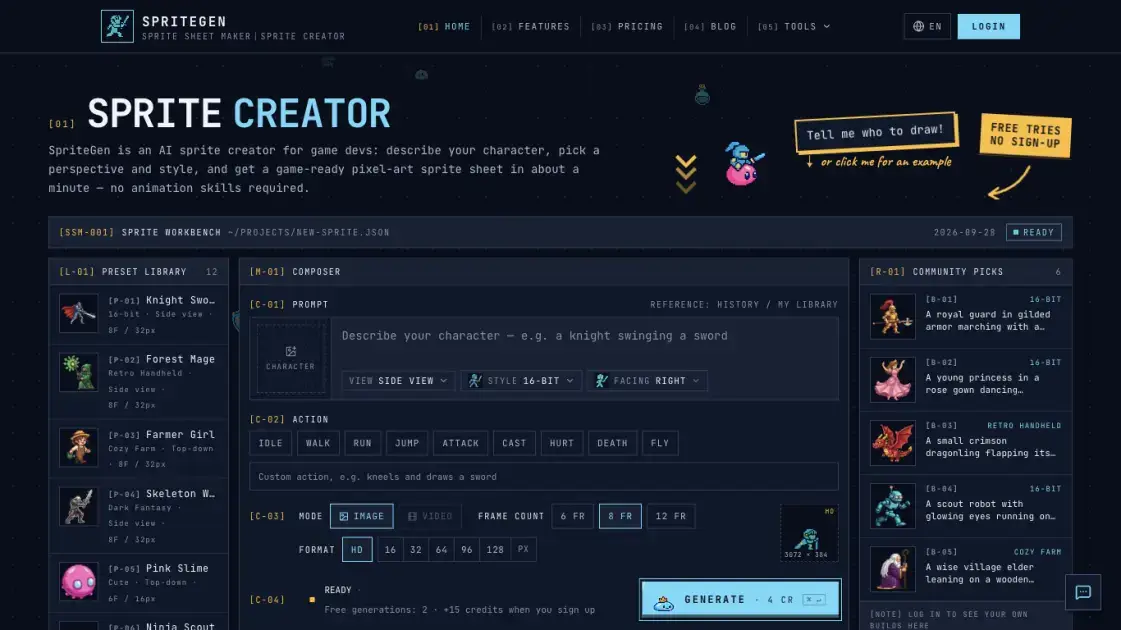
SpriteGen is an AI sprite sheet maker built for game developers who need pixel-art characters without hand-drawing every frame. Instead of a blank pixel editor, the user describes a character and an action in plain language, chooses a camera perspective, art style, and facing, and the tool returns a live animated preview alongside a transparent PNG sprite sheet in about a minute. It covers twelve built-in styles, from 16-bit and retro handheld pixel art to action anime, chibi, and 3D toon, and outputs game-engine-ready frames at 6, 8, or 12 per sheet. No animation pipeline or rigging is required, and the free browser tools for GIF conversion, frame packing, and pixel-art editing extend the workflow. Credit-based pricing lets developers pay only for what they generate, with free tries available before signing up. SpriteGen positions the AI as the animator, so shipping a consistent sprite collection takes one screen instead of hours.
How does SpriteGen work
SpriteGen separates the task into two stages. First, a language model reads the character and action description and plans the pose for every frame of the sheet. Second, an image model draws the entire pose grid in a single pass on a transparent background. The user selects a perspective, one of twelve art styles, a facing, and the frame count before generation. The result is a looping animated preview beside a PNG sprite sheet whose frames are evenly spaced on shared dimensions, so the sheet can be sliced by a fixed grid in Unity, Godot, or Phaser. Exports also include a texture atlas with JSON that game engines read directly.
Benefits of SpriteGen
For developers with limited art time, SpriteGen turns a character idea into a game-ready PNG sprite sheet in about one minute, where hand-drawing the same frames would take hours. No animation skills or rigging are required, so solo developers and small studios can prototype characters on one screen instead of commissioning art. The live animated preview removes guesswork before download, and the transparent background with evenly spaced frames means output imports directly into Unity, Godot, or Phaser without cleanup. The AI sprite maker extends the workflow to single items, icons, and NPC portraits, while the free browser tools cover GIF conversion and frame packing at no cost. Credit-based pricing with free tries keeps the entry cost low, though generating at scale still requires a paid plan.\n
Pros and Cons of SpriteGen
Pros
- Generates complete animated sprite sheets in about one minute
- Works from a plain-language character description
- Output is transparent PNG ready for game engines
- Live animated preview before download
- Free tries without an account
Cons
- Paid credits required for ongoing AI generation
- AI consistency can differ between generations
- Home creator produces one sheet per direction
Core Features of SpriteGen
Natural-language character input
Describe the subject and action in plain language with no prompt engineering. The tool reads the character and picks the pose for each frame.
Live animated preview
The sprite loops immediately after generation, so the result can be checked before downloading instead of guessing at a static image.
Transparent PNG sprite sheets
Sheets come as transparent PNGs with 6 or 8 frames in one row or 12 frames in a 4×3 grid, ready to drop into a game engine.
Consistent characters
A previous generation or an uploaded image can serve as a reference, so every action keeps one consistent look across the collection.
Multi-direction sprites
One sheet per facing is produced, with up to eight directions supported for top-down and isometric views.
Twelve built-in art styles
From 16-bit, retro handheld, cozy, dark, and cute pixel art to modern cartoon, anime, chibi, flat vector, and 3D toon.
Multiple export formats
Besides the PNG sheet, users can export an animated GIF, a ZIP of individual frames, or a texture atlas with JSON.
Credit-based, no subscription lock-in
Four credits buy one sheet and credits never expire on one-time packs, which suits developers with irregular output.
Use Cases of SpriteGen
- Side-view platformers: Generate walk and jump animations on one sheet for a player character in a few minutes.
- Top-down RPG maps: Build consistent sprites per facing from a shared reference so characters match across the map.
- Turn-based battles: Produce front-facing attack, cast, and hurt frames for player units and enemies.
- Indie studio prototyping: Test a character concept before committing to hand-drawn art, without animation skills.
- Item and inventory icons: Use the AI sprite maker to draw potions, gear, and UI icons as single transparent sprites.
FAQs of SpriteGen
What styles are supported?
Twelve built-in styles are offered in two groups. Pixel art includes 16-bit, retro handheld, cozy, dark, and cute pixel. Illustrated styles include modern cartoon, classic cartoon, action anime, soft anime, chibi, flat vector, and 3D toon. If a description names a style, it is selected automatically; otherwise one can be picked before generating.
Do I need to sign in?
No. AI generation can be tried for free without an account, protected by a quick security check. When free tries run out, signing up provides starter credits and a daily check-in, and signed-in generations bypass the security check. The free browser tools work entirely without an account.
What output formats do I get?
The core output is a transparent PNG sprite sheet with 6, 8, or 12 frames. Six and eight frames sit in one row, while twelve frames form a 4×3 grid. Cell size can be set to HD or pixel-art sizes from 16 to 128 pixels. Animated GIF, per-frame ZIP, and texture atlas with JSON exports are also available.
Can I use the sprite sheets commercially?
Yes. Every sprite sheet generated can be used in commercial games and other products, on any plan, including the free tries. The site does not restrict the license for the sheets it produces, which matters for developers shipping real games.
Is the sprite creator free to use?
Every visitor can try AI generation for free without an account. After the free tries are spent, signing up grants starter credits, with more available daily through the check-in. The GIF to Sprite Sheet, Sprite Sheet Maker, and Pixel Art Maker tools are free with no limits.
How long does it take?
Most generations finish in roughly one minute. The result appears as a looping animated preview beside the ready-to-download PNG sheet, so the whole workflow from idea to importable asset fits in a short session.
How to use SpriteGen
- Open the sprite creator on the home page. No download is required; generation runs online and the first tries are free without an account.
- Describe the character and action in plain language. Type who the character is and what they do, such as "a knight swinging a sword", or load a preset.
- Pick the perspective, style, and facing. Choose front, side, top-down, or isometric view and one of the twelve built-in art styles.
- Set the action and frames. Select idle, walk, run, jump, attack, cast, hurt, death, or fly, then choose 6, 8, or 12 frames and the cell size.
- Preview and download. Confirm the live animated preview, then export the transparent PNG sheet, animated GIF, frame ZIP, or texture atlas.
SpriteGen Website Traffic Analysis
Latest traffic information
- Monthly Visits1.6K
- Bounce Rate31.12%
- Pages Per Visit1.09
- Visit Duration00:00:00
- Global Rank11.67M
- Country/Region Ranking307.48K
Top Keywords
| Keyword | Traffic | Volume | Cost Per Click |
|---|---|---|---|
| sprite-gen | 10 | 1.62K | $0.99 |
| sprite maker | -- | 5.86K | $1.64 |
| sprite ai | -- | 3.14K | -- |
| ai sprite sheet generator | -- | 1.27K | $2.71 |
| generar sprites con ia | -- | 330 | -- |
SpriteGen Alternatives
Coralflavor offers uncensored AI chats without safety filters, plus burn-mode retention, web search, image generation, and an OpenAI-compatible API for U.S. adults.
Pet to Art is a free AI pet portrait generator that turns one clear pet photo into custom digital artwork across 170+ styles, canvas ratios, and 2K downloads.

Meta Image: browser AI studio powered by Muse Image. Edit photos with prompts, remove backgrounds, restore old photos, generate new images.
Create and edit images with Image 2.5 by GPT. Sunburst for precision, Flare for speed, up to 4K, 6 quality modes, and transparent PNG/WebP output.
Generate and edit AI images with Nano Banana Pro. Blend up to 14 images, render crisp text, and create 4K visuals online with studio controls.
SeiSei AI is a free, no-sign-up AI image generator turning text prompts into AI illustrations and realistic photos with no watermark, 5 free images daily.
Makiverse is a free online AI manga and comic generator that turns text prompts into complete manga, comics, and GIFs with consistent characters and styles.
Generate AI images for portraits, product visuals, social posts, and creative edits using Nano Banana Pro and GPT Image 2 models.
PixMira AI is a free AI photo editor and image generator. Use text prompts for precise edits, style changes, and high-quality results in seconds.
Viblo AI offers AI video generation, image creation, voice, and music tools with 250+ models. Compare quality and credit costs, then start free.
HiAPI is an AI API gateway that provides a unified endpoint for image, video, and audio generation with persistent storage and callback support.
Create cinematic videos and images from prompts, clips, and references. Built for brands, creators, and teams shipping launch-ready content fast.