
Nano Banana Pro
Nano Banana Pro: Online AI Image Generator & Prompt Library

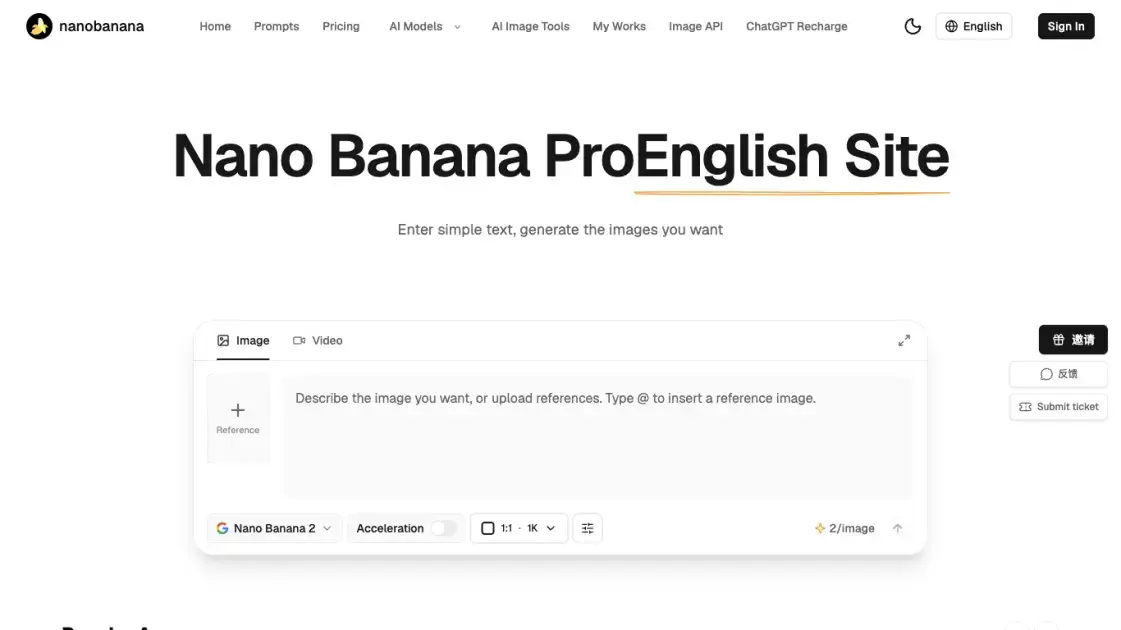
What is Nano Banana Pro
Nano Banana Pro puts Google's Nano Banana image models — alongside GPT Image, Seedream, Wan and Qwen generators — behind one browser prompt box, so creators get finished visuals without opening a design suite. Plain text descriptions and uploaded reference images both drive the same editor, returning illustrations, photorealistic scenes, product shots, posters and social covers. Cleanup tools handle watermark removal, HD upscaling, background swaps, ID photos and face repair in the same session. Developers can route the identical models through a credit-metered REST Image API. Monthly tiers add batch output, queue priority and broader licensing, while purchased credit balances never expire.
How does Nano Banana Pro work
A request starts as a description in the prompt box, optionally with reference images attached or inserted through @; the bar underneath sets model, aspect ratio and resolution, plus toggles such as Acceleration and Web Search where the model supports them. Submitting deducts credits at that model's listed rate and queues an asynchronous job on the matching upstream engine. Candidates usually return within seconds, and batch mode asks for several in one run. Any failure, timeout or content rejection gives the credit back in full, so only usable output is consumed. Results are downloaded from the task list, and a missed shot can be re-run with a tightened prompt or a mask over just the part to change.
Benefits of Nano Banana Pro
Model breadth is the draw: one balance covers the Nano Banana line, GPT Image variants, Seedream and Alibaba engines, so a prompt can be replayed across them to compare style and cost instead of juggling several subscriptions. Charges are per image rather than per seat, unused credit carries over indefinitely, and failures never bill. Retouching lives next to generation, which keeps a file moving from first draft to upscaled, background-corrected deliverable without exporting elsewhere. Beginners are not blocked either — sample prompts, templates and a no-design-skills workflow lower the learning curve, while the documented API serves teams that want the same models programmatically. Reported figures put average generation at about 5 seconds with 2000+ works produced daily.
Pros and Cons of Nano Banana Pro
Pros
- Wide model roster on one credit balance
- Per-image billing with automatic refund on failure
- Credits never expire
- Retouch, upscale and ID-photo tools in the same site
- Documented REST API with self-serve key management
Cons
- API calls limited to accounts with payment history
- No webhook callbacks, results must be polled
- Free access confined to converters and guides
- Ratios, resolutions and reference caps vary by model
- Third-party site with no Google affiliation
Core Features of Nano Banana Pro
Multi-model image generation
One selector switches between the site's enabled image engines — Nano Banana 2, Nano Banana 2.1 and Nano Banana Pro plus GPT Image 2 / 2.5, Seedream 5.0, Qwen Image Edit and Wan 2.5, or the low-cost Z Image Turbo — each billed at its own per-image credit rate. Output runs from 0.5K up to 4K across the aspect ratios a given model lists.
Reference-guided image editing
Image-to-image requests accept uploaded references, and typing @ inserts one inline so composition and lighting carry into the result. A painted mask narrows the change to the marked region.
Retouch and restoration tools
Dedicated utilities cover watermark and logo removal, lossless upscaling with detail repair, background replacement, old-photo and face restoration, AI ID photos, clothing swaps and white-background product images. A free PNG/JPG/WebP/AVIF converter with 1K/2K/4K scaling needs no account.
Prompt library and templates
Showcase pages group worked examples by scene — text to image, image to image, text to video, image to video — and filter by model, with each prompt reopenable in the editor. Poster, cover and e-commerce templates ship as ready-to-use starting points.
Developer Image API
POST /api/ai/generate/ submits an asynchronous task and returns a data.id; POST /api/ai/query/ polls that id until success or failed, with a separate upload endpoint for reference files. Accounts hold up to 10 keys, and API calls require prior payment.
Plans, credits and licensing
Billing comes as pay-as-you-go, monthly or annual. Starter, Standard and Premium differ in monthly credit allowance, upscale factor, batch capability, support level and licence scope; failed or rejected generations refund automatically.
Use Cases of Nano Banana Pro
- Freelance designers: cover art, poster sets and pitch visuals produced in one sitting rather than outsourced.
- E-commerce sellers: white-background main images, lifestyle scene shots and marketing posters built from one product photo.
- Social media operators: trending-style templates, avatars and 3x3 photo-wall grids for a week of feed content.
- Photographers and family archives: upscaling, denoising, scratch cleanup and face repair on ageing files.
- Developers: image generation embedded in their own product through the credit-billed API, including manga translation and bilingual poster text.
FAQs of Nano Banana Pro
Which image models can be used here?
Enabled engines span the Nano Banana line (2, 2.1, Pro) plus GPT Image 2 and its 2.5 Flare / Sunburst variants, with Z Image Turbo, Wan 2.5, Qwen Image Edit Plus and Seedream 5.0 rounding out the roster. The catalogue on the model pages is authoritative for what a given account may call.
How many credits does one image cost?
Rates differ per engine: Z Image Turbo 1 credit; Seedream 5.0, Wan 2.5 and Qwen Image 2 credits; Nano Banana 2 runs 2 credits up to 2K and 3 at 4K, or 4 and 5 with Turbo; Nano Banana Pro is 2 for 1K/2K and 4 at 4K, rising to 3, 4 and 6 in Turbo. Turning Web Search on adds 1 credit.
Is generated output cleared for commercial use?
Mid-tier plans include a personal or small-business licence and the top tier adds a commercial licence subject to platform guidelines. Upstream content policy still applies, so celebrity likenesses, illegal and explicit material are out of bounds.
What happens when a generation fails?
Nothing is charged. Credits for a failed, timed-out or review-rejected run return to the balance immediately and stay usable.
Can the site be used without paying?
Converters, guides and the prompt showcase open without an account. Anything that renders through a model consumes credits, and those come from a top-up or a subscription.
How is the Image API different from calling an upstream provider?
A single endpoint family switches between the rostered models, bills by image in credits, refunds failures, and stays reachable from mainland China without a proxy. Results arrive through generate-then-query polling because callbacks are not implemented.
Can an existing photo be changed instead of a new one generated?
Image-to-image accepts reference files (10 at most where the model allows) and a mask or painted region restricts edits to the marked area. Purpose-built tools already cover background swaps, clothing swaps, restoration and watermark removal.
How to use Nano Banana Pro
- Register or sign in at nano-banana.cn, then choose the Image or Video tab above the prompt box.
- Describe the target picture, or upload references and place them in the text with @.
- Pick a model, aspect ratio and resolution, and enable Acceleration or Web Search if that model lists them.
- Generate, compare the candidates, and re-run with a shorter prompt or a painted mask when a result misses.
- Download the keepers, then pass them through upscaling, background replacement or watermark removal as needed.
- For automation, create an API key, call /api/ai/generate/, and poll /api/ai/query/ roughly every 10 seconds.
Nano Banana Pro Alternatives
Browser workspace for AI image generation, reference photo editing, and short video drafts, aimed at creators, marketers, and product teams.
AI co-director that turns an idea or script into shot-by-shot storyboard panels for indie filmmakers, with real film shot references and PDF board export.
AI design studio for architects and designers: turn sketches, model views, and room photos into rendering concepts, material studies, and staged interiors.
Kinovi is a REST API that runs published video, image, and audio AI models from one endpoint. Send a model ID to createTask, poll recordInfo, and pay per use from one shared credit balance.
Coralflavor offers uncensored AI chats without safety filters, plus burn-mode retention, web search, image generation, and an OpenAI-compatible API for U.S. adults.
SpriteGen is an AI sprite creator that turns character descriptions into transparent pixel-art sprite sheets, ready to drop into your game engine.
Upload one selfie to preview 120+ cuts, colors and bangs rendered on your own face in about 20 seconds, then take the reference sheet to your barber.
Pet to Art is a free AI pet portrait generator that turns one clear pet photo into custom digital artwork across 170+ styles, canvas ratios, and 2K downloads.

Meta Image: browser AI studio powered by Muse Image. Edit photos with prompts, remove backgrounds, restore old photos, generate new images.
Create and edit images with Image 2.5 by GPT. Sunburst for precision, Flare for speed, up to 4K, 6 quality modes, and transparent PNG/WebP output.
Generate and edit AI images with Nano Banana Pro. Blend up to 14 images, render crisp text, and create 4K visuals online with studio controls.
Free unlimited image to prompt generator. Upload any image and get a detailed, accurate AI prompt for Midjourney, Stable Diffusion, FLUX and more in seconds.