
Nano AI Maker: AI Image & Short Video Workspace

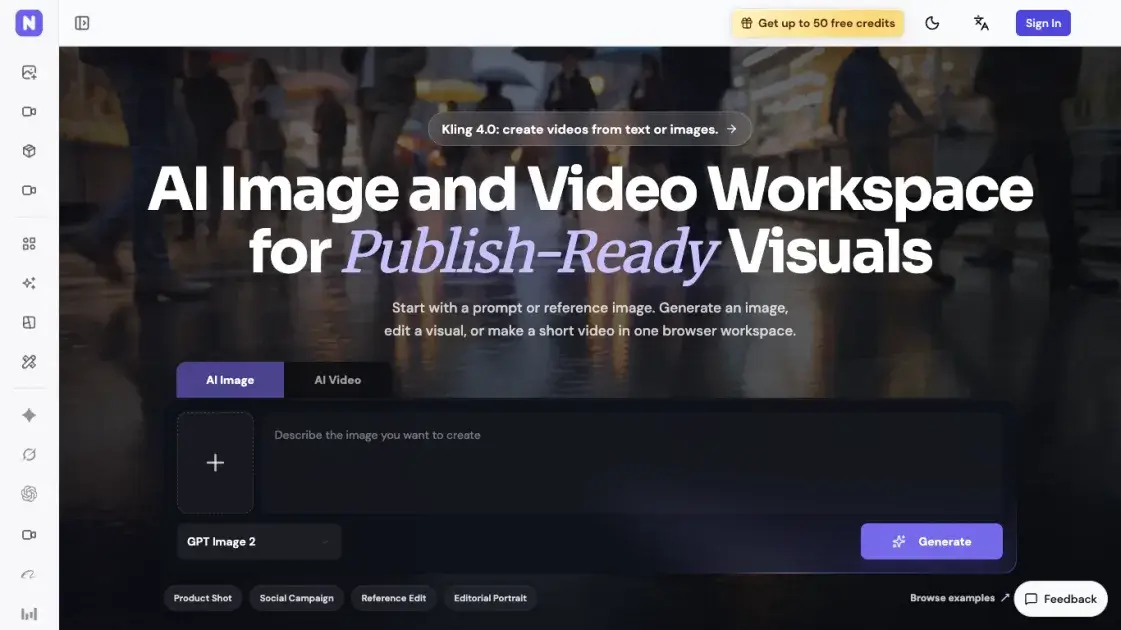
What is Nano AI Maker
Nano AI Maker is a browser-based workspace that combines AI image generation, reference-photo editing, and short video creation behind a single prompt box. Creators, marketers, founders, and product teams work from a text prompt or an uploaded reference image, choose among models such as GPT Image 2, Nano Banana 2.1, Kling 4.0, and Grok Imagine 1.5, and end up with product shots, ad creatives, social posters, or video drafts. Every task runs on credits, and the generator displays the exact spend before a job is submitted. Finished images and videos collect in an Activity feed where they can be previewed and downloaded, and a separate set of free browser utilities handles compression, format conversion, and resizing.
How does Nano AI Maker work
A request starts in the composer, where a text description or an attached reference image defines the brief and the model dropdown assigns it to an image or video engine. On submission the platform reserves the credits that model charges for the chosen resolution, so a GPT Image 2 job at 1K draws three credits while a 4K render draws eight. The job then runs server-side and reports its status, and once it succeeds the output is written into the Activity feed alongside earlier generations. Watermark handling and other output options follow whichever upstream model produced the file, and the composer exposes those controls only where the provider supports them.
Benefits of Nano AI Maker
Keeping image and video work in one browser surface removes the export-and-reimport loop that comes from stitching separate generators together, and the model dropdown lets a single brief be retried on a different engine without rewriting it. Pricing follows actual consumption rather than seat count: credits are shared across every image and video model, annual plans deliver the full year of credits in one installment, and one-off packs cover occasional spikes. Freelancers can start on the entry plan for sparse edits while studios move up for volume, and the free utility tools for compression, conversion, and resizing stay accessible for the assets already sitting on disk.
Pros and Cons of Nano AI Maker
Pros
- Image, editing, and video work in one workspace
- Shared credits across image and video models
- Cost shown before each generation
- Broad model lineup shared across image and video tasks
- Free browser tools for compression and conversion
Cons
- No permanent free tier, only starter credits
- Subscription credits expire with the billing period
- Refunds limited to cases required by law
- Checkout runs through PayPal only
- Video watermarking depends on the chosen model
Core Features of Nano AI Maker
Text-to-Image Generation
Prompts are turned into images by hosted models, with GPT Image 2 producing 1K, 2K, or 4K output and Nano Banana 2.1, Grok Imagine Image 2.0, and Seedream 5.0 Pro available as alternatives.
Reference Image Editing
An uploaded photo can be restyled or have its background replaced while the subject stays recognizable, and the three quick-start presets cover product staging, social posters, and magazine-style portraits.
Image-to-Video Drafts
A single product shot, character image, or campaign asset becomes a short video clip through image-to-video models such as Grok Imagine 1.5 and Kling 4.0.
Model Switching
The model dropdown inside the composer switches providers without leaving the page, so one workspace can route a brief to whichever image or video engine fits the target asset.
Credit Cost Display
Each model and resolution combination carries its own credit price, and the composer shows the amount a task will consume prior to submission.
Activity Library
Generated images and videos land in an Activity list, where completed results can be previewed and downloaded as files.
Use Cases of Nano AI Maker
- E-commerce sellers: catalog and marketplace imagery built from a product photo or a written description.
- Marketing teams: square social posters and campaign visuals with room reserved for a headline.
- Brand and character work: reference-based redraws that keep a face or identity direction recognizable across shots.
- Indie founders and small studios: quick creative tests that do not justify hiring a photographer or motion designer.
- Video-first creators: turning a still product or character image into a moving draft for a short clip.
FAQs of Nano AI Maker
What can Nano AI Maker produce?
Product imagery for catalogs and ads, square social posters, reference-based edits, and short video drafts generated from a still image.
How are credits charged?
Each model and resolution carries a set price, for example three credits for a 1K GPT Image 2 still and five for 2K, with the exact amount listed at submission.
Are the outputs safe for commercial work?
Commercial use is allowed as long as the user holds rights to the prompt, reference photos, logos, and any people depicted, and the upstream model's policy is respected.
Do downloads carry a watermark?
Image downloads get no extra watermark from the platform; video watermarking varies by model, and the composer exposes a control where one exists.
Where do finished files go?
Every successful image and video job is filed in Activity, where it can be previewed and downloaded at any time.
Is any workflow type missing?
Text-to-image, image-to-image, reference-driven image creation, and the text-to-video, image-to-video, and reference-to-video paths are all supported.
Can the platform be tried without paying?
New accounts can receive starter credits when available; ongoing volume requires either a monthly or annual plan, or a one-time credits pack.
How to use Nano AI Maker
- Sign in to the workspace and check the credit balance shown in the header of the composer.
- Pick the AI image or AI video tab, then describe the asset you want in the prompt field.
- Attach a reference image with the plus button when the result has to match an existing product, logo, or character.
- Choose a model from the dropdown and confirm the credit cost the composer reports.
- Press generate, then open Activity to preview the finished file and download it.
Nano AI Maker Alternatives
Seedance 3.0 preview page: planned multi-shot continuity, scene editing and audio-visual sync for AI video, while the on-page generator runs Seedance 2.5.
Black Forest Labs' multimodal model with a web generator for text-to-video, image-to-video and image editing with native audio, for creators and marketers.
Wan API is an independent platform for Wan and Seedance video models. Compare specs and rates, generate clips in the Playground, or call them through one API.
Seedance 3.0 turns text, images, video clips, and audio into videos with sound, and edits one part of a clip without regenerating the rest.
AI design studio for architects and designers: turn sketches, model views, and room photos into rendering concepts, material studies, and staged interiors.
Wery is a virtual AI studio that routes one goal to specialist agents for video, images, music and documents, keeping characters and project assets consistent.

AI video and image studio with text-to-video, image-to-video and keyframe control across Seedance, Kling, Wan and Vidu — all on one credit balance.
Browser studio for AI video, image and music generation with Grok Imagine, Kling and GPT Image models. Free daily credits, no sign-up required.
SeaMove AI is an AI video and image generation platform offering Seedance 2.0 and Seedance 2.5 models for text-to-video, image-to-video, and reference-based creation. Features multi-shot continuity, director-level control, and audio-visual sync for creators and studios.
Turns two separate portraits into a 15-second vertical rap duet video on an orange stage with a shared microphone and the original soundtrack. Free 480P preview available.
Mareel is an all-in-one AI video and image generation workspace giving creators, marketers, and ecommerce teams 40+ leading models and one shared credit balance.
Kinovi is a REST API that runs published video, image, and audio AI models from one endpoint. Send a model ID to createTask, poll recordInfo, and pay per use from one shared credit balance.