
Everygen AI: AI Video & Image Generator with Free Credits
| Added on: | Oct 14, 2026 |
| Monthly Visits: | -- |
| Social & Email: | -- |

What is Everygen AI
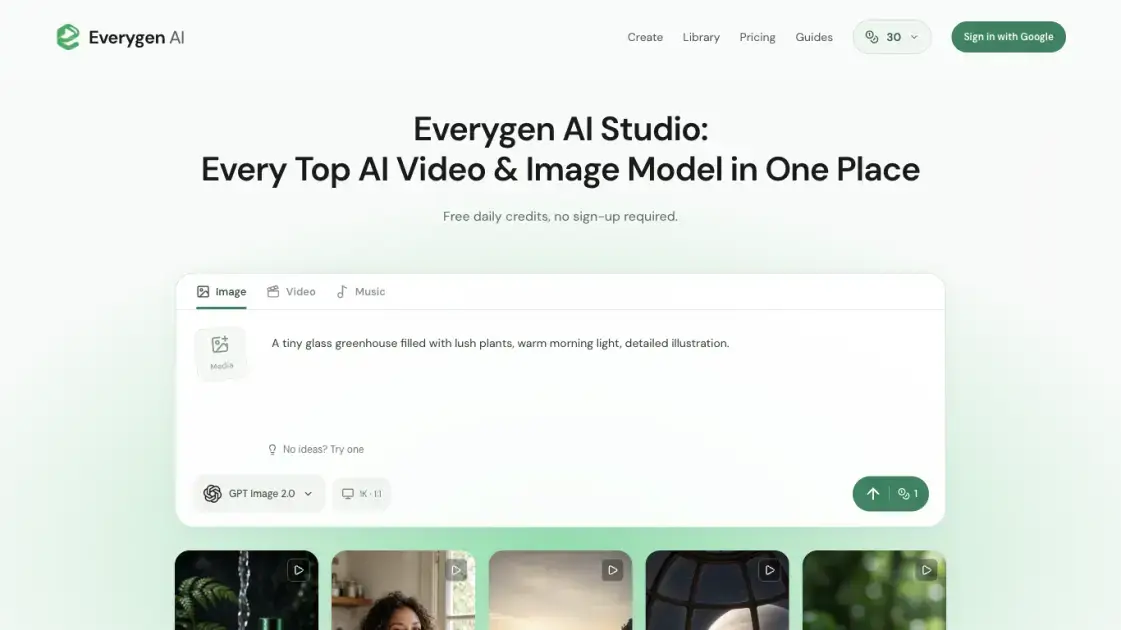
Everygen AI is a browser-based studio that combines AI video, image and music generation in one workspace at everygenai.io. It gives users a single place to choose among models such as Grok Imagine, Kling, Seedance, GPT Image, Nano Banana and Suno, set the controls for each model and keep finished creations in a library. The service targets people who need a short video clip, a still image or a music track without installing separate tools for each media type. Eligible new visitors receive welcome credits without signing in, so a first experiment does not require an account. It is an independent studio and is not affiliated with the Everygen product at everygen.ai.
How does Everygen AI work
Everygen AI routes each request to the model the user selects, with the model's own controls, defaults and supported inputs. A prompt, and optionally reference media, is submitted to that model, which reports a credit quote for the current settings before the request is accepted. The generation runs against the shared capacity of the studio, so tasks may queue when it is busy, and the confirmed charge is deducted from one wallet shared by images, videos and music. When a generation is confirmed as failed, the reserved credits are returned, and purchased credits keep their no-expiry status. Completed results appear in the workspace and remain available in the library for their storage period.
Benefits of Everygen AI
Several generation families are reachable from one interface, so a user can compare how a prompt behaves across models without setting up each service separately. A template and prompt library reduces the blank-page problem, and reference media lets an existing image or clip guide the result. Free credits remove the need to pay before evaluating quality, and generations can be run without signing in at all. Credits are quoted before submission, so the cost of a setting is visible in advance, and confirmed failures return the reserved credits. Creations stay downloaded-ready in a library, with a membership extending retention from three to thirty days.
Pros and Cons of Everygen AI
Pros
- Video, image and music in one workspace
- Free daily credits without signing in
- Multiple models selectable per media type
- Editable templates with ready prompts
- Credit quote shown before generation
Cons
- Free accounts run one generation at a time
- Free creations kept only three days
- Free daily credits expire after 24 hours
- No MCP connection in this release
- Output controls vary by selected model
Core Features of Everygen AI
Video, Image and Music in One Workspace
The studio presents Image, Video and Music as media types on the same creation screen, so users pick a starting point rather than moving between products. All three draw on one shared credit wallet, and the price is shown before a request is submitted.
Multi-Model Access
Video families include Grok Imagine Video 1.5, Kling 3.0 Turbo and Seedance 2.0 Mini; image options include GPT Image 2.5, GPT Image 2.0 and Nano Banana 2.0; Suno handles music. Selecting a model resets the controls to that model's defaults.
Editable Templates and Prompt Library
Sample scenes such as Drifting in Blue, A Paper Moon, Winter Wings and Soft by Design open in the studio with a reusable prompt, model and settings attached. Adjusting a template never submits a request on its own.
Reference Media and Output Controls
Users can add PNG, JPEG or WebP images, MP4 or MOV video and MP3 or WAV audio as references, up to 16 files. Aspect ratios range from 1:1 and 16:9 to 9:16, 21:9 and 9:21, with 1K, 2K and 4K resolution where the model supports it.
Creation Library and History
Finished work can be reviewed in the workspace and found again through creation history or the library. Free accounts keep creations for three days and memberships extend that to thirty days.
Use Cases of Everygen AI
- Social media creators: produce vertical clips at a 9:16 aspect ratio for YouTube Shorts, then add narration, captions and music in an editor.
- Marketers: explore AI UGC scenes and product video concepts such as beverage, beauty, fashion and interior shots before planning a shoot.
- Designers and storytellers: develop character, location or product concepts as still images before turning one into a video reference.
- Musicians and hobbyists: turn a musical brief into a complete track, or generate a background bed for a product scene.
- Small teams without a studio: create a first visual or musical draft in the browser using free credits rather than starting from purchased tools.
FAQs of Everygen AI
Is Everygen AI free to use?
Eligible new visitors receive welcome credits without signing in, and eligible accounts receive an additional first sign-in reward plus daily credits after each 24-hour countdown. Membership is optional.
Do I need an account to generate an image or video?
No. The studio accepts a prompt and generates without signing in. Signing in adds account rewards and keeps creations reachable through the library.
Which models can I choose from?
Video families include Grok Imagine, Kling, Seedance, Veo, Wan, Hailuo, MiniMax and Gemini-Omni, while images span GPT Image, Nano Banana, Seedream and Qwen. Suno covers music.
Can I upload my own images or footage?
Yes, when the selected model supports it. References accept PNG, JPEG or WebP images, MP4 or MOV video and MP3 or WAV audio, up to 16 files.
How long are my creations stored?
Free creations are kept for three days and work made with an active membership is kept for thirty days, starting when a creation finishes.
Do unused credits expire?
Purchased upfront credits do not expire, while daily and promotional rewards expire 24 hours after each grant. Credits with the earliest expiry are used first.
Can I use the output commercially?
Eligible outputs may be used for commercial projects subject to the selected model's terms, applicable law and the rights of others, and users remain responsible for permissions on people, trademarks and source material.
How to use Everygen AI
- Start by choosing Image, Video or Music as the media type in the studio.
- Select a model, or pick a template that loads a prompt, model and settings you can adapt.
- Write the subject, setting and style into the prompt, adding one action and camera movement for video.
- Add reference media from the panel when the selected model supports images, video or audio inputs.
- Set the aspect ratio and resolution, then check the credit quote shown for those settings.
- Generate without signing in, preview the result, download it and return to it through your history.
Everygen AI Alternatives
Wery is a virtual AI studio that routes one goal to specialist agents for video, images, music and documents, keeping characters and project assets consistent.

AI video and image studio with text-to-video, image-to-video and keyframe control across Seedance, Kling, Wan and Vidu — all on one credit balance.
SeaMove AI is an AI video and image generation platform offering Seedance 2.0 and Seedance 2.5 models for text-to-video, image-to-video, and reference-based creation. Features multi-shot continuity, director-level control, and audio-visual sync for creators and studios.
Turns two separate portraits into a 15-second vertical rap duet video on an orange stage with a shared microphone and the original soundtrack. Free 480P preview available.
Mareel is an all-in-one AI video and image generation workspace giving creators, marketers, and ecommerce teams 40+ leading models and one shared credit balance.
Kinovi is a REST API that runs published video, image, and audio AI models from one endpoint. Send a model ID to createTask, poll recordInfo, and pay per use from one shared credit balance.
An AI cartoon video generator that turns a script or prompt into an animated video with the same character in every scene, AI voiceover and soundtrack, and commercial rights included.
Gemini Omni is an online AI video generator and editor that turns a text prompt or reference image into a video, then refines each shot through conversational edits while keeping characters and the scene consistent.
Kling 4.0 turns text, images, and up to 15 Omni Reference assets into cinematic AI video, with 30-second multi-shot scenes, 10 keyframes, and 4K HDR.
Gemini Omni is a chat-based multimodal AI video generator and editor. It combines text, images, video, and audio to create cinematic clips with native audio.
Kling 4.0 turns text prompts and reference images into cinematic AI video, with native audio, flexible model options and a credit-based HTTP API for developers.
SongScene turns any MP3, Suno, or Spotify track into an AI music video with beat-synced cuts and auto lyric captions, exporting 9:16, 16:9, or 1:1 clips.