
Kling 4.0 AI Video Generator: Text and Image to Video Online

What is Kling 4.0
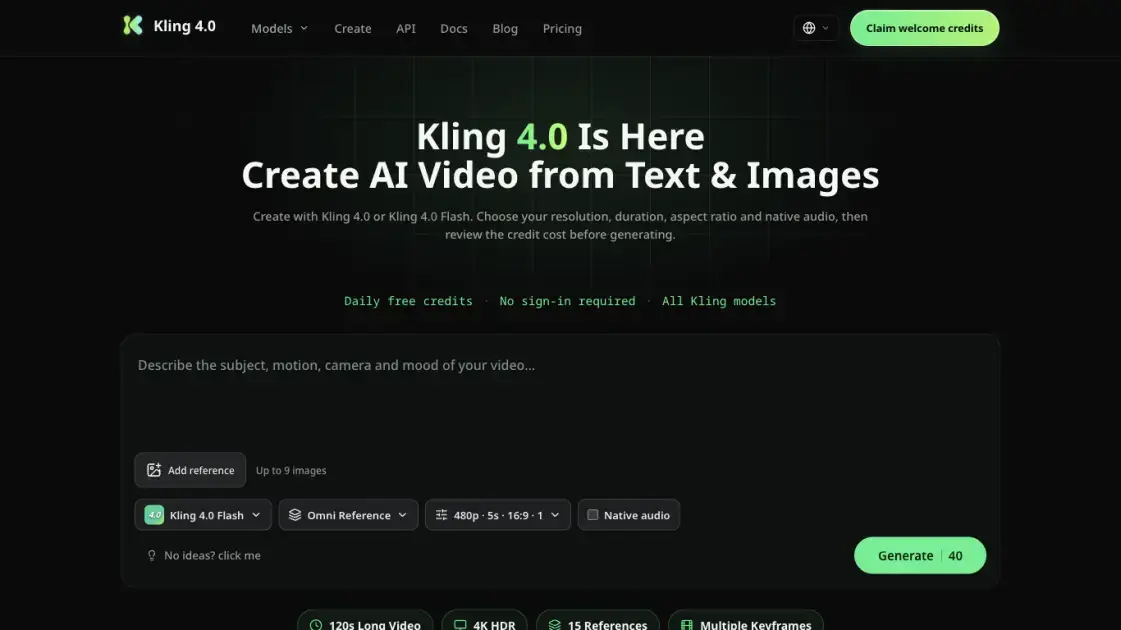
Kling 4.0 is a browser-based AI video generator on kling-4.ai, an independent platform for turning written ideas and reference images into finished clips. The homepage editor accepts a text prompt plus up to nine images, then lets creators choose between Kling 4.0 and Kling 4.0 Flash, set resolution, duration, aspect ratio and native audio, and review the credit cost before submitting. Reported Kling 4.0 capabilities include single-take shots up to 120 seconds, a multimodal reference system, 4K 60fps output and phoneme-accurate lip-sync across more than ten languages. The same workspace also hosts Kling 3.0, Kling 3.0 Omni, Kling 2.6 and Kling 3.0 Turbo, so a project can switch models without changing tools. A REST API exposes job creation and polling for developers, while daily free credits let new visitors test the workflow without signing in.
How does Kling 4.0 work
Generation runs as a job-based pipeline. A user writes a prompt, optionally adds reference images, selects Kling 4.0 or Flash, and confirms the resolution, duration, aspect ratio and audio options. The platform calculates a credit quote from those settings and submits the job only when the balance covers it. Server-side, the chosen model renders the scene, and the reported Kling 4.0 architecture keeps characters and lighting stable across a single long take while generating synchronized audio in the same pass. Completed jobs return a video URL and a thumbnail, and the API can poll one job or refresh every active job at once.
Benefits of Kling 4.0
kling-4.ai keeps several Kling models in one workspace, so creators can move between Kling 4.0, Flash, 3.0 Omni and 2.6 without switching platforms. Daily free credits and a no-sign-in homepage lower the barrier to testing, while every configuration shows its credit cost before generation. Paid plans remove the brand watermark and include commercial rights. For teams that need automation, the REST API turns prompt-to-video into a job that can be polled in code. The trade-offs are worth noting: several Kling 4.0 figures are reported rather than confirmed, and standalone credit top-ups are not offered.
Pros and Cons of Kling 4.0
Pros
- Several Kling models in one workspace
- Daily free credits without sign-in
- Credit cost shown before generating
- Native audio with multilingual lip-sync
- REST API for automated jobs
Cons
- Some Kling 4.0 specs are reported, not confirmed
- No standalone credit top-ups
- Free credits expire at daily midnight
- Watermark-free output needs paid plans
Core Features of Kling 4.0
Text and Image Prompting
Creators describe the subject, motion, camera and mood in a text box, then attach up to nine reference images to guide characters, products or visual style.
Kling 4.0 and Kling 4.0 Flash
The generator offers two speed tiers. Kling 4.0 covers 720p or 1080p clips of five to thirty seconds plus a separate 4K option, while Flash targets quick 720p drafts.
Long-Form Single-Take Video
Reported Kling 4.0 specifications extend one continuous generation to 120 seconds, with scene memory that keeps lighting, wardrobe and props consistent and clips that can be extended in either direction.
Multimodal Reference Control
A reported reference system accepts images, video, audio and 3D inputs in one project, with layered weight control intended to keep faces and brand marks stable across cuts.
Native Audio and Lip-Sync
The native audio engine produces phoneme-accurate lip-sync in more than ten languages, accepts uploaded voice references, and can add scene-matched sound and background music in a single pass.
Visible Credit Cost
Every supported configuration displays its credit cost before submission, so users can compare settings against their balance instead of discovering the price after a render.
Developer API
A REST API creates generation jobs, fetches a single job, lists recent jobs and refreshes active ones, authenticating with an x-api-key header and returning video and thumbnail URLs.
Use Cases of Kling 4.0
- Short-film creators: generate long single-take scenes with consistent characters instead of stitching many separate clips together.
- Ad and TVC teams: produce 4K product spots that keep brand elements locked, then fix single details with region redraw.
- E-commerce sellers: create listing and marketplace videos at volume while keeping packaging, logos and product detail sharp across angles.
- Social media managers: make vertical clips with native audio and lip-sync for TikTok, Reels and Shorts from a single prompt.
- Developers: automate prompt-to-video pipelines through the REST API and poll jobs until finished video URLs are returned.
FAQs of Kling 4.0
Can I generate a video with Kling 4.0 on this site?
Yes. Choose Kling 4.0 or Kling 4.0 Flash in the homepage generator, review the selected settings and the credit quote, then start the render in Create and follow the task until it finishes.
Can I try Kling 4.0 with free credits?
Eligible visitors can claim daily free credits, and the homepage works without signing in. Each video uses the credit amount shown before submission, so the available settings depend on your current balance and any membership.
What is the difference between Kling 4.0 and Kling 4.0 Flash?
Kling 4.0 supports 720p or 1080p for five to thirty seconds plus a separate 4K option for four to fifteen seconds. Flash supports 720p for five to fifteen seconds, and the selector lists the settings each option allows.
How many videos can I create at once?
A standard submission produces one video. Active monthly and yearly members can select two, three or four outputs, and each output is treated as a separate generation with its own credit cost and result.
Do unused credits expire?
Paid credits from monthly and annual plans never expire and can accumulate, even after cancellation or a plan switch. Free reward credits expire at the next UTC midnight and do not carry over from one day to the next.
Does kling-4.ai offer an API?
A REST API handles job creation, single-job polling, recent-job listing and a sync call that refreshes every active job. Requests use an approved API key in the x-api-key header, and access is rolling out during v1.
Is kling-4.ai the official Kling website?
No. kling-4.ai is an independent video creation platform and is not affiliated with, sponsored by or endorsed by Kuaishou or Kling AI. Model names belong to their respective owners, so check official sources for publisher announcements.
How to use Kling 4.0
- Write a prompt in the homepage editor describing the subject, its movement, the camera angle and the overall mood you want the clip to carry.
- Add up to nine reference images when the scene needs a specific character, product or visual direction for the model to follow.
- Choose Kling 4.0 or Kling 4.0 Flash, then set the supported resolution, duration, aspect ratio and whether native audio should be generated.
- Read the credit quote shown for the selected configuration and confirm it fits the balance in your account before submitting.
- Press Generate to submit the job, then open Create to watch progress and preview the result when the render completes.
- Download finished videos from your private history, which keeps saved assets available for later editing, re-download or reuse in another project.
- For automated workflows, request an API key, create a job through the REST endpoint and poll it until the video URL is ready.
Kling 4.0 Website Traffic Analysis
Latest traffic information
- Monthly Visits1.7K
- Bounce Rate34%
- Pages Per Visit1.41
- Visit Duration00:00:00
- Global Rank9.93M
- Country/Region Ranking3.92M
Top Keywords
| Keyword | Traffic | Volume | Cost Per Click |
|---|---|---|---|
| kling ai 4.0 | 80 | 230 | -- |
| kling 4 | 70 | 2.53K | -- |
| kling 4.0 | 50 | 6.26K | -- |
| kling omni 3.0 para que sirve | -- | 480 | -- |
Kling 4.0 Alternatives

Turns two separate portraits into a 15-second vertical rap duet video on an orange stage with a shared microphone and the original soundtrack. Free 480P preview available.
Mareel is an all-in-one AI video and image generation workspace giving creators, marketers, and ecommerce teams 40+ leading models and one shared credit balance.
Kinovi is a REST API that runs published video, image, and audio AI models from one endpoint. Send a model ID to createTask, poll recordInfo, and pay per use from one shared credit balance.
An AI cartoon video generator that turns a script or prompt into an animated video with the same character in every scene, AI voiceover and soundtrack, and commercial rights included.
Gemini Omni is an online AI video generator and editor that turns a text prompt or reference image into a video, then refines each shot through conversational edits while keeping characters and the scene consistent.
Kling 4.0 turns text, images, and up to 15 Omni Reference assets into cinematic AI video, with 30-second multi-shot scenes, 10 keyframes, and 4K HDR.
Gemini Omni is a chat-based multimodal AI video generator and editor. It combines text, images, video, and audio to create cinematic clips with native audio.
SongScene turns any MP3, Suno, or Spotify track into an AI music video with beat-synced cuts and auto lyric captions, exporting 9:16, 16:9, or 1:1 clips.
MixVio runs 21 video, image and audio models in one browser workspace, plus 11 creator tools, with exact credit cost shown before every generation.
PodcastorAI turns PDFs, URLs, notes, and audio into studio-quality video podcasts with AI hosts, voices, and scripts for YouTube, Spotify, and TikTok.
Create AI videos from text, images, or references with native sound. Reeldo AI brings Seedance, Kling, Veo, and MiniMax H3 into one studio.
FramePack AI generates long-form videos from text or images with fixed context length, solving the forgetting-drifting dilemma for creators and researchers.