
MixVio: AI Video, Image & Audio Generator for Creators

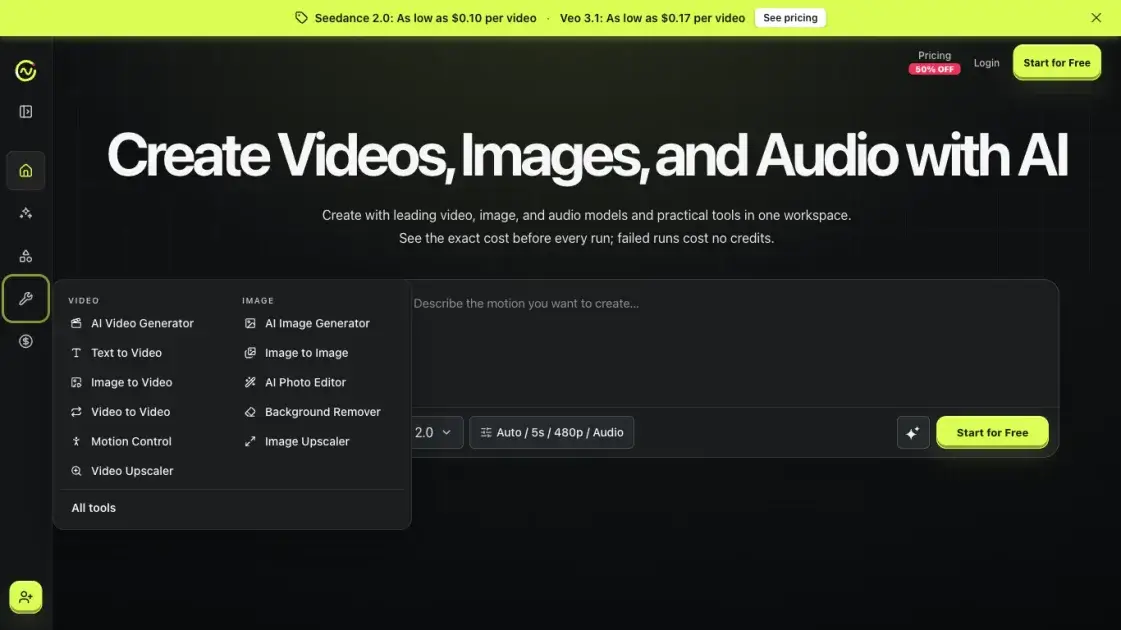
What is MixVio
MixVio is a browser workspace that puts third-party generative models for video, image, and audio behind one interface. Its public catalog covers 21 model families across 40 generation routes, including Seedance 2.0 and 2.5, Kling 3.0, Veo 3.1, Wan 3.0, MiniMax H3, GPT Image 2.5, Eleven v3, and Seed Audio 1.0. It resells access to those models rather than hosting engines of its own, and names each after the provider that supplies it.
Layered on top are 11 tools that each lock a single job, from Text to Video and Motion Control to Background Remover and a 4K Video Upscaler. Every run is billed in credits, and the quote is shown before a task is submitted rather than after it finishes. Credits are reserved at submission, settled on success, and released on failure, so a broken job does not quietly consume the balance. Uploads and results stay in a private workspace.
How does MixVio work
A run starts in the create panel, where the format tab sets video, image, or audio and the mode decides whether a text prompt, an owned still, or a reference pack drives it. Model, duration, resolution, and audio settings complete the request, or Auto fills them in by weighing quality, speed, and credits. MixVio then computes an integer credit quote and shows it with a dollar equivalent. Submitting reserves that quote and forwards the request to the selected third-party provider. On success the reservation settles and the result lands in the private workspace behind a short-lived link; on failure the reservation is released.
Benefits of MixVio
MixVio's main draw is consolidation. Twenty-one model families and eleven tools share one workspace, so a creator can move from a still to an animated clip to a voiceover without opening a second subscription or learning a second billing system. The credit model removes the other common friction, since every run is priced in integer credits and dollars before submission, reserved at that point, and released automatically when a job fails. Model choice stays open rather than locked, Auto can pick a route that fits the current budget, and uploads, results, and download links remain scoped to the account that created them.
Pros and Cons of MixVio
Pros
- 21 model families across 40 generation routes
- Credit quote locked before every run
- Failed runs release reserved credits
- Video, image, and audio in one workspace
- Uploads and results stay private
Cons
- Free tier credits expire within two weeks
- Free images and voiceovers carry MixVio branding
- Subscription credits never roll into the next period
- Free video capped at 480p and 6 seconds
- One concurrent job on the Free plan
Core Features of MixVio
One catalog across video, image, and audio
Twenty-one model families sit in one catalog covering text-to-video, image-to-video, text-to-image, image editing, and text-to-speech. Each entry lists its inputs, output size, duration, native-audio support, and credit range.
Credit quote before every run
Each generation control shows an integer credit cost and its dollar equivalent before submission, and that cost locks when displayed. A later provider price change does not alter a run already priced.
Failed runs cost no credits
A task reserves the quoted credits at submission. On success the reservation settles; on failure or a safe cancellation it is released automatically, and the failed job stays visible for retry.
Eleven tools that each lock one job
AI Video Generator, Text to Video, Image to Video, Video to Video, Motion Control, AI Image Generator, Image to Image, AI Photo Editor, Background Remover, Image Upscaler, and Video Upscaler each expose only the controls fitting one result.
Auto model selection
An Auto setting picks a model by weighing quality, speed, and credits, and only returns models the current plan can run. Video otherwise defaults to MiniMax H3, image to GPT Image 2, audio to Eleven v3.
Reference input and frame control
Routes that accept references let a creator attach an owned still, a start frame, an optional end frame, or a multi-reference pack. Seedance 2.5 takes large packs and Kling 3.0 an end frame.
Native audio on most video routes
Most video families return synchronized native audio as part of the generation, spanning 1s clips from PixVerse V6 to 30s one-takes from Seedance 2.5 with reference packs.
Private workspace and short-lived downloads
Uploads and generated results are stored as private workspace assets, not listed publicly. Providers process a request only to complete that run, and download links are short-lived and account-scoped.
Resolution and duration control
Resolution, duration, and audio settings sit on the run itself, ranging from Veo 3.1 Lite at 720p to Kling 3.0 at up to 4K. Free-plan video caps at 480p and 6 seconds.
Use Cases of MixVio
- Short-form ad video: Marketers turn a campaign brief into a 4–30s clip with native audio from Seedance 2.5.
- Product photos with readable text: Nano Banana Pro produces detailed product shots at 1K–4K with legible in-image copy.
- Animated portraits: Creators lock a still and add blinks, slight head turns, and a slow push-in through Image to Video.
- Voiceover and score: Eleven v3 renders emotion-tagged narration while Seed Audio 1.0 lays in timed ambience and cues.
- Restyling owned footage: Video to Video recasts a clip from a prompt, and Video Upscaler sharpens a locked take to 4K.
- Clean cut-outs for listings: Background Remover exports a transparent PNG, and Image Upscaler enlarges it for print or marketplaces.
FAQs of MixVio
What can I create on MixVio?
Short videos from a text prompt or a reference image, product-ready stills and photo edits, emotion-tagged voiceovers, and timed dialogue or score beds. Live routes include Seedance, Kling, Veo, GPT Image, and Seed Audio. The catalog at https://mixvio.ai/models lists what each family accepts, what it returns, and the credit range it falls into.
Can I try MixVio without paying?
Yes. Every new account receives 40 welcome credits valid for 7 days with no credit card required, and catalog models stay reachable while the remaining balance covers the displayed quote. Once those credits are spent, a Lite, Starter, Pro, or Ultra subscription, or a one-time credit pack, is needed to keep generating.
How much does one AI video cost?
It depends on model, resolution, and duration. Veo 3.1 Lite starts near 10 credits for four seconds, MiniMax H3 near 12, and Seedance 2.0 Standard near 26. The Generate control displays the exact integer credit cost and its dollar equivalent before submission, so the charge is known before the run rather than after it.
What happens when a generation fails?
Nothing is billed. MixVio reserves the quoted credits at submission, settles them only when the run succeeds, and releases the reservation if the generation fails or is safely canceled. The failed task stays visible in history with an error message, and the released balance can go toward a retry or a different model.
Does the Free plan add a watermark?
Images and voiceovers on the Free plan do. Free image outputs carry a visible MixVio watermark, and free voiceovers include an audible MixVio disclosure, while free videos carry no plan watermark. Exports from Lite, Starter, Pro, and Ultra are watermark-free and include commercial use.
Can I use MixVio output commercially?
Paid plans include commercial use of what is created, subject to the Terms of Service. The creator is responsible for holding rights to every reference image, face, voice, brand, and prompt submitted. Free-plan output is for evaluation and is not cleared for commercial publishing.
Are my uploads and finished results private?
Yes. Uploads and generated results stay inside a private workspace and are not listed publicly, and each provider processes a request only to complete that run. Download links are short-lived and scoped to the account. On paid plans, creations stay accessible for as long as the account remains active.
How to use MixVio
- Create an account. New accounts receive 40 welcome credits valid for 7 days, need no credit card, and can reach any catalog model while the balance covers the quote.
- Pick a format. The create panel opens on Video, and the Image and Audio tabs move the same workspace to stills or speech without opening a separate tool.
- Supply the input. Type a prompt, or attach an owned still, a start frame, or an optional end frame on routes that accept references; each route lists its accepted formats and limits.
- Choose a mode. Image to Video animates a still, Text to Video writes one from a brief, and Multi Reference feeds several assets into a single request.
- Set the run. Pick duration, resolution, and audio directly, or leave it on Auto so a model is chosen within the plan's limits.
- Read the quote. The Generate control shows an exact integer credit cost and its dollar equivalent before anything is submitted, and that price is what gets reserved.
- Generate and handle the result. A successful run settles the reserved credits into the private workspace; a failed run releases them and stays visible for a retry.
- Upgrade when credits run out. Choose a Lite, Starter, Pro, or Ultra subscription, or a one-time credit pack valid for 12 months, from https://mixvio.ai/pricing.
MixVio Alternatives
Pet to Art is a free AI pet portrait generator that turns one clear pet photo into custom digital artwork across 170+ styles, canvas ratios, and 2K downloads.

PodcastorAI turns PDFs, URLs, notes, and audio into studio-quality video podcasts with AI hosts, voices, and scripts for YouTube, Spotify, and TikTok.
Create AI videos from text, images, or references with native sound. Reeldo AI brings Seedance, Kling, Veo, and MiniMax H3 into one studio.
FramePack AI generates long-form videos from text or images with fixed context length, solving the forgetting-drifting dilemma for creators and researchers.
Create and edit images with Image 2.5 by GPT. Sunburst for precision, Flare for speed, up to 4K, 6 quality modes, and transparent PNG/WebP output.
Generate and edit AI images with Nano Banana Pro. Blend up to 14 images, render crisp text, and create 4K visuals online with studio controls.
Pi is an AI presentation generator that turns ideas into polished slides. One-click generation, smart layouts and templates make decks fast and easy.
Turn prompts, images, product links, and scripts into ready-to-publish AI videos with Seedance 2.5, Kling, and more. No filming or editing required.
Convert PPT to MP4 video online with AI. Upload slides, set duration, resolution and sound, then generate a polished cinematic video with narration and music.
Browse curated AI image and video prompts with real results and creator attribution, copy-ready for GPT Image, Nano Banana, Midjourney, and more.
Veo3 AI Video Generator, powered by Google DeepMind's Veo 3, creates 8-second videos with native audio, text-to-video, and cinematic quality output.
Speedpaint turns photos, logos, and illustrations into hand-drawn sketch videos with AI. Trace line art and export watermark-free 1080p whiteboard animations.