
PodcastorAI: Turn Content Into Video Podcasts with AI Hosts

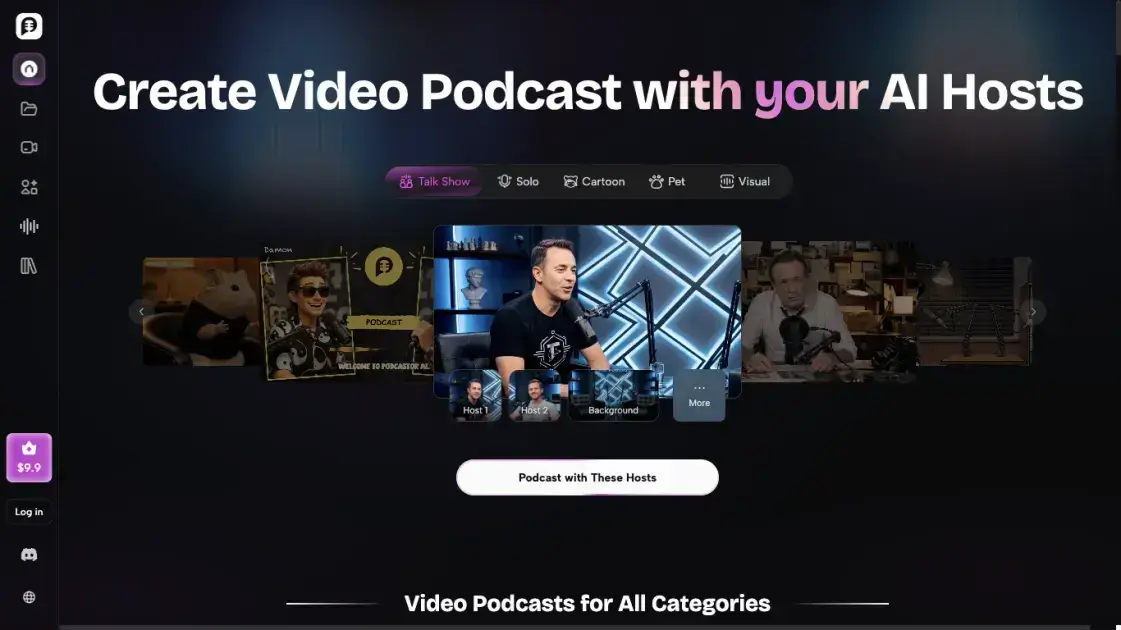
What is PodcastorAI
PodcastorAI is an AI podcast generator that turns PDFs, documents, URLs, notes, audio recordings, or simple ideas into structured podcast conversations, natural AI voices, and ready-to-publish audio or video episodes. It combines script generation, AI voices, voice cloning, and video rendering in one workflow, so creators can produce studio-quality podcasts without cameras, microphones, or editing software. Users upload a photo to build a personalized AI host, pick a format such as solo, talk show, or split-screen, and generate episodes designed for YouTube, Spotify, Apple Podcasts, and TikTok. Built for creators, educators, and marketing teams, PodcastorAI covers the full production pipeline from content understanding to multi-platform publishing.
How does PodcastorAI work
PodcastorAI processes each podcast through a staged AI pipeline. First, it reads the source content, whether a PDF, document, URL, note, or audio recording, and extracts the key information rather than reading it aloud. Second, it reorganizes those insights into an editable script with introductions, questions, transitions, and conclusions, using a Deep Dive, Storytelling, or Debate structure. Third, it assigns AI voices to each speaker, or uses a cloned voice and a reusable AI host built from an uploaded photo. Finally, it renders the episode into audio or video, combining voices, visuals, subtitles, and backgrounds into solo, talk show, or split-screen formats, ready for publishing.
Benefits of PodcastorAI
PodcastorAI removes the main barriers to podcasting: recording equipment, editing experience, and camera presence. Users can turn PDFs, URLs, notes, or audio files into publish-ready audio or video episodes in minutes, since script writing, voice selection, and video rendering all happen in one workflow. The same project can be reused as an audio episode, a two-host talk show, a split-screen interview, or a video with a custom AI host, which reduces production time for multi-channel creators. Voice cloning and a reusable AI avatar keep episodes consistent across a series, while automatic subtitles and platform-ready layouts simplify publishing to YouTube, Spotify, Apple Podcasts, and TikTok.
Pros and Cons of PodcastorAI
Pros
- No camera or editing software required
- Script, voice, and video in one workflow
- Reusable AI hosts and voice cloning
- Supports audio, video, and multiple formats
- Automatic subtitles and multi-platform publishing
Cons
- Free trial limited to 50 credits
- Projects stored only 7 days on free plan
- Watermark removal requires paid plan
- Max video length depends on plan
- AI output may need manual review
Core Features of PodcastorAI
Content-to-Podcast Conversion
Upload PDFs, documents, URLs, notes, or audio recordings, and PodcastorAI extracts key insights and reorganizes them into a structured podcast conversation with introductions, questions, transitions, and conclusions.
Editable AI Script Generation
Choose a Deep Dive, Storytelling, or Debate format, set language, tone, and episode length, then edit the generated script, speaker flow, and wording before any audio or video is produced.
Natural AI Voices and Voice Cloning
Assign different AI voices to different speakers, use a designed voice, or clone your own voice to keep a consistent sound across episodes, all in studio-quality audio output.
Personalized AI Podcast Hosts
Upload a photo to create a reusable AI avatar host for your show, or choose from premade digital human, cartoon, and pet hosts that fit the tone of your content.
Video Podcast Rendering
Turn the same project into solo shows, two-host conversations, split-screen interviews, cartoon or pet podcasts, or full video episodes with subtitles, backgrounds, scenes, and custom layouts.
Subtitles and Multi-Platform Publishing
Generate subtitles automatically for accessibility guards and export with platform-ready layouts for YouTube, Spotify, Apple Podcasts, and TikTok in one workflow.
Use Cases of PodcastorAI
Content creators: Turn blogs, URLs, PDFs, and trending ideas into podcast scripts, audio episodes, and video podcasts without recording from scratch.
Educators: Convert lessons, slides, study notes, and course materials into clear podcast episodes for easier learning and sharing with students.
Marketing teams: Transform webinars, product updates, reports, and long-form content into branded audio, video, and short-form podcast clips.
Faceless channel hosts: Build a video presence without appearing on camera by using an AI avatar as the on-screen host for the show.
Multi-language producers: Swap the AI voice and regenerate each language version while keeping the same AI host, background, and video format for international audiences.
FAQs of PodcastorAI
What is an AI video podcast generator?
PodcastorAI is an AI video podcast generator that turns documents, URLs, PDFs, notes, audio, and ideas into professional audio and video podcasts. From AI-powered script generation to customizable AI hosts, voice selection, video rendering, and publishing, everything happens in one streamlined platform.
Can I create a personalized AI podcast host?
Yes. Upload a photo to create your own AI podcast host with a personalized avatar. You can keep the same host across every episode or create different hosts for different stories, and switch hosts or backgrounds between episodes without rebuilding your setup.
Can I create both audio and video podcasts with PodcastorAI?
Yes. The same project can become an audio-only episode, a two-person talk show, a split-screen interview, a cartoon or pet podcast, or a complete video podcast with subtitles, backgrounds, scenes, and custom layouts.
Do I need editing experience to use PodcastorAI?
No. Script generation, voice selection, and video rendering are automated, so no editing experience is required. The generated podcast script is editable before production, which gives users control without demanding technical skills.
Do I need to appear on camera to create a video podcast?
No. AI hosts and avatars hold the frame for you, so you can build a video presence without showing your face. You can choose a premade AI host or create your own from a photo and pair it with a custom background.
Can I repurpose existing content into video podcasts?
Yes. Upload PDFs, documents, URLs, notes, or audio recordings, and PodcastorAI extracts the key insights and reorganizes them into a structured podcast conversation ready for audio or video production.
How to use PodcastorAI
Sign up on PodcastorAI and open the podcast generator. The free trial provides credits to test audio and video creation without a paid plan.
Create your AI host by uploading a photo, or select a premade host from the library. Assign a name and pick a background for your show.
Import your source content. Upload a PDF, document, URL, note, or audio file, or enter a topic directly, and let the tool extract the key insights.
Review the generated podcast script. Choose a Deep Dive, Storytelling, or Debate format, adjust the wording, speaker flow, and episode length before generating.
Select voices for each speaker, use a designed voice, or clone your own voice, then generate the audio podcast and preview the result.
For a video episode, pick a format such as solo, talk show, or split-screen, add your AI host tutorials to the layout, and render the video.
Add subtitles, preview the final episode, and publish it directly to YouTube, Spotify, Apple Podcasts, TikTok, or download it for manual distribution.
PodcastorAI Alternatives
MixVio runs 21 video, image and audio models in one browser workspace, plus 11 creator tools, with exact credit cost shown before every generation.
Create AI videos from text, images, or references with native sound. Reeldo AI brings Seedance, Kling, Veo, and MiniMax H3 into one studio.
FramePack AI generates long-form videos from text or images with fixed context length, solving the forgetting-drifting dilemma for creators and researchers.
Generate and edit AI images with Nano Banana Pro. Blend up to 14 images, render crisp text, and create 4K visuals online with studio controls.
Pi is an AI presentation generator that turns ideas into polished slides. One-click generation, smart layouts and templates make decks fast and easy.
Turn prompts, images, product links, and scripts into ready-to-publish AI videos with Seedance 2.5, Kling, and more. No filming or editing required.
Convert PPT to MP4 video online with AI. Upload slides, set duration, resolution and sound, then generate a polished cinematic video with narration and music.

Browse curated AI image and video prompts with real results and creator attribution, copy-ready for GPT Image, Nano Banana, Midjourney, and more.
Veo3 AI Video Generator, powered by Google DeepMind's Veo 3, creates 8-second videos with native audio, text-to-video, and cinematic quality output.
Speedpaint turns photos, logos, and illustrations into hand-drawn sketch videos with AI. Trace line art and export watermark-free 1080p whiteboard animations.
AI video production for courses and training. Create editable, reviewable videos from a topic or source material—one video or a chapter-based series.
Koozee turns a single clothing image into AI product photos, model try-on images, and marketing videos for apparel sellers, cutting costs by up to 99%.