
AI Hairstyle Try-On: See Any Haircut on Your Own Face

What is Hairstyle Atlas
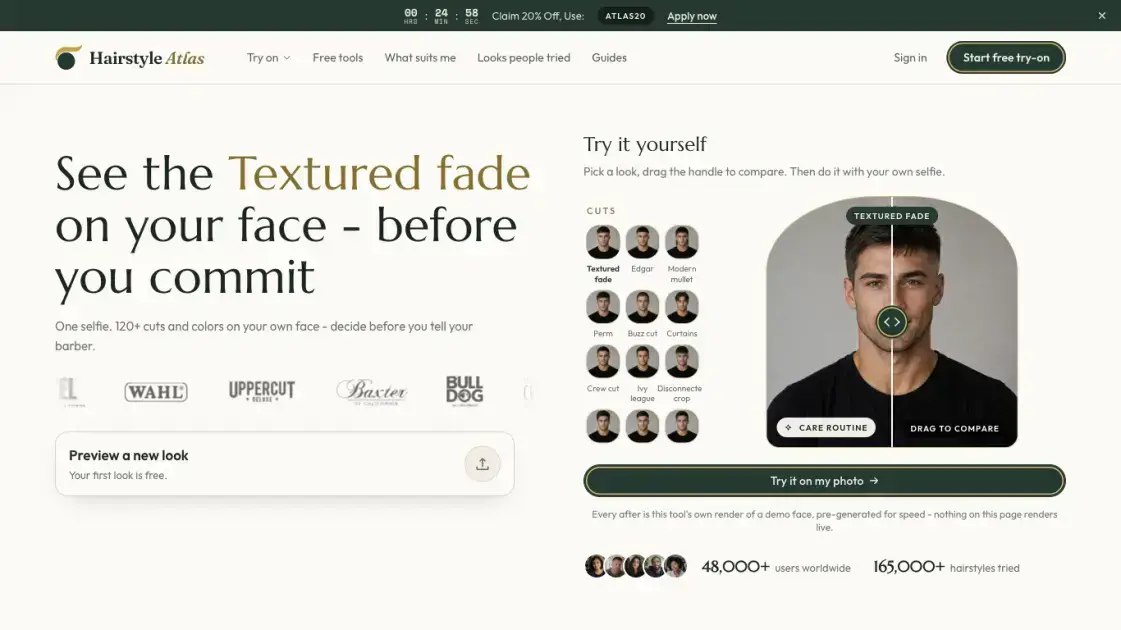
Hairstyle Atlas is a web-based AI hairstyle try-on that puts a photorealistic preview of more than 120 cuts, colors and bangs on a user's own face in about 20 seconds. The only input is one front-facing selfie; the render keeps the face, skin tone, hairline and lighting fixed and changes only the hair. The catalogue is split into 16 decision-oriented tools, one per change — fade, buzz, wolf cut, balayage, bangs and more — plus free no-photo tools such as the face shape detector and haircut quiz. A free first look needs no card, while paid plans from $9 a month add credits, clean HD downloads and a before/after sheet meant to be handed to a barber. Renders are presented as reference images for the chair, not predictions of the finished cut.
How does Hairstyle Atlas work
A user uploads one front-facing selfie and picks a cut, color, bangs or length from a catalogue of over 120 looks on that same photo. An AI image model regenerates the photo with the hair replaced while face, skin tone, hairline and lighting are held fixed. A render takes about 20 seconds and the price shows before tapping render; a failed render returns its credits. Each hairstyle costs 10 credits, a color on the cut 5, and on Pro every extra angle another 10. The finished before-and-after sheet is shown to the barber instead of describing the cut.
Benefits of Hairstyle Atlas
Because the render keeps skin tone, hairline and lighting fixed and changes only the hair, the result is a realistic preview on the user's own face rather than a filter-style repaint. Renders come back in about 20 seconds at a price shown before tapping render, and a failed render returns its credits. The before/after sheet works as a concrete reference for the barber, removing the usual back-and-forth of describing a cut. A free first look requires no card, all 14 hair textures are covered, and Pro adds front, three-quarter, side and back views.
Pros and Cons of Hairstyle Atlas
Pros
- Realistic preview on the user's own face
- Covers 120+ cuts, colors and bangs
- 16 single-decision try-on tools
- Free first look, no card needed
- Renders fail-safe, credits returned
Cons
- Renders are reference images, not predictions
- Paid plans needed for clean downloads
- Curly texture results not guaranteed
- Requires a front-facing selfie to work
- Hair sits differently once cut in reality
Core Features of Hairstyle Atlas
Photorealistic try-on on your own face
A front-facing selfie is the only input, and the render replaces the hair while keeping face, skin tone, hairline and lighting fixed, so the result is a realistic preview rather than a filter-style repaint.
120+ cuts, colors and bangs catalogue
Fades, crops, buzzes, curtains, wolf cuts, shags, bobs and pixies, plus colors from balayage to platinum and silver; any color can be painted onto any cut, with a color on an approved cut cheaper than a full render.
16 decision-oriented try-on tools
Each tool answers one question — fade haircut simulator, buzz cut filter, wolf cut try-on, balayage try-on, bang filter and more — so users browse by the change they want to make rather than by a flat gallery.
Texture-matched rendering
Users pick straight, wavy, curly or coily hair during setup, and the render is created for that texture instead of pasting straight-hair styling onto a curly head, with braids, locs, afros and silk presses included.
Free no-photo tools
The face shape detector, haircut quiz, hairline self-check and eyebrow tools run without a photo in about 30 seconds, and the same tools can be embedded on a site.
Before/after reference sheet for the barber
The comparison sheet pairs the selfie with the chosen cut, and on salon plans carries the salon's name, so the client can point instead of describing a haircut.
Use Cases of Hairstyle Atlas
- Undecided clients: Preview a cut, color or bangs on their own selfie and settle on a style before booking an appointment.
- Barber appointments: Show the before-and-after reference sheet to the barber and agree on the cut before the clippers come out.
- Receding hairlines: Preview a shaved head or a fade and weigh the look against keeping the thinning hair before committing.
- Curly and coily hair: Check whether a texture-matched cut suits the curl pattern before telling the stylist.
- Salons and barbershops: Run three candidate looks side by side on a client's selfie during consultation and put the salon's name on the comparison sheet.
FAQs of Hairstyle Atlas
Is the first hairstyle really free?
Yes. The first look includes one hairstyle with one color on it at no chargeable cost; it needs no card and no commitment, and paying only starts when the user wants more looks, colors and clean downloads without a watermark.
Can I try it without an account?
The homepage demo runs without an account. An account is created only when the user wants a render on their own photo kept in a library, where it stays visible only to the account holder while the account is open.
Does the render change anything besides my hair?
No. Hairstyle Atlas holds face, skin tone, hairline and lighting fixed and changes only the hair. A render that alters anything else is treated as a bad render, flagged and re-run for free without drawing credits.
What is the render used for?
Renders are presented as reference images for the chair, not predictions of the finished cut. A curl pattern can be predicted but not guaranteed, so the site recommends treating every render as a strong reference and showing it to a professional barber.
How much does a hairstyle cost?
A hairstyle on a photo is 10 credits, a color on that cut is 5 credits, and a facial-hair change is 10 credits; on Pro each extra angle is another 10 credits. Length, fringe and parting are free as part of the same picture, and a failed render returns its credits.
Are my photos shared or used to train models?
Photos stay in a library readable only by the account holder and are removed on deletion, with copies held up to 90 days. Nothing uploaded is published, there is no public gallery, and identifiable photos are used for training only where the user switches that on in settings.
Is there a refund policy?
Yes. Every paid plan carries a seven-day full refund with no conditions; rendering looks does not void it, and the user can email within seven days of a charge for a full refund. Cancel is available in two clicks from billing settings, with access running to the end of the paid period.
How to use Hairstyle Atlas
- Open hairstyleatlas.com and upload one front-facing selfie with the hair visible; the homepage demo runs without an account.
- Choose a hair type — straight, wavy, curly or coily — and optionally a face shape, so the catalogue narrows around it.
- Pick a cut, color, bangs or length from the catalogue; each of the 16 try-on tools is tuned to one decision.
- Review the price before tapping render; a render takes about 20 seconds and returns its credits if it fails.
- Save the before-and-after sheet and show it to the barber as a reference instead of describing the cut.
- Create an account when you want looks kept in your library; paid plans add clean HD downloads and all angles.
Hairstyle Atlas Website Traffic Analysis
Latest traffic information
- Monthly Visits2.07K
- Bounce Rate39.18%
- Pages Per Visit1.11
- Visit Duration00:00:00
- Global Rank9.17M
- Country/Region Ranking3.97M
Top Keywords
| Keyword | Traffic | Volume | Cost Per Click |
|---|---|---|---|
| textured fringe | -- | 45.32K | $0.79 |
| messy fringe | -- | 20.33K | $0.69 |
| ai hairstyle changer | -- | 1.7K | $0.97 |
| knotless braid | -- | 1.51K | $0.41 |
| high bald fade | -- | 1.21K | -- |
Top Regions
| Region | Percentage |
|---|---|
| United States | 68.09% |
| France | 31.91% |
Hairstyle Atlas Alternatives
Pet to Art is a free AI pet portrait generator that turns one clear pet photo into custom digital artwork across 170+ styles, canvas ratios, and 2K downloads.

Create and edit images with Image 2.5 by GPT. Sunburst for precision, Flare for speed, up to 4K, 6 quality modes, and transparent PNG/WebP output.
Free unlimited image to prompt generator. Upload any image and get a detailed, accurate AI prompt for Midjourney, Stable Diffusion, FLUX and more in seconds.
Create professional AI headshots from your selfies. Train a personal model, generate 7 to 20 styles, and download up to 2048×2048 photos.
Turn JPG, PNG, and WebP images into editable PowerPoint slides. Upload up to 10 images, set the order, and let AI rebuild each image as a real slide.
Create original anime characters and OCs from text prompts with Try OC Maker, an AI OC maker for character design, roleplay avatars, and full-body anime art.
AI Clothes Changer is an online tool that replaces the clothing in a person photo using either a reference image or a text description.
AI Gazou removes image backgrounds for free using AI. Upload photos, products, or logos to get transparent PNGs with clean edges and customizable margins.
Turn product photos into clean line drawings, numbered assembly steps, and IFU panels for manuals, inserts, and support pages. Export PNG or SVG.
Omoggle offers private AI makeup analysis and 1v1 look comparisons focused on technique, finish, and theme fit.
AI Image Text Editor lets users replace, remove, translate, and redact text inside finished images while preserving the original font, background, and layout.
Imgfree provides free unlimited AI image generation with GPT-Image, Midjourney, and video creation tools for creators and marketers.