
TomeApp Image to PPT Converter for Editable AI Slides

What is TomeApp
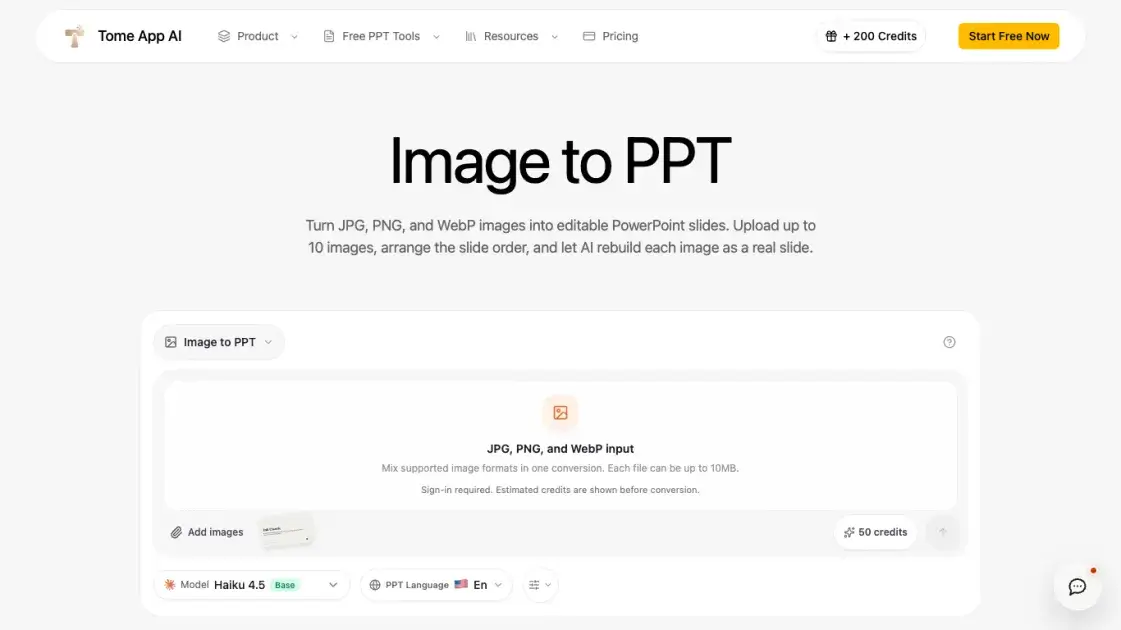
TomeApp's Image to PPT converter turns JPG, PNG, and WebP images into editable PowerPoint slides. Built for image-based mockups and design files, it accepts up to 10 images per conversion with a 10MB limit per file, and each source image becomes one slide while the drag-and-drop order is preserved. Instead of pasting a full-page screenshot, the converter uses Claude Haiku 4.5 to rebuild visible text, cards, tables, simple charts, colors, and hierarchy as editable slide elements. After generation, users can review and adjust the HTML slides in the workspace before exporting the result as a PowerPoint file. An estimated credit cost of around 50 per conversion is shown before the process starts, so the expense is clear upfront.
How does TomeApp work
Users start by uploading up to 10 JPG, PNG, or WebP images, each up to 10MB. The images are then dragged into the desired slide order, with one source image becoming one slide. TomeApp sends the set to Claude Haiku 4.5, which treats each image as a visual reference and reconstructs visible text, cards, tables, simple charts, colors, and hierarchy as editable slide elements rather than screenshots. The generated HTML slides can be reviewed and edited in the workspace, and the final result is exported as a PowerPoint file ready for further changes.
Benefits of TomeApp
Because each source image is rebuilt as editable slide elements rather than inserted as a full-page screenshot, users can fix typos, restyle content, and reorder elements after conversion instead of starting over in PowerPoint. Mixing JPG, PNG, and WebP files in one conversion saves time when source material comes from different tools, and the drag-to-order workflow sets the final slide sequence before generation, so the output matches the intended structure from the start. A manual review of typography, charts, and brand details is still advisable, since complex artwork and unreadable text may require editing.
Pros and Cons of TomeApp
Pros
- Mixed JPG, PNG, and WebP formats in one conversion
- Editable reconstruction of text, cards, tables, and charts
- Drag-to-order workflow sets the final slide sequence
- Free to start with Start Free Now
Cons
- Sign-in required before estimated credits are shown
- Complex artwork and unreadable text may need review
- Pixel-perfect output is not guaranteed
- Output PowerPoint language limited to English
Core Features of TomeApp
Editable reconstruction
AI rebuilds visible text, cards, tables, simple charts, colors, and hierarchy as editable slide elements instead of using a full-page screenshot of the source image.
Mixed image input
JPG, PNG, and WebP formats can be combined in a single conversion, with each file supported up to 10MB and up to 10 images per run.
Drag-to-order workflow
Users arrange images before generation to set the final slide sequence, and each source image becomes exactly one slide in that order.
Review and export
Generated HTML slides can be edited directly in the workspace, then exported as a PowerPoint file for continued work in standard presentation software.
Claude Haiku 4.5 model
Conversions run on Claude Haiku 4.5 as the base model, which performs the reconstruction of each image into slide structure.
Estimated credit cost
Each conversion is estimated at around 50 credits, with the expected cost displayed before conversion once the user is signed in.
Use Cases of TomeApp
- Designers: Turn visual design mockups into editable PowerPoint decks for client presentations.
- Presenters: Convert hand-drawn whiteboard sketches into structured slides for team meetings.
- Educators: Rebuild screenshots of course materials into editable slides for further refinement.
- Marketers: Transform existing campaign graphics into polished, editable PowerPoint presentations.
- Students: Convert photographed lecture notes into slides for study or presentations.
FAQs of TomeApp
What image formats can I convert with TomeApp Image to PPT?
The converter accepts JPG, JPEG, PNG, and WebP images. Up to 10 images can be uploaded per conversion, each file up to 10MB, and different formats can be mixed in a single conversion without any prior conversion steps.
Does each uploaded image become one slide?
Yes. The final slide count matches the number of uploaded images exactly, and the drag-and-drop order set before conversion is preserved in the generated deck, so the slide sequence stays predictable from start to finish.
Are the converted PowerPoint slides editable?
Yes. The AI rebuilds visible text, shapes, tables, and simple charts as editable slide elements rather than embedding a static screenshot, so content can be modified afterward in PowerPoint. Complex artwork and unreadable text may still require manual review.
Does TomeApp use my image as the slide background?
No. The converter explicitly instructs the AI to treat each source image as a visual reference, not as a full-slide screenshot or background. Slide elements are reconstructed from the image content instead of being pasted behind the layout.
Will the conversion be pixel-perfect?
Pixel-perfect output is not guaranteed. The converter prioritizes editable structure with close visual fidelity, so typography, small labels, charts, and brand details should be reviewed before presenting, especially when the source material is complex.
How to use TomeApp
- Upload up to 10 JPG, PNG, or WebP images to the converter. Each file can be up to 10MB, and different formats can be mixed freely within a single conversion.
- Drag the uploaded images to arrange the final slide sequence. One source image becomes one slide, so the order set here determines the order of the deck.
- Review the estimated credit cost before converting. The default estimate is around 50 credits per conversion, and a sign-in is required before the conversion starts.
- Send the images and let the AI rebuild each one into an editable slide. Visible text, cards, tables, simple charts, colors, and hierarchy are reconstructed as slide elements.
- Review and edit the generated HTML slides in the workspace. Adjust any element that needs correction before exporting the final result.
- Export the finished deck as a PowerPoint file. The result is a real editable presentation rather than a full-page screenshot of the source images.
TomeApp Website Traffic Analysis
Latest traffic information
- Monthly Visits33.24K
- Bounce Rate33.9%
- Pages Per Visit2.27
- Visit Duration00:01:40
- Global Rank852.42K
- Country/Region Ranking200.69K
Top Keywords
| Keyword | Traffic | Volume | Cost Per Click |
|---|---|---|---|
| tome ai | 5.1K | 13.14K | $0.76 |
| tome app | 2.97K | 3.84K | $0.23 |
| tome ai ppt | 600 | 1.38K | $0.1 |
| tome | 490 | 39.36K | $2.85 |
| tome presentation | 260 | 760 | $0.26 |
Top Regions
| Region | Percentage |
|---|---|
| India | 27.02% |
| United States | 19.89% |
| Indonesia | 13.44% |
| Brazil | 12.7% |
| Vietnam | 10.9% |
TomeApp Alternatives
Browser workspace for AI image generation, reference photo editing, and short video drafts, aimed at creators, marketers, and product teams.
AI design studio for architects and designers: turn sketches, model views, and room photos into rendering concepts, material studies, and staged interiors.
Upload one selfie to preview 120+ cuts, colors and bangs rendered on your own face in about 20 seconds, then take the reference sheet to your barber.
Pet to Art is a free AI pet portrait generator that turns one clear pet photo into custom digital artwork across 170+ styles, canvas ratios, and 2K downloads.

Create and edit images with Image 2.5 by GPT. Sunburst for precision, Flare for speed, up to 4K, 6 quality modes, and transparent PNG/WebP output.
Pi is an AI presentation generator that turns ideas into polished slides. One-click generation, smart layouts and templates make decks fast and easy.
Convert PPT to MP4 video online with AI. Upload slides, set duration, resolution and sound, then generate a polished cinematic video with narration and music.
Free unlimited image to prompt generator. Upload any image and get a detailed, accurate AI prompt for Midjourney, Stable Diffusion, FLUX and more in seconds.
Gamma AI is an AI presentation generator that turns text, PDF, and Word into slides with structured outlines, in-browser editing, and editable PPTX export.
Fuu AI is an AI presentation maker that turns text, PDFs, and documents into professional PPT slides in minutes, powered by Claude Opus 4.7.
AI Clothes Changer is an online tool that replaces the clothing in a person photo using either a reference image or a text description.
AI Gazou removes image backgrounds for free using AI. Upload photos, products, or logos to get transparent PNGs with clean edges and customizable margins.