
SeiSei AI: Free AI Image Generator, No Sign-up Required
| Added on: | Aug 12, 2026 |
| Monthly Visits: | 1.12K |
| Social & Email: | -- |

What is SeiSei AI
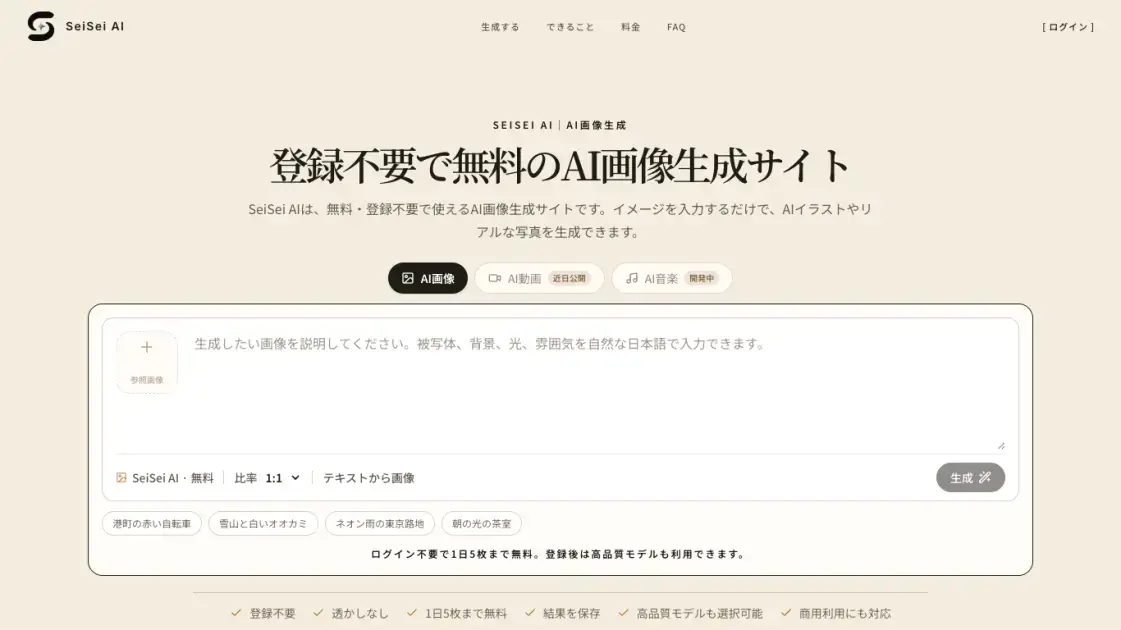
SeiSei AI is a free AI image generator that turns text prompts into images without requiring an account. Users describe a subject, place, lighting, and composition, and the tool produces either an AI illustration or a realistic photo. Anonymous visitors can generate up to five images per day at no cost, and the output carries no watermark. The generator supports multiple aspect ratios, including 1:1, 4:3, 16:9, and 9:16, and provides example prompts such as a red bicycle in a harbor town or a snowy mountain with a white wolf. After logging in, users can select higher-quality models, receive five credits upon registration, and manage their generation history. SeiSei AI positions itself as a starting point for anyone who wants to test AI image generation before committing to a paid plan.
How does SeiSei AI work
SeiSei AI converts text descriptions into images through a text-to-image generation model. The user enters a prompt specifying the subject, location, atmosphere, and aspect ratio, then the model renders an AI illustration or realistic photo. Guest users are assigned the default SeiSei AI model automatically, while logged-in users can select higher-quality models, and each generation consumes credits according to the chosen model. The process supports iteration: users can adjust a single element, such as lighting, composition, or background density, and regenerate to move the result closer to their intended image.
Benefits of SeiSei AI
SeiSei AI lowers the barrier to AI image generation by removing account requirements and watermarks. Users with no drawing or photography skills can describe a scene and receive a usable image quickly, which makes the tool practical for testing ideas. The daily free quota of five images lets casual users evaluate prompt phrasing without payment, and regenerating by adjusting single elements supports gradual refinement. Commercial use is permitted within the terms of service, covering blogs, social media, ads, and presentations. Logging in adds higher-quality models, generation history, and a one-time credit grant.
Pros and Cons of SeiSei AI
Pros
- Free to use without registration
- No watermark on generated images
- Five free images per day
- Commercial use within terms of service
- Higher-quality models available after login
Cons
- Free tier limited to five daily images
- Guest users cannot upload reference images
- Model selection requires an account
- Video and music features not yet available
Core Features of SeiSei AI
Text-to-Image Generation
Users type a description of a subject, scene, and atmosphere, and the model renders an AI illustration or realistic photo from the prompt text.
No Sign-up Required
Anonymous visitors can generate up to five images per day without creating an account, making it easy to test the service before registering.
Watermark-free Output
Generated images are saved without any SeiSei AI logo or platform watermark, so results are ready for direct use and sharing.
Multiple Aspect Ratios
The generator supports 1:1, 4:3, 3:4, 16:9, and 9:16 ratios, letting users prepare images for different publishing platforms.
High-Quality Models After Login
Registered users can choose from higher-quality models and receive five credits on sign-up, with paid plans offering larger monthly credit quotas.
Prompt Iteration Workflow
Results can be regenerated by adjusting one element at a time, such as lighting, composition, or background, to refine the output gradually.
Use Cases of SeiSei AI
- Bloggers: generate eye-catching header images and article illustrations without needing design or photography skills
- Social media managers: quickly compare multiple image options for posts, ads, and announcement materials
- E-commerce sellers: create product visual variations to explore different presentation and styling directions
- Content planners: turn vague ideas into visual drafts that can be shared and discussed with a team
- Illustrators and hobbyists: produce character concept art and scene sketches to test moods and compositions
FAQs of SeiSei AI
Is SeiSei AI free to use?
Yes. SeiSei AI is a free AI image generation service that requires no registration. Anonymous users can generate up to five images per day with the basic text-to-image model. The free access does not mean every model or an unlimited number of generations is available without cost.
Can I generate images without signing up?
Yes. Visitors can type a description on the homepage and generate images directly without creating an account. Anonymous usage is subject to a daily limit and access controls designed to prevent abuse.
Do generated images contain watermarks?
No. SeiSei AI does not overlay its logo or any platform watermark on generated images. However, the rights and permitted uses of the image content itself still need to be confirmed separately from watermark presence.
Can I use generated images for commercial purposes?
Commercial use can be considered for blogs, social media, advertising, e-commerce, and presentation materials, but it is limited to what the terms of service allow. Users should verify rights for people, trademarks, characters, buildings, and third-party materials before publishing or selling.
Do I need credits to generate after logging in?
Guest users can try SeiSei AI for free up to five images per day. After login, continued generation consumes credits, with the standard model costing one credit per image. Other models display their required credit counts in the model selection screen.
Can I write prompts in Japanese?
Yes. Subjects, places, lighting, composition, art style, and intended use can all be entered in Japanese directly. Starting with short phrases and adding one element at a time based on the generated result is also recommended.
How to use SeiSei AI
- Enter a prompt. Describe the subject, place, and atmosphere you want, for example a woman in a red coat walking along a cherry blossom path on a spring evening.
- Choose the aspect ratio. Select a format such as 1:1, 4:3, 16:9, or 9:16 depending on where the image will be published, including blogs, social media, or presentations.
- Generate the image. Submit the prompt, and the default SeiSei AI model renders the image without requiring an account or payment for the free daily quota.
- Review and refine. Look at the result and change one element at a time, such as lighting, composition, or background, then regenerate to adjust the output.
- Create an account for more options. Logging in grants five credits once, unlocks higher-quality models, and provides generation history for managing past results.
SeiSei AI Website Traffic Analysis
Latest traffic information
- Monthly Visits1.12K
- Bounce Rate42.5%
- Pages Per Visit1.11
- Visit Duration00:00:00
- Global Rank13.81M
- Country/Region Ranking973.35K
Top Keywords
| Keyword | Traffic | Volume | Cost Per Click |
|---|---|---|---|
| free ai | 10 | 95.95K | $1.86 |
| 画像生成ai 無料 登録不要 | 10 | 980 | -- |
| seisei | -- | 2.74K | -- |
| ai画像生成 無料 登録不要 | -- | -- | -- |
SeiSei AI Alternatives
Browser workspace for AI image generation, reference photo editing, and short video drafts, aimed at creators, marketers, and product teams.
AI co-director that turns an idea or script into shot-by-shot storyboard panels for indie filmmakers, with real film shot references and PDF board export.
Browser studio for AI video, image and music generation with Grok Imagine, Kling and GPT Image models. Free daily credits, no sign-up required.
Mareel is an all-in-one AI video and image generation workspace giving creators, marketers, and ecommerce teams 40+ leading models and one shared credit balance.
Kinovi is a REST API that runs published video, image, and audio AI models from one endpoint. Send a model ID to createTask, poll recordInfo, and pay per use from one shared credit balance.
Coralflavor offers uncensored AI chats without safety filters, plus burn-mode retention, web search, image generation, and an OpenAI-compatible API for U.S. adults.
SpriteGen is an AI sprite creator that turns character descriptions into transparent pixel-art sprite sheets, ready to drop into your game engine.
Pet to Art is a free AI pet portrait generator that turns one clear pet photo into custom digital artwork across 170+ styles, canvas ratios, and 2K downloads.

MixVio runs 21 video, image and audio models in one browser workspace, plus 11 creator tools, with exact credit cost shown before every generation.
Meta Image: browser AI studio powered by Muse Image. Edit photos with prompts, remove backgrounds, restore old photos, generate new images.
Create and edit images with Image 2.5 by GPT. Sunburst for precision, Flare for speed, up to 4K, 6 quality modes, and transparent PNG/WebP output.
Generate and edit AI images with Nano Banana Pro. Blend up to 14 images, render crisp text, and create 4K visuals online with studio controls.