
Weke AI: all‑in‑one browser studio for image, video and audio

What is Weke AI
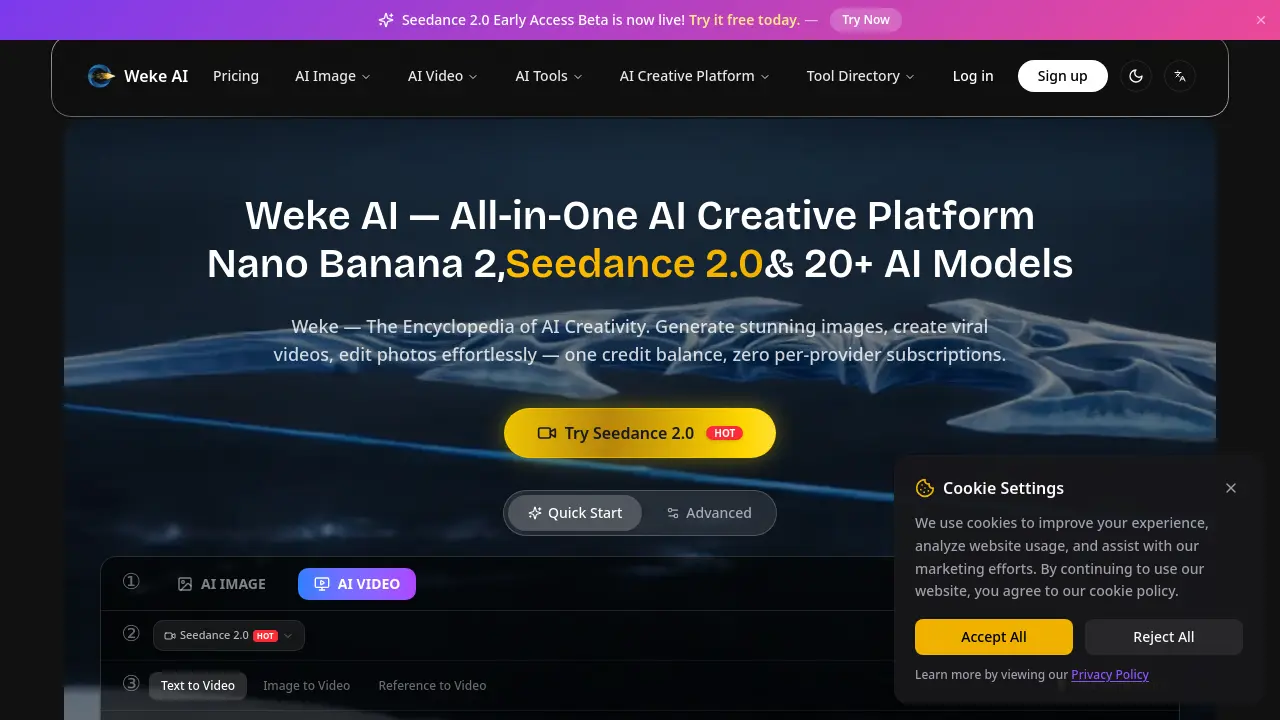
Weke AI is an all‑in‑one creative platform that consolidates more than 20 AI models for image, video, and audio generation under a single credit‑based account. Users can produce photorealistic or stylized images with Nano Banana, Nano Banana Pro, GPT‑4o, Flux, and other leading models, while the Seedance 2.0, Kling 2.6, and Veo 3.1 engines enable text‑to‑video, image‑to‑video, and reference‑based video creation up to 4 K resolution. The suite includes over 100 tools for background removal, watermark erasing, face swapping, and AI‑powered filters, allowing rapid editing without separate subscriptions. Credit pricing scales from a basic $9.99/month plan for light users to a $79.99/month Max plan for enterprise teams, with unused credits rolling over. The platform targets designers, marketers, and content creators who need fast, high‑quality AI‑generated visual assets.
How does Weke AI work
Weke AI functions as a unified cloud‑based creative suite that routes user prompts to a selection of hosted AI models. When a text or image input is submitted, the platform selects the appropriate model—such as Nano Banana (Gemini 2.5 Flash), Seedance 2.0, or GPT‑4o—via API calls, then allocates credits based on the model’s cost per generation. The model processes the request, returning image, video, or edited media, which the front‑end displays with options for aspect ratio, resolution, and optional effects. Credit balances are updated in real time, enabling continuous, subscription‑based access without per‑tool licensing.
Benefits of Weke AI
Weke AI is an all‑in‑one creative platform that consolidates more than 20 AI models—including Nano Banana, Seedance 2.0, GPT‑4o, and Veo 3.1—under a single credit‑based account. Users can generate high‑quality images, edit photos, and produce cinema‑grade videos up to 4K without managing separate subscriptions. The interface supports text‑to‑image, image‑to‑video, and multimodal audio‑visual generation, offering style presets, batch processing, and instant output. Integrated tools such as background removal, AI‑driven filters, and video upscaling streamline workflows for designers, marketers, and hobbyists, while the credit system provides flexible scaling for individual or enterprise usage.
Pros and Cons of Weke AI
Pros
- Unified credit system for images and videos.
- Access to 20+ AI models, including Seedance 2.0.
- Multi‑resolution output up to 4K.
- Integrated suite of 100+ AI editing tools.
- Tiered subscription plans with credit rollover.
Cons
- Credit costs can rise quickly for high‑resolution media.
- Free tier limited to basic generation speed.
- Advanced features require Pro or Max subscription.
- No on‑premise deployment; fully cloud‑dependent.
- Limited direct customer support for Basic users.
Core Features of Weke AI
AI Image Generation & Editing
Provides text‑to‑image, image‑to‑image, and one‑click style filters using models such as Nano Banana, GPT‑4o, and Flux, enabling rapid creation and precise photo manipulation.
AI Video Production
Supports text‑to‑video, image‑to‑video, and reference‑based video generation with models like Seedance 2.0, Veo 3.1, and Kling 2.6, delivering up to 4K resolution and customizable duration.
Unified Credit Management
Operates a single credit balance across all image, video, and tool models, eliminating per‑provider subscriptions and simplifying usage tracking for creators.
Multi‑Model Marketplace
Aggregates 20+ AI models—including Gemini, Flux, and ByteDance’s Seedance—within one platform, allowing users to select the most suitable engine for each creative task.
Integrated AI Toolkit
Offers 100+ specialized tools (background remover, watermark remover, avatar generator, meme creator, face swap, upscaler, etc.) that extend core generation capabilities without leaving the platform.
Use Cases of Weke AI
- University students: Generate thesis illustrations and animated explanations quickly using Seedance 2.0 text‑to‑video and Nano Banana image models.
- Digital marketers: Produce high‑impact social media posts with AI‑styled images and 4K videos from a single credit balance.
- Game developers: Create character avatars and 3D figurines via Nano Banana Pro and AI face‑swap tools for rapid prototyping.
- Content creators: Automate meme, comic, and short‑form video production using the integrated AI tools and trending effects library.
- Research labs: Conduct multimodal experiments by synthesizing text, image, and video data through unified API access to over 20 AI models.
FAQs of Weke AI
What is Weke AI?
Weke AI is an all‑in‑one AI creative platform that consolidates more than 20 AI models for image generation, video production, and a suite of editing tools. Users work with a single credit balance instead of multiple subscriptions, enabling seamless creation of photos, cinematic videos, and audio‑enhanced content from a unified dashboard.
What does “Weke” mean?
The name “Weke” is derived from the concept of a “knowledge encyclopedia” for AI creativity. It reflects the platform’s goal of providing a comprehensive, searchable repository of AI models and tools that empower creators to explore, experiment, and produce high‑quality visual and audio media in one place.
How does Weke AI pricing work?
Weke AI operates on a credit‑based subscription model. Plans—Basic, Pro, and Max—provide a monthly allotment of credits that are consumed per generation according to the selected model (e.g., Nano Banana 2 credits per image, Seedance 2.0 6 credits per 720p video). Credits roll over if unused, and users can choose monthly or yearly billing, ensuring predictable costs without per‑tool fees.
What AI models are available on Weke AI?
The platform hosts a diverse lineup, including Nano Banana (Gemini 2.5 Flash), Nano Banana Pro (Gemini 3 Pro), GPT‑4o, Flux, Seedance 2.0 (ByteDance), Kling 2.6, Veo 3.1, Midjourney, Stable Diffusion, DALL·E 3, and many others. All models are accessed through official APIs, allowing creators to switch between image, video, and audio generators without leaving the interface.
What is Nano Banana AI? How is it different from Nano Banana Pro?
Nano Banana AI (Gemini 2.5 Flash) focuses on fast, cost‑effective image generation and basic editing, costing 2 credits per image. Nano Banana Pro (Gemini 3 Pro) offers higher resolution outputs (1K–4K), advanced prompt‑based local edits, multi‑image fusion, and superior detail preservation, with credit costs ranging from 6 credits for 1K images up to 16 credits for 4K renders.
How does Seedance 2.0 enhance AI video creation?
Seedance 2.0, powered by ByteDance, provides dual‑branch audio‑visual co‑generation, native sound sync, and up to 2K resolution output. The model supports text‑to‑video, image‑to‑video, and reference‑based workflows, enabling creators to produce cinematic clips with accurate lip‑sync and immersive audio in seconds, all within the Weke AI credit system.
Can I use Weke AI without a subscription?
Weke AI offers a free early‑access tier for Seedance 2.0 that grants a limited number of credits to test the platform. Users can generate images and short videos without a paid plan, but credit replenishment and access to higher‑resolution models (e.g., 4K video) require a subscribed credit package.
What formats and resolutions are supported for exported media?
The platform supports JPG, PNG, WebP, and high‑definition video formats such as MP4. Image resolutions range from standard HD up to 4K for Nano Banana Pro and Veo 3.1, while video outputs include 480p, 720p, 1080p, and up to 4K, selectable in the generation settings.
How does batch generation work for videos?
Enterprise‑level (Max) and Pro plans include a batch generation feature that allows users to queue 1–100 videos simultaneously. Credits are deducted per video based on selected resolution and duration, and the system processes the batch in parallel, reducing overall turnaround time compared to single‑render requests.
How to use Weke AI
Define Weke AI’s purpose: an all‑in‑one AI creative platform that generates images, videos, and edits using models like Seedance 2.0, Nano Banana, and GPT‑4o, all managed by a single credit balance.
Log in or create an account, then select the desired module—AI Image, AI Video, or AI Tools—from the main dashboard, ensuring sufficient credits are available for the chosen model.
Input a text prompt (or upload a reference image) in the Prompt field, adjust settings such as aspect ratio, resolution, and duration, and click Generate to start the AI rendering process.
Monitor the generation progress; once completed, the platform displays a preview thumbnail, a download link, and optional options like “Return Last Frame” or “Remove Watermark” for paid users.
Analyze the output by comparing visual fidelity, audio sync (for videos), and style adherence against the original prompt, noting credit consumption per model to optimize future projects.
Export the final media in the required format (JPG/PNG for images, MP4 for videos) and apply any additional AI tools—background remover, upscaler, or lip‑sync—directly within Weke AI to refine results.
