
VideoFast
VideoFast - Easy Online Video Editor
| Added on: | Jul 8, 2024 |
| Monthly Visits: | 3.81K |
| Social & Email: | -- |

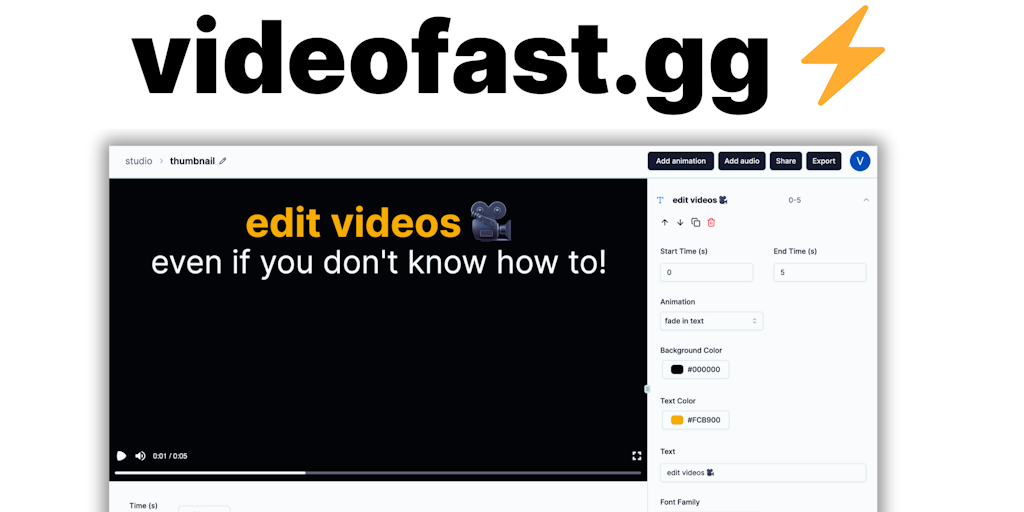
What is VideoFast
VideoFast is an online video editor designed for anyone who wants to create and edit videos easily. It’s a great choice for social media marketers, educators, or anyone who needs to quickly make professional-looking videos. VideoFast's user-friendly interface is incredibly simple to navigate, making it easy for users of any skill level to create engaging videos. With VideoFast, you can easily add text, music, and other effects to your videos, and even trim and edit them to perfection. One of its core features is the ability to upload and edit videos directly from your device, or use their stock footage library. If you need to create high-quality videos for social media or any other purpose, VideoFast is a powerful tool that can help you do it quickly and easily.
How does VideoFast work
VideoFast operates as a video editor designed for users with limited experience. It allows users to create and edit videos easily, using pre-made, customizable text, media, and shape animations. The service provides a range of features, including access to various animations, online image and GIF searching, animated emojis, and audio file integration. Different pricing plans offer varying degrees of access such as number of videos created, storage space, and export credits. VideoFast aims to simplify video creation by providing basic video editing functionality.
Benefits of VideoFast
VideoFast simplifies video editing, enabling users with no prior experience to create high-quality videos. This platform addresses the need for basic video editing without complex tools. Users can easily create and edit videos with customizable text, media, and shape animations. VideoFast offers a user-friendly design and versatile animations suitable for various users. Start with the free plan or choose a monthly or perpetual plan to access unlimited video creation, more storage, and export credits. Create a video fast!
Pros and Cons of VideoFast
Pros
- Easy to use, especially for beginners.
- Offers pre-made, customizable animations.
- Addresses a need for simplified video editing.
- Free plan is available.
Cons
- Free plan has limited usage.
- Perpetual plan storage space is small (1GB).
- Perpetual plan has limited export credits.
Core Features of VideoFast
Easily Upload and Edit Videos
You can upload your videos to VideoFast from your computer, Google Drive, Dropbox, or directly from a URL. After your video is uploaded, VideoFast will give you tools to trim, split, and merge videos.
Add Text and Effects
VideoFast allows you to add text to your videos, change the font, color, and size, as well as animate it. You can also choose to add various effects to your video like blur, brightness, and color.
Create Videos with Music
You can add and edit music to your videos from their library or upload your own. You can also adjust the volume of your audio and videos.
Export and Share Your Videos
When you are finished editing, you can export your video in a variety of formats, including MP4, MOV, and GIF. You can also share your videos directly to social media.
Use Cases of VideoFast
- Content Creators: Produce engaging short-form content with customizable text animations, using VideoFast's video fast editing capabilities.
- Social Media Managers: Quickly create marketing videos using pre-made animations and a video fast workflow to enhance brand presence.
- Educators: Develop instructional videos easily with VideoFast's simple interface, incorporating fast video editing for clear communication.
- Small Businesses: Design promotional material using VideoFast's accessible features to fast forward video production, even without expertise.
- Marketing Teams: Produce fast video advertisements with diverse animation options, speeding up the content creation and editing process.
FAQs of VideoFast
What is VideoFast?
VideoFast is an online video editor. You can use it to create and edit videos, without any download or installation required.
How do I use VideoFast?
You can go to VideoFast's website, upload your video, and start editing. It's super easy to use, and you don't need any prior experience with video editing software.
What can I do with VideoFast?
VideoFast offers a wide range of editing features, so you can create professional-looking videos.
What are the benefits of using VideoFast?
VideoFast is super easy to use, even if you've never edited a video before. It's also very quick and efficient, and you can create high-quality videos in minutes. The biggest advantage is that it's free to use.
How does VideoFast compare to other video editors?
VideoFast is different from other video editors because it's online, so you can use it anywhere with an internet connection. It's also free to use, which makes it a great option for anyone who's just starting out with video editing.
How to use VideoFast
VideoFast simplifies video editing, allowing users with no prior experience to create high-quality videos using pre-made animations and easy-to-use tools. It supports various media formats and offers different pricing plans.
- Begin by creating an account or logging in on the VideoFast platform at videofast.gg.
- Choose a pricing plan that suits your needs, considering the Free, Monthly, or Perpetual options offered by VideoFast.
- Start a new project; access the VideoFast editor to begin creating your video content.
- Select from the range of beautifully crafted text, media, and shape animations available in the VideoFast library.
- Customize the selected animations to fit your style and video requirements, ensuring a personalized touch with VideoFast.
- Add media like images, GIFs, and audio files to enhance your VideoFast video project; use the search function for online resources.
- Edit the video timeline, adjusting the timing and order of elements for optimal video fast forward effect.
- Preview your video to ensure it meets your expectations before finalizing your VideoFast creation.
- Export the completed video, considering your plan's export credits and storage space on VideoFast.
- Share your high-quality video; leverage VideoFast’s simplicity to create professional-looking videos effortlessly.
VideoFast Website Traffic Analysis
Latest traffic information
- Monthly Visits3.81K
- Bounce Rate31.61%
- Pages Per Visit3.84
- Visit Duration00:00:11
- Global Rank3.26M
- Country/Region Ranking3.64M
Visits Over Time
Top Keywords
| Keyword | Traffic | Volume | Cost Per Click |
|---|---|---|---|
| video fast | 190 | 200 | -- |
| videofast | 150 | 150 | -- |
| vid fast | 10 | 720 | -- |
| vidfast | -- | 4.06K | $1.31 |
| vidfast.pro | -- | 560 | -- |
Top Regions
| Region | Percentage |
|---|---|
| Thailand | 57.91% |
| United States | 36.43% |
| Netherlands | 5.65% |
