
Gemini Omni free AI video generator creates cinematic clips

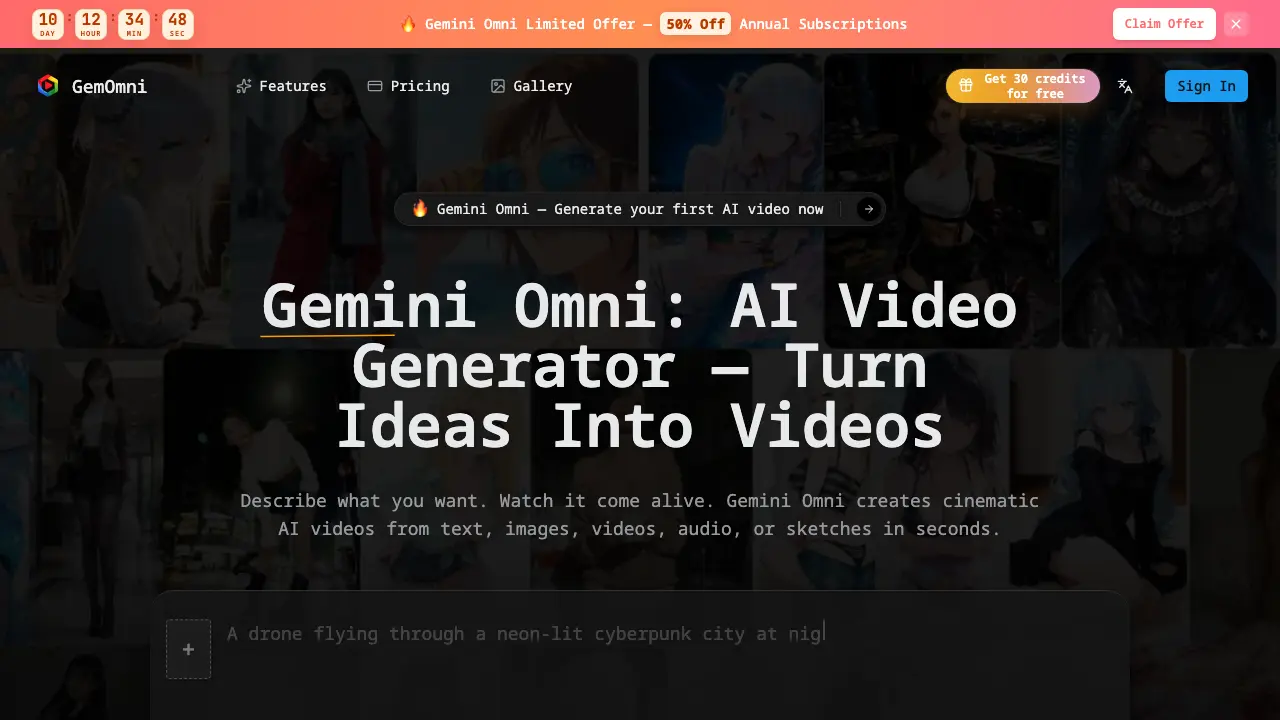
What is Gemini Omni
Gemini Omni is an AI‑driven video generator that converts text, images, audio, or sketches into cinematic clips within seconds. The platform relies on conversational editing, allowing users to describe adjustments in plain language without dealing with timelines or keyframes. It supports multiple aspect ratios—square, landscape, vertical—making it suitable for social media, advertising, education, and product demos. Smart scene enhancement automatically applies color grading, smooth transitions, and physics‑aware rendering to produce polished output. Users start with a free credit bundle and can scale through pay‑as‑you‑go plans that include API access, parallel task processing, and commercial licensing. Gemini Omni’s reference‑based editing lets creators refine videos by uploading existing media as guidance, streamlining the workflow for marketers, educators, and indie filmmakers alike.
How does Gemini Omni work
Gemini Omni operates as an AI‑driven video engine that accepts natural‑language prompts, static images, audio clips, or sketches as input, then translates these references into cinematic‑quality video sequences within seconds. Internally, a multimodal model analyses the supplied data, infers scene composition, motion dynamics and lighting, and synthesizes coherent frames using physics‑aware rendering and motion‑coherence algorithms. Users can iteratively refine output through conversational editing, issuing plain‑text commands to adjust lighting, background or duration without manipulating timelines or keyframes. The platform delivers multiple aspect‑ratio exports, supports text‑to‑video, image‑to‑video, and reference‑based editing, and provides API‑accessible credit‑based pricing for creators.
Benefits of Gemini Omni
Gemini Omni lets users generate cinematic‑quality AI videos from text, images, audio, or sketches in seconds, eliminating the need for complex timelines or keyframes. Its conversational editing interface accepts plain‑language commands to adjust lighting, extend scenes, or swap backgrounds, while reference‑based editing preserves motion coherence and physics‑aware rendering. Built‑in smart scene enhancement adds color grading and smooth transitions, and multiple aspect‑ratio presets support social, YouTube, and TikTok formats. The platform offers a free starter tier with 30 credits and pay‑as‑you‑go plans, providing API access, parallel tasks, and commercial licensing for creators across marketing, education, and indie film workflows.
Pros and Cons of Gemini Omni
Pros
- Generates cinematic videos in seconds.
- Supports text, image, audio, and sketch inputs.
- Conversational editing without timelines or keyframes.
- Multiple aspect ratios for social platforms.
- Pay‑as‑you‑go pricing with free starter credits.
Cons
- No detailed information on rendering hardware requirements.
- Limited credit tiers may restrict high‑volume users.
- Advanced features locked behind paid plans.
- Support limited to email contact.
- No on‑premise deployment option.
Core Features of Gemini Omni
Conversational Video Editing
Enables users to modify lighting, background, scene length, or actions by describing changes in plain English, eliminating timelines and keyframe complexity.
Text‑to‑Video Generation
Creates cinematic video clips from natural‑language prompts, turning abstract ideas or detailed descriptions into realistic footage within seconds.
Image‑to‑Video Animation
Transforms a single uploaded image into a dynamic video sequence, adding motion, depth, and realistic physics‑aware rendering.
Reference‑Based Video Editing
Uses uploaded images, videos, audio, or sketches as guides to replace objects, adjust actions, or maintain scene consistency during edits.
Smart Scene Enhancement
Automatically applies cinematic color grading, smooth transitions, and quality upscaling to generated videos, improving visual polish without manual effort.
Multi‑Aspect Ratio Output
Provides one‑click switching between square, landscape, and vertical formats, optimizing videos for social platforms such as TikTok, Instagram Reels, and YouTube.
Use Cases of Gemini Omni
- Educators: Convert textbook diagrams into animated video lessons, enhancing student engagement with AI-generated visuals.
- Marketers: Transform product photos into short promotional videos, accelerating ad creation without a production crew.
- Social media creators: Generate vertical TikTok or Instagram Reels from text prompts, maintaining consistent content output.
- Indie filmmakers: Pre‑visualize scenes by animating concept art, reducing storyboard turnaround time.
- Developers: Integrate Gemini Omni’s API to automate dynamic video generation within SaaS platforms.
FAQs of Gemini Omni
What is Gemini Omni?
Gemini Omni is an AI‑powered video generation platform that creates cinematic video clips from text, images, audio, sketches, or existing footage. Users interact through natural language prompts, allowing the system to generate, edit, and refine videos without traditional timelines or keyframes.
Is Gemini Omni free to use?
Gemini Omni offers a free tier that provides new users with 30 credits to experiment with text‑to‑video, image‑to‑video, and conversational editing features. Additional credits can be purchased through the pay‑as‑you‑go plans or yearly subscriptions.
How does text‑to‑video work?
The text‑to‑video workflow interprets a written prompt, converts the description into a scene layout, and then renders a coherent video sequence using Gemini’s physics‑aware AI models. The process typically completes within seconds, producing high‑quality motion and lighting that match the supplied description.
Can I edit videos with natural language?
Yes. Gemini Omni supports conversational editing, meaning users can type plain‑English commands such as “brighten the background” or “extend the last 3 seconds.” The AI applies the requested changes directly to the video without requiring manual keyframe adjustments.
What image formats are supported?
Gemini Omni accepts common raster formats including JPEG, PNG, and WebP for image‑to‑video generation. Uploaded images are analyzed for content and motion cues, after which the system animates them into a short cinematic sequence.
What can I use the generated videos for?
Generated videos may be used for social‑media content, product marketing, educational tutorials, e‑learning modules, prototype visualizations, or any non‑restricted commercial purpose, provided the user complies with the platform’s licensing terms and any applicable copyright laws.
How long does video generation take?
Video generation typically completes in a matter of seconds to a few minutes, depending on the complexity of the prompt, selected resolution, and current server load. Most standard‑resolution clips are delivered within 10–30 seconds.
Does Gemini Omni support different video styles?
Gemini Omni includes multiple style presets that influence rendering, such as cinematic, anime, toon, or realistic photography. Users can request specific aesthetics directly in the prompt (e.g., “in a neon cyber‑punk style”) and the AI adapts the visual output accordingly.
How are credits calculated for video creation?
Credits are deducted based on the type and length of the output: roughly one credit per second of generated video for standard resolution, with higher‑resolution or premium style requests consuming slightly more credits. The pricing page provides a detailed credit‑to‑output conversion table.
Can I integrate Gemini Omni via API?
Yes. All subscription plans include API access, allowing developers to programmatically submit prompts, retrieve generated videos, and manage credit usage. API documentation is available through the user dashboard after subscription activation.
How to use Gemini Omni
Gemini Omni is an AI video generator that creates cinematic clips from text, images, audio, or sketches, offering conversational editing and reference‑based enhancements for rapid content production.
Begin by entering a clear text prompt or uploading a reference image; the interface accepts natural language without special syntax, supporting multiple aspect‑ratio presets.
Submit the request; Gemini Omni processes the input and renders a video clip within seconds, displaying a preview thumbnail and basic playback controls for immediate review.
Use the conversational editor to modify the output—adjust lighting, extend scenes, or swap backgrounds—by typing plain‑English instructions, eliminating timeline or keyframe complexities.
Once satisfied, download the final video in the chosen resolution and format; the file can be directly integrated into social media, presentations, or marketing campaigns.
Analyze the generated video’s quality by checking motion coherence, color grading, and audio sync; use these observations to refine future prompts for optimal cinematic results.
Gemini Omni Website Traffic Analysis
Latest traffic information
- Monthly Visits441
- Bounce Rate39.13%
- Pages Per Visit1.07
- Visit Duration00:00:00
- Global Rank--
- Country/Region Ranking--
Visits Over Time
Top Keywords
| Keyword | Traffic | Volume | Cost Per Click |
|---|---|---|---|
| gemini omni | 20 | 978.35K | -- |
| what is gemini omni | 10 | 3.31K | -- |
| google gemini omni | -- | 20.09K | -- |
| gemini omini | -- | 17.89K | -- |
| omni gemini | -- | 17.39K | -- |
Top Regions
| Region | Percentage |
|---|---|
| United States | 100% |
