
Invideo AI: Video, Image and Audio Generation with 200+ Models

What is Invideo AI
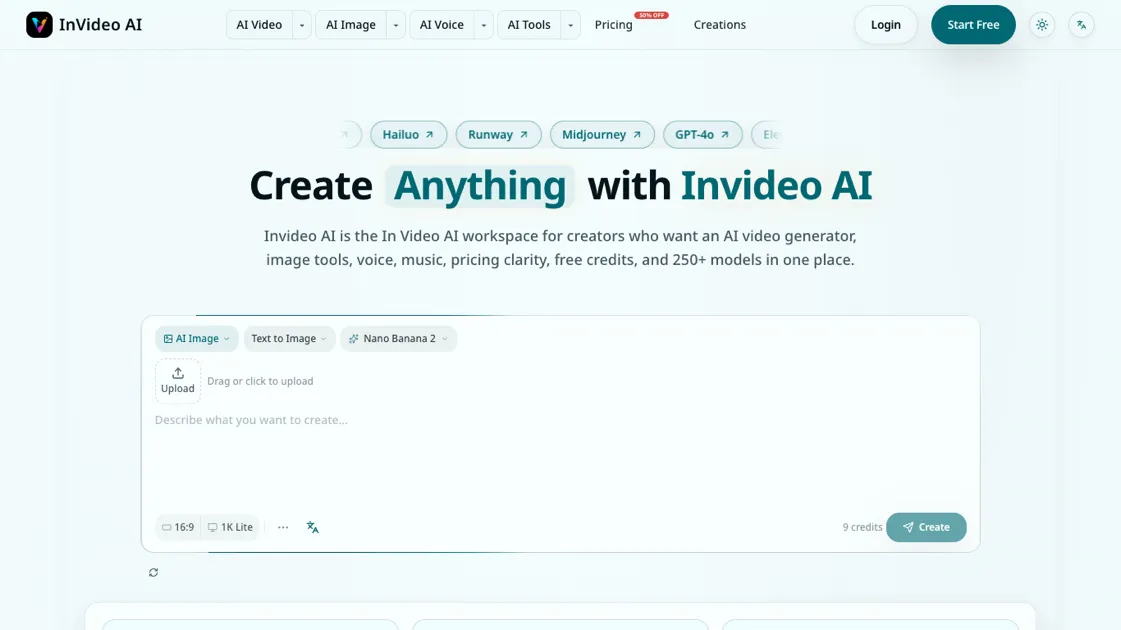
Invideo AI is a multimodel creative workspace that brings together AI video generation, image creation, voice synthesis, and music production in a single platform. With access to over 250 AI models, including Seedance, Kling, Runway, Midjourney, and Flux, creators can generate, compare, and refine content without switching between separate tools. The platform offers free credits to start, supports up to 4K output quality, and includes commercial licensing on all generated content. Invideo AI is designed for creators who need to move from a draft prompt to a polished, publishable asset, supporting production workflows across video, image, and audio within one unified workspace.
How does Invideo AI work
Invideo AI connects to multiple AI model providers through a unified browser-based workspace. A creator enters a text prompt, which routes to the selected model for processing. The output appears in the workspace for review and comparison against other models. Useful results can move into the next step, such as converting an image into a video or adding voice and music. Prompt context is preserved across stages, so instructions do not need to be re-entered. Credits are deducted per generation based on the chosen model, and the platform handles rendering and export.
Benefits of Invideo AI
Invideo AI consolidates multiple AI creative tools into a single workspace, removing the need to subscribe to separate video, image, voice, and music platforms. The model comparison system lets creators evaluate outputs from 250+ models before spending credits, reducing wasted generations. Free credits are available on sign-up, and failed generations are refunded automatically. The platform supports commercial licensing on all content, making it suitable for client work. One limitation is that credit-based pricing can become costly for high-volume production using premium models.
Pros and Cons of Invideo AI
Pros
- 250+ AI models in one workspace
- Free credits on sign-up
- Side-by-side model comparison
- 4K output quality supported
- Commercial license included
Cons
- Premium models consume credits quickly
- No dedicated mobile application
- Limited social media integrations
- Credit cost varies significantly by model
Core Features of Invideo AI
AI Video Generation
Invideo AI provides access to leading video models including Sora 2, Veo3, Seedance, Kling, and Runway Extend. Creators can generate videos from text prompts, compare model outputs side by side, and select the best result for their project. Each model varies in quality, speed, and credit cost, allowing informed choices based on production needs.
AI Image Creation
The platform supports image generation through models like Midjourney, Flux2, and Flux.1 Kontext, along with Nano Banana for specialized outputs. Users can create images from text prompts, convert images into videos, and upscale results to 4K resolution. The model comparison feature lets creators evaluate quality before committing credits.
Voice and Music Production
Invideo AI includes AI voice cloning, text-to-speech, and music generation tools. Creators can add narration to videos, generate background music, and produce avatar-based content. These audio tools are integrated into the same workspace as video and image generation, eliminating the need for separate audio software.
Model Comparison and Browsing
All 250+ AI models are organized by use case, quality, speed, and credit cost. Creators can browse video, image, voice, music, and avatar models in a single interface. This comparison system helps users choose the right model for each specific task rather than defaulting to a single generator.
Production Workflow
The workspace is structured around a production path: draft an initial asset, review the output, then expand it into a full workflow with video, voice, captions, or upscaling. Prompt context is preserved across steps, so creators can iterate without rebuilding their setup. Free credits allow quality validation before committing to paid plans.
Use Cases of Invideo AI
- Content creators: Generate social media videos, campaign clips, and promotional images using text prompts across multiple AI models.
- Marketing teams: Produce ad creatives, product visuals, and short-form video content for campaigns without relying on separate video and image tools.
- Freelance designers: Create client deliverables including images, voiceovers, and music tracks within a single workspace with commercial licensing.
- Small businesses: Build product demo videos, explainer content, and branded visuals using free credits before committing to a paid plan.
- Educators and trainers: Develop instructional videos, presentations, and audio narrations by combining AI video generation with voice synthesis tools.
FAQs of Invideo AI
What is Invideo AI?
Invideo AI is a multimodel creative workspace that combines AI video generation, image creation, voice synthesis, and music production. It provides access to over 250 AI models through a single browser-based interface on invideoai.ai.
Is Invideo AI free to use?
Invideo AI offers a free plan with 300 credits and 5 daily login bonuses, requiring no credit card. Users can generate images and videos without paying, though premium models and higher volumes require a subscription or credit pack purchase.
How do I use Invideo AI to create an AI video?
Enter a text prompt into the home generator, select a video model such as Sora 2, Kling, or Seedance, and generate. The platform renders the video and displays it in the workspace for review, editing, or export.
What is the best AI video generator for creators?
Invideo AI lets creators compare outputs from multiple video models, including Sora 2, Veo3, Seedance, and Runway Extend. The best model depends on the specific use case, quality requirements, and available credits, which the comparison interface helps evaluate.
Can I turn images into videos with Invideo AI?
Yes, Invideo AI supports image-to-video conversion. A generated or uploaded image can be expanded into a video sequence using the platform's video models, with the option to add voice, music, or captions afterward.
How much does Invideo AI cost?
The free plan costs $0 with 300 credits. The subscription plan is $15 per month or $13 per month billed yearly at $156 per year. Credit packs are available at $20 for 100 credits, with credits that never expire.
Does Invideo AI also create AI images, voice, and music?
Yes, the platform supports AI image generation through models like Midjourney and Flux, voice synthesis including cloning and text-to-speech, and music generation. All these tools are accessible within the same workspace as the video generator.
How to use Invideo AI
- Visit invideoai.ai and create a free account to receive 300 credits and 5 daily login bonuses.
- Use the home generator to enter a text prompt describing the video, image, or audio content you want to create.
- Select an AI model from the comparison interface based on your quality, speed, and budget requirements.
- Review the generated output and compare it against results from other models before committing additional credits.
- Move successful outputs into the editing or video tools to add voice, music, captions, or upscaling as needed.
- Check the pricing page to estimate credit costs before running large batches or premium model generations.
- Upgrade to a subscription or purchase credit packs once your production workflow is established and predictable.
Invideo AI Website Traffic Analysis
Latest traffic information
- Monthly Visits1.13K
- Bounce Rate29.22%
- Pages Per Visit1.06
- Visit Duration00:00:00
- Global Rank13.9M
- Country/Region Ranking--
Top Keywords
| Keyword | Traffic | Volume | Cost Per Click |
|---|---|---|---|
| invideo ai | 350 | 342.8K | $0.52 |
| in video ai | 250 | 15.66K | $0.56 |
| インビデオ | 100 | -- | -- |
| invideo | 40 | 132.69K | $0.78 |
| invideo ai нейросеть | 40 | -- | -- |
Top Regions
| Region | Percentage |
|---|---|
| India | 100% |
Invideo AI Alternatives
Seedance 3.0 preview page: planned multi-shot continuity, scene editing and audio-visual sync for AI video, while the on-page generator runs Seedance 2.5.
Browser workspace for AI image generation, reference photo editing, and short video drafts, aimed at creators, marketers, and product teams.
Black Forest Labs' multimodal model with a web generator for text-to-video, image-to-video and image editing with native audio, for creators and marketers.
Wan API is an independent platform for Wan and Seedance video models. Compare specs and rates, generate clips in the Playground, or call them through one API.
Seedance 3.0 turns text, images, video clips, and audio into videos with sound, and edits one part of a clip without regenerating the rest.
Wery is a virtual AI studio that routes one goal to specialist agents for video, images, music and documents, keeping characters and project assets consistent.

AI video and image studio with text-to-video, image-to-video and keyframe control across Seedance, Kling, Wan and Vidu — all on one credit balance.
Browser studio for AI video, image and music generation with Grok Imagine, Kling and GPT Image models. Free daily credits, no sign-up required.
SeaMove AI is an AI video and image generation platform offering Seedance 2.0 and Seedance 2.5 models for text-to-video, image-to-video, and reference-based creation. Features multi-shot continuity, director-level control, and audio-visual sync for creators and studios.
Turns two separate portraits into a 15-second vertical rap duet video on an orange stage with a shared microphone and the original soundtrack. Free 480P preview available.
Mareel is an all-in-one AI video and image generation workspace giving creators, marketers, and ecommerce teams 40+ leading models and one shared credit balance.
Kinovi is a REST API that runs published video, image, and audio AI models from one endpoint. Send a model ID to createTask, poll recordInfo, and pay per use from one shared credit balance.