
vid2vid AI Video Generator - Create Videos from Clips and Images

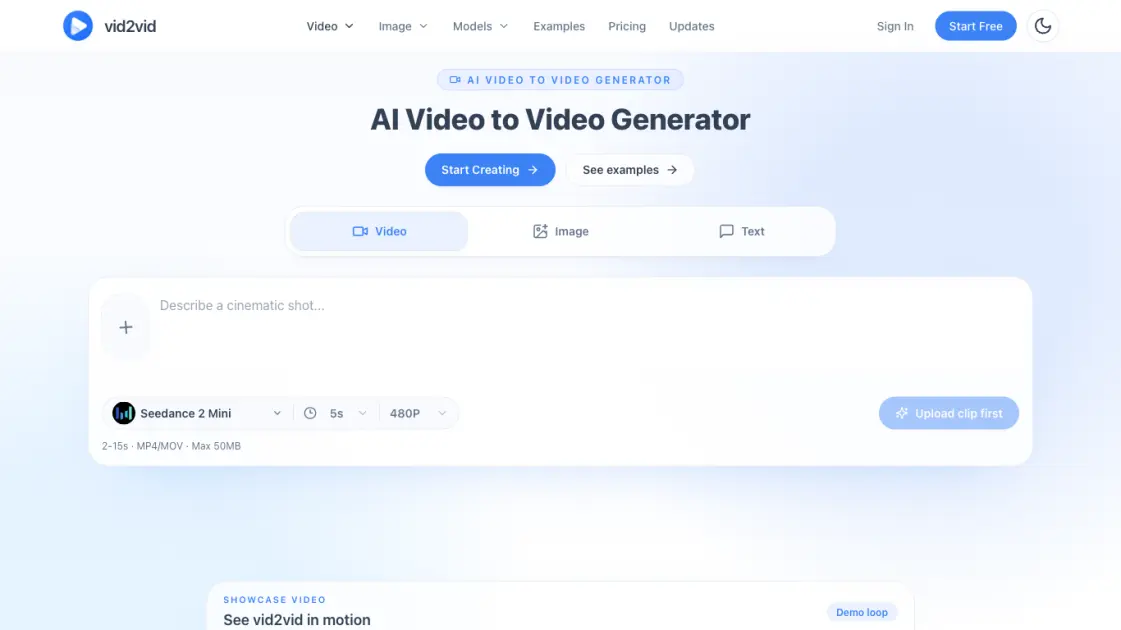
What is vid2vid
vid2vid is an AI video generator that transforms clips, images, and text prompts into short-form video content using the Seedance 2 Mini model. The platform supports three core workflows: video-to-video remixing where users upload a 2 to 15 second source clip and prompt a new style, mood, or scene; image-to-video animation that brings still images to life with motion; and text-to-video generation for creating shots from descriptive prompts. Outputs are capped at 5 seconds in 480P resolution with a 50MB file limit in MP4 or MOV format. Notable features include origami-style video transformations and visual identity consistency across generated scenes, useful for maintaining brand coherence in campaigns. Pricing starts at $15 per month for the Starter plan and $45 per month for the Creator tier, positioning vid2vid as an accessible tool for marketers, content creators, and creative teams needing rapid AI video iteration without complex production pipelines.
How does vid2vid work
vid2vid transforms source footage into stylized AI video through a three-step workflow. Users upload a 2–15 second clip or static image, then describe the desired style, mood, or scene direction in a text prompt. The Seedance 2 Mini model processes the input, remixing visual appearance while preserving the original motion trajectories, framing, and timing. Output renders at five seconds duration in 480P resolution. The pipeline maintains temporal consistency across frames, making it suitable for style transfer, scene reimagining, and creative video remixing without manual keyframing or motion reconstruction.
Benefits of vid2vid
vid2vid enables rapid iteration on existing footage while preserving original timing, framing, and creative intent, allowing users to transform atmosphere and style through natural-language prompts. The platform supports image-to-video animation for stylized concept work and text-to-video generation for quick content creation, with an origami aesthetic option for distinctive visual output. Visual consistency across scenes makes it suitable for campaign workflows. Current limitations include a five-second maximum output duration, 480p resolution ceiling, and a 50MB input file size cap, which constrain longer-form or high-fidelity production use cases.
Pros and Cons of vid2vid
Pros
- Supports video, image, and text input modes
- Preserves original motion and framing accurately
- Enables fast iteration for creative workflows
- Offers unique artistic styles like origami
- Maintains visual identity across generations
Cons
- Output limited to 5 seconds duration
- Resolution capped at 480P only
- Maximum input file size of 50MB
- No public API available for integration
- No batch processing capability mentioned
Core Features of vid2vid
Video to Video
Upload a 2-15 second clip and prompt a new style, mood, or scene direction while preserving the original motion, framing, and timing. The model re-renders footage with stylistic transformations without altering the underlying movement structure.
Image to Video
Animate still images into motion sequences, performing well for stylized visuals, campaign assets, and concept shots. The generator interprets spatial composition and adds plausible motion dynamics to static frames.
Text to Video
Generate video directly from text prompts without requiring source media. Users describe scenes, actions, or aesthetics, and the model produces corresponding short-form video output from the textual description alone.
Seedance 2 Mini Model
The underlying diffusion architecture optimized for short-form video generation. This compact model balances inference speed with visual coherence, enabling rapid iteration cycles for creative workflows.
Origami Video Style
Transform real-world footage into folded paper scenes with crisp geometric folds and paper-texture rendering. The style applies a consistent origami aesthetic across frames while maintaining temporal stability.
Visual Identity Consistency
Maintain consistent characters and visual style across multiple generated scenes. The system preserves identity markers — facial features, color palettes, design language — enabling narrative continuity in multi-shot sequences.
Output Specifications
Videos render at 5 seconds duration, 480P resolution, with a maximum 50MB input limit. Supported formats include MP4 and MOV, optimized for web delivery and social platform compatibility.
Use Cases of vid2vid
- Social media creators: Generate short-form video clips for TikTok, Reels, and Shorts from text prompts or reference images
- Marketing teams: Produce quick concept videos for campaign pitches and A/B testing before committing to full production
- Product designers: Visualize product concepts and feature demos through 5-second animated sequences from static mockups
- Content educators: Create bite-sized explainer animations for micro-learning modules and tutorial intros
- Indie game developers: Prototype cutscene ideas and character animations rapidly without traditional animation pipelines
FAQs of vid2vid
What is vid2vid and who is it for?
vid2vid is an AI video generation platform that transforms existing videos, images, or text prompts into new video content using the Seedance 2 Mini model. The service targets content creators, marketers, and developers who need quick video variations without traditional editing workflows. It accepts video clips of 2 to 15 seconds or static images up to 50 MB in MP4 or MOV format, producing 5-second outputs at 480p resolution.
How does the video-to-video generation work?
Users upload a source video clip between 2 and 15 seconds long, and the model reimagines it into a new 5-second video while preserving the general motion and structure. The Seedance 2 Mini model processes the input and generates variations that maintain temporal consistency. Each generation consumes one credit from the user's monthly allowance, and the output renders at 480p resolution suitable for social media previews and rapid prototyping.
What are the pricing plans and credit system?
vid2vid offers two subscription tiers: Starter at $15 per month with 50 credits, and Creator at $45 per month with 200 credits. Each video generation—whether video-to-video, image-to-video, or text-to-video—costs exactly one credit. Credits reset monthly and do not roll over, so users should plan their generation volume accordingly. There is no free tier or pay-per-use option currently advertised on the site.
How does vid2vid compare to other AI video generators?
Unlike general-purpose tools such as Runway Gen-3 or Luma Dream Machine that emphasize text-to-video from scratch, vid2vid specializes in video-to-video transformation with a focus on style transfer and motion preservation. The 480p output resolution and 5-second limit position it as a rapid iteration tool rather than a final production renderer. Competing platforms often offer higher resolutions and longer durations but at significantly higher price points or with more complex credit structures.
What are the technical requirements for input files?
Input videos must be between 2 and 15 seconds in duration, encoded in MP4 or MOV format, and cannot exceed 50 MB in file size. Static images for image-to-video generation follow the same format and size constraints. The platform does not publicly document specific codec requirements, frame rate limits, or aspect ratio restrictions, so users may need to experiment with standard H.264 or H.265 encoded files at common frame rates like 24, 30, or 60 fps.
Can I use generated videos commercially?
The website does not explicitly state commercial usage rights or licensing terms for generated content. Users should contact support@vid2vid.io directly to clarify ownership, attribution requirements, and any restrictions on commercial deployment before incorporating outputs into client work, marketing campaigns, or monetized channels. This ambiguity is common among newer AI video platforms and warrants written confirmation for professional use cases.
What support options are available if I encounter issues?
The only publicly listed support channel is email at support@vid2vid.io. No live chat, phone support, community forum, or knowledge base appears on the website. Response times and support scope are not documented, so users on tight deadlines should factor in potential delays. The absence of social media links or a Discord community also limits peer-to-peer troubleshooting and feature request visibility.
How to use vid2vid
- Navigate to vid2vid.io and access the main video generation interface to begin creating AI-powered video transformations
- Upload a source video clip between 2 and 15 seconds in MP4 or MOV format with a maximum file size of 50MB, or alternatively provide an image file
- Select the appropriate generation mode from the available options: Video to Video for clip transformation, Image to Video for animating stills, or Text to Video for pure generation
- Enter a detailed descriptive prompt that specifies the desired visual style, mood, atmosphere, and scene direction for the AI to follow
- Click the generate button and wait for the Seedance 2 Mini model to process the input and produce a 5-second output video at 480P resolution
- Download the completed result or modify the prompt to iterate and refine the generated video until the desired outcome is achieved
