
RGB to CMYK Converter FAQs
This online RGB to CMYK converter provides built-in settings or custom ICC profiles with real-time preview for accurate color matching and print-ready results.

FAQs of RGB to CMYK Converter
How accurate is the RGB to CMYK conversion result provided by this tool?
The RGB to CMYK converter utilizes industry-standard color management algorithms and ICC Color Management Engines, similar to professional software such as Photoshop, GIMP, and Ghostscript. This ensures that the conversion results for images, PDFs, and other files are highly accurate and meet professional expectations for print production.
Where can users download Source RGB Profiles and CMYK ICC Profiles?
Users can download various free Source RGB Profiles directly from the RGBtoCMYK.net website's resources section. For CMYK ICC profiles, official websites like ECI, FOGRA, IDEAlliance, and ICC are recommended, with a compiled collection also available on RGBtoCMYK.net for convenience.
Why is there no explicit Black Point Compensation (BPC) option in the converter?
Black Point Compensation (BPC) is a crucial optimization for achieving rich blacks and improved shadow detail in CMYK conversions. The RGB to CMYK converter has BPC enabled by default and integrated directly into its color conversion engine algorithm, ensuring optimal results without requiring a separate user option.
Is the RGB to CMYK converter a free service, and does it require user registration?
The RGB to CMYK converter is completely free to use, and all its features will remain free. There is no requirement for users to register an account or provide any personal information, offering a fast, seamless, and convenient online rgb to cmyk converter experience.
How does the RGB to CMYK converter ensure user privacy for uploaded files?
User privacy is a priority for the RGB to CMYK converter. Uploaded images and converted files are accessible only by the user. These files are automatically and permanently deleted from the server within 10 minutes of inactivity, or immediately upon downloading the converted file or navigating back to the start.
What is the primary purpose of an RGB to CMYK converter?
An RGB to CMYK converter is a crucial online tool designed to translate colors from the RGB color space, primarily used for digital displays, into the CMYK color space, which is essential for professional printing. This rgb to cmyk color converter ensures accurate color reproduction on physical printed materials, whether it's an image, PDF, or other file.
How does the online RGB to CMYK converter actually function?
The online RGB to CMYK converter operates by utilizing industry-standard ICC profiles and advanced color management algorithms. Users upload their RGB image (JPG, PNG, WebP), select appropriate CMYK ICC profiles, Source RGB Profiles, rendering intents, and dithering options, after which the tool accurately processes the conversion to CMYK for print-ready results.
What image file formats are supported for conversion by the RGB to CMYK converter?
The RGB to CMYK converter supports popular image file formats including JPG, PNG, and WebP. This versatility allows users to convert a wide range of digital images to CMYK, ensuring compatibility for various printing needs and workflows.
Why is converting RGB to CMYK essential for professional printing?
Converting RGB to CMYK using a professional rgb to cmyk converter is essential for printing due to fundamental differences in color models. RGB (additive) and CMYK (subtractive) models produce colors differently. CMYK conversion ensures color accuracy, meets professional print standards, prevents costly reprints from color mismatches, and maintains brand consistency.
What are rendering intents, and which one is generally recommended for images?
Rendering intents dictate how out-of-gamut colors are handled during the RGB to CMYK conversion. Options include Perceptual, Relative Colorimetric, Saturation, and Absolute Colorimetric. For most photographic images with continuous tones and many out-of-gamut colors, the Perceptual rendering intent is generally recommended as it maintains visual relationships between colors.
How to use RGB to CMYK Converter
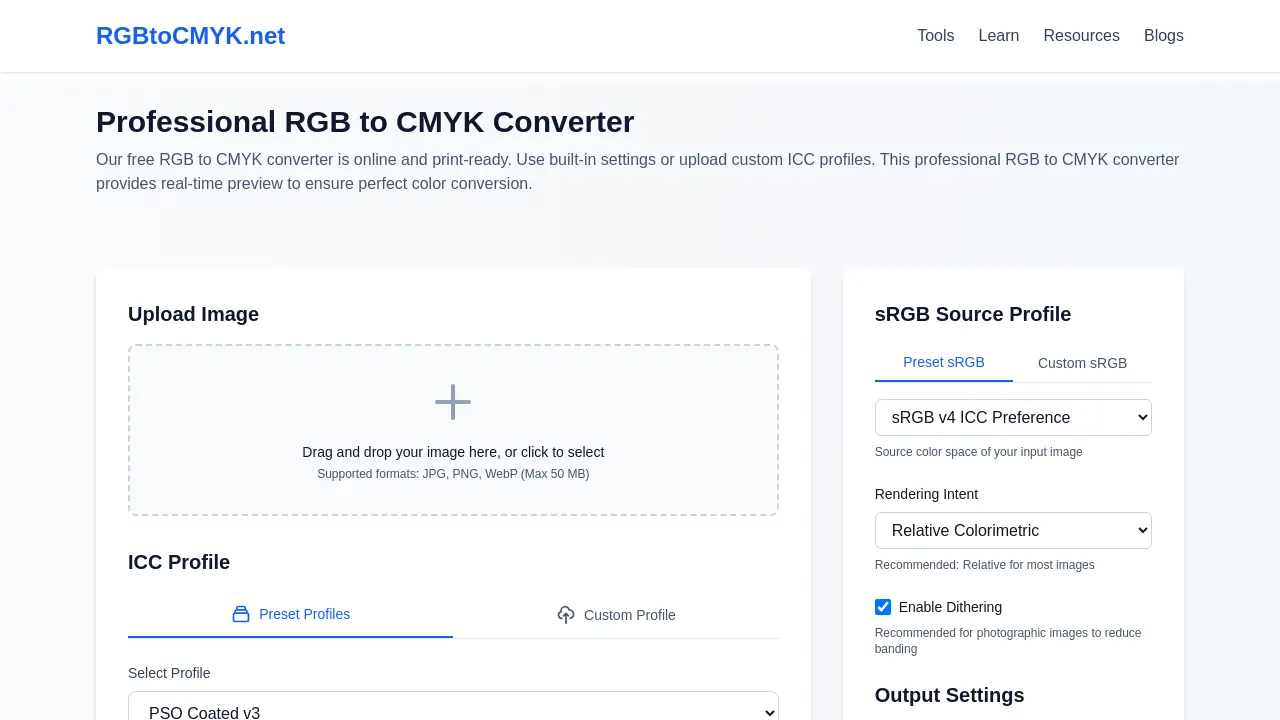
The RGB to CMYK Converter (RGBtoCMYK.net) is an online tool designed for converting RGB images to CMYK color space, optimized for professional printing. This free RGB to CMYK converter supports various image formats, ICC profiles, and rendering intents to ensure accurate color conversion.
Upload your RGB image: Begin by dragging and dropping your JPG, PNG, or WebP image file into the designated upload area or clicking to select it. The RGB to CMYK converter supports files up to 50 MB.
Select an ICC Profile: Choose a preset CMYK ICC Profile like "PSO Coated v3" or "GRACoL2006_Coated1v2" from the dropdown menu, or upload a custom ICC profile for precise color mapping.
Define sRGB Source Profile: Specify your image's source color space by selecting an sRGB profile (e.g., sRGB v4 ICC Preferences or Adobe RGB (1998)) to ensure correct interpretation of RGB values.
Choose Rendering Intent: Select a rendering intent ("Perceptual," "Relative Colorimetric," "Saturation," "Absolute Colorimetric"). "Relative Colorimetric" is generally recommended for logos and graphics, while "Perceptual" suits photographic images.
Enable Dithering (Optional): For photographic images or smooth gradients, enable Dithering to prevent color banding and ensure smoother transitions in the CMYK conversion.
Select Output Format: Choose your desired output format for the CMYK converted file. TIFF is recommended for professional printing, while JPEG and PNG are also available options.
Convert to CMYK: Click the "Convert to CMYK" button to initiate the color conversion process. The professional RGB to CMYK converter will process your settings and generate the CMYK image.
Review and Download: Utilize the real-time preview and comparison sliders to assess the CMYK conversion results. Once satisfied, download your print-ready CMYK file, ensuring accurate color reproduction for your projects.
