
RGB to CMYK Converter
Professional RGB to CMYK Converter - Free & Print Ready
| Added on: | Dec 3, 2025 |
| Monthly Visits: | 21.27K |
| Social & Email: | -- |

What is RGB to CMYK Converter
The RGB to CMYK Converter (RGBtoCMYK.net) is a professional online tool designed for accurate color conversion of digital images for print. It facilitates the transformation of RGB files (JPG, PNG, WebP) into CMYK, offering essential features for print preparation. Users can leverage built-in industry-standard ICC profiles or upload custom profiles for precise color management. The platform supports various rendering intents and includes optimizations such as Black Point Compensation and optional Dithering. A real-time preview feature, alongside before-and-after comparisons, aids in achieving optimal print results, ensuring color accuracy and consistency across printed materials without registration or cost.
How does RGB to CMYK Converter work
The RGB to CMYK Converter operates as an online tool for transforming digital image colors, crucial for print production. Users upload RGB images (JPG, PNG, WebP) up to 50 MB. The system facilitates conversion using predefined or custom ICC profiles, which define specific printing conditions and paper types. It incorporates Source RGB Profiles to interpret the input image's original color space accurately. Advanced features include four rendering intents—Perceptual, Relative Colorimetric, Saturation, and Absolute Colorimetric—to manage out-of-gamut colors, ensuring optimal color accuracy. Black Point Compensation is always active for enhanced shadow detail, and optional dithering prevents color banding in gradients. The final CMYK image can be exported in TIFF, JPEG, or PNG formats, with a real-time preview feature.
Benefits of RGB to CMYK Converter
The RGB to CMYK converter offers a professional, free online solution for accurate color conversion, essential for print-ready files. It supports various image formats, including PNG and JPG, and allows users to utilize built-in or custom ICC profiles for precise control. With a real-time preview feature, this rgb to cmyk converter ensures optimal results, aiding in maintaining brand consistency and preventing costly reprints. The platform prioritizes user privacy, deleting files promptly after use.
Pros and Cons of RGB to CMYK Converter
Pros
- Free online RGB to CMYK conversion.
- Supports various image formats (JPG, PNG, WebP).
- Offers extensive built-in ICC and sRGB profiles.
- Allows custom ICC profile uploads.
- Provides real-time preview and comparison.
- Includes professional rendering intents and optimizations.
- Ensures strong user privacy; files deleted quickly.
- High accuracy matching professional software.
Cons
- Maximum image size limit of 50 MB.
- Black Point Compensation is always enabled.
- No direct color code or HEX conversion.
- Limited output formats (TIFF, JPEG, PNG).
Core Features of RGB to CMYK Converter
Image Color Space Conversion
Facilitates the transformation of digital image colors from RGB (Red, Green, Blue) to CMYK (Cyan, Magenta, Yellow, Key/Black) for print readiness.
Custom ICC Profile Application
Allows users to upload and utilize custom ICC (International Color Consortium) profiles, ensuring precise color matching for specific printing conditions.
Real-time Conversion Preview
Provides an instant visual comparison of the original RGB image and the converted CMYK output, aiding in color accuracy validation before final download.
Advanced Color Management Options
Offers control over rendering intents (Perceptual, Relative Colorimetric, Saturation, Absolute Colorimetric) and dithering for optimized color reproduction across various image types.
Multiple Output Format Generation
Supports exporting converted CMYK images in various formats, including TIFF (recommended for printing), JPEG, and PNG, catering to diverse professional printing requirements.
Use Cases of RGB to CMYK Converter
- Graphic Designers: Convert RGB images to CMYK for print production, ensuring accurate color reproduction with various ICC profiles.
- Photographers: Prepare high-resolution JPG, PNG, or WebP images for professional printing using the online RGB to CMYK converter.
- Print Shops: Utilize the free RGB to CMYK converter to process client files, maintaining brand consistency and reducing color mismatches.
- Marketing Professionals: Convert design assets to CMYK for brochures and packaging, preventing costly reprints due to color inaccuracies.
- Students: Learn about color management by comparing RGB to CMYK conversions with different rendering intents and ICC profiles.
FAQs of RGB to CMYK Converter
How accurate is the RGB to CMYK conversion result provided by this tool?
The RGB to CMYK converter utilizes industry-standard color management algorithms and ICC Color Management Engines, similar to professional software such as Photoshop, GIMP, and Ghostscript. This ensures that the conversion results for images, PDFs, and other files are highly accurate and meet professional expectations for print production.
Where can users download Source RGB Profiles and CMYK ICC Profiles?
Users can download various free Source RGB Profiles directly from the RGBtoCMYK.net website's resources section. For CMYK ICC profiles, official websites like ECI, FOGRA, IDEAlliance, and ICC are recommended, with a compiled collection also available on RGBtoCMYK.net for convenience.
Why is there no explicit Black Point Compensation (BPC) option in the converter?
Black Point Compensation (BPC) is a crucial optimization for achieving rich blacks and improved shadow detail in CMYK conversions. The RGB to CMYK converter has BPC enabled by default and integrated directly into its color conversion engine algorithm, ensuring optimal results without requiring a separate user option.
Is the RGB to CMYK converter a free service, and does it require user registration?
The RGB to CMYK converter is completely free to use, and all its features will remain free. There is no requirement for users to register an account or provide any personal information, offering a fast, seamless, and convenient online rgb to cmyk converter experience.
How does the RGB to CMYK converter ensure user privacy for uploaded files?
User privacy is a priority for the RGB to CMYK converter. Uploaded images and converted files are accessible only by the user. These files are automatically and permanently deleted from the server within 10 minutes of inactivity, or immediately upon downloading the converted file or navigating back to the start.
What is the primary purpose of an RGB to CMYK converter?
An RGB to CMYK converter is a crucial online tool designed to translate colors from the RGB color space, primarily used for digital displays, into the CMYK color space, which is essential for professional printing. This rgb to cmyk color converter ensures accurate color reproduction on physical printed materials, whether it's an image, PDF, or other file.
How does the online RGB to CMYK converter actually function?
The online RGB to CMYK converter operates by utilizing industry-standard ICC profiles and advanced color management algorithms. Users upload their RGB image (JPG, PNG, WebP), select appropriate CMYK ICC profiles, Source RGB Profiles, rendering intents, and dithering options, after which the tool accurately processes the conversion to CMYK for print-ready results.
What image file formats are supported for conversion by the RGB to CMYK converter?
The RGB to CMYK converter supports popular image file formats including JPG, PNG, and WebP. This versatility allows users to convert a wide range of digital images to CMYK, ensuring compatibility for various printing needs and workflows.
Why is converting RGB to CMYK essential for professional printing?
Converting RGB to CMYK using a professional rgb to cmyk converter is essential for printing due to fundamental differences in color models. RGB (additive) and CMYK (subtractive) models produce colors differently. CMYK conversion ensures color accuracy, meets professional print standards, prevents costly reprints from color mismatches, and maintains brand consistency.
What are rendering intents, and which one is generally recommended for images?
Rendering intents dictate how out-of-gamut colors are handled during the RGB to CMYK conversion. Options include Perceptual, Relative Colorimetric, Saturation, and Absolute Colorimetric. For most photographic images with continuous tones and many out-of-gamut colors, the Perceptual rendering intent is generally recommended as it maintains visual relationships between colors.
How to use RGB to CMYK Converter
The RGB to CMYK Converter (RGBtoCMYK.net) is an online tool designed for converting RGB images to CMYK color space, optimized for professional printing. This free RGB to CMYK converter supports various image formats, ICC profiles, and rendering intents to ensure accurate color conversion.
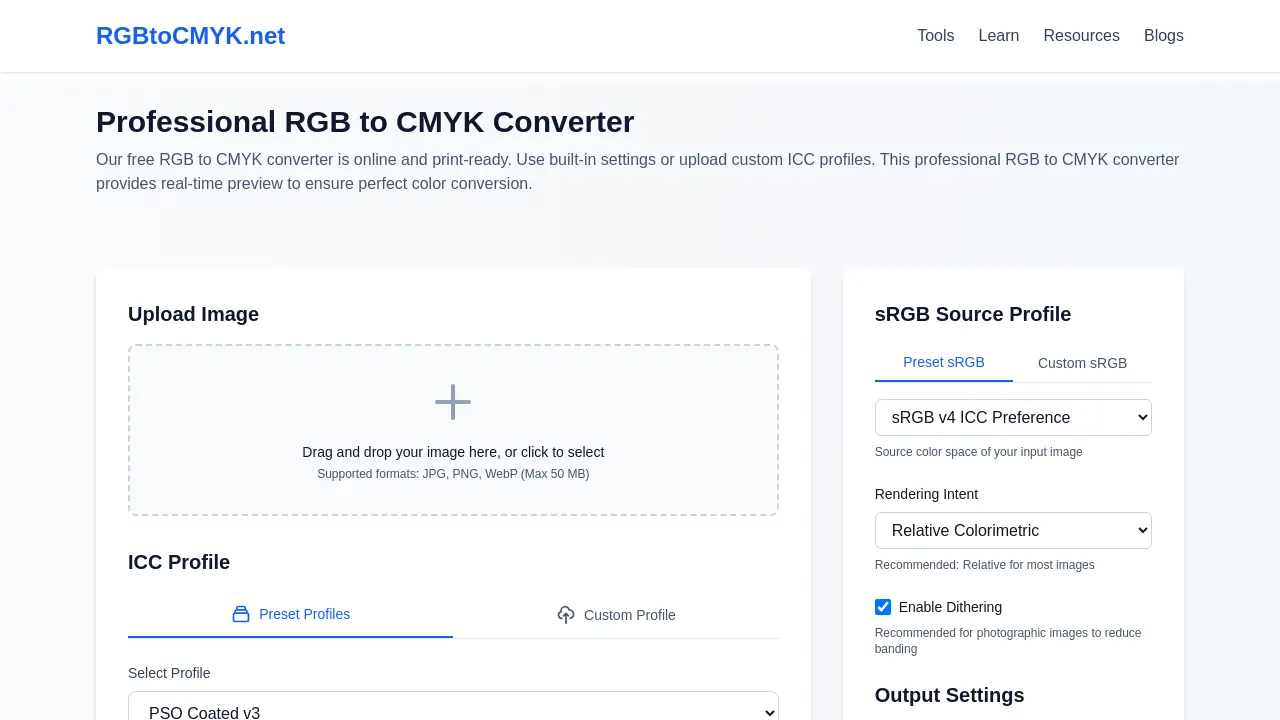
Upload your RGB image: Begin by dragging and dropping your JPG, PNG, or WebP image file into the designated upload area or clicking to select it. The RGB to CMYK converter supports files up to 50 MB.
Select an ICC Profile: Choose a preset CMYK ICC Profile like "PSO Coated v3" or "GRACoL2006_Coated1v2" from the dropdown menu, or upload a custom ICC profile for precise color mapping.
Define sRGB Source Profile: Specify your image's source color space by selecting an sRGB profile (e.g., sRGB v4 ICC Preferences or Adobe RGB (1998)) to ensure correct interpretation of RGB values.
Choose Rendering Intent: Select a rendering intent ("Perceptual," "Relative Colorimetric," "Saturation," "Absolute Colorimetric"). "Relative Colorimetric" is generally recommended for logos and graphics, while "Perceptual" suits photographic images.
Enable Dithering (Optional): For photographic images or smooth gradients, enable Dithering to prevent color banding and ensure smoother transitions in the CMYK conversion.
Select Output Format: Choose your desired output format for the CMYK converted file. TIFF is recommended for professional printing, while JPEG and PNG are also available options.
Convert to CMYK: Click the "Convert to CMYK" button to initiate the color conversion process. The professional RGB to CMYK converter will process your settings and generate the CMYK image.
Review and Download: Utilize the real-time preview and comparison sliders to assess the CMYK conversion results. Once satisfied, download your print-ready CMYK file, ensuring accurate color reproduction for your projects.
RGB to CMYK Converter Website Traffic Analysis
Latest traffic information
- Monthly Visits21.27K
- Bounce Rate35.96%
- Pages Per Visit1.65
- Visit Duration00:00:12
- Global Rank1.3M
- Country/Region Ranking205.54K
Top Keywords
| Keyword | Traffic | Volume | Cost Per Click |
|---|---|---|---|
| rgb to cmyk | 630 | 8.06K | $1.96 |
| rgb to cmyk converter | 140 | 3.13K | $2.52 |
| convert jpg rgb to cmyk | 80 | 90 | -- |
| из rgb в cmyk онлайн | 60 | -- | -- |
| из rgb в cmyk | 50 | -- | -- |
Top Regions
| Region | Percentage |
|---|---|
| United States | 22.47% |
| Indonesia | 17.23% |
| India | 10.05% |
| United Kingdom | 8.8% |
| Poland | 8.7% |
RGB to CMYK Converter Alternatives
A browser collection of 13 free creative editors for photos, vector art, PDFs, documents, video, audio, and CAD, opening without an account or install.

An online AI photo editor that removes image backgrounds, erases people, objects and text, and upscales photos 4x. Preview every photo free before paying per image.
Meta Image: browser AI studio powered by Muse Image. Edit photos with prompts, remove backgrounds, restore old photos, generate new images.
ImagineMyHouse is an AI home design tool that turns room photos into photorealistic interior, exterior, and landscape redesigns while preserving the original space geometry.
OmniEnhancer is an AI image enhancer and photo editor that improves photo quality, clarity, color, and resolution online, with free daily credits.
TranslateImage AI translates images to 70+ languages while preserving font, layout, and style. Free online AI image translator for photos and manga.
AI Clothes Changer is an online tool that replaces the clothing in a person photo using either a reference image or a text description.
AI Gazou offers free AI-powered image upscaling to enhance photos, product images, and illustrations. Upscale 2x or 4x with natural detail preservation.
PixMira AI is a free AI photo editor and image generator. Use text prompts for precise edits, style changes, and high-quality results in seconds.
AI Gazou removes image backgrounds for free using AI. Upload photos, products, or logos to get transparent PNGs with clean edges and customizable margins.
AI Image Text Editor lets users replace, remove, translate, and redact text inside finished images while preserving the original font, background, and layout.
Free AI hairstyle changer: upload a portrait and preview bobs, bangs, waves, pixie cuts, and buzz cuts while keeping your face, clothing, and lighting natural.