
ZeroBG: AI Background Remover & Photo Cleanup Tools
| Added on: | Oct 6, 2026 |
| Monthly Visits: | 2.54K |
| Social & Email: | -- |

What is ZeroBG
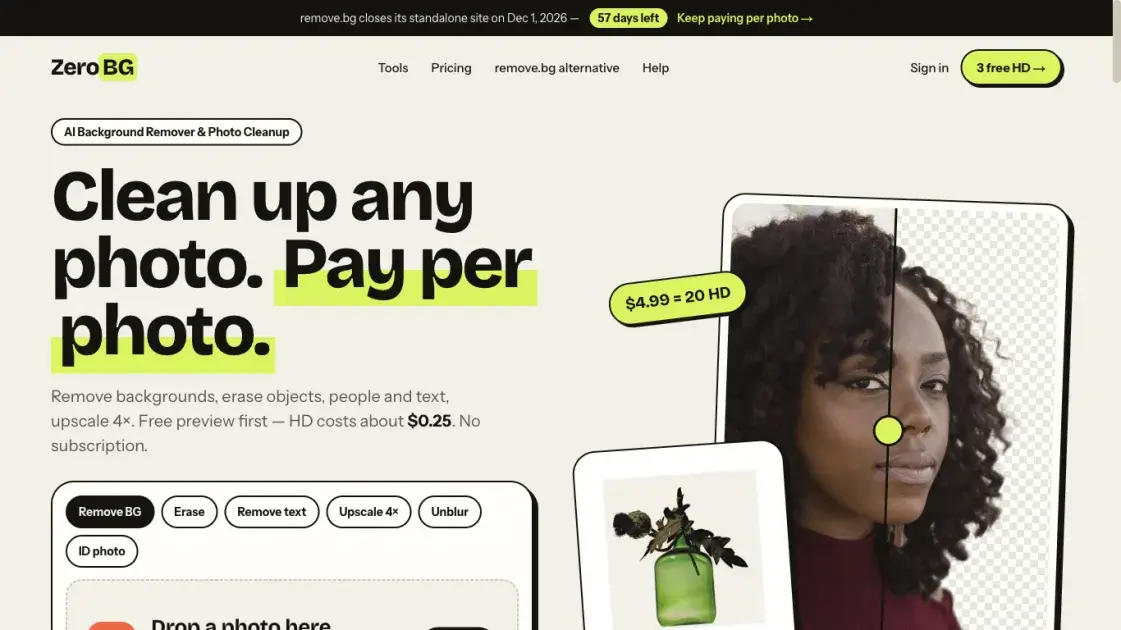
ZeroBG is a browser-based AI photo cleanup service operated by ITERO LTD. It removes image backgrounds, erases people, objects, text and emoji from photos, unblurs soft shots and upscales small images up to 4×. Cutouts are delivered as transparent PNGs or on solid white, black, red and blue fills with an optional natural shadow. Every photo can be previewed free as a 512-pixel watermarked image without an account, while full-resolution files use credits. The service targets people who need clean cutouts occasionally rather than on subscription: marketplace sellers preparing product listings, travellers removing strangers from shots, and anyone producing passport, ID or headshot photos.
How does ZeroBG work
ZeroBG processes photos with AI models rather than manual selection. Background removal runs BiRefNet, an open segmentation model that separates the main subject from its surroundings and is known for detailed edges around hair and fur. For cleanup tools such as object, text and emoji removal, the user brushes over the unwanted area and a model rebuilds the background behind it. The upscaler enlarges images up to four times, capped at 4096 pixels, while keeping the content faithful instead of repainting faces or text. Processing happens in the browser on desktop and mobile. Free previews are resized to 512 pixels on the longest side and watermarked, while unlocked downloads keep the resolution of the original upload.
Benefits of ZeroBG
ZeroBG charges per photo instead of per month, so occasional users pay only for the full-resolution files they actually keep. Every image can be tried free as a watermarked preview without an account, and failed or timed-out jobs are never charged. Both sign-up credits and one-time credit-pack credits never expire, and re-downloading the same image costs nothing, which makes the total cost predictable rather than recurring. The same credits work across every tool — background removal, object and text erasing, unblurring and 4× upscaling — and the touch-up brush for fixing cutouts stays free. Sellers, studios and API users can move to monthly plans with batch processing and higher volume.
Pros and Cons of ZeroBG
Pros
- Pay per photo instead of subscribing
- Sign-up and pack credits never expire
- Failed jobs are never charged
- Free watermarked preview without an account
- Touch-up brush is free in every tool
- Same credits work across all tools
Cons
- Free previews are watermarked and limited to 512px
- Only 3 free HD credits, then credits cost money
- Batch processing needs Pro or Business
- API access needs Pro or Business
- Semi-transparent glass, smoke and fabric can fail
- Overlapping subjects cannot be separated
Core Features of ZeroBG
AI Background Removal
Separates the main subject from its surroundings with the BiRefNet segmentation model and exports a transparent PNG at the original size, or a solid white, black, red or blue background with an optional natural shadow.
Erase Objects and People
Users brush over tourists, photobombers, wires or clutter, and a model fills the marked area with matching background. Suited to travel shots, product photos and listings. Works best on simple surroundings such as sky, walls or grass.
Remove Text and Emoji
Cleans captions, date stamps, labels, usernames, stickers and scribbles off screenshots and photos by brushing over them so the background behind is rebuilt.
Upscale 4×
Enlarges small or soft images up to 4096 pixels with a model that keeps edges and text sharp rather than repainting content, with a 100% zoom check before download.
Unblur and Sharpen
Reduces light motion blur and softness caused by camera shake or a moving subject, showing a before-and-after comparison at 100% before any credit is spent.
Free Touch-up Brush
After any cutout, erase removes leftovers and restore brings back parts of the subject the model cut away. The brush is free in every tool and re-renders the full-size file.
ID and Passport Photo Backgrounds
Replaces the background of a passport or ID photo with plain white in seconds and removes wall shadows. Country-specific size and pose rules still apply to the submitted photo.
Batch Background Removal
Processes 10 images at a time on the Pro plan and 50 at a time on Business, for sellers and studios with steady volume. Other accounts process one image at a time.
remove.bg-Style API
A POST endpoint returns the cutout directly, accepts image_file or image_url, and supports size and format options, so many existing remove.bg scripts only need a new URL and key. Included with the Pro and Business plans.
Use Cases of ZeroBG
- Marketplace sellers: produce white-background product listings, optionally with a natural shadow.
- Passport and ID applicants: swap a messy wall for plain white and remove wall shadows.
- Travellers: erase strangers, signs and clutter from holiday shots.
- Social media and thumbnails: cut subjects out cleanly so they pop on any background color.
- Logo owners: turn a logo on a solid background into a transparent PNG and upscale it if it is small.
- Headshots and team pages: replace a distracting background with one consistent color for profiles and speaker bios.
- Pet and animal photos: cut out cats and dogs while keeping soft, natural fur edges.
- Screenshot cleanup: remove captions, date stamps, labels and usernames from captures.
- Studios and shops: batch background removal across many images on the Pro and Business plans.
FAQs of ZeroBG
Is ZeroBG free?
A watermarked 512-pixel preview of every photo is free and needs no sign-up, within a daily limit. Full-resolution, watermark-free downloads use credits, with 3 given free when an account is created and a one-time 20-credit pack available afterwards.
Is an account required to use ZeroBG?
No account is needed for the free preview. An account is only required to spend HD credits on watermark-free, full-resolution downloads.
What file formats and size does ZeroBG accept?
Uploads can be JPG, PNG, JPEG or WebP up to 25MB, and results are delivered as PNG with a transparent background by default.
How do credits work and do they expire?
One credit unlocks one full-resolution, watermark-free download in any tool, and unlocking the same image again is free. Sign-up and pack credits never expire, while subscription credits reset to the plan amount each month and are used first.
What resolution are ZeroBG downloads?
Free previews are resized to 512 pixels on the longest side and carry a zerobg.ai watermark, with 1024 pixels for the upscaler. Unlocked HD downloads keep the resolution of the original upload, without a watermark.
Are uploaded photos stored or used to train AI?
They are kept only so they can be previewed and downloaded — deleted after 24 hours without an account, or after the plan's retention period with one — and are never used to train AI models.
Can ZeroBG handle hair and fur?
Background removal uses BiRefNet, a segmentation model known for detailed edges, so loose hair, curls, fur and whiskers against a reasonably distinct background usually keep natural edges.
Where does ZeroBG struggle?
Semi-transparent areas such as glass, water, smoke and sheer fabric may be cut out entirely or keep part of the old background, edges can be lost when subject and background share a color, and overlapping subjects cannot be separated.
Can ZeroBG process many images at once?
Batch background removal is included with the paid Pro and Business plans, handling 10 and 50 images at a time respectively. Other accounts process images one at a time.
Does ZeroBG keep remove.bg API scripts working?
A remove.bg-style endpoint takes a key in the X-Api-Key header plus image_file or image_url, returns the cutout directly, and supports size and format options. API access requires a Pro or Business plan.
Is ZeroBG affiliated with remove.bg or Canva?
No. ZeroBG is an independent service operated by ITERO LTD and has no connection to remove.bg or Canva.
How to use ZeroBG
- Upload a JPG, PNG or WebP up to 25MB, or paste an image with Ctrl+V — no account is needed to start.
- Wait a few seconds while the AI processes the photo and shows the result next to the original.
- Brush over anything that should disappear when using the eraser, text remover or emoji remover, then let the model fill the area.
- Compare the cutout and, for upscaling or unblurring, zoom to 100% to check edges and text before paying.
- Choose transparent, white, black, red or blue output, optionally with a natural shadow, when exporting a cutout.
- Download the free 512-pixel watermarked preview, or create a free account and spend one HD credit to keep the full-resolution, watermark-free file.
- Use the free touch-up brush to erase leftovers or restore what the model removed, then re-render the full-size file.
ZeroBG Website Traffic Analysis
Latest traffic information
- Monthly Visits2.54K
- Bounce Rate40.51%
- Pages Per Visit1.37
- Visit Duration00:00:00
- Global Rank7.47M
- Country/Region Ranking927.64K
Top Keywords
| Keyword | Traffic | Volume | Cost Per Click |
|---|---|---|---|
| ai background-changer online free | 10 | 110 | -- |
| online background changer | -- | 1.18K | $0.14 |
| photo background online change | -- | 1.08K | $0.2 |
ZeroBG Alternatives
Meta Image: browser AI studio powered by Muse Image. Edit photos with prompts, remove backgrounds, restore old photos, generate new images.
Remove image backgrounds, video watermarks, burned-in subtitles and video backgrounds with Rmark AI. Upload a file, preview, then download a clean copy.

Koozee turns a single clothing image into AI product photos, model try-on images, and marketing videos for apparel sellers, cutting costs by up to 99%.
OmniEnhancer is an AI image enhancer and photo editor that improves photo quality, clarity, color, and resolution online, with free daily credits.
TranslateImage AI translates images to 70+ languages while preserving font, layout, and style. Free online AI image translator for photos and manga.
AI Clothes Changer is an online tool that replaces the clothing in a person photo using either a reference image or a text description.
AI Gazou offers free AI-powered image upscaling to enhance photos, product images, and illustrations. Upscale 2x or 4x with natural detail preservation.
PixMira AI is a free AI photo editor and image generator. Use text prompts for precise edits, style changes, and high-quality results in seconds.
AI Gazou removes image backgrounds for free using AI. Upload photos, products, or logos to get transparent PNGs with clean edges and customizable margins.
AI Image Text Editor lets users replace, remove, translate, and redact text inside finished images while preserving the original font, background, and layout.
Bimg AI provides Nano Banana AI image editing, background removal, AI upscaling, photo restoration, and AI video generation. A platform for creators and teams.
Generate hundreds of AI product images in bulk from a CSV. PixBulk helps ecommerce sellers automate product photography with AI models like Nano Banana and GPT Image 2.