
PixBulk: Bulk AI Product Image Generator for Ecommerce

What is PixBulk
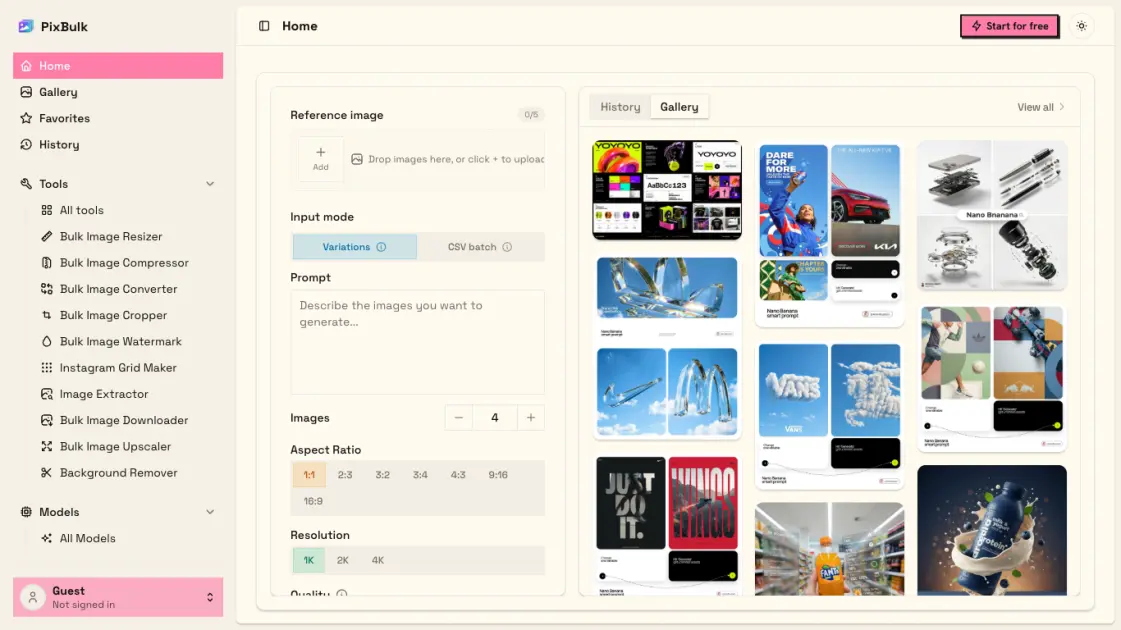
PixBulk is a bulk AI product image generator built for ecommerce sellers on Shopify, Etsy, Amazon, and eBay. It converts a CSV spreadsheet of SKUs into hundreds of AI-generated product images in minutes, replacing costly studio photography and repetitive one-by-one prompting. Users upload product data, select a visual style from models like Nano Banana or GPT Image 2, and receive a ZIP archive of ready-to-use images. Credits never expire, failed generations are refunded automatically, and a commercial usage license is included with paid plans. With pricing starting at $0.02 per image and a free tier for initial testing, PixBulk makes high-volume product image generation accessible to online merchants at any scale.
How does PixBulk work
PixBulk processes bulk image generation by accepting a CSV spreadsheet where each row supplies a product prompt and optional identifiers like SKU. The system applies AI models — Nano Banana or GPT Image 2 — to interpret each prompt and render corresponding product imagery. Users configure a single style reference, aspect ratio, and resolution that applies uniformly across the batch, ensuring visual consistency without per-image configuration. The generation runs asynchronously in the background, processing up to 200 images per batch, and delivers all completed results as a ZIP archive with file names mapped from the original CSV columns.
Benefits of PixBulk
PixBulk replaces the slow process of generating product images one at a time. Sellers upload a CSV of SKUs with prompts, select a visual style and AI model, then download all results as a ZIP. The workflow supports up to 200 images per batch at up to 4K resolution. Multiple models — Nano Banana and GPT Image 2 — offer different aesthetic outputs. Reference images can maintain brand consistency across a batch. Pricing starts at $0.02 per image with a credit system where unused credits never expire. Failed generations are refunded automatically. A commercial usage license is included on paid plans.
Pros and Cons of PixBulk
Pros
- CSV-driven bulk generation saves hours of manual one-by-one prompting
- From $0.02 per image, drastically cheaper than studio photography
- Commercial usage license included on every paid plan
- Multiple AI models with output resolution up to 4K
- Failed generations refunded automatically, pay only for images kept
Cons
- Batch size capped at 200 images per generation run
- Credit-based pricing, not an unlimited subscription model
- Requires account signup and CSV preparation before first use
- Limited to two primary AI models (Nano Banana and GPT Image 2)
Core Features of PixBulk
CSV bulk generation
Upload a CSV of SKUs and prompts to generate up to 200 product images per batch, or use a single prompt applied across all items.
Multiple AI models
Choose from Nano Banana, GPT Image 2, or Nano Banana 2 Lite, each offering different visual styles suited to different product categories.
Reference image support
Provide up to 5 reference images to guide the batch toward a consistent style, color palette, and visual composition across all outputs.
Up to 4K resolution
Export product images at resolutions up to 4K, meeting marketplace requirements for crisp zoom and detailed product presentation at large sizes.
One-click ZIP export
Every batch delivers a single ZIP archive with file names mapped from CSV columns such as SKU, making catalog integration straightforward.
Commercial usage license
Paid plans include a commercial usage license, allowing generated images to be used freely on storefronts, advertisements, and marketing campaigns.
Style variety
Generate white-background hero shots, lifestyle scenes, flat lay arrangements, or ghost mannequin apparel images from a single batch configuration.
Auto-refund for failures
Failed image generations are refunded automatically — users pay only for successfully delivered product images, never for errors or timeouts.
Use Cases of PixBulk
- Shopify & DTC store owners: Generate launch imagery for every new product drop without scheduling a photo shoot.
- Etsy & print-on-demand sellers: Produce dozens of design mockups and thumbnail variations per listing in a single batch.
- Amazon FBA sellers: Create white-background hero shots that comply with marketplace image requirements at scale.
- Dropshipping & resellers: Convert supplier photos into consistent, on-brand product images without manual editing.
- Social media & ad teams: Generate A/B test variants and multi-format ad creatives across different channels at once.
FAQs of PixBulk
Can I sell product images generated with PixBulk commercially?
Yes. All paid plans include a commercial usage license, so users can use generated images on storefronts, in advertising, and in marketing materials. The free tier images are for testing purposes.
Do failed image generations cost credits?
No. When an image fails to generate, the credits spent on that attempt are refunded automatically. Users only pay for images that are successfully delivered.
How many images can I generate in a single batch?
PixBulk supports up to 200 product images per batch. Users upload a CSV of their SKUs and prompts, and the entire batch runs in the background. Results are delivered as a ZIP file when processing completes.
Does PixBulk offer a free tier?
Yes. New accounts receive free starter credits without requiring a credit card. These credits refresh daily, allowing users to test the bulk generation workflow before committing to a paid plan.
Can I match my existing brand style across bulk generations?
Yes. PixBulk allows users to upload up to five reference images per batch. The AI models follow the style, color palette, and composition of those references, producing consistent output across all images in a run.
Can I generate multiple images for the same product SKU?
Yes. PixBulk supports a variations mode that produces multiple takes per prompt, or users can repeat the same SKU row in their CSV file to get several images for one product.
Are AI-generated product images allowed on Shopify, Etsy, and Amazon?
Generally yes for product and marketing imagery, though each marketplace has its own image and authenticity policies. PixBulk offers platform-specific aspect ratios and white-background generation to help meet marketplace requirements.
How to use PixBulk
- Sign up for a PixBulk account to receive free starter credits that refresh daily, with no credit card required for initial testing of the bulk workflow.
- Prepare a CSV file with a "prompt" column containing image descriptions for each SKU, plus optional columns for SKU identifiers or custom file names.
- Upload the CSV to PixBulk and choose an AI model, aspect ratio, and output resolution, optionally providing up to 5 reference images for style consistency.
- Review the batch settings and start generation — PixBulk processes up to 200 product images per batch in the background, notifying users upon completion.
- Download the completed ZIP archive containing all generated images, with file names mapped from CSV fields such as SKU for direct catalog integration.
