
AI‑Generated Dating Photos: 80‑180 Real‑Scored Shots for Tinder, Bumble & Hinge in 20 Minutes

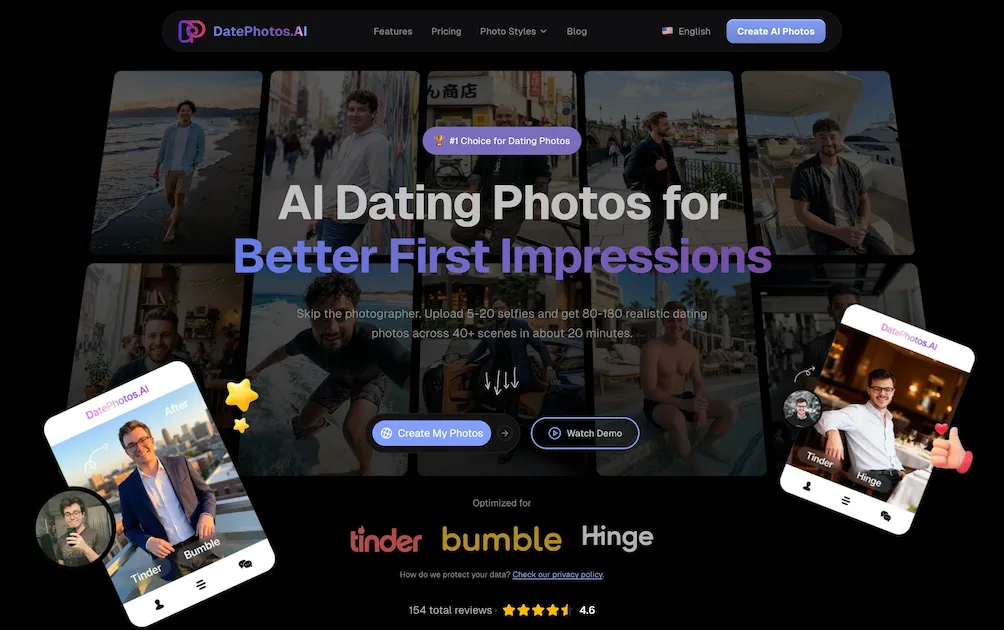
What is DatePhotos AI
DatePhotos AI is an AI‑driven service that converts 5–20 user‑uploaded selfies into 80–180 realistic dating photos in roughly 20 minutes. The platform automatically adjusts lighting, pose and angle, then renders each image in one of 40+ scene categories—including coffee shops, beaches, gyms and urban streets—providing distinct visual cues that improve profile diversity. Every generated photo receives a 0‑100 “realness” score, allowing users to filter out low‑confidence results and keep only the most natural‑looking images (average score ≈ 92). The workflow is fully online, requires no photographer, tripod or studio, and delivers final files via a single download. Pricing is a one‑time payment of $29–$79 with a 7‑day money‑back guarantee, positioning DatePhotos AI as a cost‑effective, rapid alternative to traditional photography for Tinder, Bumble and Hinge users.
How does DatePhotos AI work
DatePhotos AI processes a batch of 5–20 user‑uploaded selfies through a generative pipeline that first parses facial landmarks, lighting conditions and pose vectors. The system then feeds this data to a diffusion model trained on 40 + scene categories, spawning 80–180 variants in environments such as coffee shops, beaches or gyms. Each output receives an automated “realness” score (0‑100) based on a discriminator network, allowing users to filter high‑confidence images. Regeneration slots let users request replacements at no extra cost, while the final set downloads in standard 1K resolution within roughly 20‑30 minutes.
Benefits of DatePhotos AI
DatePhotos AI generates 80‑180 realistic dating photos from 5–20 uploaded selfies in about 20 minutes, covering 40+ scenes such as coffee shops, beaches, gyms and urban streets. The service automatically improves lighting and angles, assigns a 0‑100 realness score to each image, and allows free regeneration of up to 20 photos per project. With a one‑time fee of $29‑79 (no subscription), users receive more varied, app‑optimized pictures than typical photographer shoots or competing AI tools, while saving weeks of scheduling and hundreds of dollars. A 7‑day money‑back guarantee protects new users.
Pros and Cons of DatePhotos AI
Pros
- Generates 80–180 photos from 5–20 selfies.
- Delivery in 20–30 minutes, no scheduling.
- Realness score (0‑100) helps filter natural‑looking images.
- 40+ scene variations optimized for Tinder, Bumble, Hinge.
- One‑time cost $29‑79, 7‑day money‑back guarantee.
Cons
- Photo quality varies; some images appear overly polished.
- Requires high‑quality source selfies for best results.
- Limited control over exact pose or background details.
- No ongoing support for custom retouching.
- Realness score may misjudge borderline AI artifacts.
Core Features of DatePhotos AI
AI‑Generated Multi‑Scene Dating Photos
Creates 80‑180 realistic images from 5‑20 uploaded selfies, covering 40+ scene types (beach, coffee shop, gym, etc.) to diversify profile content and attract more matches.
Realness Score Analyzer
Assigns each generated photo a 0‑100 authenticity rating, enabling users to filter and download only the most natural‑looking images for dating apps.
Free Regeneration & Editing
Allows up to 5–20 free regenerations per project, letting users replace unsatisfactory shots without additional cost, ensuring optimal selection.
Platform‑Specific Optimization
Outputs photos pre‑tuned for Tinder, Bumble, and Hinge dimensions and style guidelines, streamlining upload and improving appearance on each app.
Rapid Turnaround (20‑30 min)
Processes uploads and delivers the full photo set within half an hour, markedly faster than traditional photographers or other AI services.
Use Cases of DatePhotos AI
- College students: Generate diverse, app‑optimized dating photos in minutes, boosting profile match rates.
- Busy professionals: Replace costly photoshoots with AI‑crafted realness‑scored images for LinkedIn‑compatible personal branding.
- International users: Produce location‑specific scenes (beach, café, city) without travel, enhancing cross‑cultural appeal on Tinder and Bumble.
- Mobile app developers: Integrate DatePhotos AI API to offer on‑the‑fly profile picture generation within dating apps.
- Content creators: Leverage free regeneration and realness scoring to quickly refresh social media avatars for higher engagement.
FAQs of DatePhotos AI
How does DatePhotos AI generate dating photos from selfies?
DatePhotos AI uses a generative‑AI pipeline that analyses 5–20 uploaded selfies, adjusts lighting and angles, and inserts the subject into 40+ predefined scene templates. The system then creates 80–180 unique, realistic images in roughly 20‑30 minutes, each scored for “realness” on a 0‑100 scale.
How many selfies should I upload for the best results?
Users should upload between 5 and 20 high‑resolution selfies that show a variety of facial expressions and angles. More source images give the AI more reference data, which improves pose diversity and the overall quality of the generated dating photos.
What kinds of scenes are available for my AI‑generated photos?
DatePhotos AI offers over 40 scene categories, including coffee shops, beaches, gyms, urban streets, waterfront docks, luxury yachts, restaurants, parks, and more. Each scene provides 3‑4 different poses, allowing you to showcase multiple facets of your personality on platforms like Tinder, Bumble, and Hinge.
Can I regenerate a photo I don’t like, and is there an extra cost?
Yes. The platform allows up to 5–20 free regenerations per project, depending on the selected plan. Regenerating a specific image simply replaces it with a new AI‑generated version at no additional charge, ensuring you can fine‑tune your profile without extra fees.
How long does it take to receive the final photo set?
After uploading your selfies, the AI processes and renders the full set of images in about 20‑30 minutes. This is substantially faster than traditional photography (1‑2 weeks) or other AI services (24‑48 hours), enabling you to refresh your dating profile almost instantly.
How to use DatePhotos AI
DatePhotos AI generates AI‑enhanced dating photos from 5‑20 user selfies, delivering 80‑180 realistic images across 40+ scenes in roughly 20 minutes, optimized for Tinder, Bumble and Hinge.
Visit datephotos.ai, click Create My Photos, and upload a set of clear, high‑resolution selfies (5‑20 recommended) following the on‑screen guidelines.
Select desired scene categories—beach, coffee shop, gym, urban street, etc.—or let the platform auto‑suggest a balanced mix that highlights varied personality traits.
Initiate the generation process; the AI adjusts lighting, angles, and background while assigning a 0‑100 realness score to each output image.
After processing (≈20‑30 min), review the gallery; use built‑in sorting by realness score to filter out low‑confidence results before downloading.
Download chosen photos individually or as a compressed pack; the files are ready for direct upload to dating apps without additional editing.
If any image appears unsatisfactory, use the free regeneration feature (5‑20 times per project) to replace specific shots, then repeat the selection step.
DatePhotos AI Website Traffic Analysis
Latest traffic information
- Monthly Visits16.9K
- Bounce Rate45.02%
- Pages Per Visit1.56
- Visit Duration00:00:11
- Global Rank1.61M
- Country/Region Ranking264.27K
Visits Over Time
Top Keywords
| Keyword | Traffic | Volume | Cost Per Click |
|---|---|---|---|
| apob ai promo code | 150 | 160 | -- |
| dating bilder ai | 140 | 150 | -- |
| images for dating apps ai | 130 | 140 | -- |
| datephotos ai | 120 | 450 | -- |
| ai dating photos | 110 | 360 | -- |
Top Regions
| Region | Percentage |
|---|---|
| United States | 42.18% |
| Germany | 13.47% |
| Vietnam | 10.64% |
| France | 10.31% |
| India | 7.32% |
