
Remove Image Background Online - NanoPhoto.AI AI Tool

What is NanoPhoto.AI
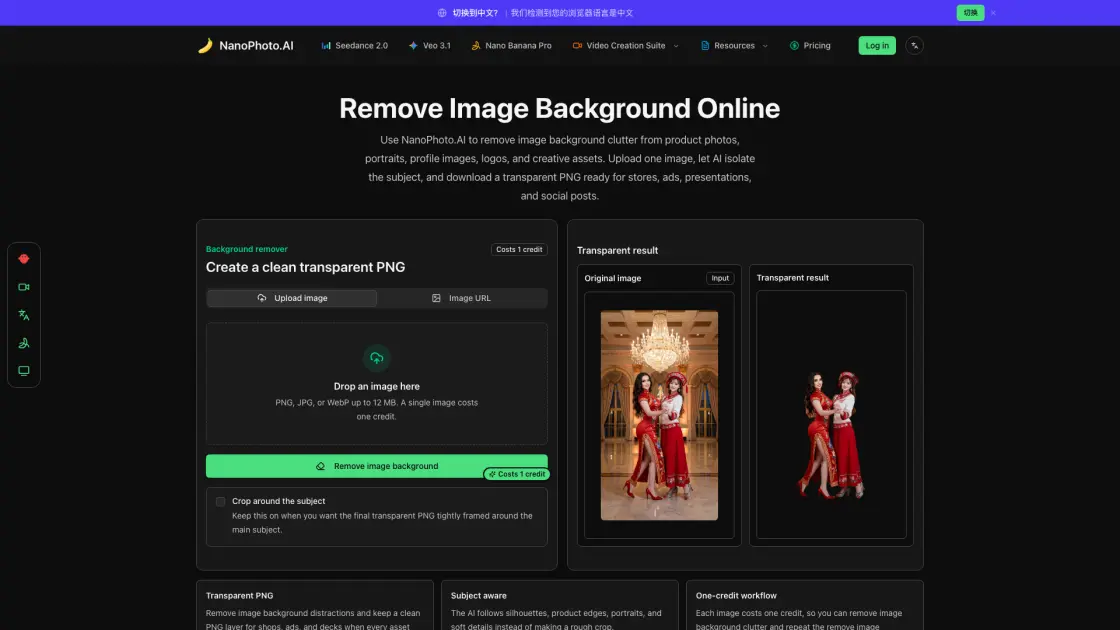
NanoPhoto.AI provides an online background removal tool that turns product photos, portraits, logos, and design assets into transparent PNG files. Instead of opening a heavy image editor and tracing masks by hand, users upload an image, let the AI separate the subject from its background, and download a clean cutout ready for e-commerce, presentations, or social media. Each image costs one credit, and the entire workflow stays inside the browser without exposing API keys. The tool is built for marketplace sellers, content creators, and design teams who need a fast, repeatable way to prepare assets without switching between multiple applications.
How does NanoPhoto.AI work
When a user uploads an image or provides a public URL, NanoPhoto.AI sends the file to the fal.ai rembg model through a secure server-side route. The model analyzes the image, identifies the primary subject by detecting edges, contrast boundaries, and depth cues, then generates an alpha mask that separates the subject from the background. The result is returned as a transparent PNG. A credit is deducted before processing begins, and if the request fails for any reason, the credit is automatically refunded so the user does not lose a charge on an incomplete operation.
Benefits of NanoPhoto.AI
Using NanoPhoto.AI saves time compared to manual masking in traditional editors. The AI handles complex edges like hair and product packaging, producing results that would take much longer by hand. The credit-based system means teams only pay for what they use, and the automatic refund on failed requests reduces waste. Because the tool runs entirely in the browser, there is no software to install and no API key to manage on the client side, which makes it accessible for small teams and individual creators who need a lightweight asset preparation step.
Pros and Cons of NanoPhoto.AI
Pros
- Fast AI-powered background removal
- Simple three-step workflow
- Automatic credit refund on failures
- No software installation needed
Cons
- Limited to single image processing
- Requires internet connection
- No batch upload option
Core Features of NanoPhoto.AI
AI-powered subject detection
The fal.ai rembg model identifies the main subject and separates it from the background, handling hair, fabric edges, and complex object contours.
One-credit workflow
Each image costs a single credit, and failed requests are automatically refunded, making the tool predictable for production use.
Crop around subject
An optional crop trims empty transparent space around the detected object, producing a compact cutout for catalogs, avatars, and stickers.
Upload or image URL
Images can be uploaded from local storage or loaded from a public HTTPS URL, supporting PNG, JPG, and WebP files up to 12 MB.
Use Cases of NanoPhoto.AI
- Marketplace sellers: Remove backgrounds from product shots to maintain consistent SKU imagery across white, brand, and lifestyle backgrounds.
- Content creators: Clean up portraits and props for YouTube thumbnails, newsletter cover art, and launch graphics without manual masking.
- Design teams: Prepare transparent cutouts for ads, comparison tables, hero visuals, and social media posts as a fast prep step before compositing.
FAQs of NanoPhoto.AI
How does NanoPhoto.AI remove image background areas?
NanoPhoto.AI sends your image to the fal.ai rembg model through a secure server-side route. The model identifies the subject, separates it from the background, and returns a transparent PNG. The user's FAL_API_KEY stays on the server and is never exposed in the browser.
How many credits does it cost to remove image background from one image?
One image costs one credit. The credit is pre-deducted before processing to prevent concurrent abuse. If the removal request fails, NanoPhoto.AI automatically refunds the credit so the user does not pay for incomplete work.
Which image types work best for background removal?
PNG, JPG, and WebP files produce good results when the subject is clearly visible and not extremely blurred. Product photos, portraits, logos, and objects with enough contrast between the subject and background typically yield the cleanest output.
Can I remove image background from a hosted image URL?
Yes. Users can paste a public HTTPS image URL instead of uploading a file. This is useful when the image already lives on a CDN or storage bucket. Private URLs, expired links, and hosts that block automated access may fail, so uploading is usually a safer option.
What does the crop around subject option do?
The crop option trims empty transparent space around the detected object. It is useful when preparing compact product cutouts, stickers, avatars, or catalog assets. Disabling it preserves the original canvas dimensions, which is helpful when the background needs to be replaced with a specific size.
How to use NanoPhoto.AI
- Upload an image or paste a URL: Drag a PNG, JPG, or WebP file onto the upload area, or paste a public HTTPS image URL. Files up to 12 MB are accepted.
- Choose crop preference: Toggle the crop option on if you want the final PNG tightly framed around the subject. Leave it off to preserve the original canvas dimensions.
- Start the removal: Click the remove background button. One credit is deducted, and the AI processes the image on the server side.
- Download the result: When the transparent PNG is ready, download it and use it in product galleries, thumbnails, social posts, or other design workflows.
NanoPhoto.AI Website Traffic Analysis
Latest traffic information
- Monthly Visits131.03K
- Bounce Rate46.71%
- Pages Per Visit2.22
- Visit Duration00:01:13
- Global Rank312.86K
- Country/Region Ranking24.09K
Visits Over Time
Traffic Sources
- Direct: 59.44%
- Organic Search: 20.39%
- Referrals: 10.82%
- Generative AI: 3.31%
- Paid Search: 2.62%
- Organic Social: 2.55%
Top Keywords
| Keyword | Traffic | Volume | Cost Per Click |
|---|---|---|---|
| nano banana | 2.11K | 3.24M | $0.65 |
| nanophoto.ai | 670 | 750 | -- |
| nano banana pro | 640 | 653.89K | $1.23 |
| nanophoto | 550 | 560 | $1.11 |
| nano photo | 540 | 10 | -- |
Top Regions
| Region | Percentage |
|---|---|
| China | 58.8% |
| United States | 3.72% |
| Ghana | 3.28% |
| Hong Kong | 2.54% |
| Taiwan | 2.18% |
