
Girl Generator – Free AI tool for creating girl images from text

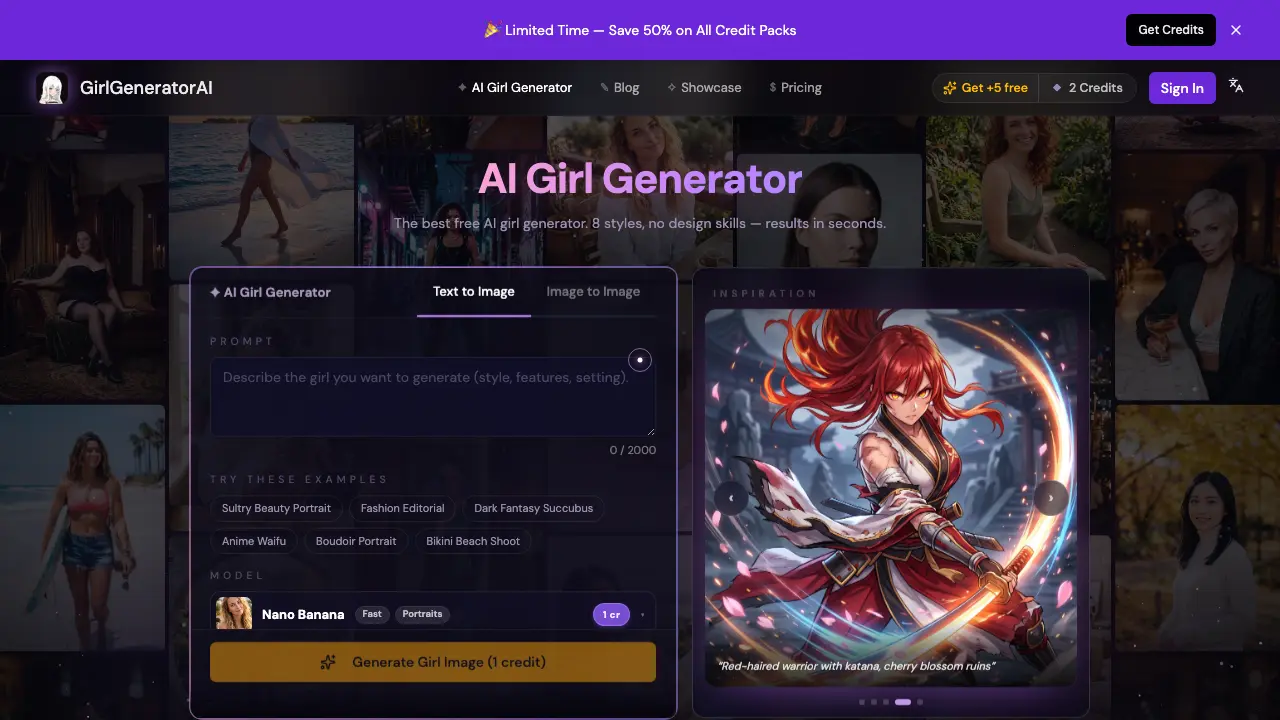
What is Girl Generator
Girl Generator is an AI‑driven image creation platform that transforms plain text prompts into high‑resolution girl illustrations within seconds. Users select from eight distinct styles—including anime, realistic, cyberpunk, watercolor, sketch, chibi, and 3D—and can adjust aspect ratio or upload a reference image for image‑to‑image refinement. The service operates without requiring an account or design expertise; a free credit batch allows immediate experimentation, while additional credit packs are available for heavier usage. Generated outputs feature fine skin textures, natural lighting, and consistent detail across styles, making them suitable for character design, avatars, story art, or marketing assets. Exported images arrive at full resolution and can be used commercially, with visibility controls for privacy. The streamlined three‑step workflow (describe, select model, generate) delivers results in 5‑70 seconds, positioning Girl Generator as an accessible, fast, and versatile tool for creators.
How does Girl Generator work
The Girl Generator processes user input through a three‑step workflow: a textual description is entered, a specific AI model and aspect ratio are selected, and the system renders a full‑resolution image. Under the hood, a text‑to‑image diffusion model interprets the prompt, optionally combined with an uploaded reference image, to synthesize a unique portrait in styles such as anime, realistic, cyberpunk, watercolor or chibi. Generation time varies by model, ranging from roughly five seconds for the fastest engine to about a minute for higher‑quality outputs, after which the image can be downloaded or shared via a direct link.
Benefits of Girl Generator
Girl Generator provides instant, text‑to‑image creation of girls in eight distinct styles—including anime, realistic, cyberpunk, watercolor, sketch, chibi, and 3D—without requiring an account or design experience. Users receive high‑definition outputs with fine skin textures and natural lighting in as little as five seconds, while free daily credits enable low‑cost experimentation. The platform supports both text‑only and image‑to‑image workflows, allowing easy iteration on existing concepts. Generated images are downloadable in full resolution and can be used for personal, commercial, or social‑media projects, offering a flexible solution for rapid character design and visual storytelling.
Pros and Cons of Girl Generator
Pros
- Generates images in under 20 seconds.
- Offers eight distinct art styles.
- No account required for basic use.
- Provides free daily credits.
- Supports both text‑to‑image and image‑to‑image modes.
Cons
- Higher‑quality renders require paid credit packs.
- Limited to pre‑defined aspect ratios.
- No advanced editing tools after generation.
- Commercial usage may have jurisdictional copyright limits.
- User interface repeats promotional text extensively.
Core Features of Girl Generator
Text‑to‑Image Generation
Converts a user‑written prompt into a high‑resolution girl image within seconds, supporting diverse styles such as anime, realistic, cyberpunk, and watercolor.
Image‑to‑Image Transformation
Accepts an uploaded reference picture and a textual prompt, then blends the reference pose or composition with the new description to produce a modified output.
Style & Model Selection
Offers eight predefined styles and multiple AI models (e.g., Z‑Image, Nano Banana, NB Pro) plus aspect‑ratio options, allowing users to tailor visual aesthetics and rendering speed.
Credit‑Based Access & Free Trials
Provides two free generations without registration, daily bonus credits, and purchasable credit packs, enabling flexible usage for both casual and high‑volume creators.
Download, Share & Commercial Use
Delivers full‑resolution images ready for download, generates shareable links, and permits personal or commercial application while respecting user privacy.
Use Cases of Girl Generator
- Game developers: Generate high‑resolution character sprites and concept art in seconds for indie game prototypes.
- Webtoon creators: Produce consistent anime‑style heroine panels without hiring an illustrator.
- Marketing students: Create eye‑catching social media avatars and thumbnail graphics for campaign mock‑ups.
- UI/UX designers: Quickly prototype user‑profile illustrations for app demos across multiple visual styles.
- Academic researchers: Generate diverse dataset of female portrait images for computer‑vision training and bias analysis.
FAQs of Girl Generator
What is an AI girl generator?
An AI girl generator is a web‑based tool that converts a textual description into a unique image of a girl. Users type prompts that specify style, clothing, setting, or mood, and the system creates a brand‑new illustration in seconds without any drawing skills.
Is Girl Generator free to use?
Yes. Girl Generator offers two free generations without requiring an account. After signing up, users receive five bonus credits and can earn two additional credits daily through the check‑in feature. Paid credit packs start at $6.99, and a subscription option begins at $9.99 per month for higher‑volume usage.
How does the text‑to‑image process work?
The platform employs a text‑to‑image model that interprets the prompt and synthesizes an original image from scratch. In image‑to‑image mode, a reference picture is uploaded; the AI uses that visual as a base while applying the textual instructions, allowing detailed style refinements or pose changes.
Which artistic styles can be generated?
Girl Generator supports eight primary styles, including realistic portraits, anime, cyberpunk, watercolor, sketch, chibi, HD‑resolution photography, and 3D renders. Users simply add style keywords such as “anime” or “realistic” to their prompt, and the engine adapts the output accordingly.
Can the generated images be used commercially?
Yes. Images produced by Girl Generator may be used for personal projects, social media, games, and commercial applications. Users should verify local copyright regulations, as AI‑generated works may have varying legal status in different jurisdictions.
How long does it take to generate an image?
Generation speed depends on the selected model. The fastest “Z‑Image” model renders a draft in roughly 5 seconds, while higher‑quality models like Nano Banana Pro require 25–70 seconds for a full‑resolution output.
What is the image‑to‑image mode and when should I use it?
Image‑to‑image mode lets you upload a reference picture alongside your text prompt. The AI preserves elements such as pose, composition, or existing style from the reference while incorporating the new description. This mode is useful for iterating on character concepts, converting photos to anime, or blending multiple visual ideas.
Are there any daily limits for free users?
Free users receive two generation credits per day without signing in. Creating an account grants five additional free credits and two extra credits each day through the daily check‑in. Once the free credits are exhausted, users must purchase additional credit packs or subscribe.
How can I control the aspect ratio of the output?
Before generating, users can select from preset aspect ratios (e.g., 1:1, 4:3, 16:9) or enter a custom ratio. The chosen aspect ratio determines the canvas dimensions, ensuring the final image fits specific format requirements such as social‑media posts or game assets.
How to use Girl Generator
Girl Generator creates AI‑generated girl images from text or reference photos, offering eight distinct styles such as anime, realistic, cyberpunk, watercolor, and 3D, with results delivered in seconds.
Access the web interface, optionally sign in for free credits, then locate the prompt box and, if desired, upload a reference image using the drag‑and‑drop area.
Compose a descriptive prompt of up to 2000 characters, including style keywords (e.g., “anime”, “realistic”, “cyberpunk”) and details about pose, clothing, lighting, or setting.
Select the desired AI model and aspect ratio from the dropdown menus; higher‑quality models may require more credits but produce finer detail and HDR‑like output.
Click “Generate Girl Image” to submit the request; the system processes the prompt, produces a full‑resolution image within 5–70 seconds, and displays a shareable link.
Review the generated image, compare it with the prompt, and use the download button to save the file locally or copy the shareable URL for social or commercial use.
If revisions are needed, tweak the prompt or upload a new reference image, repeat the generation step, and iterate until the visual result meets the project’s requirements.
Girl Generator Website Traffic Analysis
Latest traffic information
- Monthly Visits466
- Bounce Rate38.59%
- Pages Per Visit1.81
- Visit Duration00:00:39
- Global Rank--
- Country/Region Ranking--
Visits Over Time
Top Keywords
| Keyword | Traffic | Volume | Cost Per Click |
|---|---|---|---|
| how to build ai of girl | 140 | -- | -- |
| does lofi girl use ai | -- | 520 | -- |
| random anime girl generator | -- | 260 | -- |
| random waifu generator | -- | 230 | -- |
| ai生圖 白皮膚要用什麼提示詞 | -- | 200 | -- |
Top Regions
| Region | Percentage |
|---|---|
| United States | 82.69% |
| France | 17.31% |
