
World Model Hub FAQs
World Model Hub allows creators to generate AI videos, images, and 3D assets with model comparison and output control for efficient production.

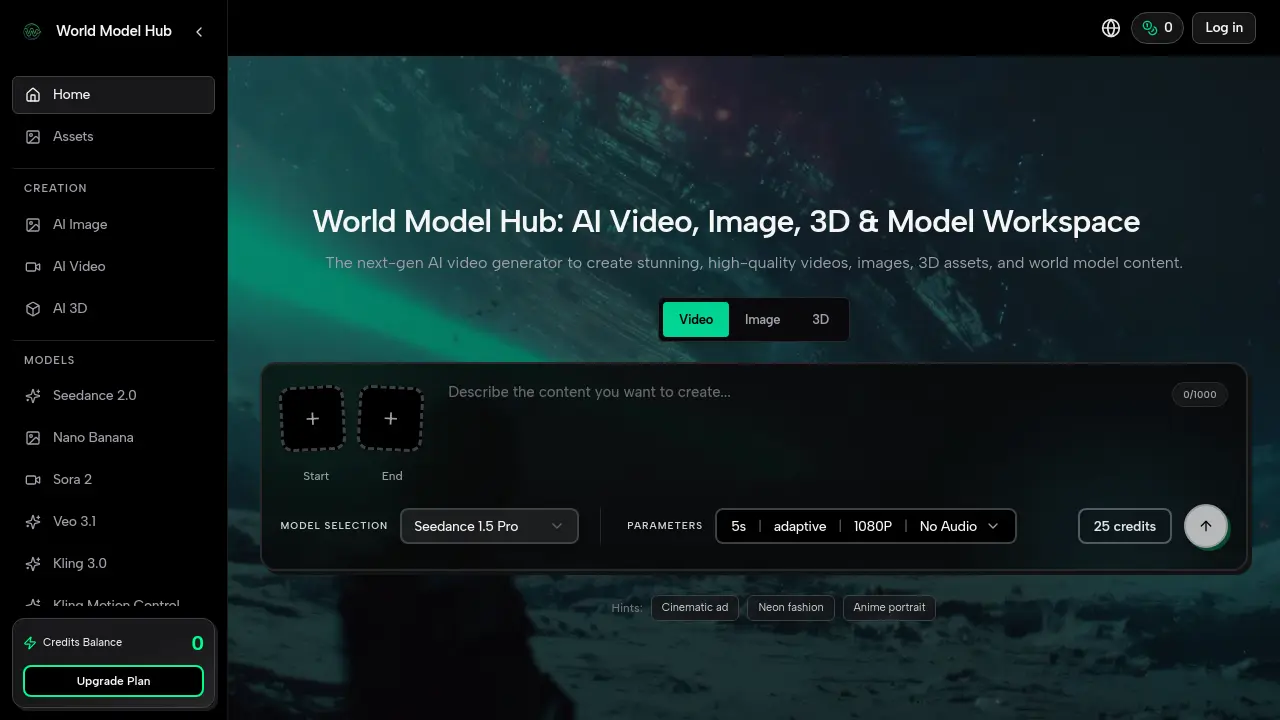
FAQs of World Model Hub
What is World Model Hub?
World Model Hub is a unified AI platform designed for generating video, image, and 3D content. It aggregates multiple leading AI models, such as Seedance and Sora 2, into a single workspace. The platform focuses on production-ready workflows, enabling stable and scalable content creation for professional use cases across various industries.
What can I create with this AI video, image, and 3D generator?
Users can generate AI-created videos, images, 3D models, and world model content. Practical applications include brand advertisements, social media shorts, educational explainers, product demos, game concept art, and pre-visualization for film. The platform supports both short-form and longer content, depending on model capabilities and parameters.
How do I start an AI video, image, or 3D generation project?
Begin by selecting an appropriate AI model for your desired media type—video, image, or 3D. Next, craft a detailed prompt describing the scene, style, and specific elements. Initiate the generation process, then use refinement tools to enhance motion, framing, or details as needed. Finally, export the completed asset in your required format for publishing or further use.
What makes WMHub different from a typical AI video generator or AI image generator?
WMHub distinguishes itself by integrating numerous specialized AI models into one platform, allowing direct comparison and selection without switching tools. It emphasizes production consistency, cross-channel output formats, and stable quality scaling. This unified approach streamlines workflows for teams, reducing iteration costs and supporting enterprise-level creative demands.
How fast are AI video and AI image results generated?
Generation speed depends on the selected model, output resolution, and content complexity. Initial results typically appear within seconds for images and short video clips. Longer or higher-resolution videos may require more processing time. The platform's infrastructure is optimized for rapid iteration, enabling quick previews and refinements within a single session.
Is there a free tier for this AI creation platform, and how do upgrades work?
WMHub uses a credit-based system with initial free credits for new users to test the platform. Additional credits can be purchased through various upgrade plans, which offer different credit bundles and features. Pricing details, including per-generation credit costs for each model, are available on the dedicated pricing page for transparent cost management.
Can I use WMHub AI outputs for commercial work?
Yes, outputs generated on WMHub can be used for commercial purposes, such as client projects, advertisements, and product content. Users are advised to review the Terms of Service for any specific licensing terms or attribution requirements. The platform is designed to support professional and business workflows legally and ethically.
How can I keep AI video and AI image results consistent across iterations?
Consistency is maintained through careful prompt engineering, using style references, and controlling random seeds. WMHub's workflow allows users to save and reuse parameters, ensuring uniform character appearance, visual style, and quality across multiple generations. This is critical for branding and series-based content that requires repeatable results.
Who should use WMHub for AI content creation?
WMHub is suitable for marketing teams, content creators, educators, e-commerce professionals, filmmakers, and game developers. It serves users who need to produce high-volume, quality-controlled assets efficiently. The platform is ideal for scenarios like campaign creation, social media scheduling, training modules, product visualization, and creative pre-production.
How does the credit system work on WMHub?
Each generation consumes a set number of credits based on the chosen model, video duration, resolution, and any additional parameters. Credits are deducted automatically from the user's balance upon creation. Users can monitor their remaining credits in the account dashboard. Balance replenishment occurs through plan purchases or occasional promotional free credits, ensuring flexible, pay-as-you-go usage.
What video AI models are available on WMHub?
The platform supports video models including Seedance 1.5 Pro, Seedance 2.0, Sora 2, Veo 3.1, Kling 3.0, Kling Motion Control, Kling 2.6, and Grok Imagine. Each model offers unique strengths, such as cinematic storytelling, motion control, or specific aesthetic styles, allowing users to select the best fit for their project requirements.
What image AI models are available for generation?
Image generation is powered by models like Nano Banana, Nano Banana 2, and Nano Banana Pro. These range from general-purpose image creation to more advanced, high-fidelity outputs. The Nano Banana series is optimized for diverse artistic and commercial image tasks, from portraits to detailed illustrations.
What 3D AI models does WMHub support?
Currently, WMHub provides Hunyuan 3D V3.1 for 3D asset generation. This model converts textual descriptions into three-dimensional objects and scenes, facilitating rapid prototyping, environment design, and concept visualization for industries like gaming, architecture, and product development.
Is there a maximum duration for AI-generated videos?
The default video generation length is typically 5 seconds, but some models offer adaptive settings for longer durations. Maximum achievable length varies by model and selected resolution. Users should consult the specific model's documentation on WMHub for precise limitations and options for extending video length.
How to use World Model Hub
- Access the World Model Hub platform and select the desired content type—video, image, or 3D—from the main navigation to enter the creation workspace.
- Browse the model hub to select an appropriate AI model, such as Seedance for video or Nano Banana for images, based on the project's specific creative requirements.
- Compose a detailed prompt describing the scene, style, and key elements, incorporating hint keywords like "cinematic ad" to guide the AI generation effectively.
- Configure generation parameters including duration, resolution (e.g., 1080p), adaptive settings, and style hints to control output quality and credit consumption.
- Verify the available credit balance in the system meter, then initiate generation; the platform automatically deducts credits based on model and parameter choices.
- Wait for the initial output to render, monitoring progress; video generation typically takes longer than image or 3D asset creation.
- Review the generated media for alignment with the prompt and quality; use enhancement tools to refine motion, framing, or visual details iteratively.
- Repeat generation with adjusted prompts or parameters to improve consistency and achieve production-ready quality suitable for professional use.
- Export the final asset in preferred formats (e.g., MP4, PNG) and utilize publish options for direct cross-channel deployment to social or campaign platforms.
- Monitor ongoing credit usage and consider plan upgrades for higher-volume needs; regularly explore new models in the hub for future projects.
