
Smartrazor - Edit YouTube videos faster and easier
| Added on: | May 12, 2024 |
| Monthly Visits: | 1.99K |
| Social & Email: | -- |

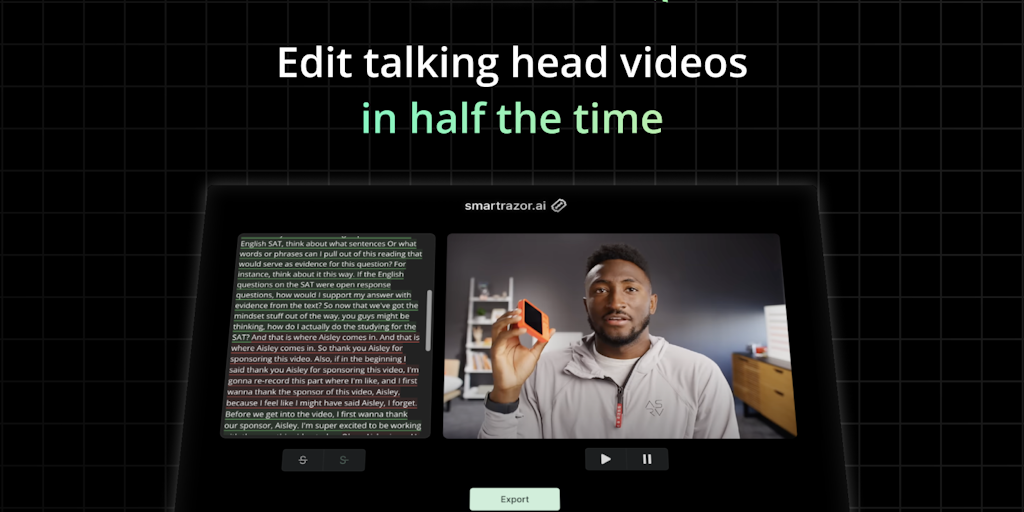
What is Smartrazor
Smartrazor is an AI tool that aims to help YouTubers cut their editing time in half. It's designed for creators who spend a lot of time editing their videos and are looking for ways to streamline their workflow. Smartrazor leverages AI technology to automate certain aspects of the editing process, like cutting out unnecessary sections, adding transitions, and even generating subtitles. Some users have reported that it's a game-changer for their editing process, with some even saying they can't wait to use it. 😉
Core Features of Smartrazor
Cut Editing Time in Half
Smartrazor is an AI tool designed to help YouTubers significantly reduce their video editing time. It utilizes advanced technology to streamline the editing process, enabling creators to focus on other aspects of their content.
Smartrazor's Key Features:
Automatic Transcription
Smartrazor automatically transcribes your video content, making it easier to manage and edit. It converts speech into text, which can then be used for creating captions, subtitles, or even generating a script for your video.
AI-Powered Editing Suggestions
The AI analyzes your video content and provides intelligent editing suggestions. These suggestions can help you identify sections to trim, enhance, or even add transitions.
Automated Video Optimization
Smartrazor optimizes your videos for better performance. It can analyze the content, provide insights on how to improve the engagement and optimize the video for different platforms.
Simplified Content Management
Smartrazor helps manage your video content efficiently. It organizes your videos, allowing you to easily find and access them when needed.
Improved Workflow
By automating several editing tasks, Smartrazor streamlines your video creation workflow, giving you more time to focus on creating high-quality content.
FAQs of Smartrazor
What is Smartrazor?
Smartrazor is an AI-powered tool that helps YouTubers cut their editing time in half. It uses AI to analyze your video footage and automatically identifies the best parts to keep, so you can spend less time editing and more time creating.
How do I use Smartrazor?
You can upload your video footage to Smartrazor and it will automatically analyze it for you. Then, you can choose to keep the parts that Smartrazor has identified as the best, or you can manually edit the video yourself.
What makes Smartrazor different from other editing tools?
Smartrazor is different from other editing tools because it uses AI to do the work for you. This means you can spend less time editing and more time creating content. Our friends at Upperhunt think it solves a very real and interesting problem for YouTubers!
What are some of the benefits of using Smartrazor?
Some of the benefits of using Smartrazor include:
- Save time: Smartrazor can help you cut your editing time in half.
- Improve your videos: Smartrazor can help you identify the best parts of your video to keep, so you can create better videos.
- Create more content: Smartrazor can help you create more content by freeing up your time.
Who is Smartrazor for?
Smartrazor is for anyone who creates YouTube videos. It's perfect for YouTubers of all levels, from beginners to professionals. It's also great for anyone who wants to create high-quality videos without spending a lot of time editing.
Smartrazor Website Traffic Analysis
Latest traffic information
- Monthly Visits1.99K
- Bounce Rate39.24%
- Pages Per Visit1.11
- Visit Duration00:00:00
- Global Rank9.51M
- Country/Region Ranking5.64M
Top Keywords
| Keyword | Traffic | Volume | Cost Per Click |
|---|---|---|---|
| razor clips for content creators | -- | 370 | -- |
| razor on editting | -- | 30 | -- |
| shaving razor-ai | -- | 10 | -- |
Top Regions
| Region | Percentage |
|---|---|
| Mexico | 59.36% |
| Spain | 37.63% |
| United Kingdom | 3.01% |
Smartrazor Alternatives
Scribix is an AI video clipper that cuts podcasts and interviews into captioned vertical shorts, then publishes them to YouTube, TikTok and LinkedIn.
Katto turns long videos and podcasts into scored, captioned 9:16 clips. It ranks clips by viral potential and exports them to 7 platforms from one place.
Gemini Omni is an online AI video generator and editor that turns a text prompt or reference image into a video, then refines each shot through conversational edits while keeping characters and the scene consistent.
Remove image backgrounds, video watermarks, burned-in subtitles and video backgrounds with Rmark AI. Upload a file, preview, then download a clean copy.

AI video production for courses and training. Create editable, reviewable videos from a topic or source material—one video or a chapter-based series.
Video Editor AI automatically turns long videos into viral shorts with AI highlight detection, smart captions, and auto reframe. Free, no sign-up required.
VidBG Remover uses AI to remove video backgrounds and export transparent footage with an alpha channel. Supports MP4, MOV, WebM with stable edges.
Medeo creates professional AI videos via chat. Supports text, image, and URL inputs with AI editing and character consistency for ads, explainers, and shorts.
Remove hardcoded subtitles from short videos with NanoPhoto.AI. Upload MP4, MOV, or WebM, let AI clean burned-in text, and download a clean subtitle-free MP4.
Face AI, a free AI video face swap tool, enables users to replace one or multiple faces in videos up to 15 seconds, delivering 4K, watermark‑free results.
Omni Flash is an AI video editor for creators that enables natural‑language edits, using image, audio or sketch references to swap characters, transfer style or motion, while preserving scene coherence and physics across multi‑turn refinements.
Copy Video AI extracts scene, camera, motion, audio and style details from YouTube links or MP4 uploads, generating a reusable structured prompt for creators, marketers and editors.