
Medeo AI Video Generator – Chat with AI to Create Videos

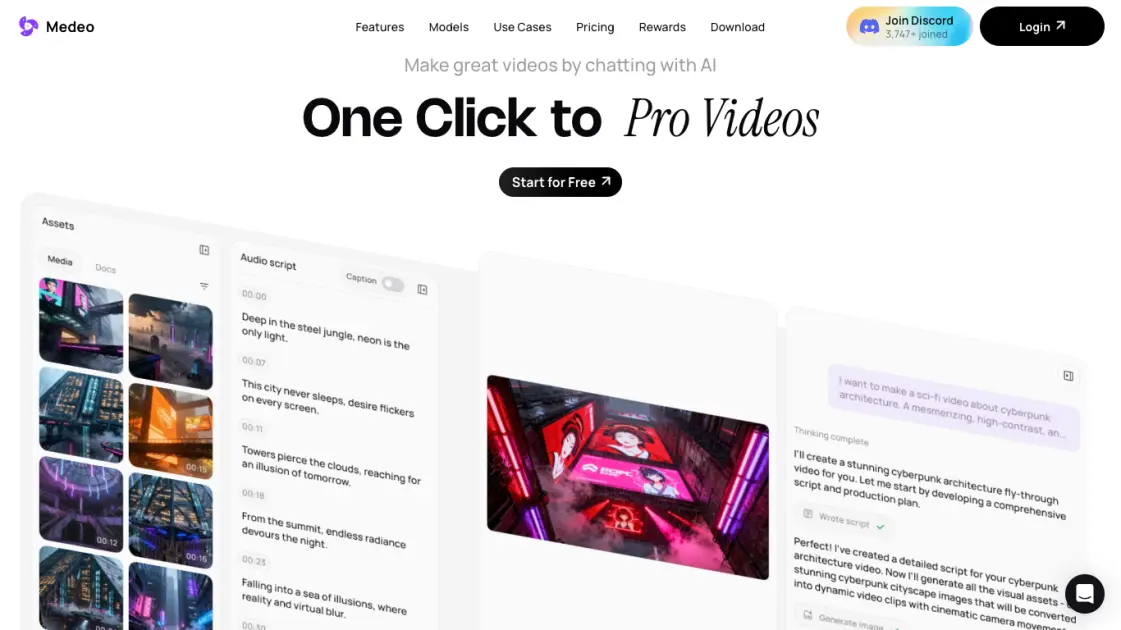
What is Medeo
Medeo is an AI video generation platform that enables users to create professional videos by chatting with an AI assistant instead of using complex editing software. The tool accepts text, images, URLs, and existing media as input, then generates polished videos suitable for marketing ads, educational explainers, animated shorts, and social media content. A key feature is character consistency, which locks a character's appearance across scenes, locations, and emotions throughout the video. Medeo also offers a chat-based editing system where users can request changes in natural language, such as making a segment faster or changing background music. The platform provides millions of stock assets, hundreds of AI voices, and flexible export options in both 16:9 and 9:16 aspect ratios. Recipe templates like Flavor Diorama Ad and World Cup Smash help users start quickly, and pricing begins with a free tier before scaling to Pro and enterprise plans.
How does Medeo work
Medeo generates professional AI videos through a conversational interface where users describe their vision in natural language and the system assembles complete productions from text, images, URLs, audio, or video inputs. The chat-based workflow handles both creation and iterative editing — users request changes like pacing adjustments or music swaps through dialogue while the platform maintains character visual consistency across scenes. An integrated visual track synchronizes scripts with millions of stock assets, AI voices, and user uploads, allowing drag-and-drop refinement. Projects export in 16:9 or 9:16 ratios, and recipe templates accelerate common formats like ads, explainers, and shorts.
Benefits of Medeo
Medeo enables users to create AI videos through a conversational chat interface, eliminating the need for editing skills. The platform supports inputs including text, images, URLs, and media while maintaining character consistency across scenes — useful for brand storytelling. Users access millions of stock assets, hundreds of AI voices, and flexible exports in 16:9 and 9:16 ratios. Recipe templates accelerate production for ads, explainers, and shorts. The free tier provides features with 1GB storage, though the Pro plan's 700 credits (roughly three minutes of AI video) may limit creators. Collaborative editing supports teams, but the credit model can become costly for heavy use.
Pros and Cons of Medeo
Pros
- Chat-based interface requires no video editing skills
- Character consistency maintained across all generated scenes
- Supports text, image, URL, and blog post inputs
- Exports in both 16:9 and 9:16 aspect ratios
- Free tier available for testing core features
Cons
- Pro plan requires annual billing commitment
- Credit system limits monthly video generation minutes
- Free tier offers only 1GB storage capacity
- No monthly billing option for Pro subscription
- Advanced features may have learning curve
Core Features of Medeo
Chat-Based Video Creation
Users generate professional videos by conversing with AI, describing ideas in natural language without touching complex editing tools or timelines.
Chat-Based Video Editing
Modify videos through conversational commands like "make this faster" or "change the music," with instant updates applied automatically.
Character Consistency Engine
Lock character identity across scenes, generating the same persona in new locations, actions, and emotions while maintaining perfect visual continuity.
Multi-Format Asset Library
Access millions of stock images, videos, and hundreds of AI voices, plus upload custom files, text, and URLs for unified creative resources.
Visual Timeline Editor
Drag and modify every sound, subtitle, and asset on an intuitive track that stays perfectly synced with the generated script.
Flexible Aspect Ratio Export
Export finished projects in both 16:9 and 9:16 formats, optimizing content for any platform or device requirement.
Recipe Template Library
Choose from diverse pre-built templates including product ads, educational explainers, animated shorts, and social media formats.
URL-to-Video Conversion
Transform web pages, blog posts, and online articles directly into structured video content with automated extraction and formatting.
AI Image Generation and Animation
Create custom visuals from text prompts and animate static images into dynamic video sequences using integrated generative models.
Use Cases of Medeo
- Content creators: Produce faceless YouTube videos at scale using chat-based editing and stock assets
- Marketing teams: Generate professional product ads and explainer videos without video editing expertise
- Real estate agents: Create property showcase videos from listings using URL-to-video and image animation
- Educators: Build animated explainer videos for courses with character consistency and AI voiceovers
- Social media managers: Automate short-form video production for TikTok and Reels with flexible aspect ratios
FAQs of Medeo
What is Medeo and how does it work?
Medeo is an AI video generation platform that creates professional videos through a chat interface. Users describe their video idea in natural language, and the AI generates complete videos with visuals, audio, subtitles, and synchronized timing. The platform supports multiple input types including text prompts, images, URLs, and existing video files, then uses AI models to transform these into polished video content without requiring any video editing expertise.
Who is Medeo designed for?
Medeo serves content creators, marketers, educators, and businesses who need professional video content without learning complex editing software. The platform suits YouTube automation channels, faceless video creators, real estate agents showcasing properties, and marketing teams producing explainer videos or social media ads. Both beginners with zero editing experience and professionals seeking faster production workflows can benefit from the chat-based approach.
How do I create videos with Medeo?
Creating videos starts by opening the chat interface and describing the desired video concept in plain language. The AI then generates a complete video draft including script, visual assets from the built-in stock library or user uploads, AI voiceover, and synchronized subtitles. Users can refine the output through conversational edits like "make the intro shorter" or "change the background music," with changes applied instantly. Final videos export in both 16:9 and 9:16 aspect ratios for different platforms.
What pricing plans does Medeo offer?
Medeo provides a Free tier at $0 per month with core features including chat-based video creation, AI generative tools, video editor access, collaborative editing, and 1GB storage. The Pro plan costs $39 per month billed annually at $314, offering 700 monthly credits (approximately 3 minutes of full AI video or 30 minutes using stock footage), unlimited storage, and access to all features. Both tiers include the complete creative suite with recipe templates and character consistency tools.
How does Medeo compare to other AI video generators?
Unlike traditional AI video tools that require timeline editing or prompt engineering, Medeo uses a conversational interface where users simply chat their vision into existence. The platform distinguishes itself with character consistency technology that maintains visual identity across scenes, an integrated visual track for precise audio-visual synchronization, and recipe templates for specific video formats like product ads or educational explainers. The all-in-one asset library eliminates the need to source media from external sites.
How to use Medeo
- Visit medeo.app and click "Get Started" to create a free account using email or social login
- Choose a recipe template or start from scratch by describing your video idea in the chat
- Provide input materials such as text scripts, images, URLs, or audio files for the AI to process
- Review the AI-generated video draft and request edits by typing natural language instructions
- Lock character appearances for consistency across scenes using the character consistency feature
- Adjust timing, music, subtitles, and visual assets on the visual track timeline
- Select export aspect ratio (16:9 or 9:16) based on your target platform requirements
- Download the final video or share directly to social media platforms from the platform
Medeo Website Traffic Analysis
Latest traffic information
- Monthly Visits114.56K
- Bounce Rate45.04%
- Pages Per Visit2.24
- Visit Duration00:00:37
- Global Rank341.03K
- Country/Region Ranking16.98K
Top Keywords
| Keyword | Traffic | Volume | Cost Per Click |
|---|---|---|---|
| medeo | 6.54K | 27.78K | $2.7 |
| medeo ai | 1.61K | 1.82K | $1.6 |
| synthesia | 1.14K | 178.92K | $1.13 |
| midjourney | 420 | 1.26M | $0.91 |
| medeo app | 330 | 740 | -- |
Top Regions
| Region | Percentage |
|---|---|
| United States | 22.59% |
| Nigeria | 14% |
| Taiwan | 12.7% |
| Brazil | 8.99% |
| Morocco | 3.33% |
Medeo Alternatives
Seedance 3.0 preview page: planned multi-shot continuity, scene editing and audio-visual sync for AI video, while the on-page generator runs Seedance 2.5.
Browser workspace for AI image generation, reference photo editing, and short video drafts, aimed at creators, marketers, and product teams.
Black Forest Labs' multimodal model with a web generator for text-to-video, image-to-video and image editing with native audio, for creators and marketers.
Wan API is an independent platform for Wan and Seedance video models. Compare specs and rates, generate clips in the Playground, or call them through one API.
Seedance 3.0 turns text, images, video clips, and audio into videos with sound, and edits one part of a clip without regenerating the rest.
Scribix is an AI video clipper that cuts podcasts and interviews into captioned vertical shorts, then publishes them to YouTube, TikTok and LinkedIn.
Wery is a virtual AI studio that routes one goal to specialist agents for video, images, music and documents, keeping characters and project assets consistent.

AI video and image studio with text-to-video, image-to-video and keyframe control across Seedance, Kling, Wan and Vidu — all on one credit balance.
Browser studio for AI video, image and music generation with Grok Imagine, Kling and GPT Image models. Free daily credits, no sign-up required.
SeaMove AI is an AI video and image generation platform offering Seedance 2.0 and Seedance 2.5 models for text-to-video, image-to-video, and reference-based creation. Features multi-shot continuity, director-level control, and audio-visual sync for creators and studios.
Turns two separate portraits into a 15-second vertical rap duet video on an orange stage with a shared microphone and the original soundtrack. Free 480P preview available.
Katto turns long videos and podcasts into scored, captioned 9:16 clips. It ranks clips by viral potential and exports them to 7 platforms from one place.