
NanoPhoto.AI Video Subtitle Remover
AI Video Subtitle Remover — Remove Burned-in Captions Free

What is NanoPhoto.AI Video Subtitle Remover
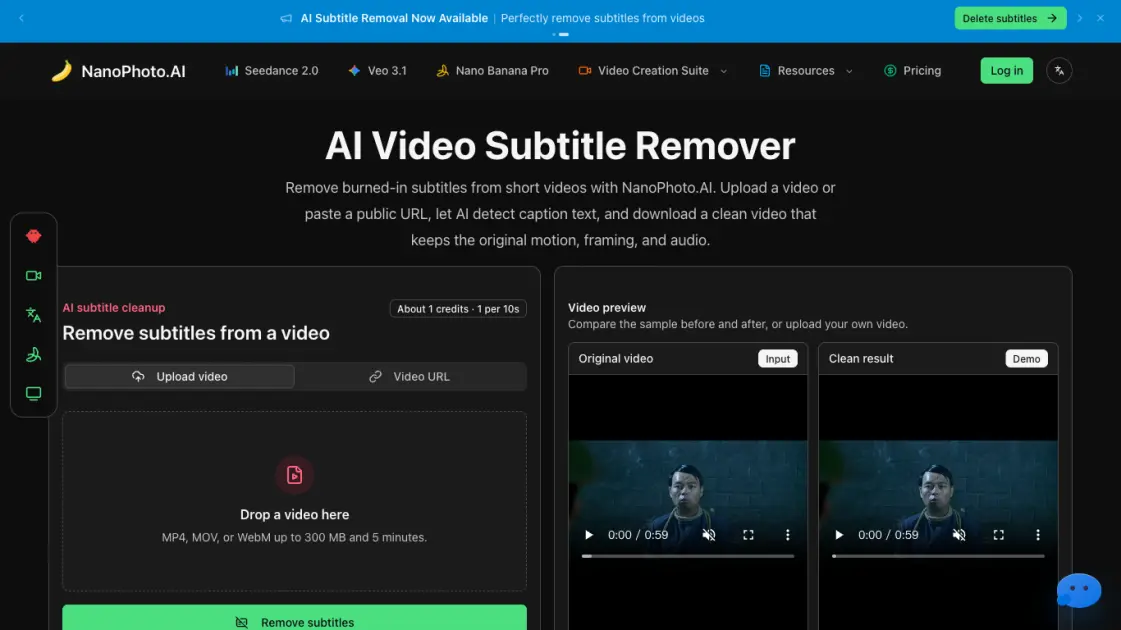
NanoPhoto.AI offers an AI-powered subtitle remover that detects and removes burned-in captions from short videos without manual editing. Users upload an MP4, MOV, or WebM clip up to 300 MB and 5 minutes, or paste a public HTTPS video URL. The AI analyzes each frame, identifies hardcoded caption regions, and reconstructs the pixel data behind the text. The output preserves the original motion, audio track, and visual framing, making it suitable for content repurposing and localization workflows. Credits are calculated by duration at one credit per ten seconds of video, rounded up for short clips.
How does NanoPhoto.AI Video Subtitle Remover work
The user uploads a local video file or provides a public HTTPS URL. NanoPhoto.AI transfers the video to its storage and submits it to the AI processing pipeline. The subtitle remover scans each frame to detect hardcoded caption text, then reconstructs the pixel data behind those regions using frame-by-frame computer vision. Once processing finishes, the clean video is saved to NanoPhoto.AI storage, and the user receives a stable download link. The entire workflow preserves the original audio track, timing, and visual framing.
Benefits of NanoPhoto.AI Video Subtitle Remover
NanoPhoto.AI Video Subtitle Remover fills a practical gap for creators who need clean clips without launching a full video editor. Its AI handles the frame-by-frame caption removal automatically, so the user only needs to upload or paste a URL and wait for the processed output. The credit model ties cost directly to video length, which keeps short-form cleanup economical. The tool also saves the result to stable storage instead of relying on a temporary processing URL, giving users a reliable download link for editing, posting, or archiving.
Pros and Cons of NanoPhoto.AI Video Subtitle Remover
Pros
- Removes burned-in subtitles without manual editing
- Preserves original audio and video timing
- Accepts uploads and public URLs
- Credit cost scales with video duration
- Saves output to stable cloud storage
Cons
- Limited to 5 minutes and 300 MB per video
- Re-encoding may alter file size slightly
- Cannot process removable subtitle tracks
Core Features of NanoPhoto.AI Video Subtitle Remover
AI Subtitle Detection and Removal
The AI identifies burned-in caption regions in each frame and reconstructs the background pixels, producing a clean video without visible subtitles.
Stable Video Output
Processed files are saved to NanoPhoto.AI storage with a reliable download link, keeping the original framing, motion, and audio track intact.
Duration-based Credit System
Subtitle removal costs one credit per ten seconds of footage, rounded up. A 26-second clip costs 3 credits, making short-video cleanup affordable.
Multi-format Upload Support
The tool accepts MP4, MOV, and WebM files up to 300 MB and 5 minutes, covering the most common short-video formats for creators and operators.
URL-based Processing
Instead of uploading, users can paste a public HTTPS video URL, and the server retrieves the file directly for AI cleanup.
Use Cases of NanoPhoto.AI Video Subtitle Remover
- Social media editors: Clean burned-in captions before cutting videos for Shorts, Reels, TikTok, and ads that need fresh text overlays.
- Marketing teams: Remove outdated subtitles from product demos, campaign clips, and course teasers for reuse in new layouts.
- Localization specialists: Prepare clean master clips before adding translated subtitles, dubbing, or new captions in post-production.
- Content archivists: Strip platform overlays and draft captions from archived footage for clean repurposing.
FAQs of NanoPhoto.AI Video Subtitle Remover
What kind of subtitles can this remove?
The tool is designed for burned-in or hardcoded subtitles embedded in the video image. It does not handle removable subtitle tracks, which can usually be disabled in a standard video player or editor.
How are credits calculated?
Credits are based on video duration at one credit per ten seconds, rounded up. A 26-second clip costs 3 credits. This makes short-video cleanup predictable and affordable.
Which video formats are supported?
Users can upload MP4, MOV, or WebM files up to 300 MB and 5 minutes in length. The tool also accepts public HTTPS video URLs for direct server-side processing.
Will the result keep my audio and timing?
The cleaned video retains the original audio track, timing, and visual framing. Re-encoding during processing may slightly change bitrate or file size.
Why do you store the result after processing?
The AI processing service returns a temporary URL. NanoPhoto.AI downloads the result to its own storage so the final download link remains stable and accessible.
How to use NanoPhoto.AI Video Subtitle Remover
- Upload or paste a URL: Start with a local MP4, MOV, or WebM file, or provide a public HTTPS video URL for server-side retrieval.
- AI removes caption text: The processing pipeline identifies hardcoded subtitles and repairs the background pixels frame by frame.
- Review and download: Compare the source and clean result in the browser, then download the subtitle-free MP4 for editing, posting, or archiving.
NanoPhoto.AI Video Subtitle Remover Website Traffic Analysis
Latest traffic information
- Monthly Visits131.03K
- Bounce Rate46.71%
- Pages Per Visit2.22
- Visit Duration00:01:13
- Global Rank312.86K
- Country/Region Ranking24.09K
Visits Over Time
Traffic Sources
- Direct: 59.44%
- Organic Search: 20.39%
- Referrals: 10.82%
- Generative AI: 3.31%
- Paid Search: 2.62%
- Organic Social: 2.55%
Top Keywords
| Keyword | Traffic | Volume | Cost Per Click |
|---|---|---|---|
| nano banana | 2.11K | 3.24M | $0.65 |
| nanophoto.ai | 670 | 750 | -- |
| nano banana pro | 640 | 653.89K | $1.23 |
| nanophoto | 550 | 560 | $1.11 |
| nano photo | 540 | 10 | -- |
Top Regions
| Region | Percentage |
|---|---|
| China | 58.8% |
| United States | 3.72% |
| Ghana | 3.28% |
| Hong Kong | 2.54% |
| Taiwan | 2.18% |
