
Captions Generator
Captions Generator — Free AI Caption & Subtitle Generator

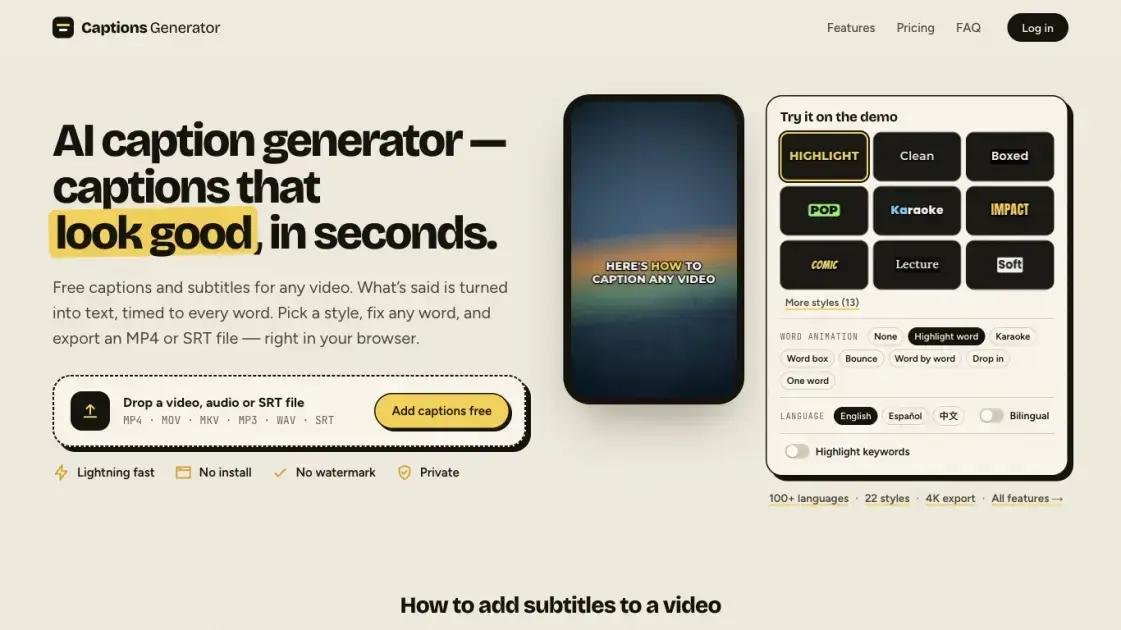
What is Captions Generator
Captions Generator (captionsgenerator.app) is a browser-based, AI-powered caption and subtitle generator. It turns the speech in a video or audio file into text that is timed to every word, then lets the user style, edit and translate that text before export. The tool targets creators who need subtitles for TikTok, Reels, YouTube Shorts or long-form video, and viewers who rely on captions for accessibility. Output is a burned-in MP4 or a subtitle file in SRT, VTT or TXT format, produced without installing software. Only the audio track is sent for transcription, so the video itself stays on the device.
How does Captions Generator work
Captions Generator runs the captioning work in two places. The editor itself renders and exports inside the browser, so the video file never leaves the device; the same rendering code draws both the editor preview and the final export. Only the audio track is sent to an AI speech-recognition service, which detects the spoken language on its own and returns text with timings for each word. That transcript becomes the subtitle track, which can then be restyled or translated, and translation and export run without consuming the free monthly caption minutes. On export the user chooses between burning the captions into the video and downloading a separate SRT, VTT or TXT file; importing an existing SRT or VTT skips transcription entirely.
Benefits of Captions Generator
The free plan is unusually complete for a caption tool: exports carry no watermark, reach 1080p, and include SRT, VTT and TXT downloads plus unlimited free translation into more than 100 languages. Because rendering happens in the browser, the video file is never uploaded, which keeps private or unreleased footage off third-party servers. Word-level timing plus 22 styles and a wide set of word animations means the captions can be styled for short vertical clips as easily as for 16:9 video, and the same export doubles as an SRT generator. Editing is available before download, so names and misheard words can be corrected rather than re-transcribed, and the safe zone checker reports the exact areas each social app covers.
Pros and Cons of Captions Generator
Pros
- Free plan with no watermark and 1080p export
- SRT, VTT and TXT downloads, plus free translation into 100+ languages
- Video never leaves the device; only audio is sent for transcription
- Word-level timing with 22 styles and word animations
- Built-in safe zone checker and PNG overlays for Reels, TikTok and Shorts
Cons
- An account is required, even on the free plan
- Free accounts export videos of no more than 3 minutes
- Free plan caps captions at 30 minutes per month
- Word animations, bilingual captions and keyword highlights are Pro only
- The Pro fair-use limit is 50 hours of captions a month
Core Features of Captions Generator
Automatic transcription with word-level timing
Speech is converted to text and each word is timed against the audio, so captions appear exactly when they are spoken. Transcription covers 100 languages with automatic language detection, including sentences that mix English and Chinese.
Caption styles and word animations
The editor ships 22 caption styles, eight of them free, ranging from Highlight, Clean and Boxed to Karaoke, Pop, Comic, Neon and Impact. Word animations include highlight word, karaoke, word box, bounce, word by word, drop in and one word, alongside line animations such as pop, slide and typewriter.
Subtitle translation and bilingual captions
Captions can be translated into more than 100 languages for free, including right-to-left scripts such as Arabic and Hebrew. Pro adds bilingual captions that display two languages at once, useful for learners and viewers abroad.
MP4, SRT, VTT and TXT export
Captions can be burned into the video and exported as an MP4 up to 1080p on the free plan and up to 4K on Pro, with no watermark on either. Subtitle files are downloadable as SRT, VTT or plain-text TXT, and the same export can produce a transcript as a Word or TXT file.
Editing, SRT import and speaker names
Any word can be fixed after transcription, and lines can be merged or split before download. Existing SRT or VTT files can be imported, restyled and burned into a video, and the audio-to-SRT workflow detects speakers automatically so their names can be added to the SRT, VTT or transcript.
Safe zone checker and PNG overlays
A separate checker shows the areas Instagram, TikTok and YouTube Shorts cover on screen. It reports the safe zones for Reels, Stories, TikTok and Shorts and offers transparent 1080 × 1920 PNG overlays to lay over footage in CapCut, Premiere or Canva.
Use Cases of Captions Generator
- Social media creators: add bold, styled captions to TikToks, Reels and YouTube Shorts that stay clear of each app's interface.
- YouTubers: upload an SRT file so viewers can switch subtitles on, or burn captions into the video.
- Podcasters and interviewers: convert MP3, WAV or M4A audio into a timed SRT, with speaker names added automatically for podcast transcripts.
- Learners and international audiences: translate subtitles into more than 100 languages, or show two languages at once with bilingual captions.
- Accessibility teams: produce captions for prerecorded audio, which WCAG 2.2 treats as a Level A requirement.
FAQs of Captions Generator
Is Captions Generator free?
Yes. A free account captions and edits videos up to 90 minutes long and exports them up to 3 minutes, with 30 minutes of captions a month, no watermark, 1080p MP4 output, SRT, VTT and TXT downloads and translation into 100+ languages. Free minutes reset on the 1st of each month.
Do exported videos have a watermark?
No. Free exports carry no watermark and no logo in 720p or 1080p, and subtitle files never include one. Every Pro style and word animation can be tried in the editor before upgrading.
Which languages are supported?
Transcription works in 100 languages with automatic detection, and translation covers more than 100 languages for free, including right-to-left scripts such as Arabic and Hebrew.
Are uploaded videos stored?
The video stays on the device and is never uploaded; only the audio track is sent to produce the transcript, and it is not stored.
Does it work for TikTok, Reels and YouTube Shorts?
Yes. Captions are drawn at the size of the video, so vertical 9:16 clips work like 16:9 video, and a safe zone checker shows the areas each app covers so text is not hidden under buttons.
What does Pro add?
Pro removes the export length and monthly minute limits, exports up to 4K, and adds all 22 styles with word animations, bilingual captions, AI keyword highlights, custom fonts and saved styles.
Can an existing SRT file be used?
Yes. An SRT or VTT file can be imported, restyled and burned into a video, or edited and converted to another subtitle format.
How to use Captions Generator
- Drop a video, audio or SRT file into the upload box; supported inputs include MP4, MOV, MKV, WEBM, MP3, WAV, M4A, AAC, FLAC, OGG, SRT and VTT.
- Let the AI transcribe the speech in one of 100 languages, detected automatically.
- Check the transcript and fix any word, then merge or split lines where needed.
- Pick one of the caption styles and adjust the font, colors, outline, background and position; add word animations or keyword highlights on Pro.
- Translate the captions into another language, or switch on bilingual captions, if required.
- Export a captioned MP4 up to 1080p or 4K, or download the subtitles as SRT, VTT or TXT.
Captions Generator Alternatives
Katto turns long videos and podcasts into scored, captioned 9:16 clips. It ranks clips by viral potential and exports them to 7 platforms from one place.
Translate Now is a browser-based AI voice translator for real-time speech translation, live transcription, and replayable bilingual audio transcripts.

OpenSubs is a free in-browser AI subtitle generator that transcribes speech with Whisper, translates into 20 languages and burns captions into video.
talat transcribes meetings, dictation and recordings locally on your Mac or Windows PC, with private AI notes, summaries and speaker identification.
Video Editor AI automatically turns long videos into viral shorts with AI highlight detection, smart captions, and auto reframe. Free, no sign-up required.
Viblo AI YouTube MP3 Downloader inspects public videos and lists available M4A or WebM audio formats with size, duration, and temporary direct links.
Turn public Instagram Reels and videos into clean transcripts with NanoPhoto.AI. Copy, read, and download spoken text with one credit.
VoiceScriber turns speech into text in 100+ languages using on-device AI on your iPhone. Works completely offline with no uploads for total privacy.
Remove hardcoded subtitles from short videos with NanoPhoto.AI. Upload MP4, MOV, or WebM, let AI clean burned-in text, and download a clean subtitle-free MP4.
Free to start · Search any podcast, read full transcripts with timestamps, get AI summaries, key takeaways, mind maps and chat every episode.
Petti Chat is an AI-powered web tool that lets pet owners capture short pet sounds, interpret likely intent in human language, and reply with calm, pet‑friendly audio, ensuring privacy and real‑time interaction.
GPT Realtime 2 is an AI voice generator for developers and product teams, offering realtime speech‑to‑speech interaction, low‑latency audio, prompt control, tool handoffs and downloadable session recordings.