
Translate Now
Translate Now: AI Voice Translator for Live Speech and Audio

What is Translate Now
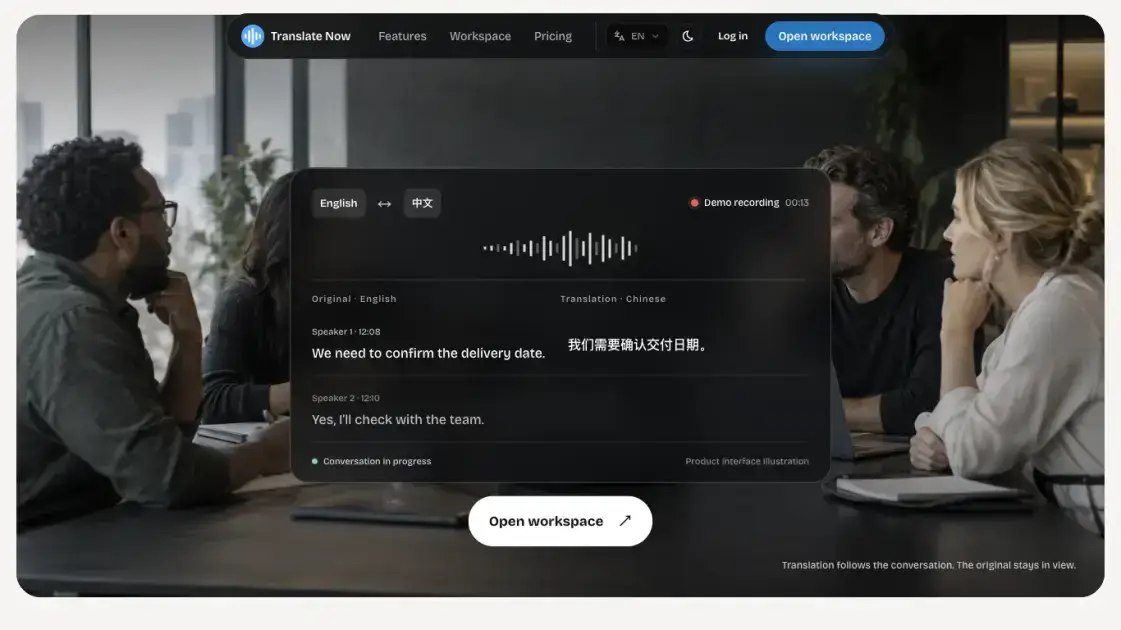
Translate Now is a browser-based AI translator built for live conversations and recorded audio. It turns real-time speech into a bilingual transcript, keeping the original wording and its translation side by side while people talk. Speaker labels and timestamps keep multi-person meetings, classes, and interviews in order, and partial speech stays visible before a speaker finishes. The same bilingual structure works for uploaded recordings, which become timestamped transcripts you can search, replay, and verify against the source audio. Review tools such as notes, summaries, and keywords stay connected to the transcript in one workspace, and sessions can be exported for later use. The product runs entirely in a modern browser with no app install, which makes it a practical choice for anyone who needs live translation and a reliable bilingual record of what was said.
How does Translate Now work
Translate Now works in one continuous flow around a conversation. Users first choose the spoken language and the target language, keeping both visible for checking names, numbers, and specialist terms. They then start live capture with the microphone or upload an audio file, and the AI translator streams original and translated text in sequence while adding speaker labels and timestamps. Partial speech appears before a speaker finishes, and source text stays beside its translation throughout. After capture, the same bilingual transcript becomes a searchable record, where a phrase can be replayed, verified against the original audio, annotated, and exported. The tool treats speech as a sequence of speakers, timing, and context, so the live moment and the review moment stay connected in one workspace.
Benefits of Translate Now
Translate Now keeps the source and the translation side by side, so the meaning of every line can be checked against the original wording while people speak. Speaker-aware ordering and timestamps make multi-person sessions readable, and search with audio replay turns review into a verification step instead of guesswork. Because everything stays connected in one workspace, a session becomes a bilingual record that is easy to revisit, annotate, and export. Billing is transparent: recording, realtime transcription, bilingual captions, and interpreter audio each have a set per-minute credit rate, and failed jobs are refunded. The browser-based design removes the need for an app install, which lowers the barrier for students, teams, and travelers.
Pros and Cons of Translate Now
Pros
- Real-time bilingual transcript keeps original and translation together
- Speaker labels and timestamps keep multi-person sessions ordered
- Searchable and replayable recording review with source verification
- Browser-based, no app installation required
- Transparent credit-based billing with refunds for failed jobs
Cons
- No permanent free tier; usage requires credits or annual payment
- Depends on OpenAI frontier models for transcription and translation
- Credit billing rounds up per started time block
- No offline mode; a network connection is required
- Checkout limited to regions and cards supported by Stripe
Core Features of Translate Now
Live speech translation
The AI translator follows a conversation in real time, showing a live transcript with translated lines appearing right after the original. Speaker-aware ordering keeps questions, answers, and handoffs in sequence.
Recording review with search and replay
Upload existing audio and the tool creates a timestamped, speaker-labeled transcript. Search a phrase, compare its translation, and replay the matching source audio before trusting a quote.
Bilingual transcript workspace
Original and translated text stay paired in one document. Speaker turns, timestamps, notes, summaries, and keywords are kept together, so a session reads as a single bilingual record instead of disconnected text.
Recording capture and control
Users decide when the microphone starts and which files enter the workspace. Every session is tied to an account for history, replay, export, and deletion control.
Export and working memory
Transcripts, translations, notes, and keywords can be exported after a conversation. The saved material doubles as working memory, supporting the next task once the microphone stops.
Use Cases of Translate Now
- International meetings: Follow decisions in cross-language discussions without pausing, and keep a bilingual record for absent teammates and later action checks.
- Classes and lectures: Read translated captions while listening, then search, replay, and review difficult passages when preparing notes.
- Interviews and research: Translate interviews while preserving speakers and timestamps, making it faster to check the exact source phrasing.
- Travel and daily conversations: Keep long cross-language exchanges flowing, with times, addresses, and names still visible in the original text.
FAQs of Translate Now
What is Translate Now?
Translate Now is a browser-based AI translator for real-time speech translation, live transcription, and recorded audio translation. The AI translator keeps the original transcript, translation, timestamps, and review tools in one workspace, so a conversation becomes a single bilingual document instead of scattered notes.
Can I translate a conversation live?
Yes. Choose the source and target languages and allow microphone access. The AI translator shows incoming transcript segments with translated text as the conversation continues, keeping speaker turns and timestamps in order throughout the session.
Can I translate an existing audio recording?
Yes. Upload a supported recording and the AI translator creates a timestamped transcript, keeps translation connected to the source audio, and lets you search and replay any passage to verify the exact wording before relying on it.
Does the AI translator work for more than one speaker?
When transcription includes speaker information, the AI translator keeps turns in order for meetings, classes, interviews, and other multi-person sessions, so questions, answers, and handoffs stay in the correct sequence.
Do I need to install an app?
No. Open the AI translator in a modern browser, sign in, and start a live session or upload a recording. There is no desktop or mobile app to install, which keeps setup fast across different devices.
How does pricing work?
Translate Now offers prepaid credit packs of 200 or 2,000 credits, plus a one-time $299 annual unlimited plan. Recording uses one credit per started five-minute block, realtime transcription one per three minutes, bilingual captions one per two minutes, and interpreter audio three per minute.
How do I get support?
The contact email hello@translatenow.io is listed on the site for questions about accounts, billing, and usage. The site also documents refunds for failed processing jobs, privacy controls, and Stripe-managed checkout for secure payment.
How to use Translate Now
- Open the workspace in a modern browser and sign in with an account, which keeps sessions, transcripts, and exports tied to one place.
- Choose the spoken language and the language you need. Both stay visible so names, numbers, and specialist terms can be checked against the source.
- Start live capture with the microphone, or upload an existing audio recording to bring a file into the workspace for processing.
- Follow the bilingual transcript as it streams, with speaker labels and timestamps keeping multi-person turns in order.
- Search an important phrase, replay its audio, compare the original and translated text, and verify the exact source moment.
- Export transcripts, notes, summaries, and keywords after the session, or keep them as working memory for the next step.
Translate Now Alternatives
OpenSubs is a free in-browser AI subtitle generator that transcribes speech with Whisper, translates into 20 languages and burns captions into video.
talat transcribes meetings, dictation and recordings locally on your Mac or Windows PC, with private AI notes, summaries and speaker identification.
MeeLang is a Chrome extension that provides real-time AI translation subtitles for Google Meet, supporting over 30 languages with sub-second latency.
MenuForma turns any PDF, photo, or website menu into a digital QR menu with online ordering, 70+ languages, and AI food photos for restaurants.
Memo Card turns live or recorded lectures into AI lecture notes with transcription, real-time translation, bilingual captions, quizzes, and replay.

TranslateImage AI translates images to 70+ languages while preserving font, layout, and style. Free online AI image translator for photos and manga.
Viblo AI YouTube MP3 Downloader inspects public videos and lists available M4A or WebM audio formats with size, duration, and temporary direct links.
Turn public Instagram Reels and videos into clean transcripts with NanoPhoto.AI. Copy, read, and download spoken text with one credit.
AI Image Text Editor lets users replace, remove, translate, and redact text inside finished images while preserving the original font, background, and layout.
VoiceScriber turns speech into text in 100+ languages using on-device AI on your iPhone. Works completely offline with no uploads for total privacy.
Free to start · Search any podcast, read full transcripts with timestamps, get AI summaries, key takeaways, mind maps and chat every episode.
Petti Chat is an AI-powered web tool that lets pet owners capture short pet sounds, interpret likely intent in human language, and reply with calm, pet‑friendly audio, ensuring privacy and real‑time interaction.