
MeeLang - Real-time AI Translation Subtitles for Google Meet
| Added on: | Aug 17, 2026 |
| Monthly Visits: | -- |
| Social & Email: | -- |

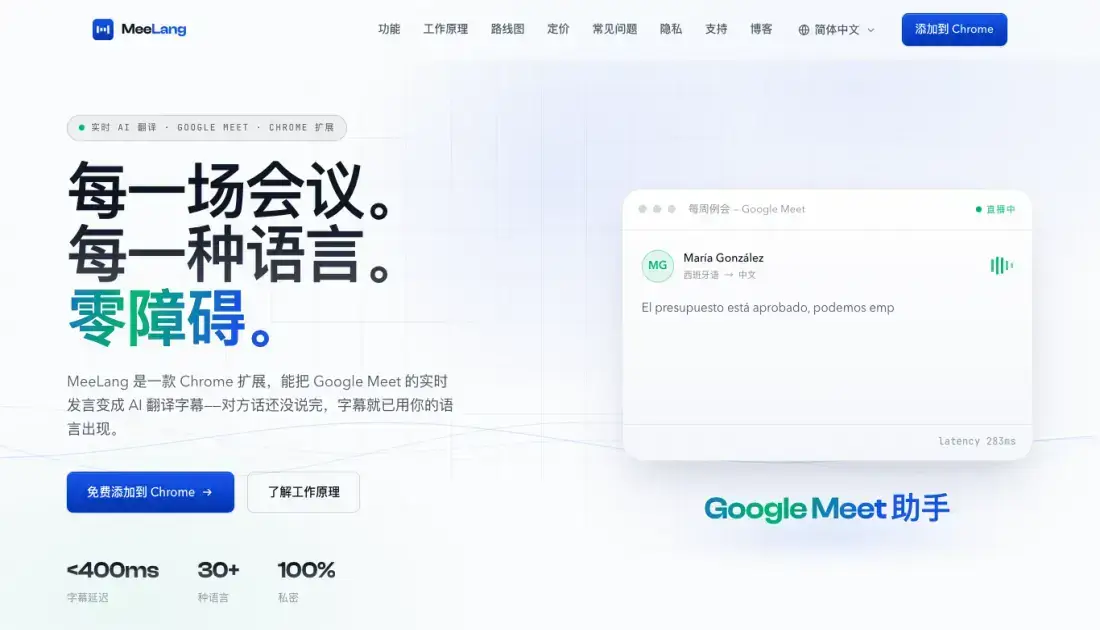
What is MeeLang
MeeLang is a Chrome extension that delivers real-time AI translation subtitles directly within Google Meet calls. The tool captures live speech and converts it into translated subtitles with sub-400ms latency, supporting over 30 languages. Unlike traditional subtitle services, MeeLang operates entirely within the browser, requiring no account creation, credit card, or meeting bots. The extension prioritizes privacy by keeping all meeting content and audio local to the user's device. MeeLang currently works with Google Meet, with support for Zoom and Microsoft Teams planned for future releases. The free tier provides 90 minutes of translation per month, while the Pro plan expands this to 600 minutes and adds AI meeting summaries.
How does MeeLang work
MeeLang operates as a Chrome extension that captures live audio from the current browser tab during Google Meet calls. The extension processes speech through an AI translation engine, generating subtitles in the user's preferred language within 400 milliseconds. Users install the extension from the Chrome Web Store, join their meeting as usual, and see translated subtitles overlaid on the meeting interface. The system requires no account creation, credit card, or external bots joining the call.
Benefits of MeeLang
MeeLang eliminates language barriers in real-time meetings by providing instant translation subtitles without requiring account registration or credit card information. The extension maintains privacy by keeping all content local, while the sub-400ms latency ensures translations keep pace with natural conversation. With support for over 30 languages and a free tier offering 90 minutes monthly, MeeLang makes cross-language communication accessible to occasional and regular users alike. The tool integrates directly into Google Meet, eliminating the need for external bots or complex setup procedures.
Pros and Cons of MeeLang
Pros
- Free tier with 90 minutes monthly, no credit card required
- Sub-400ms latency keeps translations in sync with conversation
- Privacy-first design keeps all data on the user's device
- Simple one-click installation from Chrome Web Store
- Supports over 30 languages with natural AI translation
Cons
- Currently limited to Google Meet, Zoom and Teams not yet supported
- Free tier caps at 90 minutes per month, heavy users need Pro plan
- Chrome-only, no support for other browsers or desktop apps
- Meeting summaries only available on the paid Pro plan
Core Features of MeeLang
Real-Time Subtitles
Subtitles appear with sub-400ms latency, translating speech as it happens. Users stay synchronized with the conversation without lag.
AI-Powered Translation
The translation engine understands context and adapts to fast-paced, technical speech. Results read naturally rather than sounding machine-generated.
Meeting Memory
All meeting records are stored in one searchable location. Users can browse bilingual transcripts, export recordings, or replay original audio.
Privacy-First Design
Meeting content and audio remain on the user's device. MeeLang does not store data or retain content on external servers.
Use Cases of MeeLang
- Remote teams: Multinational teams use MeeLang to translate Google Meet calls where participants speak different languages.
- International conferences: Event organizers provide real-time translated subtitles for multilingual webinar attendees.
- Client meetings: Sales teams communicate with international clients during Google Meet calls with instant translation.
- Educational settings: Students and educators use translated subtitles to follow cross-language online classes.
- Freelance translators: Independent translators use MeeLang to follow multilingual meetings while preparing written translations.
FAQs of MeeLang
How does MeeLang translate Google Meet conversations in real time?
MeeLang captures live audio from the Google Meet tab in your browser, processes it through an AI translation engine, and displays translated subtitles on your screen within 400 milliseconds. The translation happens entirely in the browser without requiring external servers to store your meeting content.
What languages does MeeLang support?
MeeLang supports over 30 languages including English, Chinese, Japanese, Spanish, French, German, Korean, Portuguese, Italian, Russian, Arabic, and Hindi. The language list continues to expand as the translation engine improves.
Is MeeLang free to use?
MeeLang offers a free tier that includes 90 minutes of translation per month, meeting record management, and export capabilities. The Pro plan costs $9.99 per month and includes 600 minutes of translation plus AI meeting summaries.
Does MeeLang support Zoom or Microsoft Teams?
Currently MeeLang only works with Google Meet. Support for Zoom Web and Microsoft Teams is planned for future releases, as indicated on the product roadmap.
Where are my meeting recordings stored?
All meeting content and audio remain on your device. MeeLang does not store your data on external servers, and you can access, export, or delete your meeting records at any time through the dashboard.
Can I use MeeLang without creating an account?
Yes, MeeLang requires no account creation, credit card, or registration. You install the Chrome extension and start using it immediately in your Google Meet calls.
How to use MeeLang
- Install the MeeLang extension from the Chrome Web Store with one click, no account or credit card required.
- Join a Google Meet call as you normally would, and MeeLang automatically detects the active tab audio.
- Select your preferred translation language from the extension popup to begin receiving real-time subtitles.
- Access your meeting records, bilingual transcripts, and exported audio from the MeeLang dashboard.
MeeLang Alternatives
Translate raw manga, manhwa, manhua and webtoons into 50+ languages with AI, keeping artwork, speech bubbles and panel layout intact across full chapters.
Translate Now is a browser-based AI voice translator for real-time speech translation, live transcription, and replayable bilingual audio transcripts.

OpenSubs is a free in-browser AI subtitle generator that transcribes speech with Whisper, translates into 20 languages and burns captions into video.
talat transcribes meetings, dictation and recordings locally on your Mac or Windows PC, with private AI notes, summaries and speaker identification.
MenuForma turns any PDF, photo, or website menu into a digital QR menu with online ordering, 70+ languages, and AI food photos for restaurants.
Memo Card turns live or recorded lectures into AI lecture notes with transcription, real-time translation, bilingual captions, quizzes, and replay.
TranslateImage AI translates images to 70+ languages while preserving font, layout, and style. Free online AI image translator for photos and manga.
AI Image Text Editor lets users replace, remove, translate, and redact text inside finished images while preserving the original font, background, and layout.
LectMate is a web SaaS that captures live or recorded lectures, delivering real-time transcription, translation and bilingual notes for overseas students.
PDF Translate is an AI PDF translator for professionals and students, providing free, fast multilingual translation of PDFs while keeping fonts, tables and images intact.
AI Subtitle Translator is a subtitle translation tool for creators and educators, providing batch processing in 100+ languages, multi-format support and exact timestamp alignment for fast global video localization.
Mumble AI is a Mac voice‑first app that captures meeting recordings, voice notes and dictation, offering on‑device privacy or cloud AI for fast transcription, live speaker‑labeled transcripts and automatic summaries.