
Panel Font: AI Manga Translator for Manhwa and Manhua

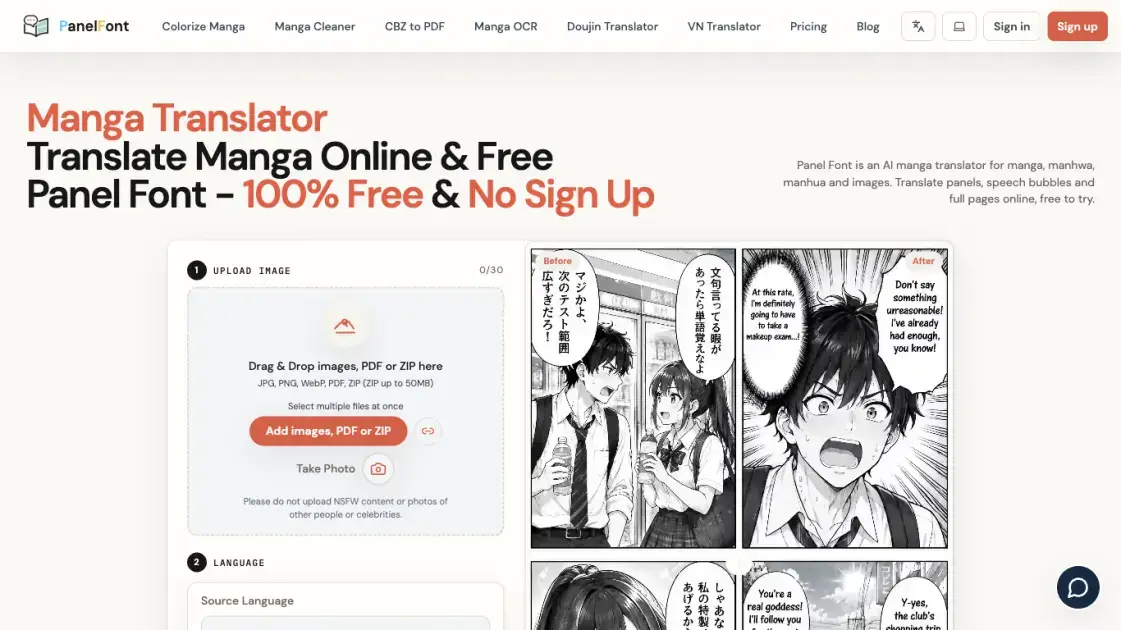
What is Panel Font
Panel Font converts lettering inside manga, manhwa and manhua pages into a chosen target language while keeping the surrounding artwork intact. Scanlation groups, language learners and collectors use it to read chapters published only in Japanese, Korean or Chinese. The service runs in a browser, accepts images, PDF files and ZIP archives, and handles irregular speech bubbles as well as full pages. A daily free credit allowance lets new readers test the translator before committing to a subscription.
How does Panel Font work
After a file is uploaded, OCR trained on comic typography isolates lettering from the artwork and reads even overlapping bubbles or handwritten fonts. The selected model then translates the extracted dialogue using comic-plot context, character tone and series terminology. Original text is erased and the background is redrawn so the page can be typeset with the translated lines in place. Batch jobs run through a multi-threaded queue, and the Before and After preview places the finished page beside the source.
Benefits of Panel Font
No installation is needed because image processing runs on remote servers and the translator opens in any browser on a computer, tablet or phone. Daily free credits, watermark-free output and several model choices keep casual reading affordable while still serving high-volume graphic novel work. Cloud delivery means each update arrives without manual upgrades, and signed-in users can revisit saved results for a limited period. Subscribers receive much larger processing quotas and permanent cloud storage for finished pages.
Pros and Cons of Panel Font
Pros
- Browser-based access without desktop installation
- Batch uploads of images, PDFs and ZIP archives
- Over 100 source languages
- Fast and high-quality model options
- No watermark on any plan
Cons
- Ten daily credits on the free tier
- Guest results lost after a browser refresh
- Unused daily credits do not roll over
- Member-exclusive models blocked for one-time credit buyers
- Browser extension still in development
Core Features of Panel Font
Batch Translation Queue
Large sets of images or PDF files go in together, with multi-threaded smart queuing handling heavy chapter updates in seconds. JPG, PNG, WebP, PDF and ZIP uploads are accepted, with ZIP archives capped at 50MB.
Layout-Aware Typesetting
Irregular bubbles and panel structures are recognized automatically, and original lettering is erased before the background art is redrawn for seamless typesetting.
Broad Language Coverage
More than a hundred popular and niche source languages are covered, and the source can be auto-detected while the target language is selected manually.
Context-Tuned Models
Several translation models support fast turnaround or higher-quality output, with comic-plot optimization preserving character tones and series-specific terminology.
Comic-Font OCR
Stylized lettering, overlapping bubbles and handwritten text are isolated from background art through OCR trained on comic book typography.
Use Cases of Panel Font
- Scanlation groups: Speed up first-draft localization of weekly chapters before editors refine the wording.
- Language learners: Check comprehension of unfamiliar Japanese bubbles while reading original pages.
- Doujinshi collectors: Read out-of-print physical copies of niche works in a language they understand.
- Independent comic artists: Test English-language interest in their own comics before paying for professional localization.
- Typesetters: Decode dense background sound effects so redrawn lettering stays faithful to the source.
FAQs of Panel Font
Does Panel Font need to be installed?
No. Processing happens on remote servers, so a standard browser on a computer, tablet or phone is enough.
Which file types can be uploaded?
JPG, PNG, WebP, PDF and ZIP files are accepted, with ZIP archives limited to 50MB; an image URL and a webcam capture are available too.
How many languages does it cover?
Over a hundred source languages are supported, and the source language can be left on Auto-Detect.
What does the free tier include?
It provides 10 daily credits, basic processing at 10 credits per image, concurrency of 2, and output without watermarks.
Are uploaded comic pages kept private?
Uploaded images and generated text are stored with cloud providers under encryption for transfer and storage, and guest results disappear once the browser is refreshed.
Can handwritten and overlapping lettering be read?
OCR tuned to comic typography separates characters from background artwork, including messy handwritten fonts and stacked bubbles.
What is the refund window for paid plans?
A refund can be requested within three days of activation if usage stays below 5% of the monthly quota.
How to use Panel Font
- Pick a translation model and choose single-image or batch mode according to the quality target and the number of files.
- Add JPG, PNG, WebP, PDF or ZIP files by dragging them into the upload area, choosing local files, or using the Take Photo control.
- Set the source language to Auto-Detect or a specific one, then select the target language such as English.
- Press Translate and let the smart queue process the pages.
- Compare the Before and After panels to check the translated lettering against the original artwork.
Panel Font Alternatives
Translate raw manga, manhwa, manhua and webtoons into 50+ languages with AI, keeping artwork, speech bubbles and panel layout intact across full chapters.
Translate Now is a browser-based AI voice translator for real-time speech translation, live transcription, and replayable bilingual audio transcripts.

OpenSubs is a free in-browser AI subtitle generator that transcribes speech with Whisper, translates into 20 languages and burns captions into video.
Run private OSINT searches for email addresses, usernames, and images across public sources, then review cited matches and evidence-grounded AI summaries.
Free unlimited image to prompt generator. Upload any image and get a detailed, accurate AI prompt for Midjourney, Stable Diffusion, FLUX and more in seconds.
MeeLang is a Chrome extension adding live bilingual subtitles to Google Meet, Zoom, Teams, Webex, and YouTube, with local transcripts and no meeting bot.
MenuForma turns any PDF, photo, or website menu into a digital QR menu with online ordering, 70+ languages, and AI food photos for restaurants.
Makiverse is a free online AI manga and comic generator that turns text prompts into complete manga, comics, and GIFs with consistent characters and styles.
Memo Card turns live or recorded lectures into AI lecture notes with transcription, real-time translation, bilingual captions, quizzes, and replay.
TranslateImage AI translates images to 70+ languages while preserving font, layout, and style. Free online AI image translator for photos and manga.
Omoggle offers private AI makeup analysis and 1v1 look comparisons focused on technique, finish, and theme fit.
AI Image Text Editor lets users replace, remove, translate, and redact text inside finished images while preserving the original font, background, and layout.