
VoiceScriber: Offline AI Voice Transcription for iPhone

What is VoiceScriber
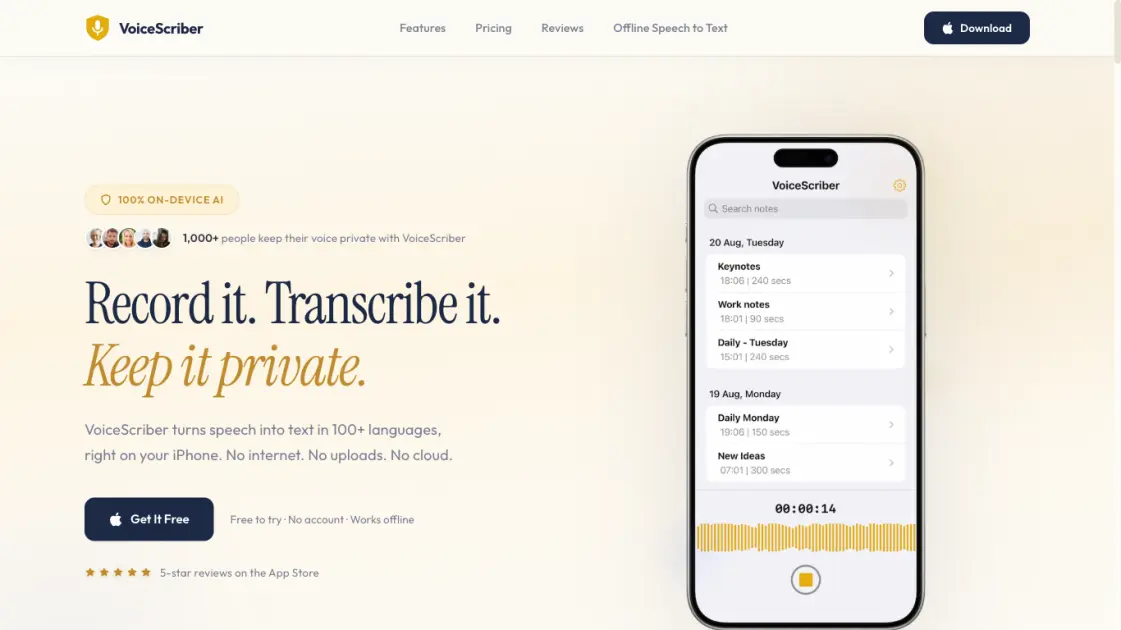
VoiceScriber is an iOS application that provides offline voice transcription through on-device artificial intelligence, eliminating the need for an internet connection or cloud uploads. The app supports over 100 languages and processes all audio directly on the iPhone, a design choice that keeps user data private by ensuring no audio ever reaches an external server. VoiceScriber handles meetings, lectures, and voice memos with a straightforward three-step workflow: record, transcribe, and share or export the results. The on-device approach delivers transcription without the latency of server-based alternatives and continues working in airplane mode. Early App Store reviews from international users highlight the transcription accuracy and the privacy advantages of a fully offline system. VoiceScriber offers a free trial with no account requirement, positioning it as a practical option for those seeking private, offline voice transcription on iPhone.
How does VoiceScriber work
VoiceScriber streamlines offline voice transcription into a three-step workflow that never requires an internet connection. Users tap the microphone to record meetings, lectures, or voice memos, with recording available even in airplane mode. The on-device AI engine then converts speech to text within seconds across 100+ languages, processing everything locally without any server upload. From there, the transcribed text can be copied, shared to any application, or exported alongside the original audio. Transcripts can also be edited directly within the app, keeping content fully private and never sending audio to the cloud.
Benefits of VoiceScriber
VoiceScriber's defining advantage is total privacy: audio never leaves the iPhone, with no cloud servers or uploads. On-device AI handles speech recognition offline, including in airplane mode, and supports over 100 languages from English to Arabic. Transcription completes in seconds with no waiting, and reviews note accuracy rivaling cloud alternatives. No account is required to start, and users control what gets shared or exported. The three-tap workflow covers record, transcribe, and use, with in-app editing available. The main limitation is iOS exclusivity — there is no Android, web, or desktop version.
Pros and Cons of VoiceScriber
Pros
- On-device AI keeps all audio private on iPhone
- Works offline and in airplane mode
- Supports 100+ languages for transcription
- No account required to use the app
- Fast transcription with no server waiting
Cons
- iPhone only, no Android or desktop version
- Free to try but requires paid subscription for full access
- No cloud sync or backup between devices
- Transcription accuracy varies by language and audio quality
Core Features of VoiceScriber
On-Device AI Transcription
VoiceScriber uses on-device AI to convert speech to text in seconds. No server uploads, no progress bars, no waiting. The transcription stays entirely on the iPhone.
100% Offline & Airplane Mode
The app works completely without an internet connection. Users can record and transcribe meetings, lectures, or voice memos even in airplane mode with no interruption to workflow.
100+ Language Support
VoiceScriber supports over 100 languages including English, Japanese, Arabic, and many more. The local AI model handles each language on-device without needing any cloud fallback for transcription.
Privacy-First Architecture
No audio or transcription data ever leaves the iPhone. Cloud transcription sends audio to external servers, but VoiceScriber keeps everything private on the device.
No Account Required
VoiceScriber requires no account creation or login to use. Users can open the app and start transcribing immediately with zero setup and no sign-up friction.
Share on Your Terms
Transcripts can be copied to the clipboard, shared to any messaging app, or exported as full audio recordings. Users decide what leaves their phone and when it happens.
In-App Transcript Editing
The built-in editor lets users refine transcriptions directly inside the app. There is no need to switch to a separate text editor for quick corrections or adjustments.
Home Screen Widget
The iOS home screen widget provides quick access to VoiceScriber from the home screen. Users can start a new recording without opening the full app first.
Use Cases of VoiceScriber
- Journalists: Record and transcribe interviews with total privacy, no audio uploaded to any server.
- Students: Transcribe lectures offline in 100+ languages, including during flights or in airplane mode.
- Professionals: Capture meeting notes on-device and share text on their own terms, keeping recordings private.
- Travelers: Transcribe voice memos and conversations without Wi-Fi or mobile data, anywhere abroad.
- Content creators: Record spoken audio, transcribe it, and repurpose the text for posts, captions, or scripts.
FAQs of VoiceScriber
What is VoiceScriber and who is it for?
VoiceScriber is an iPhone app that converts speech to text using on-device AI. It supports over 100 languages and works entirely offline. The app is designed for anyone who needs to transcribe meetings, lectures, interviews, voice memos, or any spoken content while keeping audio data private. Journalists, students, researchers, and privacy-conscious professionals are common users. No account registration is required to use the app.
How does VoiceScriber protect user privacy?
VoiceScriber processes all audio directly on the iPhone. No recordings or transcriptions are uploaded to any server, including servers operated by the app developer. The app works without an internet connection, which means audio data never leaves the device. This approach eliminates the privacy risks associated with cloud-based transcription services that send audio to remote servers for processing.
What languages does VoiceScriber support for transcription?
VoiceScriber supports transcription in over 100 languages, including English, Japanese, Arabic, and many others. The on-device AI model handles multiple languages without requiring separate language packs or downloads. This broad language support makes the app suitable for multilingual users and those working with content in less commonly supported languages.
How does VoiceScriber work?
VoiceScriber follows a three-step process. The user opens the app and taps the microphone button to start recording. Once finished, the on-device AI converts the speech into text within seconds. The resulting transcript can be edited directly inside the app, copied to the clipboard, shared through other apps, or exported along with the original recording. A home screen widget provides quick access to start new recordings.
Does VoiceScriber require an internet connection?
No. VoiceScriber functions entirely offline without any internet connection. All AI processing happens on the device, so the app works in airplane mode, on subways, in remote areas, or anywhere without Wi-Fi or cellular service. The only time an internet connection might be needed is when downloading the app from the App Store or processing a purchase.
What are the pricing options for VoiceScriber?
VoiceScriber offers a free trial for new users to evaluate the app. Subscription options include a weekly plan at $5.99 per week and a lifetime purchase at $49.99. The lifetime option provides permanent access with a single payment. All processing happens on-device regardless of the pricing tier, so the privacy and offline capabilities remain the same across all options.
How can users get support or contact the developers?
Users can reach the VoiceScriber team by email at hello@a6digital.com. The app does not maintain social media accounts on platforms such as Twitter, Facebook, Instagram, or Discord. Support inquiries, feedback, and feature requests are handled through email communication.
How to use VoiceScriber
- Record. Open the VoiceScriber app and tap the microphone button. Record meetings, lectures, voice memos, or any spoken audio, even in airplane mode with no network connection.
- Transcribe. The on-device AI engine converts speech to text in seconds across more than 100 languages. No server uploads are needed. No progress bar appears during processing.
- Use it anywhere. The transcribed text can be copied, shared to any app, or exported alongside the original recording. Transcripts can also be edited directly inside the app.
