
Video to Text
Transcribe video and audio to text online with 99 languages.
| Added on: | Apr 5, 2026 |
| Monthly Visits: | 212 |
| Social & Email: | -- |

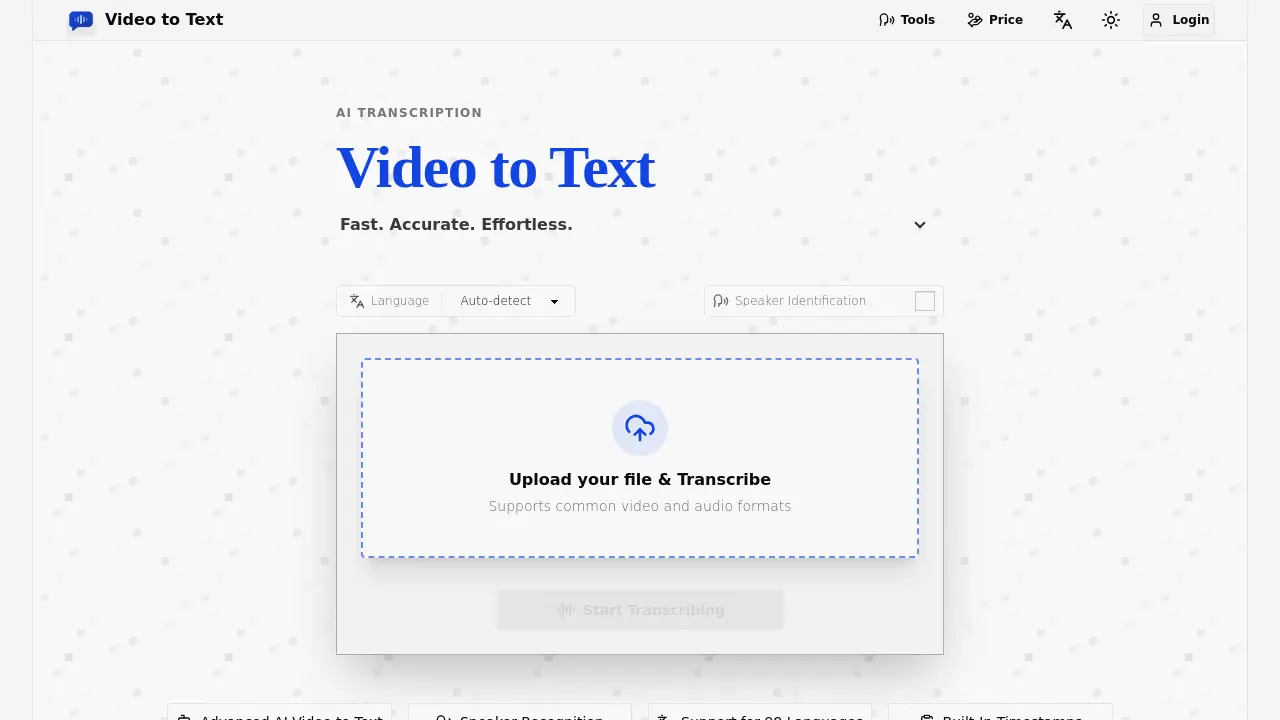
What is Video to Text
Video to Text is an AI-powered transcription tool that converts video and audio files into accurate, searchable text. It supports 99 languages, speaker identification, and built-in timestamps, making it ideal for subtitles, meeting notes, interviews, and multilingual content workflows. The tool offers fast processing, automatic language detection, and export options in TXT, SRT, VTT, and CSV formats. New users receive 30 free transcription minutes, with pay-as-you-go pricing starting at $9.90 for 200 minutes. Video to Text supports common file formats like MP4, MOV, MP3, and WAV, and handles up to 5 GB files with a 10-hour maximum length.
How does Video to Text work
Video to Text is an AI-powered transcription service that converts video and audio files into accurate, searchable text. It supports 99 languages, including English, Spanish, French, German, Chinese, and Japanese, with automatic language detection and multi-language recognition for mixed-language recordings. The platform offers speaker diarization to identify different speakers, timestamped transcripts for subtitles and editing, and exports in TXT, SRT, VTT, and CSV formats. Users can upload files up to 5 GB and 10 hours long in formats like MP4, MOV, MKV, MP3, WAV, and FLAC. The service provides a simple pay-as-you-go pricing model, starting with 30 free minutes for new users, and is designed for creators, educators, journalists, and teams needing fast, reliable transcription.
Benefits of Video to Text
Video to Text offers fast, accurate AI transcription for video and audio files, supporting 99 languages with automatic detection. Its advanced features include speaker identification, timestamps, and multi-language recognition, making it ideal for subtitles, meeting notes, interviews, and multilingual content workflows. The tool supports common formats like MP4, MOV, MP3, and WAV, with export options in TXT, SRT, VTT, and CSV. Users benefit from a simple upload-to-export workflow, 30 free transcription minutes for new users, and pay-as-you-go pricing starting at $9.9 for 200 minutes. This efficient solution enhances accessibility, content creation, and productivity for creators, teams, and learners.
Pros and Cons of Video to Text
Pros
- Supports 99 languages.
- High accuracy transcription.
- Speaker identification included.
Cons
- Limited file size (5 GB).
- No subscription options.
- Pay-per-use pricing.
Core Features of Video to Text
AI-Powered Transcription
Converts video and audio files into accurate text using advanced AI, ensuring high precision for various content types.
Multi-Language Support
Transcribe content in 99 languages with automatic language detection, including English, Spanish, Chinese, and Japanese.
Speaker Identification
Identifies and labels different speakers in transcripts, ideal for interviews, meetings, and discussions.
Timestamp Integration
Adds built-in timestamps to transcripts for easy navigation and subtitle creation.
Export Flexibility
Exports transcripts in multiple formats (TXT, SRT, VTT, CSV) for compatibility with various workflows and tools.
Use Cases of Video to Text
- Content Creators: Generate accurate subtitles and captions for YouTube videos, online courses, and social media clips to improve accessibility and reach.
- Business Professionals: Convert meetings, webinars, and calls into searchable notes for easy review of decisions and action items.
- Researchers and Journalists: Transcribe interviews and recordings into editable text for quoting, analysis, and content production.
- Educators and Students: Transform lectures and lessons into study materials, notes, and summaries for better learning and review.
- Language Learners: Use transcripts to practice listening comprehension, check vocabulary, and follow along with audio content.
FAQs of Video to Text
What is Video to Text?
Video to Text is an AI transcription tool that converts video and audio files into text, subtitles, and timestamped transcripts. It supports 99 languages, speaker identification, and multiple export formats.
How accurate is the transcription?
Video to Text uses advanced AI to provide high-accuracy transcriptions. While accuracy can vary based on audio quality, accents, and background noise, the tool is designed to deliver reliable results for most content types.
What languages does Video to Text support?
Video to Text supports 99 languages, including English, Spanish, Portuguese, French, German, Italian, Chinese, and Japanese. It also offers automatic language detection and multi-language recognition for mixed-language recordings.
Can I transcribe videos with multiple speakers?
Yes, Video to Text includes speaker diarization, which identifies and labels different speakers in the transcript. This feature is ideal for interviews, meetings, and discussions.
What file formats are supported for upload?
Video to Text supports common video formats like MP4, MOV, MKV, WEBM, and M4V, as well as audio formats such as MP3, WAV, M4A, FLAC, OGG, AAC, and OPUS.
What export formats are available?
You can export your transcript as TXT, SRT, VTT, or CSV. These formats are compatible with text editors, subtitle tools, spreadsheets, and content management systems.
Is there a free trial available?
Yes, new users receive 30 free transcription minutes after signing up. This allows you to test the full workflow before purchasing additional minutes.
How much does Video to Text cost?
Video to Text offers pay-as-you-go pricing. Plans start at $9.9 for 200 minutes, $19.9 for 600 minutes, and $99 for 6000 minutes. Each plan includes 30 free minutes for new users.
How long does the transcription process take?
Transcription is typically very fast. A one-hour audio file can often be processed in under a minute, though final speed depends on file size, upload time, and network conditions.
What happens if there’s an error during transcription?
If an error occurs during file upload or transcription, your balance will not be deducted. Charges are only applied after the transcription is successfully completed.
Is there a file size limit?
Yes, each file can be up to 5 GB, with a maximum media length of 10 hours.
Can I use Video to Text for subtitles?
Yes, Video to Text is ideal for creating subtitles. It supports timestamped transcripts and exports in SRT and VTT formats, which are standard for subtitles.
Who can benefit from using Video to Text?
Video to Text is useful for content creators, educators, journalists, researchers, teams, and language learners. It helps create subtitles, searchable notes, study materials, and more.
How do I get started with Video to Text?
To get started, upload a video or audio file, let the AI transcribe it, and then export the result in your preferred format. The process is simple and straightforward.
How to use Video to Text
- Navigate to the Video to Text website and click the "Upload your file & Transcribe" button.
- Select your video or audio file from your device and upload it to the platform.
- Choose the appropriate language settings for your content, or let the tool auto-detect the language.
- Initiate the transcription process and wait for the AI to process your file.
- Once the transcription is complete, review the generated transcript for accuracy.
- Export the transcript in your preferred format, such as TXT, SRT, VTT, or CSV.
Video to Text Website Traffic Analysis
Latest traffic information
- Monthly Visits212
- Bounce Rate39.48%
- Pages Per Visit1.05
- Visit Duration00:00:00
- Global Rank--
- Country/Region Ranking--
Visits Over Time
Top Keywords
| Keyword | Traffic | Volume | Cost Per Click |
|---|---|---|---|
| video to text | -- | 130.57K | $0.31 |
| video to transcript | -- | 60.63K | $0.51 |
| video transcription | -- | 40.93K | $1.1 |
| video into text | -- | 7.28K | $0.3 |
| transcript audio | -- | 3.94K | $3.07 |
Top Regions
| Region | Percentage |
|---|---|
| United States | 100% |
