
LipSync FAQs
LipSync is a free AI lip‑sync tool that lets creators sync audio to portraits or cartoons without sign‑up, delivering accurate animation for projects.

FAQs of LipSync
What is LipSync and what features does it offer?
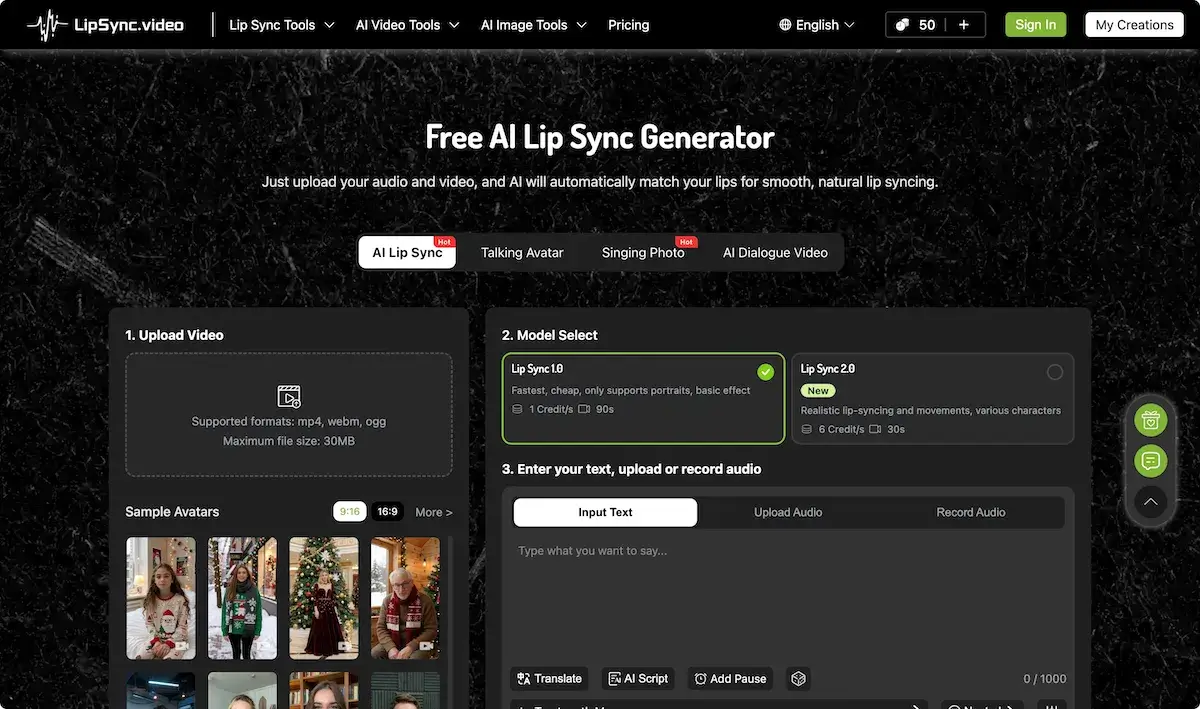
LipSync is a cloud‑based AI lip‑syncing platform that converts static images, avatar models, and short video clips into realistic talking videos. It supports portrait photos, cartoon sketches, animal illustrations, and recorded footage by generating mouth movements from uploaded text or audio. The service includes tools such as Talking Photo, Singing Photo, AI Baby Podcast, AI Dialogue Video, and multilingual dubbing. Users complete the process in three steps: upload media, choose a Lip Sync model (1.0 or 2.0), and provide the speech input. Additional options include real‑time subtitle generation, preset emotional expressions, and a credit‑based billing system.
How many credits are required to produce a lip‑sync video with LipSync?
Credits are the currency for using LipSync. The amount of credit consumed depends on the selected model. Lip Sync 1.0, a basic portrait model, costs 1 credit per second of output and is ideal for shorter clips (~90 s). Lip Sync 2.0, a more realistic model offering diverse character choices, uses 6 credits per second and is suited for longer 30‑second results. Credits are automatically deducted when you click “Generate.” If you exhaust your balance, you can purchase additional packs from the website; any unused credits remain valid forever.
What file formats and video requirements are supported by LipSync?
LipSync accepts mp4, webm, and ogg files up to 30 MB. Recommended resolution is 720 p or 1080 p for optimal clarity. Only one face should be present, and the face must face the camera with good lighting. The platform works best with frontal portraits but also handles cartoon characters and animal images as long as the primary face can be detected. Irregular angles, heavy shadows, or occluded mouths can reduce sync accuracy.
Where can I purchase additional credits and what discounts are available during the Christmas promotion?
Credits can be bought from the “Purchase Credits” page after signing in. During the Christmas sale, users receive up to 300 bonus credits when purchasing any credit pack, effectively boosting the number of renderings for the same cost. Bonus credits are applied automatically and remain usable forever. Prices and pack sizes are listed on the Pricing page, with options for one‑time purchases or subscription plans in multiple currencies. Support can be reached via the website’s contact email or community channels.
Can I use LipSync to create multilingual dubbing or subtitle‑enabled videos?
Yes. LipSync’s AI Video Dubbing and AI Video Translate tools allow users to generate dubbed audio or subtitles in various languages. After selecting audio or entering a script, the platform synchronizes lip movements while producing subtitles or a new audio track in the chosen language. This feature is available on all models and can be combined with Lip Sync 2.0 for realistic facial expressions. The final videos are downloadable in mp4, webm, or ogg format and are ready for social media sharing or presentations.
How to use LipSync
- LipSync is an AI‑driven lip‑sync platform that transforms uploaded videos or images into synchronized speech, enabling realistic lip‑movement generation for characters, cartoons, and real faces.
- Begin by selecting Upload Video and choosing a supported format (mp4, webm, ogg) with a maximum size of 30 MB; note recommended 720p/1080p settings.
- Select the desired sync model: LipSync 1.0 for basic portrait work or LipSync 2.0 for realistic facial animation, noting credit usage per second.
- Enter script text, upload a pre‑recorded audio file, or use the built‑in record option; enable translation or subtitles as needed for multilingual output.
- Click Generate to initiate processing; the preview window displays the lip‑synchronized video, allowing users to adjust timing or pause points before final rendering.
- After approval, download the final file, view credit consumption, and manage remaining credits via the dashboard, or purchase additional packs to maintain workflow continuity.
