
LipSync - Free AI Lip Sync Video Online, No Sign-Up

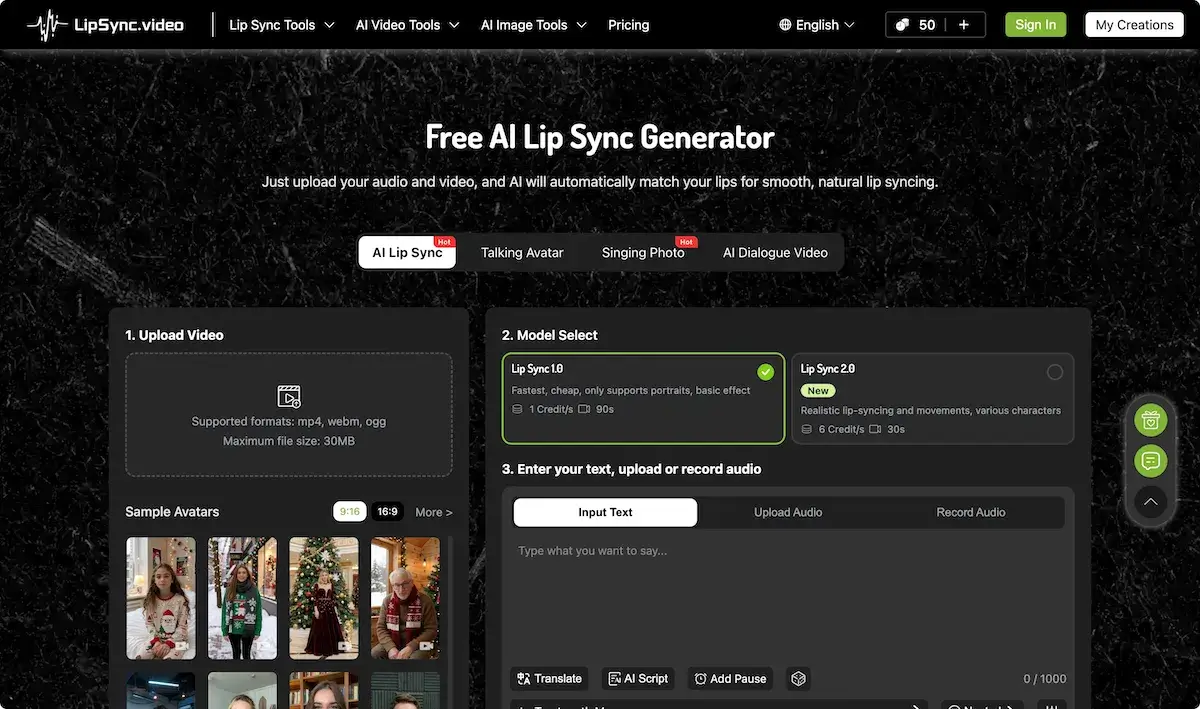
What is LipSync
LipSync is an AI‑driven lip‑syncing platform that turns uploaded video or static images into realistic speech‑aligned animations. The service supports MP4, WebM, and Ogg files up to 30 MB, recommending 720p or 1080p resolution for optimal face detection. Users select between Lip Sync 1.0, a cost‑effective option for portrait clips, and Lip Sync 2.0, which delivers high‑fidelity movements for diverse characters. Text can be entered directly, a voice file uploaded, or audio recorded, and optional subtitles or translation can be enabled. Credits are consumed per second of output, and a holiday promotion offers up to 300 bonus credits with credit‑pack purchases. The platform’s straightforward workflow and scalable credit model make it suitable for content creators, educators, and marketers seeking efficient lip synchronization solutions.
How does LipSync work
LipSync is an AI‑driven lip sync platform that converts uploaded audio or text into synchronized mouth movements for a single‑face video. Users upload an mp4, webm, or ogg file (max 30 MB, 720p–1080p) and choose between Lip Sync 1.0 (basic portrait effect, 1 credit → 90 s) or Lip Sync 2.0 (realistic movements, 6 credits → 30 s). The service then renders the face, applies lip synchronization, and outputs a new video, all payable in a credit system. Designed for creators, the tool supports lip synching in various styles. The platform, including a LipSync Pro version, integrates with lip sync.video for advanced workflow. Can be accessed through LipSync studio interface.
Benefits of LipSync
LipSync delivers AI‑powered lip synchronization for videos and images, powered by lip sync.ai technology. Upload a mp4 or webm, select a model, and the system generates realistic mouth movements that match any audio track, ensuring accurate lip‑synching. The platform supports portrait, cartoon, and animal media with basic and advanced sync options via Lip Sync 1.0 and Lip Sync 2.0. Credits are perpetual, and a single purchase gives lifetime access, plus extra bonuses during the Christmas sale. The lip sync.video tool is part of the LipSync studio suite, also offered as LipSync Pro for advanced features.
Pros and Cons of LipSync
Pros
- Receive up to 300 bonus credits during Christmas sale
- Unlimited credit lifespan after purchase
- Supports multiple audio/video formats (mp4, webm, ogg)
- Fast Lip Sync 1.0 offers low cost and speed
- Integrated AI blog and community support
Cons
- Only works with single-faced videos
- Cartoon or animal faces may not sync properly
- Credit cost per second can add up quickly
- Limited resolution guidance may affect output quality
- No mention of offline use or API integration
Core Features of LipSync
AI Lip Sync Video Generation
Creates realistic mouth movements for a single face video based on uploaded or recorded audio, supporting various character models with adjustable speed and emotion settings.
Multi‑Language Video Dubbing
Automatically transcribes, translates, and replaces the original audio track of a video into selected languages while keeping lip movement synchronized for seamless multilingual content.
Talking Photo and Avatar Creation
Transforms static photographs or avatar templates into animated talking clips; users can input text or upload audio, and the tool generates synchronized speech and lip motion.
Video Translation Tool
Provides on‑screen subtitles and dubbing for existing videos in any target language, leveraging AI to adjust timing and voice‑over to match original pacing.
AI Character and Portrait Generator
Generates photorealistic or stylized character and portrait images from textual prompts, enabling quick creation of custom avatars for subsequent lip‑sync or animation use.
Audio‑Based Baby Podcast Creation
Synthesizes and outputs a baby‑like voice recording of entered text, ideal for creating engaging audio content for infant‑focused applications.
Use Cases of LipSync
- Students: Use LipSync to automatically sync lecture audio with student avatars for engaging e-learning videos.
- Content Creators: Enhance YouTube intros by syncing popular songs with animated characters using LipSync AI lip‑syncing.
- Marketers: Create multilingual ad videos with LipSync’s video dubbing and translation for global audience outreach.
- Educators: Generate talking avatars that recite lesson scripts with natural lip synchronization for online classrooms.
- Animators: Apply LipSync’s cartoon lip‑sync generator to bring hand‑drawn characters to life quickly.
FAQs of LipSync
What is LipSync and what features does it offer?
LipSync is a cloud‑based AI lip‑syncing platform that converts static images, avatar models, and short video clips into realistic talking videos. It supports portrait photos, cartoon sketches, animal illustrations, and recorded footage by generating mouth movements from uploaded text or audio. The service includes tools such as Talking Photo, Singing Photo, AI Baby Podcast, AI Dialogue Video, and multilingual dubbing. Users complete the process in three steps: upload media, choose a Lip Sync model (1.0 or 2.0), and provide the speech input. Additional options include real‑time subtitle generation, preset emotional expressions, and a credit‑based billing system.
How many credits are required to produce a lip‑sync video with LipSync?
Credits are the currency for using LipSync. The amount of credit consumed depends on the selected model. Lip Sync 1.0, a basic portrait model, costs 1 credit per second of output and is ideal for shorter clips (~90 s). Lip Sync 2.0, a more realistic model offering diverse character choices, uses 6 credits per second and is suited for longer 30‑second results. Credits are automatically deducted when you click “Generate.” If you exhaust your balance, you can purchase additional packs from the website; any unused credits remain valid forever.
What file formats and video requirements are supported by LipSync?
LipSync accepts mp4, webm, and ogg files up to 30 MB. Recommended resolution is 720 p or 1080 p for optimal clarity. Only one face should be present, and the face must face the camera with good lighting. The platform works best with frontal portraits but also handles cartoon characters and animal images as long as the primary face can be detected. Irregular angles, heavy shadows, or occluded mouths can reduce sync accuracy.
Where can I purchase additional credits and what discounts are available during the Christmas promotion?
Credits can be bought from the “Purchase Credits” page after signing in. During the Christmas sale, users receive up to 300 bonus credits when purchasing any credit pack, effectively boosting the number of renderings for the same cost. Bonus credits are applied automatically and remain usable forever. Prices and pack sizes are listed on the Pricing page, with options for one‑time purchases or subscription plans in multiple currencies. Support can be reached via the website’s contact email or community channels.
Can I use LipSync to create multilingual dubbing or subtitle‑enabled videos?
Yes. LipSync’s AI Video Dubbing and AI Video Translate tools allow users to generate dubbed audio or subtitles in various languages. After selecting audio or entering a script, the platform synchronizes lip movements while producing subtitles or a new audio track in the chosen language. This feature is available on all models and can be combined with Lip Sync 2.0 for realistic facial expressions. The final videos are downloadable in mp4, webm, or ogg format and are ready for social media sharing or presentations.
How to use LipSync
- LipSync is an AI‑driven lip‑sync platform that transforms uploaded videos or images into synchronized speech, enabling realistic lip‑movement generation for characters, cartoons, and real faces.
- Begin by selecting Upload Video and choosing a supported format (mp4, webm, ogg) with a maximum size of 30 MB; note recommended 720p/1080p settings.
- Select the desired sync model: LipSync 1.0 for basic portrait work or LipSync 2.0 for realistic facial animation, noting credit usage per second.
- Enter script text, upload a pre‑recorded audio file, or use the built‑in record option; enable translation or subtitles as needed for multilingual output.
- Click Generate to initiate processing; the preview window displays the lip‑synchronized video, allowing users to adjust timing or pause points before final rendering.
- After approval, download the final file, view credit consumption, and manage remaining credits via the dashboard, or purchase additional packs to maintain workflow continuity.
LipSync Website Traffic Analysis
Latest traffic information
- Monthly Visits302.04K
- Bounce Rate45.52%
- Pages Per Visit3.05
- Visit Duration00:01:39
- Global Rank142.3K
- Country/Region Ranking150.84K
Top Keywords
| Keyword | Traffic | Volume | Cost Per Click |
|---|---|---|---|
| lip sync | 4.21K | 17.73K | $1.03 |
| lipsync | 4.1K | 13.79K | $0.69 |
| lip sync ai | 2.09K | 7.66K | $0.7 |
| lipsync ai | 1.77K | 2.88K | $0.13 |
| ai avatar lipsync video | 950 | 670 | -- |
Top Regions
| Region | Percentage |
|---|---|
| United States | 14.37% |
| Ireland | 8.35% |
| Uganda | 8.08% |
| Thailand | 7.97% |
| Germany | 6.84% |
LipSync Alternatives
Seedance 3.0 preview page: planned multi-shot continuity, scene editing and audio-visual sync for AI video, while the on-page generator runs Seedance 2.5.
Browser workspace for AI image generation, reference photo editing, and short video drafts, aimed at creators, marketers, and product teams.
Black Forest Labs' multimodal model with a web generator for text-to-video, image-to-video and image editing with native audio, for creators and marketers.
Wan API is an independent platform for Wan and Seedance video models. Compare specs and rates, generate clips in the Playground, or call them through one API.
Seedance 3.0 turns text, images, video clips, and audio into videos with sound, and edits one part of a clip without regenerating the rest.
Wery is a virtual AI studio that routes one goal to specialist agents for video, images, music and documents, keeping characters and project assets consistent.

AI video and image studio with text-to-video, image-to-video and keyframe control across Seedance, Kling, Wan and Vidu — all on one credit balance.
Browser studio for AI video, image and music generation with Grok Imagine, Kling and GPT Image models. Free daily credits, no sign-up required.
SeaMove AI is an AI video and image generation platform offering Seedance 2.0 and Seedance 2.5 models for text-to-video, image-to-video, and reference-based creation. Features multi-shot continuity, director-level control, and audio-visual sync for creators and studios.
Turns two separate portraits into a 15-second vertical rap duet video on an orange stage with a shared microphone and the original soundtrack. Free 480P preview available.
Mareel is an all-in-one AI video and image generation workspace giving creators, marketers, and ecommerce teams 40+ leading models and one shared credit balance.
Kinovi is a REST API that runs published video, image, and audio AI models from one endpoint. Send a model ID to createTask, poll recordInfo, and pay per use from one shared credit balance.