
AI Kid Voice Generator - Natural Child Voice TTS Tool
| Added on: | Jul 20, 2026 |
| Monthly Visits: | 10.47K |
| Social & Email: | -- |

What is KidVoice
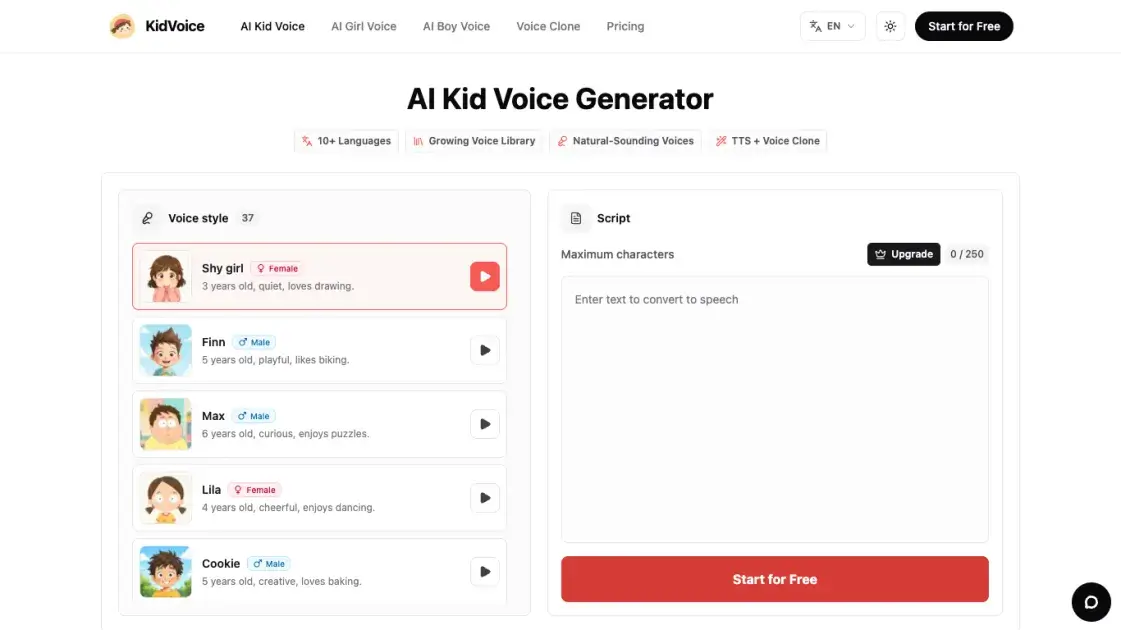
KidVoice is an AI-powered voice generator that produces natural-sounding child and teenage voices from text input. The tool offers 37 distinct voice styles spanning kids, teens, and young adults, with support for 10 languages including English, Chinese, Japanese, Korean, German, French, Russian, Portuguese, Spanish, and Italian. Users can type or paste text, select a voice style, and preview the audio directly in the browser before downloading. Beyond preset voices, KidVoice also supports voice cloning from uploaded reference audio, making it possible to create custom child-like voices for specific projects. The platform operates on a credit-based system with a free tier that provides 20 credits daily, allowing casual users to generate audio without committing to a subscription. For higher volume needs, paid plans start at $2.79 per month.
How does KidVoice work
KidVoice operates through a straightforward text-to-speech process. The user selects a voice style from the available library or uploads reference audio for cloning, then enters or pastes the desired text. The AI model processes the text and generates a corresponding audio file with the chosen voice characteristics. For preset voices, the system applies learned speech patterns from training data on child and teen vocal profiles. For cloned voices, the AI analyzes the reference audio to replicate its tonal qualities and speech style. Once generation is complete, the audio is available for in-browser preview and immediate download. The entire process runs server-side, requiring only a web browser with no software installation.
Benefits of KidVoice
KidVoice eliminates the need to hire child voice actors or invest in expensive recording equipment for projects requiring young voices. The AI-generated output sounds natural enough for most creative and educational applications, from short video narration to interactive storytelling. With 37 voice styles and 10 language options, it covers a wide range of use cases without requiring multiple tools. The browser-based preview and download workflow keeps things simple — users can go from text to usable audio in under a minute. The free tier with daily credits makes it accessible for individuals experimenting with child voice content, while paid plans remain affordable for regular creators. However, the credit system may feel limiting for high-volume production, and voice cloning quality depends heavily on the reference audio provided.
Pros and Cons of KidVoice
Pros
- Natural-sounding child and teen AI voices
- 37 voice styles across multiple age ranges
- 10 language support for international projects
- Free tier with daily credits for casual use
- Voice cloning from reference audio
Cons
- Credit system limits high-volume production
- Voice cloning quality depends on reference audio
- No API access for automated workflows
- Paid plans required for higher credit allocations
Core Features of KidVoice
AI Voice Generation
KidVoice uses artificial intelligence to convert written text into natural child and teen speech. The generated voices carry realistic intonation, pacing, and emotional nuance suitable for storytelling, narration, and character dialogue.
37 Voice Styles
The platform provides a library of 37 distinct voice styles covering kids, teens, and young adults across multiple age ranges and personalities. Users can browse and preview each voice before committing to generation.
Multilingual Support
KidVoice supports 10 languages: English, Chinese, Japanese, Korean, German, French, Russian, Portuguese, Spanish, and Italian. This allows creators to produce child voice content for international audiences without switching tools.
Voice Cloning
Users can upload reference audio of a permitted voice to clone a custom child or teen voice. This feature is useful for recreating specific vocal characteristics or matching a desired tone for branded content.
Browser Preview and Download
Generated audio can be previewed directly in the browser, letting users verify quality before downloading. Audio files are available for immediate download in standard formats, with no need for external editing software.
Free Daily Credits
KidVoice provides 20 free credits per day on the free tier, allowing users to test the generator and produce a limited number of audio clips without entering payment information.
Use Cases of KidVoice
- Content creators: Add child or teen narration to short videos and social media clips without hiring voice actors.
- Educators: Generate audio for language learning materials, children's stories, or interactive educational content.
- Game developers: Create character voices for kids, teens, or young NPCs in indie games and interactive projects.
- Musicians: Experiment with child vocal samples for music production, audio sketches, or creative sound design.
- Storytellers: Produce audiobook-style narration with varied young character voices for podcasts and audio stories.
FAQs of KidVoice
Is KidVoice a real AI kid voice generator?
KidVoice is an AI-powered platform that generates child and teen voice audio from text input. It uses trained AI models to produce realistic-sounding young voices across multiple age ranges and styles.
How do I create AI kid voices?
Type or paste your text into the input field, choose a voice style from the library, and click generate. The AI produces an audio clip you can preview and download directly from your browser.
Can I create voices in languages other than English?
Yes, KidVoice supports 10 languages: English, Chinese, Japanese, Korean, German, French, Russian, Portuguese, Spanish, and Italian. Each language has its own set of available voice styles.
How many kid and teen voice styles are available?
KidVoice offers 37 voice styles covering kids, teens, and young adults. The library includes different age ranges, genders, and personality types for varied creative needs.
Can I clone a voice instead of choosing a preset?
Yes, KidVoice supports voice cloning from uploaded reference audio. You can provide a sample of a permitted voice and the AI will generate speech matching its tonal characteristics.
What kind of reference audio works best for voice cloning?
Clear, noise-free recordings with minimal background interference produce the best cloning results. Longer samples with varied intonation give the AI more data to work with for accurate replication.
What can I use the audio for?
Generated audio can be used for short video narration, storytelling, educational content, game character voices, music sketches, and other creative projects that require child or teen voice content.
Do I need editing software to hear the result?
No, KidVoice provides in-browser audio preview so you can listen to the generated clip before downloading. No additional software is required for basic playback and quality verification.
Can I regenerate the audio if it does not sound right?
Yes, you can regenerate audio by adjusting the text, switching voice styles, or modifying settings. Each regeneration uses credits from your account balance.
Can I download the generated audio?
Yes, all generated audio clips are available for immediate download in standard audio formats after previewing in the browser.
How to use KidVoice
- Visit the KidVoice website and navigate to the voice generator interface in your browser.
- Type or paste the text you want to convert into child or teen speech in the input field.
- Browse the voice library and select a style from the 37 available kid, teen, or young adult options.
- Click the generate button and wait for the AI to process your text into an audio clip.
- Preview the generated audio in the browser to verify the quality and voice match.
- Download the audio file in your preferred format for use in your project.
KidVoice Website Traffic Analysis
Latest traffic information
- Monthly Visits10.47K
- Bounce Rate40.77%
- Pages Per Visit1.78
- Visit Duration00:00:30
- Global Rank2.09M
- Country/Region Ranking2.6M
Top Keywords
| Keyword | Traffic | Volume | Cost Per Click |
|---|---|---|---|
| озвучка ии мужской женский детский голос бесплатно | 340 | -- | -- |
| quote about teachers. short | 170 | 180 | -- |
| free ai baby voice generator | 150 | 220 | -- |
| peppa pig finnish narrator text to speech | 150 | 160 | -- |
| ai kid sound | 140 | 150 | -- |
Top Regions
| Region | Percentage |
|---|---|
| United States | 24.13% |
| Philippines | 22% |
| Brazil | 10.58% |
| India | 10.46% |
| Colombia | 9.17% |
KidVoice Alternatives
LOVO AI turns scripts into MP3 voiceovers in the browser, with 21 voice previews, permission-based voice cloning, 74-language speech, and a video editor.

Play HT is a free AI voice generator that turns text into speech with 200+ public voices, streams previews in the browser, and exports MP3 files.
MixVio runs 21 video, image and audio models in one browser workspace, plus 11 creator tools, with exact credit cost shown before every generation.
PodcastorAI turns PDFs, URLs, notes, and audio into studio-quality video podcasts with AI hosts, voices, and scripts for YouTube, Spotify, and TikTok.
Generate expressive AI voiceovers and dialogue with Seed Audio. An ElevenLabs-powered text-to-speech tool with performance tags, multi-voice selection, and fast MP3 preview.
Miso One AI is an AI voice generator that lets creators and development teams produce expressive dialogue audio, test cloning, review prompts, and download speech samples with credit tracking.
CAVN AI is an AI music platform for creators, offering text‑to‑song, voice cloning, stem separation, mastering and 4K video creation, free for commercial use.
Petti Chat is an AI-powered web tool that lets pet owners capture short pet sounds, interpret likely intent in human language, and reply with calm, pet‑friendly audio, ensuring privacy and real‑time interaction.
GPT Realtime 2 is an AI voice generator for developers and product teams, offering realtime speech‑to‑speech interaction, low‑latency audio, prompt control, tool handoffs and downloadable session recordings.
GPT Realtime is an AI voice generator platform for developers and product teams, offering low‑latency speech‑to‑speech, image‑aware prompts, SIP call support, API workflow planning and reusable cache for rapid voice‑app prototyping.
This online PDF voice reader uses AI to convert documents, including scanned files via OCR, into natural speech in 142+ languages, supporting all PDF formats.
AnySpeech is a professional AI text to speech platform offering 100+ realistic voices across 50+ languages, designed for content creators, YouTubers, and podcasters worldwide.