
Read PDF Aloud
Read PDF Aloud offers free AI-powered voice reading.

What is Read PDF Aloud
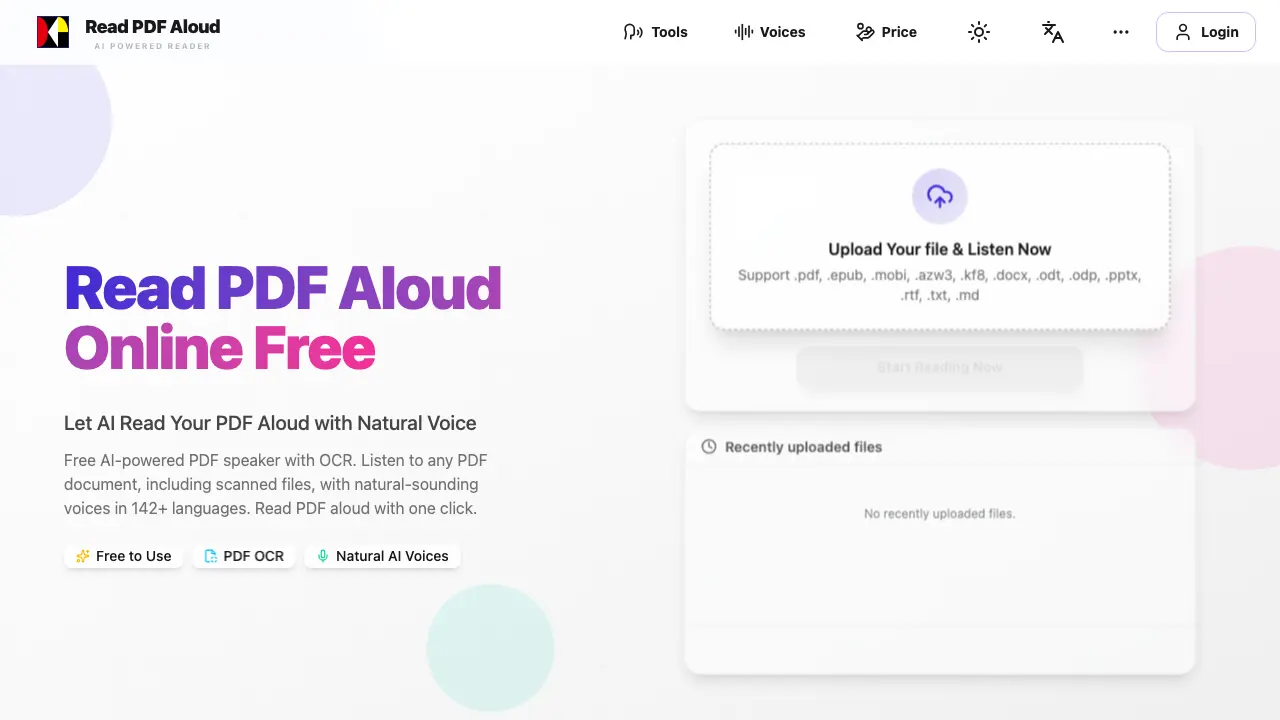
Read PDF Aloud is an AI-powered online tool that converts PDF documents into natural-sounding speech. It supports 142 languages and offers 100+ voice options, making it versatile for various users. The tool uses OCR technology to read text from scanned PDFs and handwritten notes, ensuring accessibility for non-searchable files. Users can upload PDFs, select a preferred voice, and listen instantly without long loading times. The platform processes most data locally, providing a smooth experience and allowing users to resume from where they left off. Additionally, it supports MP3 export for offline listening. Compatible with all devices and browsers, Read PDF Aloud is a convenient solution for students, professionals, and anyone needing auditory access to documents.
How does Read PDF Aloud work
Read PDF Aloud is an AI-powered online tool that converts PDF documents into natural-sounding speech. Users can upload PDF files, which are then parsed and processed locally in their browser. The extracted text is converted to audio using advanced text-to-speech technology, supporting 142 languages and over 100 voice options. The tool employs OCR technology to read scanned PDFs and allows users to export audio as MP3 files. Designed with a local-first philosophy, it ensures smooth performance and continuity across sessions. Compatible with all modern devices, Read PDF Aloud provides an intuitive and accessible way to listen to documents, making it ideal for students, professionals, and individuals with diverse reading needs.
Benefits of Read PDF Aloud
Read PDF Aloud offers a free, AI-powered solution for converting PDF documents into natural-sounding speech. With support for 142 languages and 100+ voice options, this tool provides an accessible way to listen to PDFs on any device. Its advanced OCR technology enables reading of scanned documents, while local processing ensures a smooth, instant experience. Users can upload various file formats, choose from diverse voices, and even export audio as MP3 files for offline listening. This versatile tool caters to students, professionals, and anyone seeking an alternative to traditional reading, making document consumption more flexible and convenient.
Pros and Cons of Read PDF Aloud
Pros
- Free to use with daily credits.
- Supports 142 languages and 100+ voice options.
- Works on any device with a modern browser.
Cons
- Limited information on premium features.
- No mobile app available.
- Processing may require internet connection.
Core Features of Read PDF Aloud
AI-Powered PDF Reading
Utilizes advanced AI to read PDF documents aloud with natural-sounding voices, supporting 142+ languages for a seamless listening experience.
OCR Technology for Scanned PDFs
Employs cutting-edge OCR technology to extract text from scanned and handwritten PDF documents, enabling audio conversion of non-searchable files.
Cross-Platform Compatibility
Works on any device with a modern browser, including Windows, Mac, iPhone, iPad, Android, and Linux, ensuring accessibility across platforms.
MP3 Export Functionality
Allows users to export the generated audio as MP3 files for offline listening and sharing on various devices and audio players.
Local-First Processing
Processes most data locally on the user's device, ensuring a smooth experience without long loading times and enabling offline use.
Use Cases of Read PDF Aloud
- Students: Convert textbooks and study materials into audiobooks for efficient learning and multitasking.
- Professionals: Transform lengthy reports and documents into audio format for convenient consumption during commutes.
- Language Learners: Practice pronunciation and listening skills in 142 languages using the text-to-speech feature.
- Researchers: Convert academic papers and research documents into podcasts for hands-free review and analysis.
- Individuals with ADHD: Utilize auditory learning to maintain focus and reduce distractions while processing information.
FAQs of Read PDF Aloud
How do I use Read PDF Aloud to listen to a PDF document?
Using Read PDF Aloud is simple and straightforward. First, upload your PDF file to the platform. The tool will then parse the document and extract the text directly in your browser. Next, select your preferred language and voice from the 142+ language options and 100+ natural AI voices available. Finally, click the play button to start listening to your PDF document. The tool processes most of the work locally, ensuring a smooth and instant experience without long loading times.
What types of files can I upload to Read PDF Aloud?
Read PDF Aloud supports a wide range of file formats, including .pdf, .epub, .mobi, .azw3, .kf8, .docx, .odt, .odp, .pptx, .rtf, .txt, and .md. This versatility allows you to listen to various types of documents, from PDFs to eBooks and even PowerPoint presentations.
Can Read PDF Aloud read scanned PDFs and handwritten notes?
Yes, Read PDF Aloud is equipped with AI-powered OCR (Optical Character Recognition) technology. This feature enables the tool to extract text from scanned documents and even handwritten notes, converting them into natural-sounding speech instantly. This makes it an excellent choice for students and professionals dealing with non-searchable files.
Is Read PDF Aloud free to use, and what are the limitations?
Read PDF Aloud offers free daily credits to all registered users upon login, making it accessible for regular use. While the free version provides a great experience, there may be premium features or additional credits available for purchase to enhance your usage further. The tool is designed to be user-friendly and cost-effective for everyone.
Can I export the audio from Read PDF Aloud as an MP3 file?
Yes, Read PDF Aloud allows you to export the audio narration of your PDF documents as MP3 files. This feature is perfect for offline listening and sharing the audio with others. You can download the MP3 files and listen to them on any device or audio player, making it convenient for on-the-go use.
How to use Read PDF Aloud
- Navigate to the Read PDF Aloud website and select the "Read Aloud PDF" tool.
- Upload your PDF file by clicking the "Upload Your File" button.
- Choose your preferred language and voice from the available options.
- Click the "Start Reading Now" button to begin the audio playback.
- Use the player controls to pause, resume, or skip to different sections of the document.
- To export the audio, click the download button and save the MP3 file to your device.
Read PDF Aloud Website Traffic Analysis
Latest traffic information
- Monthly Visits67.45K
- Bounce Rate38.38%
- Pages Per Visit2.05
- Visit Duration00:00:19
- Global Rank531.52K
- Country/Region Ranking21.59K
Visits Over Time
Traffic Sources
- Organic Search: 41.17%
- Direct: 40.37%
- Referrals: 11.57%
- Generative AI: 4.51%
- Organic Social: 1.74%
- Mail: 0.64%
Top Keywords
| Keyword | Traffic | Volume | Cost Per Click |
|---|---|---|---|
| lector de pdf voz | 390 | 230 | -- |
| read pdf aloud | 370 | 4.98K | $2.02 |
| озвучка документа ворд онлайн | 360 | -- | -- |
| narrador de pdf gratis | 280 | -- | -- |
| aloud reader pdf | 270 | 340 | -- |
Top Regions
| Region | Percentage |
|---|---|
| United States | 11.45% |
| France | 7.08% |
| Nigeria | 6.24% |
| Brazil | 5.85% |
| Colombia | 5.81% |
