
Imgen Studio Introduction
Imgen Studio provides the GPT Image 2 AI image generator and editor in one web workspace, letting teams and creators create, edit, upscale and remove backgrounds from images without swapping tools.

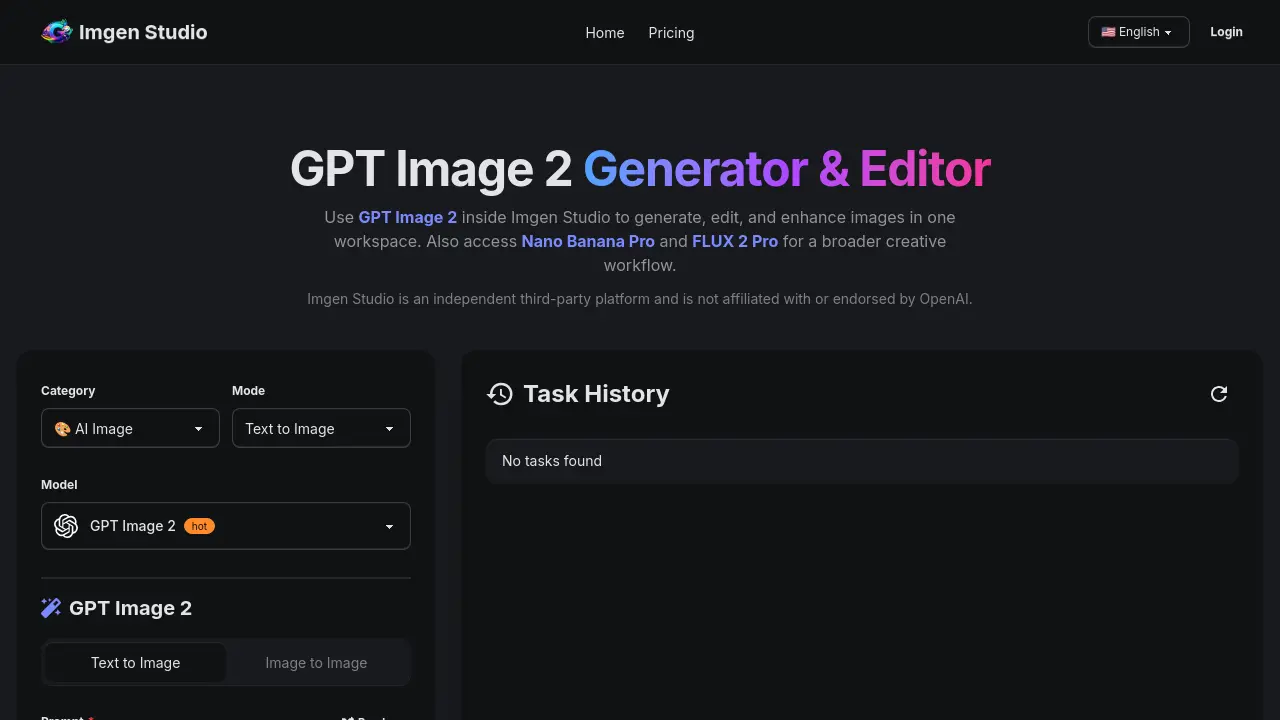
What is Imgen Studio
Imgen Studio is a web‑based AI platform that combines text‑to‑image generation, image‑to‑image editing, and post‑processing tools within a single workspace. Powered by the GPT Image 2 model and supplemented with Nano Banana Pro and FLUX 2 Pro, the service lets users create high‑resolution visuals from plain‑language prompts, refine them with inpainting, background removal, or upscaling to 4K, and export the results in PNG, JPG, or WebP formats. The interface supports multiple aspect ratios, batch variants, and quick switching between models, making it suitable for e‑commerce product shots, UI mockups, posters, anime avatars, and other text‑heavy or photorealistic assets. Free daily credits are available on sign‑up, while paid plans provide unlimited commercial rights and priority access. Imgen Studio operates entirely in the browser, requiring no local installation or API configuration.
How does Imgen Studio work
Imgen Studio provides a browser‑based workspace where GPT Image 2 generates, edits, and enhances visuals without installing software. Users submit a text prompt, select size and variant settings, and the model produces high‑resolution images in seconds; the same interface then allows image‑to‑image adjustments, in‑painting, background removal, and 4K upscaling. Integrated switchable models—Nano Banana Pro and FLUX 2 Pro—let creators compare styles within the same session, while built‑in export options (PNG, JPG, WebP) support commercial workflows. Free daily credits enable testing, and paid plans grant commercial rights and higher‑resolution outputs.
Benefits of Imgen Studio
Imgen Studio consolidates AI‑powered image generation, editing, and upscaling into a single browser‑based workspace. Using GPT Image 2, Nano Banana Pro, or FLUX 2 Pro, users can create text‑heavy visuals, photoreal product shots, or stylized concepts without switching tools. The platform offers one‑click background removal, in‑painting/out‑painting, and 4K upscaling, while free daily credits let new users test the workflow before subscribing. Commercial rights are included in paid plans, and all outputs can be exported as PNG, JPG, or WebP, making Imgen Studio suitable for e‑commerce, marketing, and creative prototyping.
Pros and Cons of Imgen Studio
Pros
- Unified generation, editing, and upscaling in one workspace.
- Free daily credits for trial without credit card.
- Access to multiple models (GPT Image 2, Nano Banana Pro, FLUX 2).
- Full commercial rights included in paid plans.
- Fast photorealistic output for product and marketing images.
Cons
- Subscription starts at $9.99 / month.
- Free credits are limited; heavy users need paid plan.
- No downloadable desktop application; requires internet browser.
- Output quality varies across different AI models.
- Restricted content policy limits certain creative uses.
