
Cartoon2Real FAQs
Cartoon2Real AI uses artificial intelligence to turn cartoon and anime images into realistic human portraits quickly and easily online.

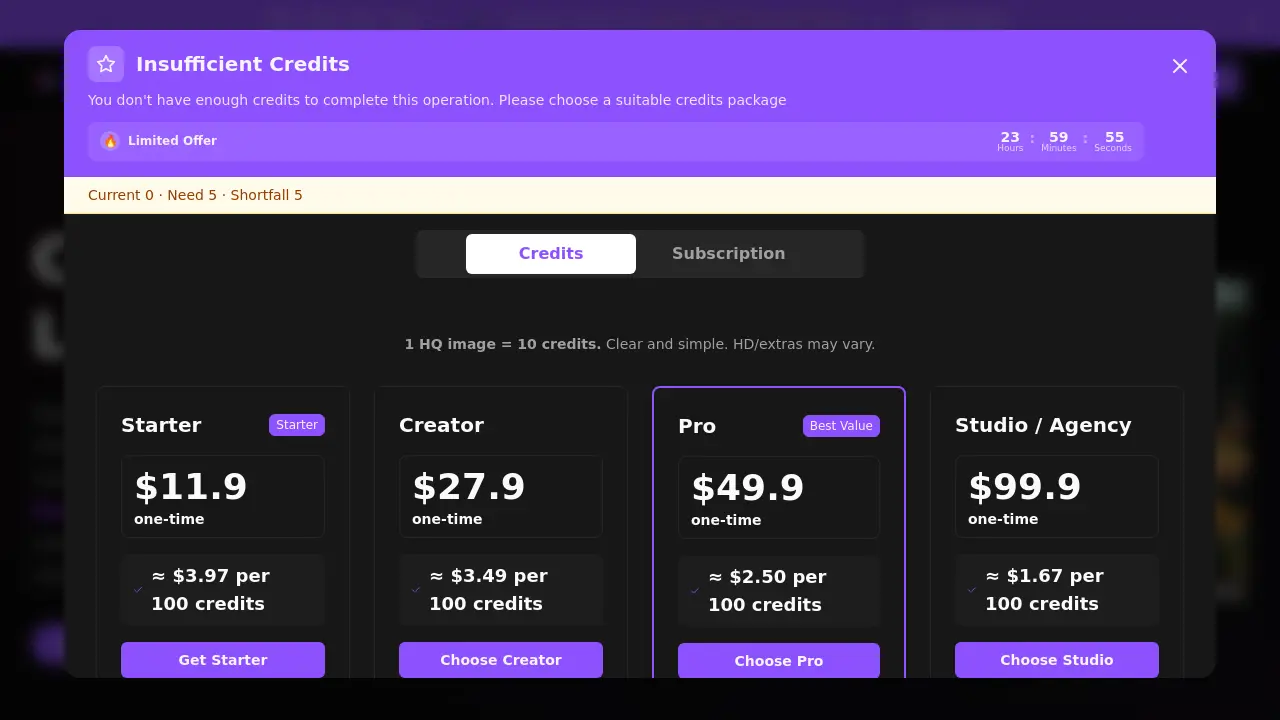
FAQs of Cartoon2Real
What is a credit?
A credit is the unit of currency used on Cartoon2Real to generate transformed images. Each generation consumes a set number of credits based on output quality and selected style options. Credits can be purchased in one-time packs or through subscription plans, with pricing details available on the pricing page.
How many credits per image?
The standard rate is one high-quality (HQ) image per 10 credits. producing higher-definition outputs, adding watermarks, or using batch processing may require additional credits. The exact cost for specific features is displayed before confirming a generation.
Credit packs vs subscriptions?
Credit packs are one-time purchases suitable for occasional use, providing a fixed credit balance valid for 12 months. Subscriptions offer regular credit replenishment along with benefits like priority processing, HD outputs without watermarks, batch transformation capabilities, and access to premium styles for frequent creators.
Do you train on my uploads?
No, Cartoon2Real does not utilize uploaded images to train its artificial intelligence models. User uploads are processed solely to fulfill the specific transformation request and are automatically deleted from servers immediately after the generated output is delivered.
How do I turn anime or cartoons into real people?
Users upload a supported cartoon or anime image file, select a preferred realistic style from the available options, and initiate the generation. The AI processes the request within seconds directly in the web browser, requiring no software installation or design expertise.
Commercial use?
Commercial utilization of generated images is allowed under the condition that the user holds the rights to or is properly licensed for the original cartoon source material. Users remain responsible for verifying the licensing status of any input content before commercial application.
Which image formats are accepted?
The tool accepts JPG, PNG, JPEG, WEBP, HEIC, and GIF file formats. Uploads can include screenshots, digital illustrations, or other cartoon-style artworks, with a maximum file size limit of 10 megabytes per image.
Can I upload anime characters or cartoon pets?
Yes, the AI is capable of transforming anime-style characters, stylized human figures, and cartoon representations of pets. The system's training encompasses diverse artistic styles to accommodate various source materials while aiming for realistic human or animal feature adaptation.
How realistic are the generated images, and what factors influence quality?
The output realism stems from AI training on large datasets of human facial features and artistic styles. Result quality is influenced by the clarity and detail of the input cartoon, the simplicity of the character design, and the selected visual style. Well-defined, high-contrast sources typically yield the most lifelike transformations.
What are the system requirements for using Cartoon2Real?
Cartoon2Real functions as a fully web-based application, requiring only a contemporary internet browser such as Chrome, Firefox, or Safari and a stable network connection. No local software installation or high-performance computing hardware is necessary, allowing use on most desktops, laptops, and mobile devices.
Can the AI transform images with multiple characters or complex scenes?
The AI can process images containing multiple cartoon characters, but optimal accuracy is achieved when individual faces are clear, well-framed, and not overlapping. Complex backgrounds or scenes with numerous subjects may reduce the transformation precision for each character, so isolated portraits produce the best results.
What visual styles are available, and how do they affect the output?
Several visual styles are provided, ranging from soft, natural realism to high-detail photographic renditions. Each style adjusts elements like lighting, skin texture, and fine facial features to alter the final aesthetic. Users can preview style examples to select the one that best matches their desired realism level for the source cartoon.
What customer support options are available for technical issues?
Primary support is accessible via email at support@cartoontoreal.com for account, billing, or technical inquiries. The website also offers a searchable FAQ section and a blog with usage guides. Email responses are typically provided during standard business hours, and no telephone support is currently offered.
How to use Cartoon2Real
Cartoon2Real is a web-based AI application that transforms cartoon or anime-style images into photorealistic human portraits, operating entirely within a browser without requiring software installation.
- Users must first visit the Cartoon2Real website and log into an account to verify available credits for processing images.
- Locate the upload interface, then drag a cartoon image file into the designated area or click to select a file from local storage.
- Optionally, select a specific realistic visual style from the available options; the default style applies automatically if no choice is made.
- Initiate the transformation by clicking the "Transform to Real Life" button, which sends the image to the AI model for analysis.
- The AI typically processes the image within seconds, after which the resulting realistic portrait is displayed on the screen.
- Download the generated realistic image by clicking the download button, or use sharing options to post directly to social platforms.
- The output serves practical purposes such as creating profile pictures, visualizing character concepts, or generating unique marketing visuals.
- Monitor credit consumption, as each high-quality image generation deducts approximately 10 credits from the user's balance.
