
Viral Video AI
Viral Video AI: AI Video Generator for TikTok, Reels & Shorts

What is Viral Video AI
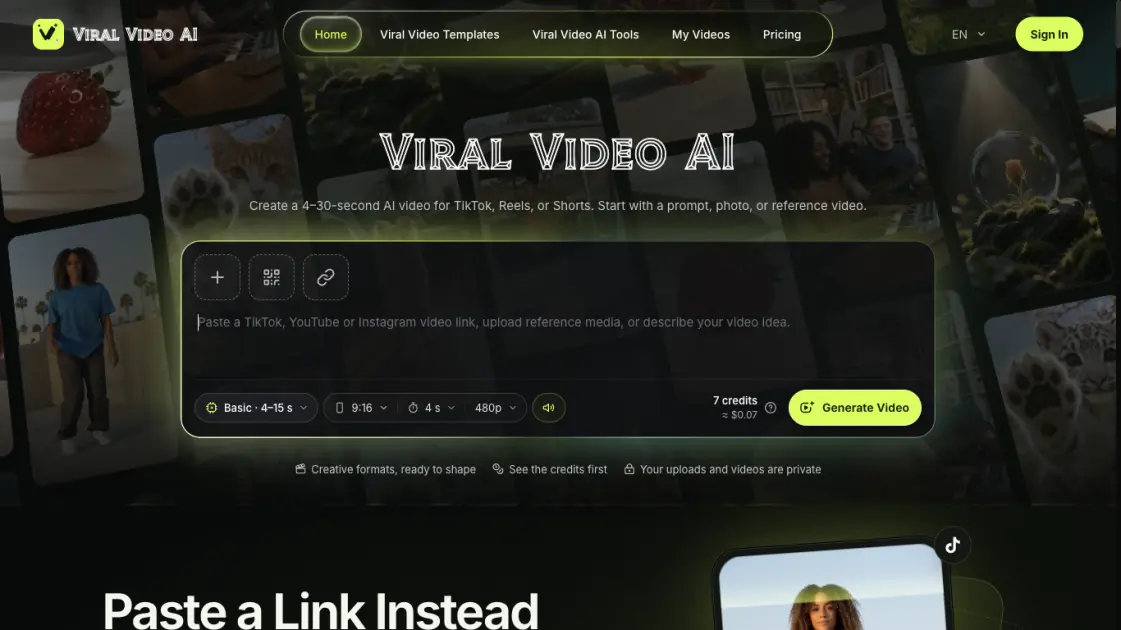
Viral Video AI produces short social clips from a written prompt, reference photos, a reference video, or a prepared template. The platform targets creators making vertical content for TikTok, Instagram Reels, and YouTube Shorts who want a finished MP4 without editing long-form footage. Outputs run 4–30 seconds depending on the selected tier, and the creation area shows a credit estimate before any generation begins. Completed tasks can be replayed and downloaded from a single workspace, and uploads stay private.
How does Viral Video AI work
A generation begins when the creator supplies a subject description, media files, or a reference link, then selects a model tier, duration, resolution, and audio setting. Those choices feed an estimator that displays the credit cost before the Generate Video action is confirmed. The underlying model interprets a single image as the opening frame, uses multiple photos as appearance references, and follows a supplied clip for motion, though appearance and timing may vary. Processing runs asynchronously, and a completed task is available to play back and save as an MP4 file; if the connection drops, the task remains listed under My Videos.
Benefits of Viral Video AI
Reviewing paired source-and-result previews before generating helps creators judge whether a prompt or reference is worth spending credits on. Credit quotes appear up front and update with each setting change, so the cost of a clip is visible before the task starts. Media and finished videos remain private, and confirmed failures are refunded to the original purchase. The download is a standard MP4 that can be edited elsewhere for licensed music or precise speech. Because templates and tools are grouped by creative goal, a creator can move from a dance idea to a product reveal without learning a separate editor.
Pros and Cons of Viral Video AI
Pros
- Text, photo, and video-reference inputs
- Prepared trending templates with set runtimes
- Transparent per-task credit quotes
- Private uploads and downloads
- Failed generations return credits
Cons
- No permanent free tier
- Exact reference matching not guaranteed
- No song upload or voice matching
- Credits expire on monthly and yearly plans
- Platform disclosure rules still apply when posting
Core Features of Viral Video AI
Multiple input modes
Text prompts, uploaded photos, a phone upload, or a public TikTok, YouTube, or Instagram link can all start a generation. A video link is previewed as a motion reference before the creator writes a new description.
Trend template library
Eleven prepared templates cover dance, sports cameos, visual memes, transitions, lip sync, and pet scenes, with runtimes between 5 and 15 seconds. Photo-action templates supply set movements, while scene templates allow edits to the starting brief.
Flexible output settings
Basic generates 4–15-second clips at 480p or 720p; Pro extends to 30 seconds and 1080p. Aspect ratio choices include portrait, landscape, and square, with an adaptive ratio applied when a single photo is used without video.
Native audio control
The Native Audio switch requests generated sound, and turning it off produces a silent clip. Separate song uploads, exact voice matching, precise lip sync, and beat mapping are not provided.
Credit transparency and privacy
The quote recalculates when media or settings change, and confirmed failed generations return credits to the original purchase. Uploaded media and finished videos are kept private.
Use Cases of Viral Video AI
- Short-form creators: turn a trend prompt or a favorite public clip into an original vertical video for TikTok, Reels, or Shorts.
- Pet owners: transform a single pet photo into an animated pet reaction or a themed template such as Snow Leopard Paws.
- Product sellers: build a short product showcase from one product image using the AI Product Video Generator.
- Dance and music fans: cast themselves or friends into prepared dance routines like Paloma Blanca or Shan Shen Bu.
- Social media teams: produce multiple themed clips from text and stills without filming new footage.
FAQs of Viral Video AI
What can be generated with Viral Video AI?
Short social clips built from text descriptions, reference photos, a video reference, or one of the prepared templates. Categories span dance, pets, animation, product showcases, and meme-style scenes.
Is a photo or video required to start?
Neither is mandatory: text alone can drive a generation. Adding one image sets the first frame, multiple photos act as appearance references, and a reference video supplies motion.
Does the result match the supplied reference exactly?
Exact replication is not promised. Appearance, motion, lettering, and audio may differ, so the full result should be inspected before it is shared or another attempt is purchased.
Which lengths and resolutions are available?
The Basic tier covers 4–15 seconds at 480p or 720p, while Pro reaches 30 seconds and 1080p. Portrait, landscape, and square ratios are offered where applicable.
How are credits calculated?
The creation area quotes each task based on tier, output length, resolution, reference-video duration, and whether a template reference is used. Recheck the figure after changing any setting.
Can personal music be added?
Native Audio produces generated sound, and disabling it requests silence. Licensed tracks and precise speech need to be added in an editor after the MP4 is downloaded.
Where do finished videos go?
Completed tasks stay in the creation area and under My Videos for replay and download. The saved file is an MP4 for later editing or posting.
How to use Viral Video AI
- Open the creation area on the home page and choose Upload Media, Upload from Phone, or Video Link.
- Enter a prompt or paste a public TikTok, YouTube, or Instagram URL to preview as a reference.
- Configure the generation model, duration, resolution, aspect ratio, and Native Audio toggle.
- Read the displayed credit quote, then select Generate Video and sign in when asked.
- Wait for the task to finish, play the full clip, inspect motion and sound, then download the MP4.
Viral Video AI Alternatives
Turn a static logo into an animated video with Logo Animation AI. Upload a logo, pick a style or describe the motion, and export MP4 or transparent WebM.
MV Creator turns songs, photos and lyrics into downloadable music videos with lip-sync, slideshow, lyric, karaoke and visualizer tools for musicians.

Tavoa is an all-in-one AI creation platform for images, videos, music, and voice. Create production-ready content with leading AI models in one studio.
Happy Wan builds cinematic video from text, images, clips and audio direction, with @-tag references, scene extension and multi-shot continuity for creators.
Kling 4.0 turns text prompts or first and last frames into 5–30 second clips with optional audio, letting creators direct and refine scenes in one workspace.
UniRoute gives developers one API and one pay-as-you-go USD balance for Claude, GPT, Gemini, Seedance and Suno text, image, video and audio models.
TokLab puts AI image, video, language and audio models behind one API key and one prepaid USD balance, with live listed prices and no subscription.
Photo-to-video studio that turns portraits into Hello 2027 climb, Goodbye 2026 and Lunar New Year clips with fixed Wan templates. No prompts, 6-15s MP4s.
Multimodal AI video generator that turns text prompts, reference images, and clips into cinematic multi-shot sequences with consistent characters.
Seedance 3.0 preview page: planned multi-shot continuity, scene editing and audio-visual sync for AI video, while the on-page generator runs Seedance 2.5.
Browser workspace for AI image generation, reference photo editing, and short video drafts, aimed at creators, marketers, and product teams.
Black Forest Labs' multimodal model with a web generator for text-to-video, image-to-video and image editing with native audio, for creators and marketers.