
Logo Animation AI
Logo Animation AI: Turn Static Logos into Animated Videos

What is Logo Animation AI
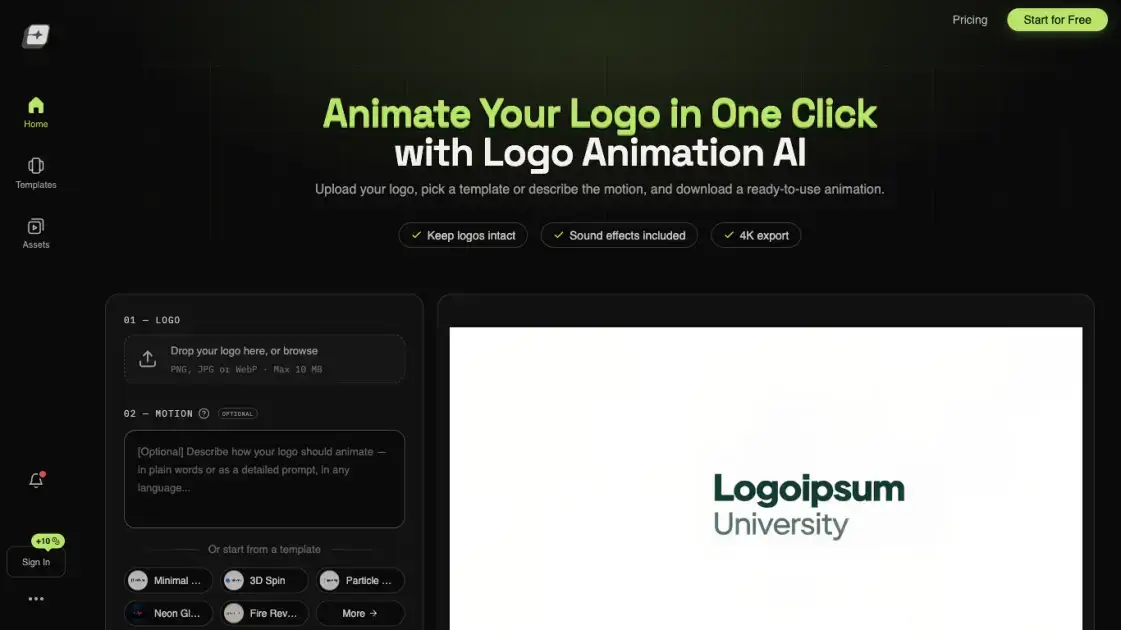
Logo Animation AI turns a supplied brand mark into a short motion clip without timeline editing or keyframe work. A user uploads a PNG, JPG or WebP image, chooses a preset reveal or writes a plain-language prompt, and receives a downloadable video with optional synchronized audio. Outputs support an alpha channel for overlaying onto other footage and scale to 4K for use in intros, signage or social posts. The service runs on cloud GPUs, so rendering happens remotely and takes roughly 30 to 50 seconds per clip. It suits creators who need a polished reveal quickly but do not work in motion-design software.
How does Logo Animation AI work
The workflow begins when a flat image is uploaded and the system identifies its dominant shapes and colors. A preset can be chosen, a description supplied, or the decision left to an AI director that derives a reveal from the artwork itself. Background is set to solid or transparent, and resolution is fixed before rendering starts. Cloud GPUs then synthesize the motion frames and pair them with a sound track matched to the pacing. A finished file is returned as MP4 or as WebM with an alpha channel, and only completed clips consume credits.
Benefits of Logo Animation AI
Turnaround is short enough to iterate: most renders finish within a minute, so several styles can be tested in one session. Because processing is remote, the work runs on any laptop, tablet or phone with no software installation. One-time credit packs avoid recurring billing and do not lapse, which keeps occasional use inexpensive compared with hiring freelancers. Commercial rights accompany every paid export as long as the uploaded artwork is owned by the submitter. Transparent output removes the need for green-screen setups when a logo must sit over footage.
Pros and Cons of Logo Animation AI
Pros
- Alpha-channel exports for clean compositing
- Sound effects synchronized to each reveal
- Rendering up to 4K UHD
- One-time credits that never expire
- No design or prompt-writing skills needed
Cons
- Free-tier videos carry a site watermark
- GIF and MOV export still in development
- Re-generating to refine a result spends more credits
- Purchases are non-refundable after rendering
- Default preview capped at 720p, 5s, 16:9
Core Features of Logo Animation AI
Style Presets and Prompt Control
A catalog spanning minimal reveals, 3D spins, particle bursts and light effects can be selected directly. Leaving the motion field blank lets the model inspect the artwork's shape and design a matching reveal on its own.
Transparent Alpha Output
Exports can carry an alpha channel, allowing the animated mark to be laid over video, slides or web pages without chroma-key work.
Synchronized Sound Design
Each render is paired with audio cues timed to the visual transitions, and the track can be muted before download when a silent clip is preferred.
High-Resolution Rendering
Clips can be produced up to 4K UHD, with aspect ratio chosen to suit YouTube intros, digital signage or social feeds.
Credit-Based Purchasing
Packs are bought once, never renew, and stay available until spent. Failed generations return their credits automatically.
Use Cases of Logo Animation AI
- Video editors: drop an animated brand mark with transparency over a finished cut.
- YouTube creators: open videos with a short reveal instead of a static end card.
- Small businesses: produce a consistent logo sting without hiring a motion designer.
- Social media managers: prepare lightweight clips for platform-specific aspect ratios.
- Presenters: add a branded intro to slide decks and recorded talks.
FAQs of Logo Animation AI
Does the free plan include a watermark?
Yes. Credits granted to a new account produce clips bearing a logoanimationai.com watermark; removing it requires any paid pack.
What input artwork is accepted?
PNG, JPG and WebP files no larger than 10 MB can be uploaded, and a transparent source yields the cleanest result.
Which download formats exist?
Standard MP4 suits direct posting, while WebM keeps the alpha channel for compositing; GIF and MOV are listed as in development.
How is the credit cost calculated?
Charges equal video duration multiplied by a per-second rate that varies with resolution, from 1 credit at 480p to 5 at 4K; the total appears before generation.
Are refunds available?
Credit packs are non-refundable once rendering has occurred, except where consumer law requires otherwise.
Can the clips be used in client work?
Yes, full commercial rights are granted provided the person uploading the logo owns it.
Where does rendering happen?
Processing runs on remote GPUs, so local hardware is not involved and most clips finish in 30 to 50 seconds.
How to use Logo Animation AI
- Open the builder and drop a PNG, JPG or WebP logo into the first panel, with a 10 MB size ceiling.
- Pick a motion template from the gallery or type a plain-language description, or leave the field empty for an automatic reveal.
- Select a solid or transparent background and set the output resolution.
- Press Animate and wait for the cloud render to finish; most clips take 30 to 50 seconds.
- Download the result as MP4 for direct sharing or transparent WebM for editing software.
Logo Animation AI Alternatives
Viral Video AI turns text, photos, or a video reference into short clips for TikTok, Reels, and Shorts. Explore trend templates and download MP4 videos.
MV Creator turns songs, photos and lyrics into downloadable music videos with lip-sync, slideshow, lyric, karaoke and visualizer tools for musicians.

Tavoa is an all-in-one AI creation platform for images, videos, music, and voice. Create production-ready content with leading AI models in one studio.
Happy Wan builds cinematic video from text, images, clips and audio direction, with @-tag references, scene extension and multi-shot continuity for creators.
Kling 4.0 turns text prompts or first and last frames into 5–30 second clips with optional audio, letting creators direct and refine scenes in one workspace.
UniRoute gives developers one API and one pay-as-you-go USD balance for Claude, GPT, Gemini, Seedance and Suno text, image, video and audio models.
TokLab puts AI image, video, language and audio models behind one API key and one prepaid USD balance, with live listed prices and no subscription.
Photo-to-video studio that turns portraits into Hello 2027 climb, Goodbye 2026 and Lunar New Year clips with fixed Wan templates. No prompts, 6-15s MP4s.
Multimodal AI video generator that turns text prompts, reference images, and clips into cinematic multi-shot sequences with consistent characters.
Seedance 3.0 preview page: planned multi-shot continuity, scene editing and audio-visual sync for AI video, while the on-page generator runs Seedance 2.5.
Browser workspace for AI image generation, reference photo editing, and short video drafts, aimed at creators, marketers, and product teams.
Black Forest Labs' multimodal model with a web generator for text-to-video, image-to-video and image editing with native audio, for creators and marketers.