
TikFilmer AI Movie Generator turns ideas into full films

What is TikFilmer
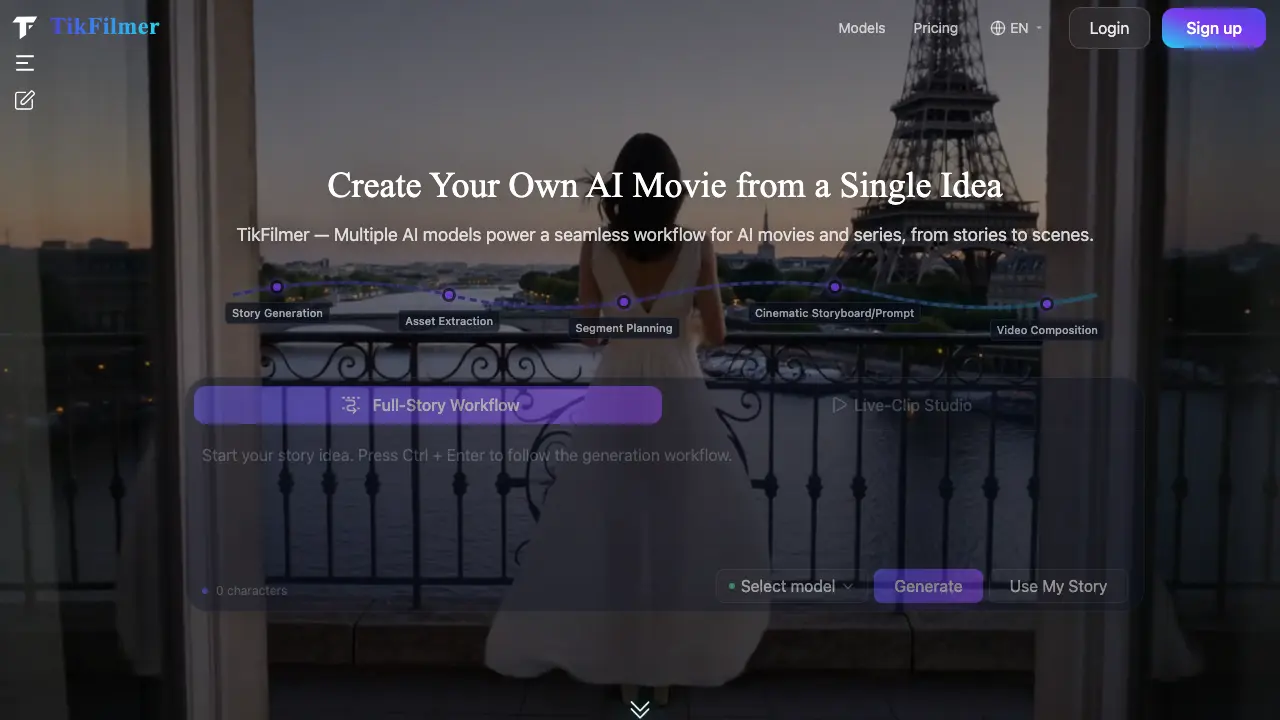
TikFilmer is an online AI movie generator that transforms a textual idea or full screenplay into a high‑definition short film through a fully integrated workflow. Users input a concept, after which the platform’s ensemble of leading LLM, image and video models automatically extracts characters, scenes and props, generates professional storyboard prompts, and composes cinematic video clips. The system supports multiple visual styles—including realistic, anime, 3D animation and ink‑wash—and offers one‑click preview, editing and MP4 export while keeping all project data stored locally for privacy. By combining asset extraction, intelligent storyboard planning and automated video synthesis, TikFilmer enables creators without filmmaking expertise to produce polished, copyright‑owned movies ready for personal, commercial or monetized use.
How does TikFilmer work
TikFilmer operates as an end‑to‑end AI movie generator that transforms a textual idea or full screenplay into a high‑definition short film. After the user submits a prompt, the platform’s integrated large‑language models generate a complete narrative, then automatically extract core assets—characters, locations, props—and produce reference images. A proprietary storyboard engine creates cinematic shot sequences and lens‑language prompts, which feed into combined image and video synthesis models (including OpenAI, Gemini, Midjourney, and others). The resulting clips are compiled, allowing one‑click preview, editing, and MP4 export, while all project data remains stored locally in the browser for privacy.
Benefits of TikFilmer
TikFilmer offers an end‑to‑end AI movie generator that turns a single idea or complete script into a high‑definition short film. The platform integrates leading LLM, image and video models—such as GPT‑5.2, Gemini 3.1, Midjourney V7, and others—to automate story generation, asset extraction, storyboard planning, and video composition in a single workflow. Users can select from multiple visual styles (realistic, anime, 3D, ink‑wash) and edit professional lens prompts before exporting an MP4 or project file. All project data is stored locally in the browser, ensuring privacy and full copyright ownership of the final film.
Pros and Cons of TikFilmer
Pros
- Integrated multiple top AI models in one platform.
- End‑to‑end workflow from story input to downloadable MP4.
- Supports diverse visual styles, including realistic, anime, and 3D.
- Local browser storage ensures user data privacy.
- No professional filmmaking skills required.
Cons
- No clear pricing information on the site.
- Reliance on internet connection for AI model access.
- Limited detail on output resolution and rendering speed.
- Potential learning curve for complex storyboard adjustments.
- Copyright claims depend on user‑generated content only.
Core Features of TikFilmer
Complete Idea‑to‑Movie Workflow
Transforms a user’s text idea or script into a full cinematic short by sequentially generating story assets, planning scenes, and synthesizing video, requiring no specialist skills.
AI‑Driven Asset Extraction
Automatically identifies characters, locations, props and other narrative elements from the input story, creates editable asset data and generates reference images for production.
Smart Storyboard Engine & Pro Lens Prompts
Uses an intelligent AI movie agent to produce professional storyboard frames and lens‑language prompts, ensuring visual consistency and cinematic framing before video rendering.
Integrated Multi‑Model Architecture
Combines leading LLMs, image generators and video synthesis models (e.g., GPT‑5.2, Gemini, Midjourney, Sora) within a single platform, keeping the system up‑to‑date with the latest AI advances.
Rich Multi‑Style Movie Creation
Supports diverse visual styles—realistic, anime, 3D animation, ink‑wash, and more—allowing creators to select or switch styles that best suit their narrative vision.
Local Data Storage & Privacy Protection
Stores all scripts, assets and project files locally in the user’s browser, offering one‑click export and ensuring that creative content remains private and secure.
Use Cases of TikFilmer
- Independent filmmakers: Convert a short script into a fully rendered short film using the integrated AI storyboard and one‑click video generation.
- University media students: Experiment with diverse visual styles—realistic, anime, or 3D—through the platform’s multi‑style AI movie creation tools.
- Marketing interns: Produce a commercial‑grade advertisement from a brief concept, leveraging automatic asset extraction and cinematic lens prompts.
- Content creators: Generate episodic series clips by inputting story ideas and using the AI’s segment planning to maintain narrative consistency.
- Researchers in AI art: Test latest LLM and video models within a single environment, analyzing output quality across updated AI movie generation models.
FAQs of TikFilmer
What is an AI Movie Generator?
An AI Movie Generator is an online tool that converts text ideas, scripts, or story descriptions into complete short films. TikFilmer’s platform leverages multiple AI models to generate scenes, apply cinematic lens language, and synthesize video without requiring traditional filming equipment.
How does AI movie generation work on TikFilmer?
TikFilmer analyzes the submitted script, automatically segments it into shots, selects appropriate visual styles, and generates matching cinematic scenes. The system controls lens angles, color grading, and atmosphere, then assembles the frames into a cohesive video file ready for download.
Can I use my own screenplay to create a movie?
Yes. Users can paste a full screenplay, short story, or custom shot list into TikFilmer. The AI interprets the plot, extracts characters and settings, and produces exclusive movie scenes that reflect the original narrative intent.
Who holds the copyright for movies created with TikFilmer?
All AI‑generated content produced on TikFilmer is owned entirely by the user. The platform grants full copyright to the creator, allowing personal use, commercial promotion, and monetization without additional licensing restrictions.
Is my original script and any uploaded footage kept private?
TikFilmer stores all creative assets—including scripts, storyboards, and generated media—locally in the user’s browser. The service only retains account and credit information on its servers, ensuring that user data remains private and under the creator’s control.
What visual styles can TikFilmer generate?
TikFilmer supports a variety of visual styles such as realistic live‑action, anime, 3D animation, fantasy, ink‑wash painting, and other artistic themes. The platform continuously adds new styles to accommodate diverse creative projects.
Do I need prior filmmaking experience to use TikFilmer?
No professional filmmaking knowledge is required. TikFilmer provides a streamlined idea‑to‑movie workflow that includes automatic asset extraction, smart storyboard planning, and one‑click video generation, making it accessible to beginners and seasoned creators alike.
How can I export my finished movie from TikFilmer?
After previewing and adjusting the generated video, users can click a single “Download MP4” button to save the final film locally. Project data can also be exported for further editing or archival backup at any time.
What AI models power TikFilmer’s movie generation?
TikFilmer integrates several leading AI models, including OpenAI’s GPT‑5.2 and Sora 2, Google Gemini 3.1, ByteDance’s Doubao Seed 2.0, Alibaba’s Qwen Plus, DeepSeek V3.2, Midjourney V7, and others. These models are regularly updated to maintain state‑of‑the‑art performance.
How is credit or payment handled on TikFilmer?
TikFilmer operates on a credit‑based system where each AI generation or asset export consumes a predefined number of credits. Users purchase credits through the platform’s pricing page, and credits are deducted automatically as features are used.
How to use TikFilmer
TikFilmer serves as an AI‑driven movie generator, converting a textual idea or screenplay into a complete cinematic video through integrated story generation, asset extraction, storyboard planning, and video composition.
Input a concise idea or upload a finished script, select a preferred AI model (e.g., GPT‑5.2, Gemini 3.1, Midjourney), then click Generate to let the system produce a full story outline automatically.
Review the automatically extracted assets—characters, scenes, props—and modify any element; generate reference images using the built‑in image models to ensure visual consistency before production.
Use the AI‑powered storyboard engine to arrange scenes, accept either direct video prompts or preview storyboard images, and adjust lens‑type prompts for desired cinematic style.
Press the one‑click Generate & Export button; the platform renders video clips, allows frame‑by‑frame preview, and provides MP4 download or project saving for further editing.
Analyze the exported video by checking scene continuity, visual style fidelity, and dialogue alignment with the original script; iterate by returning to asset or storyboard steps as needed.
Apply the final movie to personal projects, commercial campaigns, or content monetization, confident that all generated content remains fully owned and stored locally for privacy protection.
