
Subdivide - Your practice, perfected with the ultimate metronome
| Added on: | Jun 12, 2024 |
| Monthly Visits: | 1.27K |
| Social & Email: | -- |

What is Subdivide
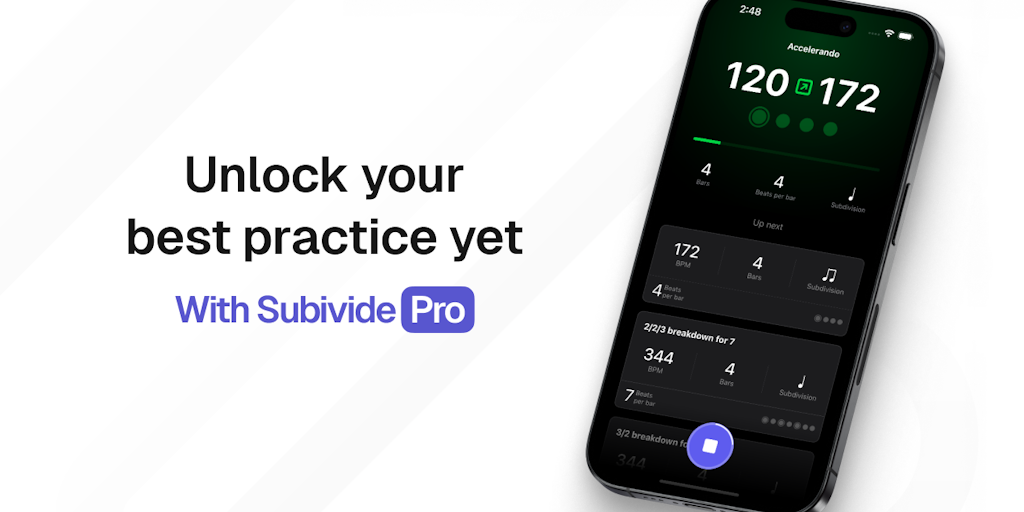
Subdivide is a metronome app designed for musicians of all levels. It offers advanced controls, shareable tracks, and automated transitions, making it a powerful tool for practice. Whether you need to work on your timing, explore different tempos, or create complex rhythms, Subdivide can help you take your playing to the next level. Its innovative features, like its ability to automatically transition between different subdivisions, let you create intricate rhythms with ease. Subdivide also allows you to share your practice tracks with others, so you can collaborate with fellow musicians or simply show off your progress.
Core Features of Subdivide
Advanced Controls
Subdivide offers advanced controls to help you practice more effectively.
Shareable Tracks
You can share your practice tracks with others.
Automated Transitions
The app features automated transitions that can help you smoothly move between different sections of your practice routine.
Modes
Subdivide includes a variety of modes to help you practice in different ways.
FAQs of Subdivide
What is Subdivide?
Subdivide is a metronome app designed to help musicians practice more effectively. It offers a wide range of features, including advanced controls, shareable tracks, and automated transitions.
How do I use Subdivide?
Subdivide is easy to use. You can adjust the tempo and time signature, create custom patterns, and even share your practice tracks with others. You can also use the app’s automated transitions to smoothly move between different tempos and time signatures.
What are some of the benefits of using Subdivide?
Subdivide can help you improve your timing, rhythm, and overall musicality. It's a great tool for practicing alone or with others. You can use it to create custom practice routines, track your progress, and even share your work with others.
How is Subdivide different from other metronome apps?
Subdivide stands out from other metronome apps because it offers a wide range of features designed to help musicians of all levels practice more effectively. It is also very user-friendly, and is a great tool for both beginners and experienced musicians.
Subdivide Website Traffic Analysis
Latest traffic information
- Monthly Visits1.27K
- Bounce Rate37.08%
- Pages Per Visit1.18
- Visit Duration00:00:00
- Global Rank12.87M
- Country/Region Ranking5.19M
Top Keywords
| Keyword | Traffic | Volume | Cost Per Click |
|---|---|---|---|
| metronome with subdivision | -- | 510 | $1.44 |
| subdivide metronomo | -- | 260 | -- |
Top Regions
| Region | Percentage |
|---|---|
| United States | 100% |
Subdivide Alternatives
Browser studio for AI video, image and music generation with Grok Imagine, Kling and GPT Image models. Free daily credits, no sign-up required.
SongScene turns any MP3, Suno, or Spotify track into an AI music video with beat-synced cuts and auto lyric captions, exporting 9:16, 16:9, or 1:1 clips.
MusicDesk offers AI vocal removal, stem splitting, reference-based mastering and noise cleanup in the browser, plus free trim, join, convert and speed tools.

SongFor creates AI-powered personalized songs with custom lyrics and studio-quality production for birthdays, anniversaries, weddings and more. Free preview, pay only if you love it.
MelodyCraft is an AI music generator that turns lyrics into songs, creates AI covers, and offers various music styles for content creators.
Viblo AI offers AI video generation, image creation, voice, and music tools with 250+ models. Compare quality and credit costs, then start free.
Invideo AI provides video, image, and audio generation through 200+ AI models with free credits and a unified workspace for content creators.
Musicaura turns mood, scene, or lyric prompts into original songs and background tracks for creator videos, podcasts, and games.
Create royalty-free AI music from text or lyrics with Free Music Creator. Generate songs and download high-quality audio for personal and commercial use.
CraftMusic AI, an AI music generator for creators, lets users write lyrics, generate songs or instrumentals from prompts, fine‑tune genre and mood, then download royalty‑free tracks for videos, podcasts, games or ads.
CAVN AI is an AI music platform for creators, offering text‑to‑song, voice cloning, stem separation, mastering and 4K video creation, free for commercial use.
Voicss is an online AI vocal remover that separates vocals and instrumentals, creates karaoke backing tracks, and isolates vocals for remixing, serving singers and creators with a fast, no‑download interface.