
MusicDesk: AI Vocal Remover, Stem Splitter & Mastering
| Added on: | Sep 27, 2026 |
| Monthly Visits: | -- |
| Social & Email: | -- |

What is MusicDesk
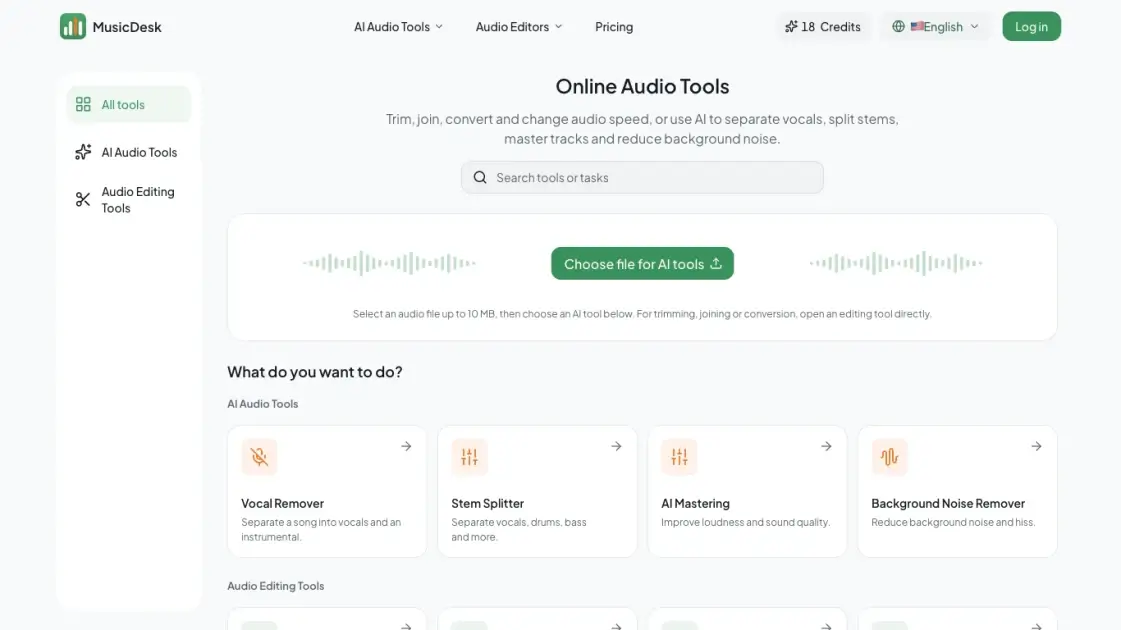
MusicDesk is a browser-based audio workspace that combines free editing utilities with AI processing for music, speech and podcast material. Its AI tools separate vocals from instrumentals, split tracks into 2, 4 or 6 stems, master a mix against a reference track, and reduce steady recording noise or crowd sound. Alongside them sit four non-AI editors for trimming, joining, converting to WAV and changing playback speed. Every AI tool shows an estimated Credit cost before a task starts, results can be previewed before download, and output formats range from MP3 up to 32-bit WAV and 24-bit FLAC depending on plan.
How does MusicDesk work
Each AI tool follows the same path: upload a file, pick a mode and output format, review the estimated Credits, then wait for the task to appear in Recent tasks. Vocal Remover and Stem Splitter run a separation model that estimates which sounds belong to each track, so a vocal can leave slight bleed in the instrumental. Noise Remover isolates the unwanted layer and returns both a cleaned track and the extracted noise track. AI Mastering takes two files and uses the reference to guide the target's level, frequency balance, peaks and stereo width.
Benefits of MusicDesk
Everything runs in the browser, so no desktop audio editor is needed and tasks start from a single upload. Separation, mastering and noise cleanup share one account, and each AI result can be previewed before it is downloaded. Pricing is transparent: the estimated Credit cost appears before a task is submitted, and a technical failure returns the usage that was deducted. One limitation worth noting is that free accounts export AI results as MP3 only, and the free monthly allowance covers roughly three minutes of processing.
Pros and Cons of MusicDesk
Pros
- Runs entirely in the browser, no desktop editor required
- Eight tools cover editing, separation, mastering and cleanup
- Estimated Credits are shown before each task starts
- Cleaned and isolated tracks both returned for review
- Six output formats up to 32-bit WAV and 24-bit FLAC
Cons
- Free accounts export AI results as MP3 only
- Free monthly allowance covers roughly three minutes
- AI tasks require signing in before upload
- Separated stems are estimates, not original recordings
- Mastering needs a suitable reference track
Core Features of MusicDesk
AI Vocal Remover
Splits a finished song into a vocal track and an instrumental, so a backing track for rehearsal or an isolated voice for phrasing study can be previewed and downloaded.
AI Stem Splitter
Offers 2-, 4- and 6-stem splits covering vocals, drums, bass, guitar, piano and other sounds, plus dedicated single-instrument modes when one part matters most.
AI Mastering with Reference Track
Takes a target mix and a second reference file, then guides overall level, tonal balance, peak behaviour and stereo width toward the reference rather than replacing the mix.
Background Noise Remover
Two cleanup modes: Recording noise targets hiss, room tone and microphone self-noise, while Audience sounds isolates applause, cheering and whistles from a live performance.
Free Audio Editing Tools
Trim a selected range, join files in order, convert supported audio to WAV and adjust playback speed, all without installing desktop software.
Flexible Output Formats
Results export as MP3, 16-bit or 32-bit WAV, 16-bit or 24-bit FLAC and M4A, with access checked against the account's plan when a task is submitted.
Use Cases of MusicDesk
- Singers and rehearsal: Download a backing track from the Vocal Remover to practise a cover or learn entrances without the original lead vocal.
- Musicians studying parts: Use 4- or 6-stem splits to isolate drums, bass, guitar or piano for arranging and arrangement study.
- Podcasters: Cut the needed segment with the Audio Trimmer, reduce hiss with the Noise Remover, then join segments with the Audio Joiner.
- Video editors: Trim music to length and convert it to WAV for editors that expect an uncompressed file.
- Producers and remixers: Pull separated stems into a DAW to test new arrangements, build edits or prepare samples.
- Live recording owners: Separate applause and cheering from a performance with the Audience sounds mode to judge the show on its own.
FAQs of MusicDesk
What is MusicDesk and who is it for?
MusicDesk is an online audio workspace for musicians, podcasters, video editors and anyone cleaning up recordings. It bundles free editing tools with AI processing for vocal removal, stem splitting, reference-based mastering and noise reduction, all in the browser.
Which MusicDesk tool should I choose?
Start from the result you need. Use Vocal Remover for a vocal and backing split, Stem Splitter when individual instruments matter, AI Mastering to push a finished mix toward a reference, and the Noise Remover for steady hiss or crowd sounds.
Do I need to install audio editing software?
No. Every tool runs on the site itself, so there is nothing to install on Windows or macOS. The four editing utilities work in the browser directly, while the AI tools require an account so tasks can return to Recent tasks.
What do the AI audio tools require?
The AI tools require a signed-in account, enough Credits, and an uploaded file. Standard processing costs 0.1 Credit per second with a 6-Credit minimum per task, and each tool displays an estimate before the task starts.
Which audio formats and file limits are supported?
MP3, WAV, FLAC, OGG and M4A uploads are accepted, generally up to 10 MB and 120 minutes, or 50 MB per file for AI Mastering. Output can be MP3, M4A, 16 or 32-bit WAV, or 16 or 24-bit FLAC.
Are all MusicDesk audio tools free?
Trimming, joining, conversion and speed adjustment are free to use. The AI tools run on Credits: a free monthly allowance, one-time Credit packs, or the Pro membership with a larger monthly amount and all output formats.
How are Credits calculated and do they expire?
Processing is billed by the second, rounded up, with a 6-Credit minimum for one minute of audio. Purchased Credits never expire, while free and Pro monthly allowances expire 30 days after each grant and do not roll over.
How to use MusicDesk
- Create an account: Sign in before uploading an AI file, so the finished task returns to your Recent tasks list and Credits can be deducted.
- Choose the result you need: Pick trimming, joining, conversion, speed change, vocal removal, stem splitting, mastering or noise cleanup for the audio at hand.
- Add your audio: Upload MP3, WAV, FLAC, OGG or M4A, generally up to 10 MB and 120 minutes, or 50 MB per file for mastering.
- Adjust the available settings: Select a separation mode, cleanup mode or output format, then review the estimated Credits before starting.
- Review and download: Listen to the preview alongside the isolated noise or reference track, then download the version worth keeping.
- Move to the next task: Open the following tool and select the file you want to work on, editing the downloaded result if needed.
MusicDesk Alternatives
Miso One AI is an AI voice generator that lets creators and development teams produce expressive dialogue audio, test cloning, review prompts, and download speech samples with credit tracking.

Voicss is an online AI vocal remover that separates vocals and instrumentals, creates karaoke backing tracks, and isolates vocals for remixing, serving singers and creators with a fast, no‑download interface.
Weke AI is a browser‑based AI creative platform for designers, marketers and content creators, providing text‑to‑image, text‑to‑video and audio generation, editing tools, and unified access to 20+ leading AI models via a single credit balance.
LiveTalk Translate offers AI-powered two-way voice translation with low latency, supporting 50+ languages directly in your browser without any app download.
AnySpeech is a professional AI text to speech platform offering 100+ realistic voices across 50+ languages, designed for content creators, YouTubers, and podcasters worldwide.
Audjust AI helps creators edit audio and generate music with AI by shortening songs, lengthening audio, finding loops, and creating tracks from text.
AI Add Audio to Video auto‑detects video scenes and inserts realistic sound effects from a large library, cutting manual editing time for creators.
kirkify instantly creates marketing videos, cinematic images, and audio, enabling marketers and creators to produce visuals quickly with editing and export.
This in-browser tool accurately analyzes song tempo, musical key, and Camelot code using Essentia.js for DJs and producers.
This platform provides AI voice cloning to generate lifelike voices from text or audio samples, suitable for videos, podcasts, and diverse content creation needs.
Eleven Music provides an advanced AI music generator, transforming text prompts into professional, royalty-free songs instantly, with multi-language vocal options.
Describe Music analyzes music, audio, and voice files with advanced AI, generating detailed descriptions, identifying instruments, analyzing emotions, and providing SEO-friendly tags for content creators.