
CraftMusic AI creates music and lyrics from prompts

What is CraftMusic AI
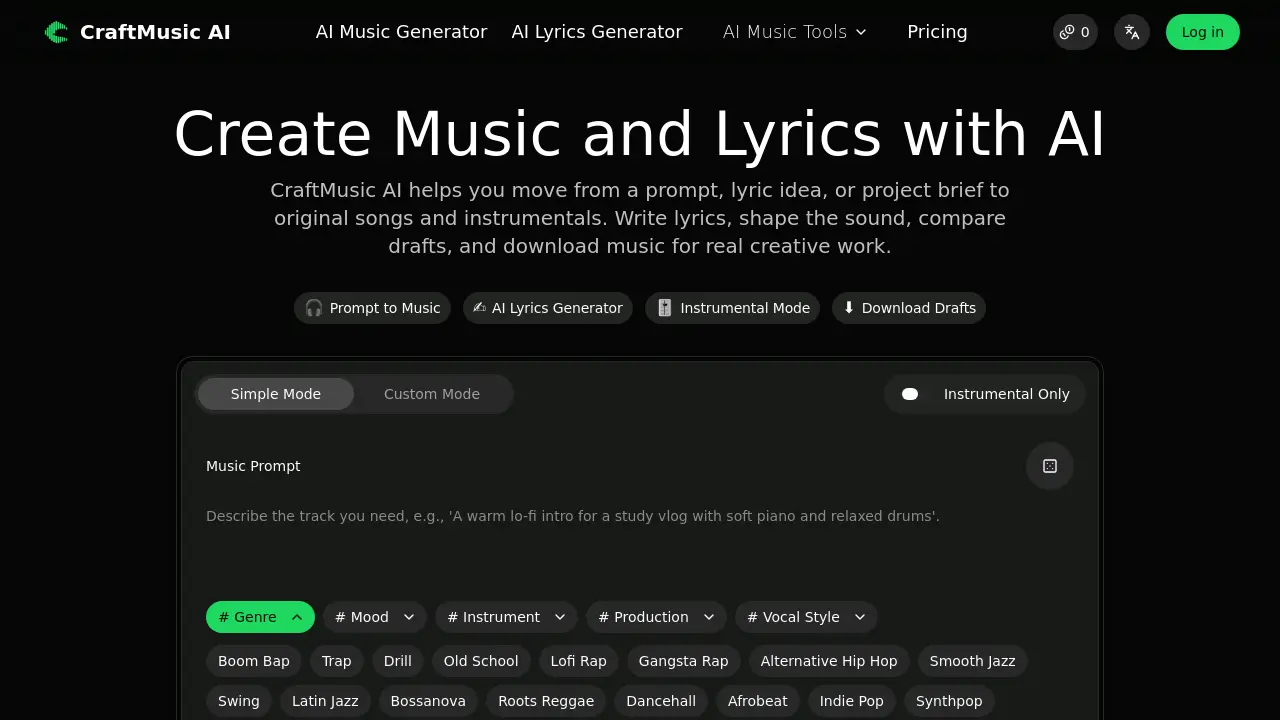
CraftMusic AI is an AI‑driven music creation platform that transforms simple text prompts, lyric ideas, or project briefs into fully‑formed songs and instrumentals. Users describe the intended use—such as a video intro, podcast bed, game scene, or advertisement—and specify genre, mood, instrumentation, and vocal style. The system then generates multiple draft tracks, allowing creators to compare versions, refine the direction, and download royalty‑free audio for editing, testing, or publishing. In addition to the AI Music Generator, the suite includes an AI Lyrics Generator that produces structured verses, hooks, and choruses from thematic inputs. Downloads are provided with clear commercial‑use rights based on the chosen subscription plan, making CraftMusic AI suitable for musicians, video producers, podcasters, and marketers who need fast, customized, high‑quality audio without extensive production resources.
How does CraftMusic AI work
CraftMusic AI processes a textual prompt or lyric draft through two core models: an AI Music Generator and an AI Lyrics Generator. The user supplies genre, mood, instrumentation, and vocal style, which the system encodes into a latent representation that drives a neural synthesis pipeline, producing multi‑track audio or structured lyric sections. Generated drafts can be compared, revised, and exported as royalty‑free files, while commercial‑use rights depend on the subscription tier. By linking prompt parsing, style conditioning, and downloadable output, the platform enables creators to turn simple descriptions into complete songs or instrumentals for videos, podcasts, games, or ads.
Benefits of CraftMusic AI
CraftMusic AI lets creators turn a simple prompt, lyric idea, or project brief into original songs or instrumentals in a few steps. The platform combines an AI Music Generator and an AI Lyrics Generator, so users can draft lyrics, define genre, mood, and instrumentation, then compare multiple drafts before downloading royalty‑free audio for editing, testing, or publishing. Adjustable sound controls reduce reliance on generic loops, while instrumental‑only mode supports podcasts, games, and ads. Free credits let new users explore the workflow, and tiered plans add higher generation limits, commercial‑use rights, and unlimited downloads for professional projects.
Pros and Cons of CraftMusic AI
Pros
- Generates royalty‑free music from text prompts.
- Includes AI lyric writing and instrumental modes.
- Tiered plans with free credits for testing.
- Supports multiple genres and mood tags.
- Allows direct download of draft audio files.
Cons
- Requires subscription for higher generation limits.
- No real‑time collaborative editing features.
- Limited free tier (only 2 songs/month).
- Advanced controls may need technical knowledge.
- Customer support limited to email.
Core Features of CraftMusic AI
AI Music Generator
Creates full songs or instrumental tracks from text prompts, allowing users to specify genre, mood, instruments, and vocal style, then outputs royalty‑free audio drafts.
AI Lyrics Generator
Transforms themes, titles, or story ideas into structured lyric drafts with hooks, verses, and choruses, which can be edited and paired with generated music.
Draft Comparison & Download Workflow
Generates multiple track options, lets users compare drafts, select the strongest version, and download high‑quality audio for editing, testing, or publishing.
Instrumental Mode & Sound Control
Enables creation of vocal‑free music and precise direction through genre, mood, and instrument tags, reducing generic loops and matching the envisioned sound.
AI Audio Post‑Processing Tools (Vocal Remover, Stem Splitter, Mastering)
Provides automated vocal removal, stem separation, and mastering to refine generated tracks, preparing them for professional use and seamless integration.
Use Cases of CraftMusic AI
- YouTubers: Generate royalty‑free background tracks that match video mood and length for quick publishing.
- Game developers: Create looping instrumental beds with specific genre and tempo for adaptive game scenes.
- Podcast producers: Produce vocal‑free music beds that complement dialogue without competing frequencies.
- Songwriters: Turn lyrical drafts into full‑arranged songs, adjusting vocal style and instrumentation via prompts.
- Marketers: Produce custom jingles aligned with brand tone, ready for commercial use under plan licenses.
FAQs of CraftMusic AI
What can I create with CraftMusic AI?
CraftMusic AI provides two primary creation tools: an AI Music Generator that produces full songs or instrumental tracks, and an AI Lyrics Generator that constructs structured lyric drafts with hooks, verses, and choruses. Users start with a text prompt or supplied lyrics, define genre, mood, and instrumentation, then download the resulting audio files.
Is CraftMusic AI only for musicians?
The platform is designed for a broad audience. While musicians use it for songwriting and demoing, video creators, podcasters, game developers, marketers, educators, and small teams also rely on CraftMusic AI to quickly generate original background music and lyric ideas without needing a full recording studio.
Can I make royalty‑free music with CraftMusic AI?
Yes. All audio generated by CraftMusic AI is created from scratch based on the user’s prompt, resulting in royalty‑free tracks. Commercial‑use rights depend on the subscription plan; free users receive personal‑use licenses, whereas paid tiers include a commercial license that permits monetized distribution.
Can I use the music for YouTube, podcasts, games, or ads?
Generated tracks can be applied to YouTube videos, podcast intros, game soundscapes, advertisements, and other multimedia projects. Users must ensure that their plan includes the appropriate commercial‑use rights for public or monetized distribution, as outlined in the license terms.
Can I turn lyrics into a song?
Yes. Users can write lyrics with the AI Lyrics Generator or paste existing lyrics into the AI Music Generator. By providing details such as genre, vocal style, and instrumentation, CraftMusic AI composes a matching musical arrangement and renders a complete song draft.
Can I create instrumental‑only music?
CraftMusic AI offers an Instrumental Mode that generates music without vocal tracks. This mode is ideal for podcast beds, narration overlays, game loops, meditation playlists, tutorial backgrounds, or any situation where vocals would interfere with spoken content.
How do I make the output sound less generic?
Providing a detailed, context‑rich prompt yields more distinctive results. Include the intended use case, specific mood, genre, key instruments, tempo, vocal characteristics, and any reference styles. For example, “warm lo‑fi intro for a study vlog with soft piano, vinyl crackle, and a mellow bass line” guides the model toward a tailored sound.
Is CraftMusic AI free to try?
New users receive free credits that allow limited music and lyric generations each month. This trial lets creators evaluate the workflow, compare drafts, and download a small number of tracks before deciding whether to upgrade to a paid plan for higher limits and commercial licensing.
What are the differences between the subscription plans?
Plans range from a free tier (2 songs/month, 1 generation, personal‑use only) to Premium (1200 songs/month, 600 generations, unlimited downloads, 24/7 support, and commercial license). Each ascending tier adds more generation credits, concurrent tasks, download allowances, advanced features such as AI stem splitting, mastering, and AI singing‑voice model training.
How can I download and use the generated tracks?
After generating a track, users can compare multiple drafts, select the preferred version, and click the download button. The file is provided in a standard audio format suitable for editing in DAWs, uploading to video platforms, or embedding in game engines. Commercial‑use rights apply according to the active subscription.
How to use CraftMusic AI
CraftMusic AI generates original songs, instrumentals, and lyrics from plain‑text prompts, offering genre, mood, and vocal controls to suit video, podcast, game, or advertising needs.
Open the AI Music Generator, enter a concise description of the intended use (e.g., “intro music for a tech vlog”), then select genre, mood, instruments, and vocal style from the sidebar.
Click Generate My Track; the platform processes the prompt, produces several draft audio files, and displays a waveform preview for each version.
Play each draft, compare hook strength, arrangement fit, and emotional tone, then choose the most appropriate version by clicking the Download button beneath the selected waveform.
Optionally switch to Instrumental Mode or use the AI Lyrics Generator to add or replace lyrical content, then regenerate the track to align vocals with the chosen arrangement.
After downloading, import the audio into your DAW or video editor; verify that the tempo, key, and length match project specifications, adjusting with the provided BPM tapper if needed.
Review the royalty‑free licensing terms attached to your subscription plan; ensure commercial use rights are active before publishing on platforms such as YouTube, podcasts, or games.
Archive the final mix and any alternate drafts for future reference, using the built‑in metadata tags (genre, mood, instrument) to facilitate later searches and reuse.
CraftMusic AI Website Traffic Analysis
Latest traffic information
- Monthly Visits44.58K
- Bounce Rate37.2%
- Pages Per Visit2.18
- Visit Duration00:00:31
- Global Rank684.29K
- Country/Region Ranking433.18K
Top Keywords
| Keyword | Traffic | Volume | Cost Per Click |
|---|---|---|---|
| mp3 to midi | 950 | 35.88K | $0.29 |
| audio to midi | 560 | 19.53K | $0.42 |
| bpm tapper | 280 | 49.41K | $0.28 |
| craftmusic ai | 230 | -- | -- |
| wav to midi | 220 | 5.03K | $0.4 |
Top Regions
| Region | Percentage |
|---|---|
| United States | 31.31% |
| United Kingdom | 8.72% |
| Canada | 6.05% |
| India | 5.58% |
| Vietnam | 4.91% |
CraftMusic AI Alternatives
Browser studio for AI video, image and music generation with Grok Imagine, Kling and GPT Image models. Free daily credits, no sign-up required.
Kinovi is a REST API that runs published video, image, and audio AI models from one endpoint. Send a model ID to createTask, poll recordInfo, and pay per use from one shared credit balance.
SongScene turns any MP3, Suno, or Spotify track into an AI music video with beat-synced cuts and auto lyric captions, exporting 9:16, 16:9, or 1:1 clips.
SongFor creates AI-powered personalized songs with custom lyrics and studio-quality production for birthdays, anniversaries, weddings and more. Free preview, pay only if you love it.
MelodyCraft is an AI music generator that turns lyrics into songs, creates AI covers, and offers various music styles for content creators.
Viblo AI offers AI video generation, image creation, voice, and music tools with 250+ models. Compare quality and credit costs, then start free.

Invideo AI provides video, image, and audio generation through 200+ AI models with free credits and a unified workspace for content creators.
Musicaura turns mood, scene, or lyric prompts into original songs and background tracks for creator videos, podcasts, and games.
Create royalty-free AI music from text or lyrics with Free Music Creator. Generate songs and download high-quality audio for personal and commercial use.
CAVN AI is an AI music platform for creators, offering text‑to‑song, voice cloning, stem separation, mastering and 4K video creation, free for commercial use.
AI Inspo is an AI creative platform that lets creators, marketers and designers generate images, videos and music from prompts in minutes, eliminating the need to switch between separate tools.
GoAISong is an AI music generation website for creators and marketers that produces complete, MP3‑ready songs with vocals, lyrics, beats and covers, delivering commercial‑licensable tracks in minutes.