
Studiobit - Elevate your content creation
| Added on: | Jul 11, 2024 |
| Monthly Visits: | -- |
| Social & Email: | -- |

What is studiobit
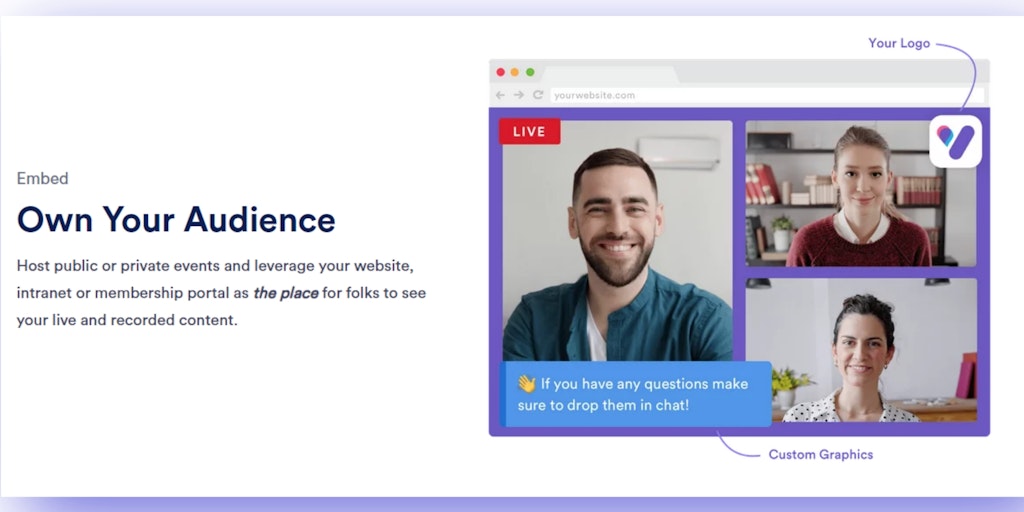
Studiobit is a browser-based live streaming platform that allows users to create and multistream branded and engaging events. It’s easy to use, with no software to download. Users can create custom backgrounds and layouts, add branding elements, and integrate with other platforms. It’s perfect for businesses, educators, and anyone who wants to create professional-looking live streams. Some key features of Studiobit include its ability to support multiple presenters, it’s seamless integration with popular streaming platforms, and ability to track analytics. The platform is free to use for basic features and offers paid plans for additional features. Studiobit can be a great option for those looking to create engaging and professional live stream events.
How does studiobit work
Studiobit is a live streaming platform designed for creating branded, dynamic live stream events. It allows users to host live streams and simultaneously broadcast to multiple social destinations and their own websites. Studiobit features an intuitive user interface, enabling users to incorporate guests, manage camera setups, and integrate pre-recorded video. The platform supports multistreaming, allowing a single stream to reach various social channels. Its chat functionality facilitates audience interaction and community building. Customizations like color schemes and branded graphics are available. Studiobit targets business communications, creators, community engagement, training, and government sectors.
Benefits of studiobit
Studiobit is a user-friendly, browser-based studio for creating dynamic live stream events. With Studiobit, effortlessly multistream to various destinations, expanding your reach while owning your audience. The intuitive interface allows beginners to quickly understand and create high-quality, branded live streams. Engage viewers with interactive chat, fostering a sense of community. Studiobit provides customization options, including templates and layouts, and easily incorporates guests and pre-recorded video. Perfect for business communications, community engagement, and more, Studiobit helps you craft a polished, on-brand experience. Sign up today and start live streaming.
Pros and Cons of studiobit
Pros
- Free to start live streaming.
- Multistream to many destinations easily.
- Offers audience interaction via chat.
- Allows for branded live stream events.
Cons
- Lacks detailed feature information.
- Reliance on browser-based studio.
Core Features of studiobit
Create and Multistream Branded Live Events
Studiobit is a web-based studio and live streaming platform. Users can create and multistream fully branded and engaging events.
Start for Free
Users can start using Studiobit for free.
Customizable Branding
Users can customize their events with their own branding.
Engaging Features
Studiobit offers a variety of engaging features, such as polls, Q&A, and chat.
Multistreaming
Studiobit allows users to multistream their events to multiple platforms simultaneously.
Use Cases of studiobit
- Businesses: Use Studiobit for dynamic presentations and reinvent all-hands meetings with engaging live stream events.
- Creators & Influencers: Expand reach using Studiobit's multistreaming capabilities, pulling audiences to owned properties while live streaming.
- Educators: Employ Studiobit to present training sessions and facilitate interaction through integrated chat features.
- Houses of Worship: Connect communities remotely, offering new participation methods via Studiobit's live streaming platform.
- Government: Digitize public communications using Studiobit to transform processes and formats for broader access.
FAQs of studiobit
What is Studiobit?
Studiobit is a browser-based live streaming platform that allows you to create and multistream fully branded and engaging events. It is easy to use and does not require any downloads or installations.
How does Studiobit work?
Studiobit uses your browser to create a virtual studio where you can add different elements, such as cameras, graphics, and audio. You can then use this studio to broadcast your event live to multiple platforms, such as YouTube, Facebook, and Twitch.
What are the benefits of using Studiobit?
Studiobit offers several benefits over traditional live streaming methods, such as:
- Ease of use: Studiobit is very easy to use, even for beginners. You don't need any technical expertise to get started.
- Branding: You can create a fully branded experience for your viewers by adding your logo, colors, and other branding elements.
- Multistreaming: You can easily multistream your event to multiple platforms with just a few clicks.
- Engagement: Studiobit allows you to engage your viewers with interactive elements, such as polls, Q&A, and chat.
How do I get started with Studiobit?
You can sign up for a free Studiobit account and start using the platform right away. You can also watch the tutorials on the Studiobit website to learn more about how to use the platform.
How to use studiobit
Studiobit is a live streaming platform designed to create branded and engaging live events. It offers multistreaming, chat features, and customization options.
Begin by signing up for a free Studiobit account. This provides access to the platform's core functionalities for live streaming events.
Set up your desired social channels within Studiobit. This enables multistreaming to various destinations, expanding audience reach.
Customize your live stream with branded graphics, layouts, and colors. This helps maintain a consistent brand identity for your audience.
Invite guests or co-hosts to participate in your live stream. This can be done with just a few clicks within the Studiobit interface.
Incorporate pre-recorded video content into your live stream. This allows for dynamic presentations and improved viewer engagement.
Monitor and engage with your audience through the chat feature. Acknowledge participation and answer questions in real time.
Start your live stream to multiple platforms simultaneously. Studiobit simplifies the process of broadcasting to different social channels.
Review the analytics and engagement data after the live stream. Analyze audience interaction and identify areas for improvement in future events.
studiobit Alternatives
Seedance 3.0 preview page: planned multi-shot continuity, scene editing and audio-visual sync for AI video, while the on-page generator runs Seedance 2.5.
Browser workspace for AI image generation, reference photo editing, and short video drafts, aimed at creators, marketers, and product teams.
Black Forest Labs' multimodal model with a web generator for text-to-video, image-to-video and image editing with native audio, for creators and marketers.
Wan API is an independent platform for Wan and Seedance video models. Compare specs and rates, generate clips in the Playground, or call them through one API.
Seedance 3.0 turns text, images, video clips, and audio into videos with sound, and edits one part of a clip without regenerating the rest.
Scribix is an AI video clipper that cuts podcasts and interviews into captioned vertical shorts, then publishes them to YouTube, TikTok and LinkedIn.
Wery is a virtual AI studio that routes one goal to specialist agents for video, images, music and documents, keeping characters and project assets consistent.

AI video and image studio with text-to-video, image-to-video and keyframe control across Seedance, Kling, Wan and Vidu — all on one credit balance.
Browser studio for AI video, image and music generation with Grok Imagine, Kling and GPT Image models. Free daily credits, no sign-up required.
SeaMove AI is an AI video and image generation platform offering Seedance 2.0 and Seedance 2.5 models for text-to-video, image-to-video, and reference-based creation. Features multi-shot continuity, director-level control, and audio-visual sync for creators and studios.
Turns two separate portraits into a 15-second vertical rap duet video on an orange stage with a shared microphone and the original soundtrack. Free 480P preview available.
Katto turns long videos and podcasts into scored, captioned 9:16 clips. It ranks clips by viral potential and exports them to 7 platforms from one place.