
SJinn AI Agent for Image, Video, Audio & 3D Content Creation

What is SJinn
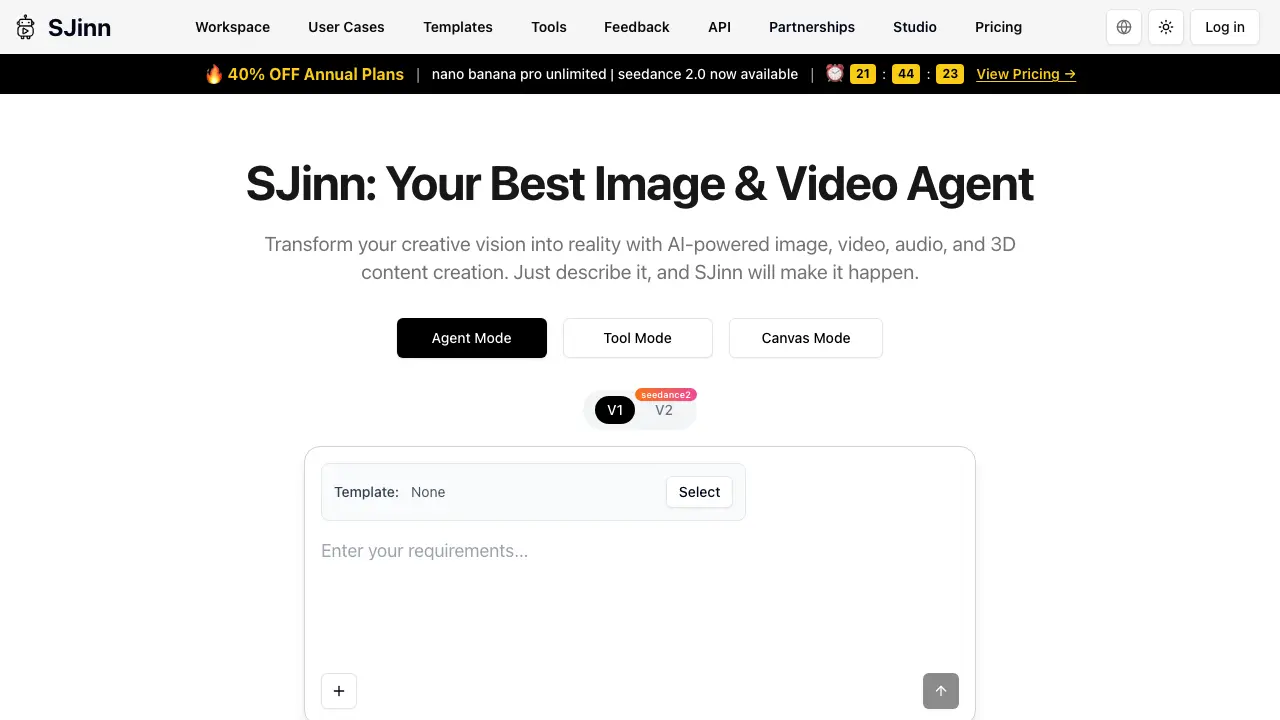
SJinn is an AI‑driven creative agent that converts textual prompts into high‑quality images, videos, audio, and 3D assets. By selecting Agent, Tool, or Canvas mode, users can choose the level of automation or manual control that best fits their workflow. The platform supports multiple generation models (V1, V2, Seedance 2.0) and offers a library of pre‑built templates for rapid prototyping. Integrated tools such as video watermark removal, image‑to‑video conversion, and specialized effects (e.g., slime face, rust removal) extend its functionality for both individual creators and enterprise teams. Pricing includes annual plans with a 40 % discount, and an API provides programmatic access for seamless integration into existing pipelines. SJinn positions itself as a versatile content creation hub, aiming to streamline the production of multimedia assets from a single interface.
How does SJinn work
SJinn functions as an AI‑driven content agent that converts textual prompts into images, videos, audio, and 3‑D assets. Users input a description, the system routes the request to the appropriate generation engine—Agent Mode for full workflow automation, Tool Mode for specific utilities, or Canvas Mode for iterative editing. Behind the scenes, pretrained diffusion models and multimodal generators produce media, while a central API coordinates asset management, versioning, and output delivery. Projects remain private within the workspace, and the platform supports team plans and enterprise integrations, enabling collaborative creative pipelines without manual rendering.
Benefits of SJinn
SJinn offers an AI‑driven workflow for creating image, video, audio, and 3D assets from simple text prompts. By selecting Agent, Tool, or Canvas mode, users can generate content quickly, experiment with variations, or customize outputs within a unified workspace. The platform includes specialized generators such as video watermark removal, image‑to‑video conversion, and the Seedance 2.0 video engine, supporting both individual creators and enterprise teams. Projects remain private, and API access enables integration with existing pipelines. Pricing options include annual plans with a discount, making the service accessible for a range of creative and production needs.
Pros and Cons of SJinn
Pros
- Multi‑modal AI generation (image, video, audio, 3D).
- Agent, Tool, and Canvas modes for flexible workflows.
- Template library accelerates project start‑up.
- API documentation available for integration.
- Annual plans include a 40 % discount.
Cons
- Enterprise‑level team plans not clearly defined.
- Pricing details beyond discount are unspecified.
- Project privacy statements are vague.
- Interface shows many tool options, may overwhelm new users.
- Limited public information on performance benchmarks.
Core Features of SJinn
Multi‑Modal Content Generation
Creates images, videos, audio, and 3D assets from textual prompts, enabling users to materialize creative concepts without manual design or rendering effort.
Agent, Tool, and Canvas Modes
Offers three interaction layers: Agent Mode for guided AI assistance, Tool Mode for specific generation utilities, and Canvas Mode for iterative visual editing.
Specialized Video Generation Tools
Provides dedicated generators (e.g., watermark removal, image‑to‑video, slime‑face, object‑talk) that streamline niche video production tasks with AI‑driven automation.
Workspace and Template Management
Organizes projects within a collaborative workspace, allowing users to apply pre‑built templates for faster content setup and consistent output quality.
API and Integration Support
Exposes RESTful endpoints for programmatic access, enabling developers to embed SJinn’s generation capabilities into external applications and workflows.
Use Cases of SJinn
- Digital artists: Generate high‑resolution AI images and 3D assets from textual prompts, accelerating concept development.
- Video editors: Produce short clips or visual effects using SJinn’s video generator tools, reducing rendering time.
- Content marketers: Create multimedia posts—including audio, video, and graphics—through a single AI interface for faster campaign rollout.
- Educators: Build illustrative visuals and interactive 3D models for lecture materials without extensive design expertise.
- Startup teams: Prototype product demos with AI‑generated media, enabling rapid iteration on pitch decks and investor presentations.
FAQs of SJinn
How is SJinn priced?
SJinn offers subscription plans that are billed either monthly or annually, with a discounted rate for annual commitments. The pricing structure includes tiers based on feature access, such as the “nano,” “banana,” and “pro unlimited” plans, and currently features a promotional 40 % discount on annual subscriptions. Detailed price tables are available on the SJinn pricing page.
Does SJinn support enterprise‑level team plans?
Yes, SJinn provides enterprise‑level plans designed for organizations that require multiple user seats, centralized billing, and advanced administration controls. These plans include dedicated account management, priority support, and the ability to integrate SJinn’s API across team workflows, making it suitable for larger creative teams and agencies.
Are projects created in SJinn private?
All projects generated within SJinn are stored securely and remain private to the user or the designated team members unless explicitly shared. SJinn employs encryption at rest and in transit, and its privacy policy outlines that content is not used for external training without user consent.
Who should use SJinn?
SJinn targets creators such as graphic designers, video producers, marketers, and 3D artists who need rapid AI‑generated visual content. It is also useful for educators, students, and small businesses seeking affordable, high‑quality media creation without extensive technical expertise.
How does SJinn work?
SJinn operates through an AI‑driven engine that interprets natural‑language prompts to generate images, videos, audio, and 3D assets. Users select a mode (Agent, Tool, or Canvas), input descriptive text, and the system leverages trained diffusion and generative models to produce the requested media, which can then be edited or exported directly from the workspace.
What makes SJinn different from other AI tools?
SJinn differentiates itself by offering an integrated multi‑modal platform that combines image, video, audio, and 3D generation in a single interface. It supports “Agent Mode” for automated task handling, a robust template library, and a dedicated API for custom integrations, positioning it as a comprehensive creative assistant rather than a single‑purpose generator.
Can I access SJinn via an API for custom workflows?
SJinn provides a well‑documented RESTful API that enables developers to embed its generative capabilities into external applications, automate batch processing, or integrate with existing content pipelines. API keys are issued through the user dashboard, and rate limits correspond to the selected subscription tier.
Is there a free trial or limited‑feature version of SJinn?
SJinn offers a free trial period that grants access to a limited set of features and a capped number of generation credits. This allows prospective users to evaluate the platform’s performance before committing to a paid plan. Details on trial eligibility and credit limits are listed on the pricing page.
How do I secure my account and prevent unauthorized usage?
Users can protect their SJinn accounts by enabling two‑factor authentication (2FA) and employing strong, unique passwords. Additionally, API keys can be regenerated or revoked at any time from the dashboard, and role‑based permissions allow administrators to control team member access to sensitive projects.
How to use SJinn
SJinn serves as an AI‑driven image, video, audio, and 3D content generator, enabling users to create multimedia assets from textual descriptions in Agent, Tool, or Canvas modes.
Access the platform via the Workspace tab, select the desired mode (Agent, Tool, or Canvas), and choose a template or start from a blank canvas for project initialization.
Input a clear, concise prompt describing the visual or auditory outcome; the system parses the request, applies the appropriate generative model, and begins rendering the multimedia asset.
Monitor progress through on‑screen status indicators; once processing completes, preview the generated media within the interface, ensuring alignment with the original prompt specifications.
Export the final asset using the provided download options, selecting format and resolution that match the intended distribution channel or further editing workflow.
Review the export quality by comparing key visual or audio metrics—such as fidelity, color accuracy, and sound clarity—to the project goals, adjusting prompts for iterative refinement if necessary.
Integrate the completed media into broader projects, leveraging SJinn’s API documentation for automated pipelines or sharing within team collaboration spaces for feedback and approval.
SJinn Website Traffic Analysis
Latest traffic information
- Monthly Visits354.31K
- Bounce Rate39.61%
- Pages Per Visit3.65
- Visit Duration00:03:05
- Global Rank123.05K
- Country/Region Ranking21.77K
Visits Over Time
Traffic Sources
- Direct: 46.8%
- Organic Search: 25.26%
- Organic Social: 15.08%
- Referrals: 6.66%
- Paid Search: 3.03%
- Generative AI: 1.94%
Top Keywords
| Keyword | Traffic | Volume | Cost Per Click |
|---|---|---|---|
| sjinn ai | 16.96K | 10.41K | $0.39 |
| sjinn | 16.19K | 12.42K | $1.23 |
| sjinn.ai | 2.81K | 2.91K | -- |
| sjinn ai free | 880 | 470 | -- |
| sjin ai | 820 | 860 | -- |
Top Regions
| Region | Percentage |
|---|---|
| United States | 11.38% |
| India | 7.69% |
| Mexico | 6.21% |
| Brazil | 6.15% |
| Japan | 5.23% |
