
Photo to Video AI
Photo to Video AI – Free AI Photo to Video Generator Online

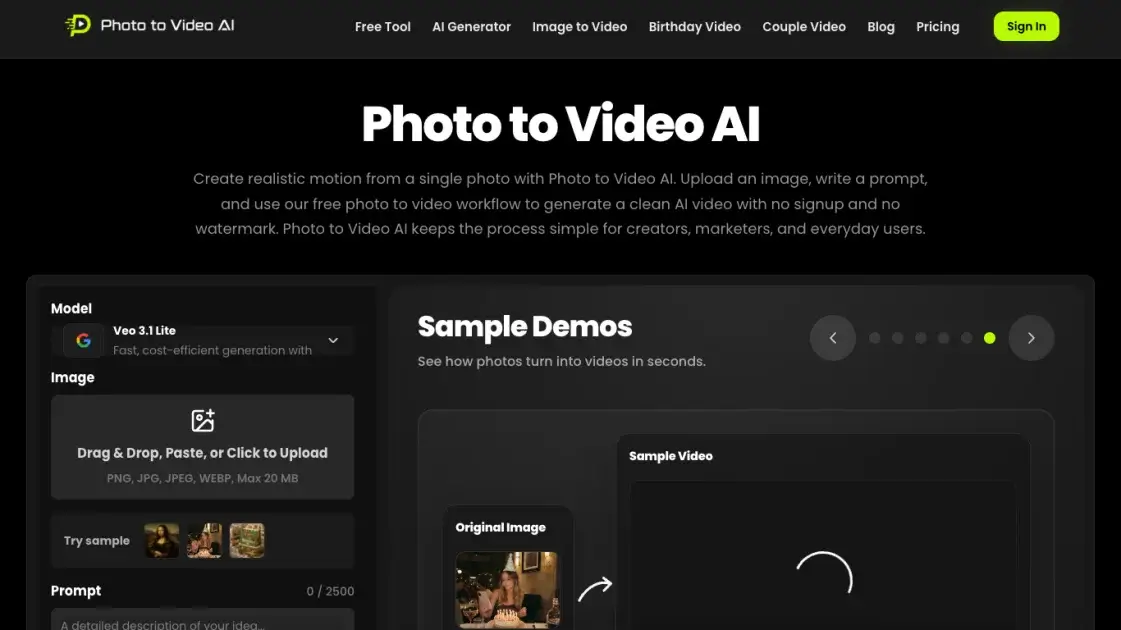
What is Photo to Video AI
Photo to Video AI offers a straightforward solution for transforming a single still image into a short AI-generated video clip. Accessible at phototovideo-ai.net, the tool runs on Google's Veo 3.1 Lite model and supports common image formats including PNG, JPG, WEBP, and HEIC, with file sizes up to 20MB. Users can upload a photo, provide a text prompt to guide motion, and choose from multiple output durations (4, 6, or 8 seconds) at 720p HD resolution with native audio. Both 16:9 and 9:16 aspect ratios are available, making it suitable for platforms ranging from YouTube to TikTok. The service operates on a freemium model: basic usage is free with no signup required and no watermark applied. Paid tiers (Lit, Pro, and Ultra) unlock additional credits that can be used across a broader suite of AI video models, including Veo, HappyHorse, Seedance, Kling, and Wan.
How does Photo to Video AI work
A user uploads a single image in PNG, JPG, WEBP, or HEIC format, up to 20 MB, and writes a text prompt describing the desired motion—camera movement, subject animation, lighting changes, or scene transitions. The user then selects an aspect ratio (16:9 for landscape or 9:16 for vertical) and a duration (4, 6, or 8 seconds). The Veo 3.1 Lite model processes the image and prompt to generate a 720p HD video with native audio, keeping generation fast and cost-efficient. The finished clip is ready to download without a watermark, and no signup is required.
Benefits of Photo to Video AI
Photo to Video AI removes the usual barriers to free AI video generation: no signup required and no watermark on downloads, making it viable for both quick drafts and client-facing content. It accepts JPEG, PNG, WebP, and HEIC images, offers multiple motion styles from cinematic pans to portrait animation, and generates output in seconds using Veo 3.1 Lite with native audio baked in. While the 20 MB file cap and 720p resolution limit high-end production use, the combination of frictionless access, prompt-guided motion control, and clean HD output delivers surprising value from a free, no-login tool.
Pros and Cons of Photo to Video AI
Pros
- Free to use with no signup required
- No watermark on downloaded videos
- Supports JPEG, PNG, WebP, and HEIC
- Multiple motion styles and cinematic effects
- Native audio included in every output
Cons
- Limited to 720p resolution output only
- Only 4, 6, or 8 second durations available
- No multi-photo video generation supported
- Premium models require credit purchases
- No mobile application currently available
Core Features of Photo to Video AI
Multiple Motion Styles & Cinematic Effects
The platform offers cinematic pans, zooms, parallax depth effects, portrait animation, product reveals, and social video effects to transform static images into dynamic footage.
AI Prompt Customization
Users can describe subject motion, camera movement, lighting, pacing, emotion, and scene details through text prompts, giving fine-grained control over the generated video output.
HD Output Without Watermark
Every generated video is delivered in high definition with no watermark branding, allowing clean, professional results suitable for direct publishing or further editing.
All Image Formats Supported
The tool accepts JPEG, PNG, WebP, and HEIC files, covering real photographs, product images, AI-generated art, illustrations, and other common image types.
No Signup Required
No account creation is needed to use the tool. Users can upload an image and generate a video immediately, making the entry barrier effectively zero.
Multiple Aspect Ratios and Durations
Videos can be rendered in 16:9 landscape or 9:16 portrait orientation, with duration options of 4, 6, or 8 seconds to suit different platform requirements.
Native Audio Always Included
Every video output includes native audio generated by the underlying Veo 3.1 Lite model, eliminating the need for separate audio track sourcing or synchronization.
Use Cases of Photo to Video AI
- Social media creators: Turn static images into vertical short-form videos for TikTok, Reels, and YouTube Shorts.
- Ecommerce marketers: Transform product photos into polished video ads for campaigns, listings, and social posts.
- Real estate agents: Convert property listing photos into cinematic virtual tour videos for buyer engagement.
- Couples & event storytellers: Animate birthday, anniversary, proposal, or wedding photos into warm keepsake videos.
- Pet owners & creators: Bring pet photos to life with playful motion for viral social content and sharing.
FAQs of Photo to Video AI
What is Photo to Video AI?
Photo to Video AI is a web-based tool that transforms a single still photograph into a short AI-generated video clip with realistic motion. Accessible at phototovideo-ai.net, it runs on Google's Veo 3.1 Lite model and accepts common image formats such as PNG, JPG, WEBP, and HEIC, with a maximum file size of 20 MB. Users provide a text prompt describing the desired animation, and the tool renders the result at 720p HD resolution with native audio, supporting both 16:9 and 9:16 aspect ratios.
How to make an AI video from a photo?
To create an AI video from a photo, navigate to the Photo to Video AI website and upload an image by dragging and dropping, pasting from clipboard, or browsing the file system. Write a motion prompt of up to 2500 characters describing how the image should animate, then select the desired aspect ratio (16:9 landscape or 9:16 portrait) and duration (4, 6, or 8 seconds). Click the "Create" button to trigger generation, and once complete, download the resulting video directly — no watermark is applied and no signup is required for free usage.
Which AI model powers Photo to Video AI?
Photo to Video AI runs on Google's Veo 3.1 Lite model, a video generation model capable of producing short clips with coherent motion from a single image input. For users on paid tiers (Lit, Pro, and Ultra), additional credits unlock access to a broader suite of AI video models including Veo, HappyHorse, Seedance, Kling, and Wan, providing flexibility across different generation styles and quality levels depending on the specific project requirements.
Can I use Photo to Video AI for free?
Yes, Photo to Video AI offers a free tier that requires no payment and no signup to use. Free users can upload a photo, write a motion prompt, select aspect ratio and duration, and generate a video without any cost. The free tier is functionally complete for basic use — output is rendered at 720p resolution with native audio and carries no watermark. The only limitation is that free users have a restricted number of daily generations, while paid tiers unlock additional credits for higher-volume use.
Can I convert photo to video without logging in?
Yes, Photo to Video AI does not require any form of login, account registration, or sign-in to use the service. Users can visit the website directly, upload a photo, configure generation settings, and download the finished video entirely anonymously. This no-login approach makes the tool particularly convenient for quick one-off tasks where creating an account would be an unnecessary barrier, and it applies equally to both free and watermark-free output.
Can I generate a video from multiple photos?
Photo to Video AI is designed to accept a single photo as input per generation, so directly combining multiple images into one video clip is not currently supported. Each generation takes one still image and a text prompt to produce a coherent animated segment. For projects requiring multiple scenes, users can generate separate videos from individual photos and combine them using third-party video editing software, or explore other tools in the paid credit pool that may offer multi-image capabilities.
Can I download AI videos without a watermark?
Yes, all videos generated by Photo to Video AI are delivered without any watermark, regardless of whether the user is on the free tier or a paid plan. This is a notable advantage over many competing AI video tools that reserve clean output for paid subscribers. The downloaded video includes native audio and is rendered at the full 720p resolution with the selected aspect ratio, ready for direct use on platforms such as YouTube, TikTok, or Instagram without additional post-processing.
How to use Photo to Video AI
- Navigate to the Photo to Video AI website to begin — no account registration or sign-in is required.
- Upload a photo by dragging and dropping, pasting from clipboard, or clicking to browse supported image formats.
- Accepted formats include PNG, JPG, JPEG, and WEBP, with a maximum file size of 20 MB per upload.
- Write a motion prompt of up to 2500 characters describing how the image should animate or move.
- Select the desired aspect ratio for the output video — choose between 16:9 (landscape) or 9:16 (portrait).
- Choose the video duration from three options: 4 seconds, 6 seconds, or 8 seconds.
- The output is rendered at 720p resolution and always includes native audio in the generated video.
- Click the "Create" button to trigger the generation process and wait for the video to finish.
- Download the resulting video directly — no watermark is applied to any generated output.
Photo to Video AI Alternatives
Seedance 3.0 preview page: planned multi-shot continuity, scene editing and audio-visual sync for AI video, while the on-page generator runs Seedance 2.5.
Browser workspace for AI image generation, reference photo editing, and short video drafts, aimed at creators, marketers, and product teams.
Black Forest Labs' multimodal model with a web generator for text-to-video, image-to-video and image editing with native audio, for creators and marketers.
Wan API is an independent platform for Wan and Seedance video models. Compare specs and rates, generate clips in the Playground, or call them through one API.
Seedance 3.0 turns text, images, video clips, and audio into videos with sound, and edits one part of a clip without regenerating the rest.
Wery is a virtual AI studio that routes one goal to specialist agents for video, images, music and documents, keeping characters and project assets consistent.

AI video and image studio with text-to-video, image-to-video and keyframe control across Seedance, Kling, Wan and Vidu — all on one credit balance.
Browser studio for AI video, image and music generation with Grok Imagine, Kling and GPT Image models. Free daily credits, no sign-up required.
SeaMove AI is an AI video and image generation platform offering Seedance 2.0 and Seedance 2.5 models for text-to-video, image-to-video, and reference-based creation. Features multi-shot continuity, director-level control, and audio-visual sync for creators and studios.
Turns two separate portraits into a 15-second vertical rap duet video on an orange stage with a shared microphone and the original soundtrack. Free 480P preview available.
Mareel is an all-in-one AI video and image generation workspace giving creators, marketers, and ecommerce teams 40+ leading models and one shared credit balance.
Kinovi is a REST API that runs published video, image, and audio AI models from one endpoint. Send a model ID to createTask, poll recordInfo, and pay per use from one shared credit balance.