
Peek - AI-Powered Tab Organization and Summarization
| Added on: | Jun 7, 2024 |
| Monthly Visits: | 685 |
| Social & Email: | -- |

What is Peek
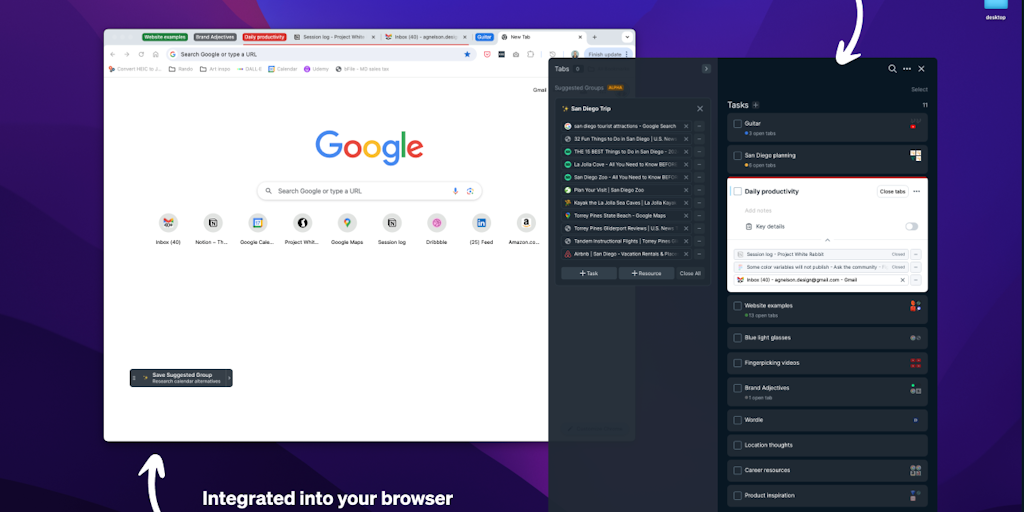
Peek is a workspace that automatically organizes and summarizes your tabs using AI. It's designed for anyone who works with multiple tabs, like students, researchers, and knowledge workers. Peek analyzes the content of your tabs, groups them into relevant categories, and provides you with concise summaries for each tab. This saves you time by eliminating the need to manually sort through a long list of tabs, and helps you get a better understanding of the information you're working with. Peek is built with advanced natural language processing and machine learning algorithms, making it a powerful tool for anyone looking to improve their productivity and focus.
Core Features of Peek
Automatically organizes your tabs
Peek uses AI to automatically organize your open tabs into meaningful groups, helping you to easily navigate and find the information you need.
Summarizes web pages
Peek can summarize web pages, making it easier for you to quickly understand the key points of a webpage.
Provides a unified workspace
Peek gives you a unified workspace for all your web browsing needs, allowing you to access all your open tabs, notes, and files in one place.
FAQs of Peek
What is Peek?
Peek is an AI-powered workspace that helps you organize and summarize your browser tabs. It uses AI to analyze the content of your tabs and group them into meaningful categories. Peek can also generate summaries of each tab, so you can quickly get a sense of what each one is about. This can be really helpful if you have a lot of tabs open and you're not sure what's in each one.
How do I use Peek?
Peek is a browser extension that you can install on Chrome or Firefox. Once you install Peek, it will start automatically organizing your tabs. You can then use Peek to navigate your tabs, read summaries of each tab, and even create notes on each tab.
How can Peek help me?
Peek can help you save time and improve your productivity. By organizing your tabs and providing summaries of each one, Peek can help you focus on the information that's most important to you. Peek can also help you avoid information overload by making it easier to manage your tabs.
How does Peek compare to other tab management tools?
Peek is different from other tab management tools in a few ways. First, Peek uses AI to organize your tabs, which means you don't have to manually create categories. Second, Peek generates summaries of each tab, which can be really helpful if you're trying to quickly get a sense of what's in each one. Finally, Peek is designed to be a more user-friendly experience than other tab management tools.
Peek Website Traffic Analysis
Latest traffic information
- Monthly Visits685
- Bounce Rate46.67%
- Pages Per Visit3.53
- Visit Duration00:02:17
- Global Rank5.32M
- Country/Region Ranking--
Top Keywords
| Keyword | Traffic | Volume | Cost Per Click |
|---|---|---|---|
| peek ai | 10 | 3.03K | $5.36 |
Top Regions
| Region | Percentage |
|---|---|
| United States | 100% |
Peek Alternatives
Open-source AI coworker for Slack and Lark that runs Claude Code, Codex or Pi on your own machine with the plan or API key you already pay for.
Wery is a virtual AI studio that routes one goal to specialist agents for video, images, music and documents, keeping characters and project assets consistent.

Free invoice maker for freelancers and small businesses on Web, iOS and Android. Create unlimited PDF invoices, manage clients and companies, and bill from AI assistants via MCP.
Relay App turns plain-language instructions into AI workflows that connect 200+ apps, run reliable automations, and pause for human approval.
AtAt runs Claude Code, Codex, or local models in the text field you are typing in, no app-switching. It adds TabTab autocomplete, screenshots, and clipboard history.
Dash is an AI teammate in Slack and Microsoft Teams that connects 3,000+ tools, automates workflows and completes tasks in your channel.
ScanPDF AI is a free online PDF scanner that turns photos and scans into clean PDFs, OCR searchable text, and receipt-to-Excel data in your browser.
Always free browser that shares your logged-in Chrome state with AI agents like Claude Code and Codex, running browser automation up to 3.45x faster.
Ritto AI learns from one real demonstration of your work, finds the repeated tasks, and completes them the same way. Join the beta for early access.
Gamma AI is an AI presentation generator that turns text, PDF, and Word into slides with structured outlines, in-browser editing, and editable PPTX export.
AI-powered PDF to Markdown converter with OCR for scanned pages. Get clean, structured Markdown from any PDF in seconds online.
Taskly is an AI-native task manager where teams describe work in plain English and Otto drafts, prioritizes, and organizes tasks with your approval every step.