
Relay App: AI Workflow Automation With 200+ App Integrations

What is Relay App
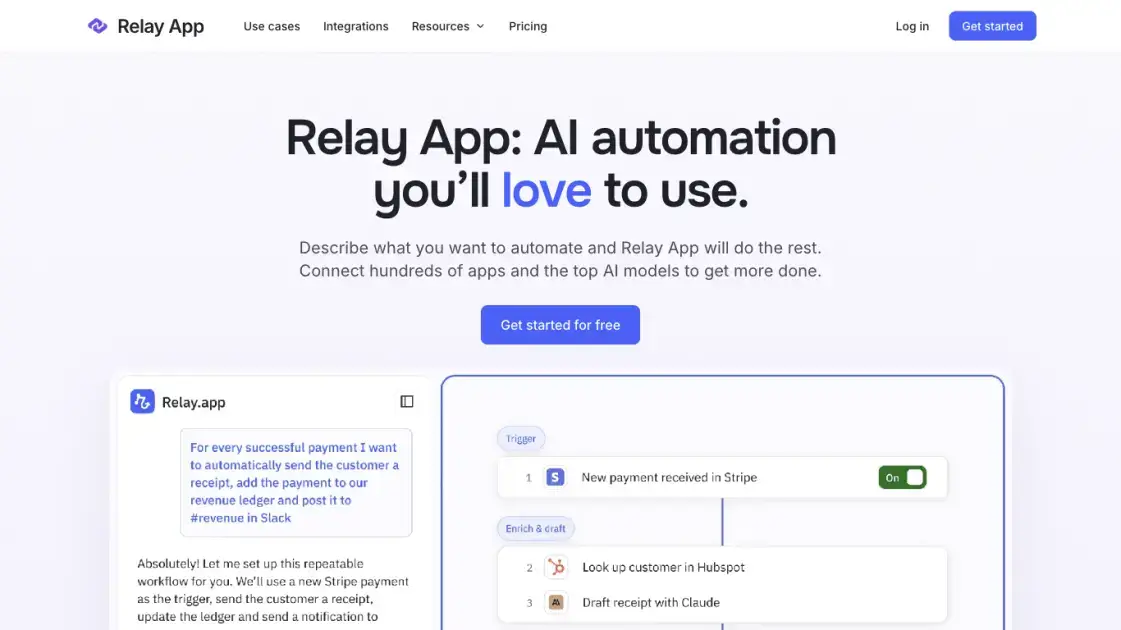
Relay App is an AI automation platform where users describe the process they want in plain language and the service assembles the workflow for them. A conversation with the builder, powered by a frontier model, produces an initial set of steps that can then be reviewed and adjusted in a visual editor. Workflows link more than 200 popular apps, draw on leading AI models, and keep decisions predictable through branching, loops, and data transformations. Human-in-the-loop actions let a teammate approve a decision, review AI output, or supply missing information before the process continues. Accounts are free to create, and the interface is available in English and Chinese, so a small team can test how automation fits daily operations without a large setup project.
How does Relay App work
Each run starts with a trigger that decides when the workflow should act, such as a new record in a connected app or a recurring schedule. Relay App then works through the steps added to the workflow, passing data from one action to the next and applying branches, loops, and transformations where the process needs them. AI actions handle extraction, summarization, or classification, and a custom prompt can call a chosen model when the built-in options are too narrow. Before an important action, a human step can hold the run until someone approves the result or fills in missing details.
Benefits of Relay App
Relay App lowers the effort of automation because the first draft comes from a conversation rather than a blank canvas. Runs stay dependable: the process follows defined steps, and AI handles extraction, summarization, and classification inside clear boundaries, so results are repeatable rather than improvised. Approval and review steps let a person correct or complete the output before the workflow acts on it, which suits processes that touch customers, invoices, or records. Connections to more than 200 apps, reusable sequences, MCP servers, and tables keep related work in one place instead of stitching tools together by hand.
Pros and Cons of Relay App
Pros
- Natural-language building lowers setup effort
- Visual editor keeps workflow logic readable
- More than 200 app integrations
- Human approval steps are built in
- Custom prompts allow model choice
Cons
- Free plans on this site cover workflow guides
- Feature availability depends on the connected service
- Advanced branching needs some planning
- No paid automation detail is published here
Core Features of Relay App
Describe a Workflow in Chat
Users explain the apps and steps they want to connect in natural language, and the builder turns that conversation into a working draft.
Refine Steps in a Visual Editor
The editor shows the sequence of steps, conditions, and data flow, so users can adjust logic without turning the process into a wiring diagram.
Triggers for Every Starting Point
Workflows can begin from an app change, a schedule, a form, a webhook, an email, an RSS item, a table row, or a manual run.
AI Actions With Model Choice
Built-in actions extract data, summarize text, and classify records, while custom prompts allow a specific model and output format.
Human-in-the-Loop Checkpoints
A step can pause for an approval, a review of generated content, or a request for information that a person supplies.
MCP Servers and Shared Tables
Custom tools can be exposed to assistants such as ChatGPT and Claude, and structured data can be stored in tables that workflows read and update.
Use Cases of Relay App
- Sales teams: Collect a new lead, organize its details, and prepare a follow-up for review.
- Managers: Turn meeting notes into a short update and share next actions with the team.
- HR teams: Coordinate onboarding checklists, account requests, and welcome messages in one sequence.
- Operations: Extract document details and flag missing information for a person to resolve.
- Marketing teams: Move a draft through research, editing, review, and a final handoff.
FAQs of Relay App
What is Relay App?
Relay App is an AI automation platform for building agents and workflows in natural language. It connects hundreds of apps and leading AI models so repetitive business processes can run with fewer manual steps.
Who is Relay App for?
The product targets teams that handle repeatable operations such as lead qualification, onboarding, reporting, and document processing. Small businesses and operations, sales, marketing, and HR groups can start from a template or describe their own process.
How does a workflow start?
Every workflow begins with a trigger, which can be a change in a connected app, a schedule, a form submission, an incoming email, a webhook, a table row, or a manual run that a user starts.
Can a workflow use a specific AI model?
Built-in AI actions cover data extraction, summarization, and classification. When a task needs different behavior, users write a custom prompt, choose a model, and define the output format for the next step.
How does human review fit into a run?
A workflow can pause for an approval, a review of AI-generated content, or a request for information. The run continues only after the assigned person responds, which keeps decisions involving customers or money under human control.
Is there a free plan?
Creating an account is free, and paid automation plans are not currently offered on relayapp.org. Users can read the workflow examples and manage their account there, while the archived illustrations describe plans on the original Relay.app service.
Which apps can be connected?
The platform works with more than 200 popular apps, and webhooks or custom HTTP requests cover services that lack a built-in connection. Availability of a specific integration depends on the service being used.
How to use Relay App
- Create a free account: Sign up on the site to reach the builder, workflow examples, and account settings.
- Describe the automation: Explain in the chat which apps and steps the process should include, then let the builder draft the workflow.
- Refine in the visual editor: Review the generated steps and add conditions, loops, or data transformations where the process needs them.
- Connect apps and accounts: Link each service the workflow touches and choose which account and fields a step may use.
- Add human checkpoints: Place an approval, review, or information request before actions that carry risk or need judgment.
- Run and monitor: Start the workflow manually or from its trigger, then check the run history and adjust the steps as needed.
Relay App Alternatives
Free invoice maker for freelancers and small businesses on Web, iOS and Android. Create unlimited PDF invoices, manage clients and companies, and bill from AI assistants via MCP.

AtAt runs Claude Code, Codex, or local models in the text field you are typing in, no app-switching. It adds TabTab autocomplete, screenshots, and clipboard history.
Dash is an AI teammate in Slack and Microsoft Teams that connects 3,000+ tools, automates workflows and completes tasks in your channel.
Aurey AI is a browser-based game maker that turns text descriptions into playable games, with version history and community sharing.
Always free browser that shares your logged-in Chrome state with AI agents like Claude Code and Codex, running browser automation up to 3.45x faster.
Ritto AI learns from one real demonstration of your work, finds the repeated tasks, and completes them the same way. Join the beta for early access.
doany is an AI company builder that builds your product, finds customers, and sells for you. No code, no team needed. You own 100% of the company.
Aldena creates isolated rooms where AI agents handle client work with real roles, shared memory, and human approval gates.
Referent uses AI agents to automate legal practice operations - client intake, matter management, document filing, and billing prep. Built for solo and small law firms.
Loop Engineering is an AI-powered platform that automates SaaS maintenance through verified agent workflows, memory persistence, and independent verification for every product run.
Taskly is an AI-native task manager where teams describe work in plain English and Otto drafts, prioritizes, and organizes tasks with your approval every step.
Ottermind is an AI workspace where you describe your vision and it builds the architecture, code, and deployment. Work with files, memory, and tools across devices.